
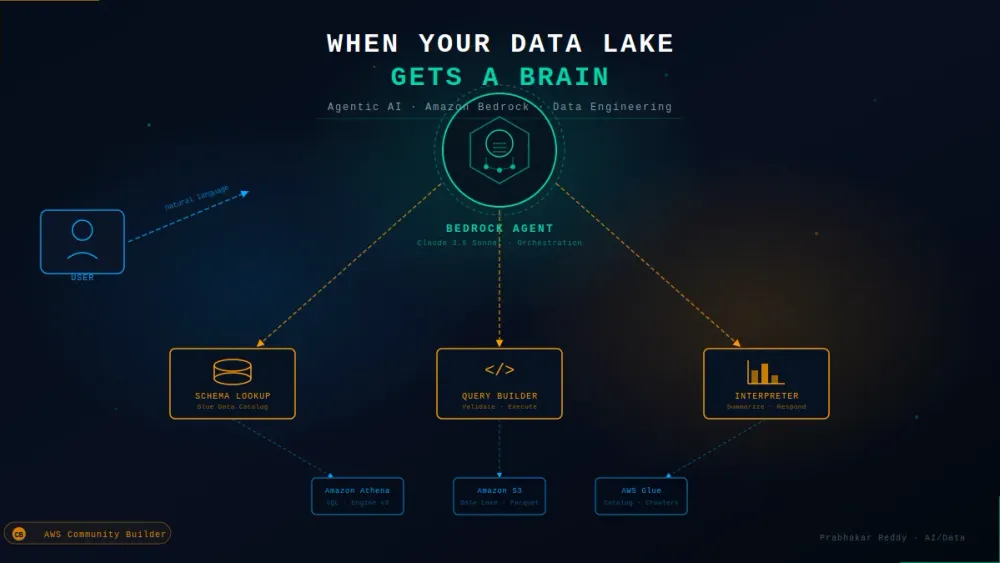
When Your Data Lake Gets a Brain: Agentic AI Querying with Amazon Bedrock Title Querying Your Data Lake with Amazon Bedrock Agents: An Architecture Deep Dive
Most data teams still write SQL to get answers from their lake. This post walks through a production architecture that lets a Bedrock Agent handle the reasoning — schema lookup, query generation, Athena execution, and result interpretation — so analysts can just ask.

There's a question I keep hearing from data teams right now: "Can we just ask the data lake a question instead of writing a query?"
The honest answer used to be "sort of, with a lot of duct tape." Now it's genuinely yes — if you architect it correctly. This post walks through how I built a production-grade agentic query layer on top of an existing S3 + Glue + Athena data lake using Amazon Bedrock Agents, what the architecture actually looks like, and the things that broke before it worked.
The Problem Worth Solving
A typical data lake stack looks like this: raw data lands in S3, Glue Crawlers catalog it, Athena queries it, and analysts write SQL to get answers. That last step is the bottleneck. Not because SQL is hard, but because the analyst has to know:
- Which table has which data
- How it's partitioned
- What the column names actually mean (especially after three rounds of "quick schema changes")
- Whether to join, filter, or aggregate to get what they need
What if an agent handled that reasoning layer? Not a chatbot that generates SQL and hopes for the best — an actual agent that understands your data catalog, constructs valid queries, executes them against Athena, and interprets the results in the context of the original question.
That's what this architecture builds.
Architecture Overview
1
2
3
4
5
6
7
8
9
10
11
12
13
14
15
16
17
18
19
20
21
22
23
24
25
26
27
28
29
30
31
32
33
34
35
36
┌─────────────────────────────────────────────────────────────────┐
│                        User / Application                        │
└────────────────────────────┬────────────────────────────────────┘
                             │ Natural language question
                             ▼
┌─────────────────────────────────────────────────────────────────┐
│                    Amazon Bedrock Agent                          │
│                  (Claude 3.5 Sonnet / Haiku)                    │
│                                                                  │
│   Orchestration Layer — decides which tools to call, in what    │
│   order, and how to interpret results before responding          │
└──────┬─────────────────┬──────────────────┬─────────────────────┘
       │                 │                  │
       ▼                 ▼                  ▼
┌────────────┐   ┌──────────────┐   ┌──────────────────┐
│  Tool 1    │   │   Tool 2     │   │    Tool 3        │
│  Schema    │   │   Query      │   │    Result        │
│  Lookup    │   │   Builder    │   │    Interpreter   │
│            │   │              │   │                  │
│ Glue Data  │   │ Constructs + │   │ Formats +        │
│ Catalog    │   │ validates    │   │ summarizes       │
│ API calls  │   │ Athena SQL   │   │ query output     │
└─────┬──────┘   └──────┬───────┘   └──────┬───────────┘
      │                 │                  │
      ▼                 ▼                  │
┌───────────┐    ┌─────────────┐           │
│ AWS Glue  │    │   Amazon    │           │
│   Data    │    │   Athena    │           │
│  Catalog  │    │             │           │
└───────────┘    └──────┬──────┘           │
                        │                  │
                        ▼                  │
                 ┌─────────────┐           │
                 │  Amazon S3  │           │
                 │  Data Lake  ├───────────┘
                 └─────────────┘
Three tool groups. Each Lambda-backed. The agent orchestrates them — it doesn't just call them sequentially, it reasons about which to call based on what it knows so far.
Layer 1: Schema Lookup (Glue Data Catalog Tool)
The agent's first move when it receives a question is to understand the available data. This tool wraps the Glue Data Catalog API and returns structured metadata the agent can reason over.
1
2
3
4
5
6
7
8
9
10
11
12
13
14
15
16
17
18
19
20
21
22
23
24
25
26
27
28
29
30
31
32
33
34
35
36
37
38
39
40
41
42
43
44
45
46
47
48
49
50
import boto3
import json

glue = boto3.client('glue')

def get_schema_context(database: str, question_keywords: list[str]) -> dict:
    """
    Returns relevant table schemas from the Glue Data Catalog
    based on keyword relevance to the user's question.
    """
    tables_response = glue.get_tables(DatabaseName=database)
    tables = tables_response['TableList']

    relevant_tables = []

    for table in tables:
        table_name = table['Name']
        columns = table['StorageDescriptor']['Columns']
        partition_keys = table.get('PartitionKeys', [])

        # Score relevance based on table name + column name overlap with question
        score = sum(
            1 for kw in question_keywords
            if kw.lower() in table_name.lower() or
            any(kw.lower() in col['Name'].lower() for col in columns)
        )

        if score > 0:
            relevant_tables.append({
                'table_name': table_name,
                'columns': [
                    {'name': col['Name'], 'type': col['Type']}
                    for col in columns
                ],
                'partition_keys': [
                    {'name': pk['Name'], 'type': pk['Type']}
                    for pk in partition_keys
                ],
                'location': table['StorageDescriptor']['Location'],
                'relevance_score': score
            })

    return {
        'database': database,
        'relevant_tables': sorted(
            relevant_tables,
            key=lambda x: x['relevance_score'],
            reverse=True
        )[:5]  # Cap at top 5 to stay within context limits
    }
Why this matters: Dumping the entire catalog into the agent's context is a mistake I made early on. A data lake with 80 tables overwhelms the model's reasoning with irrelevant schema. Relevance scoring first — even a naive keyword match — dramatically improves query accuracy.
Layer 2: Query Builder + Validator (Athena Tool)
The agent constructs SQL based on schema context, then this tool validates and executes it. The critical part is the validation step — you don't want the agent learning from a failed query via error message if you can catch it before execution.
1
2
3
4
5
6
7
8
9
10
11
12
13
14
15
16
17
18
19
20
21
22
23
24
25
26
27
28
29
30
31
32
33
34
35
36
37
38
39
40
41
42
43
44
45
46
47
48
49
50
51
52
53
54
55
56
57
58
59
60
61
62
63
64
65
66
67
68
69
70
71
72
73
74
75
76
77
78
79
80
81
82
83
84
85
import boto3
import time
import re

athena = boto3.client('athena')
S3_OUTPUT = 's3://your-athena-results-bucket/query-results/'

def validate_query(sql: str, available_tables: list[str]) -> dict:
    """
    Pre-execution validation: check referenced tables exist,
    no destructive operations, partition filter present on large tables.
    """
    sql_upper = sql.upper().strip()

    # Block destructive operations
    destructive = ['DROP', 'DELETE', 'INSERT', 'UPDATE', 'ALTER', 'TRUNCATE']
    for keyword in destructive:
        if re.search(rf'\b{keyword}\b', sql_upper):
            return {'valid': False, 'reason': f'Destructive operation detected: {keyword}'}

    # Ensure query is SELECT only
    if not sql_upper.startswith('SELECT'):
        return {'valid': False, 'reason': 'Only SELECT queries are permitted'}

    # Check referenced tables exist in catalog
    referenced = re.findall(r'FROM\s+(\w+)', sql_upper)
    referenced += re.findall(r'JOIN\s+(\w+)', sql_upper)
    for ref in referenced:
        if ref.lower() not in [t.lower() for t in available_tables]:
            return {'valid': False, 'reason': f'Table not found in catalog: {ref}'}

    return {'valid': True}

def execute_athena_query(sql: str, database: str) -> dict:
    """
    Execute validated SQL against Athena, poll for completion,
    return results with column headers.
    """
    response = athena.start_query_execution(
        QueryString=sql,
        QueryExecutionContext={'Database': database},
        ResultConfiguration={'OutputLocation': S3_OUTPUT},
        WorkGroup='data-agent-workgroup'  # separate workgroup for cost tracking
    )

    execution_id = response['QueryExecutionId']

    # Poll with backoff
    for attempt in range(20):
        status = athena.get_query_execution(QueryExecutionId=execution_id)
        state = status['QueryExecution']['Status']['State']

        if state == 'SUCCEEDED':
            break
        elif state in ['FAILED', 'CANCELLED']:
            reason = status['QueryExecution']['Status'].get('StateChangeReason', 'Unknown')
            return {'success': False, 'error': reason, 'query': sql}

        time.sleep(min(2 ** attempt * 0.5, 10))  # exponential backoff, max 10s

    # Fetch results
    results = athena.get_query_results(QueryExecutionId=execution_id)
    rows = results['ResultSet']['Rows']

    if not rows:
        return {'success': True, 'data': [], 'row_count': 0}

    headers = [col['VarCharValue'] for col in rows[0]['Data']]
    data = [
        {headers[i]: col.get('VarCharValue', None)
         for i, col in enumerate(row['Data'])}
        for row in rows[1:]  # Skip header row
    ]

    # Cost metadata
    stats = status['QueryExecution']['Statistics']
    data_scanned_mb = stats.get('DataScannedInBytes', 0) / (1024 * 1024)

    return {
        'success': True,
        'data': data[:100],  # Cap rows returned to agent context
        'row_count': len(data),
        'data_scanned_mb': round(data_scanned_mb, 2),
        'execution_id': execution_id
    }
The separate workgroup is not optional. Tag it, set a data scan limit per query, and you have both cost visibility and a circuit breaker for runaway queries. I learned this after an agent decided to do a full table scan on a 2TB dataset to answer "how many orders were placed last week."
Layer 3: Bedrock Agent Setup
This is where the orchestration lives. The agent definition wires together the tools and gives the model its operating instructions.
1
2
3
4
5
6
7
8
9
10
11
12
13
14
15
16
17
18
19
20
21
22
23
24
25
26
27
28
29
30
31
32
import boto3

bedrock_agent = boto3.client('bedrock-agent')

agent_instruction = """
You are a data analyst assistant with direct access to a production data lake.

Your capabilities:
1. Look up available tables and their schemas from the Glue Data Catalog
2. Write and execute SQL queries against Amazon Athena
3. Interpret query results and answer the user's question in plain language

How to operate:
- Always start by checking schema context before writing a query
- Use partition filters wherever possible to minimize data scanned
- If a query returns no results, tell the user why (wrong date range, filter too narrow, etc.)
- Never assume column names — always verify against the schema first
- Report the data scanned in MB after each query so the user is aware of cost

What you must NOT do:
- Run queries without partition filters on tables larger than 10GB
- Return raw query dumps — always summarize and interpret the data
- Make up column names or table names that weren't in the schema lookup
"""

response = bedrock_agent.create_agent(
    agentName='data-lake-analyst',
    agentResourceRoleArn='arn:aws:iam::ACCOUNT_ID:role/BedrockAgentRole',
    foundationModel='anthropic.claude-3-5-sonnet-20241022-v2:0',
    instruction=agent_instruction,
    idleSessionTTLInSeconds=1800
)
Action Groups: Connecting Tools to the Agent
Each tool group registers as an Action Group. Here's the schema definition for the Athena query tool — this is what tells the agent what parameters to pass:
1
2
3
4
5
6
7
8
9
10
11
12
13
14
15
16
17
18
19
20
21
{
  "name": "execute_data_lake_query",
  "description": "Execute a validated SQL query against the Athena data lake and return results",
  "parameters": {
    "sql": {
      "description": "The SELECT SQL query to execute. Must include partition filters where applicable.",
      "required": true,
      "type": "string"
    },
    "database": {
      "description": "The Glue database name to query against",
      "required": true,
      "type": "string"
    },
    "explain_intent": {
      "description": "Brief description of what this query is intended to answer",
      "required": true,
      "type": "string"
    }
  }
}
The
explain_intent parameter is deliberate. It forces the agent to articulate what it's trying to do before executing — which both improves query quality and gives you an audit log of reasoning, not just SQL.What the Flow Looks Like End-to-End
User asks: "What were the top 5 product categories by revenue in Q4 2024, and how did that compare to Q4 2023?"
Here's the agent's actual reasoning trace:
1
2
3
4
5
6
7
8
9
10
11
12
13
14
15
16
17
18
19
20
21
22
23
24
25
26
27
28
29
30
31
32
33
Step 1 → TOOL: schema_lookup
  Input:  keywords=["product", "category", "revenue", "order"]
  Output: Returns `orders` table (order_id, product_id, amount, order_date)
          and `products` table (product_id, category, name)
          Partition key on `orders`: year, month

Step 2 → REASONING:
  "I need to join orders + products on product_id,
   filter year IN (2023, 2024) AND month IN (10,11,12),
   group by category and year, sum amount, rank by revenue"

Step 3 → TOOL: execute_data_lake_query
  SQL:
    WITH ranked AS (
      SELECT
        p.category,
        YEAR(o.order_date) AS year,
        SUM(o.amount) AS revenue,
        RANK() OVER (PARTITION BY YEAR(o.order_date) ORDER BY SUM(o.amount) DESC) AS rank
      FROM orders o
      JOIN products p ON o.product_id = p.product_id
      WHERE o.year IN (2023, 2024)
        AND o.month IN (10, 11, 12)
      GROUP BY p.category, YEAR(o.order_date)
    )
    SELECT * FROM ranked WHERE rank <= 5
    ORDER BY year DESC, rank ASC

  Data scanned: 1.34 MB  ✓ (partition filter worked)

Step 4 → REASONING + RESPONSE:
  Compares 2023 vs 2024 top 5, notes category rank changes,
  surfaces any new entrants or dropouts, formats as readable summary
The Three Things That Will Break This in Production
1. Schema drift without catalog updates
Glue Crawlers don't run in real time. If your upstream pipeline adds a column and the Crawler hasn't run yet, the agent will generate SQL with outdated schema and get confusing errors. Fix: trigger a targeted Crawler run as part of your pipeline's post-load step, not on a fixed schedule.
2. Ambiguous column names across tables
If
orders and order_items both have a column called amount, the agent will sometimes pick the wrong one without explicit guidance. Fix: add column-level descriptions to your Glue Data Catalog. They're often left blank. They matter more than anyone admits.3. The agent will full-scan if you let it
Without hard guardrails in the query validator, the agent will occasionally generate queries without partition filters — especially on aggregation questions where the date range isn't explicit in the user's question. Fix: the validator in Layer 2 is non-optional. Add a partition filter check for any table above a size threshold.
Cost Guardrails Worth Adding
1
2
3
4
5
6
7
8
9
# In your Athena workgroup config
workgroup_config = {
    'ResultConfiguration': {
        'OutputLocation': S3_OUTPUT
    },
    'EnforceWorkGroupConfiguration': True,
    'PublishCloudWatchMetricsEnabled': True,
    'BytesScannedCutoffPerQuery': 10 * 1024 * 1024 * 1024  # 10 GB hard limit
}
Add a CloudWatch alarm on
DataScannedInBytes per workgroup. If your agent starts scanning 10x the normal amount, something in the reasoning has gone wrong — and you want to know before the bill does.Where This Is Heading
This architecture is genuinely useful today for internal analyst tooling. But the next frontier is agents that don't just query — they detect. An agent that periodically runs its own quality checks, notices that revenue dropped 40% in a partition and flags it, or compares today's data profile against last week's baseline without anyone asking.
The data lake is the same. The agent is what changes the relationship between the data and the people who need it.
Built and tested on AWS Glue 4.0, Amazon Athena engine v3, Amazon Bedrock Agents with Claude 3.5 Sonnet. IAM role configuration and full Terraform for this setup available on request.
Enjoyed reading this content? Let the author know!
Your likes, comments, shares, and saves help creators reach more builders.

Loading recommendations
Loading article