
Speculative Decoding on SageMaker: 2.6x Faster with EAGLE3 on Blackwell
A benchmark comparing g5, g6e, and g7e instances for LLM inference on SageMaker. We test prefix caching, EAGLE3 speculative decoding, and native vLLM containers across Ampere, Ada, and Blackwell GPUs.

Deploying large language models in production often comes down to one question: how do you get the most tokens per dollar? In this post, I benchmark three Amazon SageMaker AI GPU instance families - Ampere (g5), Ada Lovelace (g6e), and Blackwell (g7e) - and show how combining speculative decoding with the right hardware choice can deliver a 2.6x throughput improvement while cutting costs by 4x.
The techniques covered here - speculative decoding , automatic prefix caching , and native vLLM container deployment - are applicable to most decoder-only LLMs on SageMaker. I use Qwen3-32B as the benchmark model, but the optimization patterns transfer broadly.
What We Tested
Instance | GPUs | VRAM | Architecture | $/hr |
|---|---|---|---|---|
ml.g5.12xlarge | 4x NVIDIA A10G | 96 GB | Ampere | $7.09 |
ml.g6e.12xlarge | 4x NVIDIA L40S | 192 GB | Ada Lovelace | $13.12 |
ml.g7e.2xlarge | 1x NVIDIA RTX PRO 6000 | 96 GB | Blackwell | $4.20 |
Each instance was tested with multiple serving configurations: DJL LMI v20 (the managed container), native vLLM containers with prefix caching, and EAGLE3 speculative decoding. Concurrency ranged from 1 to 32 simultaneous requests.
The benchmark workload used ~1,000 input tokens and ~560 output tokens per request - representative of a long-context generation task like document correction or summarization.
Container Selection: CUDA Compatibility
Before diving into results, one practical finding worth sharing: not all containers work on all instance types.
Container | g5 (Ampere) | g6e (Ada) | g7e (Blackwell) |
|---|---|---|---|
DJL LMI v20 (CUDA 12.8) | ✅ | ✅ | ❌ |
Native vLLM 0.15.1 (CUDA 12.9) | ❌ | ✅ | ✅ |
Blackwell GPUs require CUDA 12.9+. The current DJL LMI containers ship with CUDA 12.8, so g7e deployments must use the native vLLM Deep Learning Container:
Plain text
763104351884.dkr.ecr.us-west-2.amazonaws.com/vllm:0.15.1-gpu-py312-cu129-ubuntu22.04-sagemaker
This container runs vLLM directly without the DJL Java runtime layer. Configuration is done through
SM_VLLM_ prefixed environment variables that map to vLLM engine arguments.Results: Throughput and Latency

Left: p50 latency increases with concurrency. Right: per-request output generation speed. EAGLE3 configurations maintain higher throughput across all concurrency levels.
At a Glance (C=32)
Config | tok/s | Requests/sec | $/M tokens |
|---|---|---|---|
g5 - DJL LMI v20 baseline | 14.5 | 0.81 | $1.65 |
g5 - vLLM + prefix caching | 14.1 | 0.75 | $1.77 |
g6e - vLLM + prefix caching | 21.5 | 1.21 | $2.06 |
g6e - vLLM + EAGLE3 | 26.6 | 1.45 | $1.72 |
g7e - vLLM + prefix caching | 18.5 | 0.99 | $0.79 |
g7e - vLLM + EAGLE3 | 34.6 | 1.92 | $0.41 |
Fastest Single Request (C=1)
Config | tok/s | p50 Latency | TTFT |
|---|---|---|---|
g6e + EAGLE3 | 85.0 | 7.0s | ~200ms |
g7e + EAGLE3 | 56.8 | 10.4s | ~250ms |
Speculative Decoding

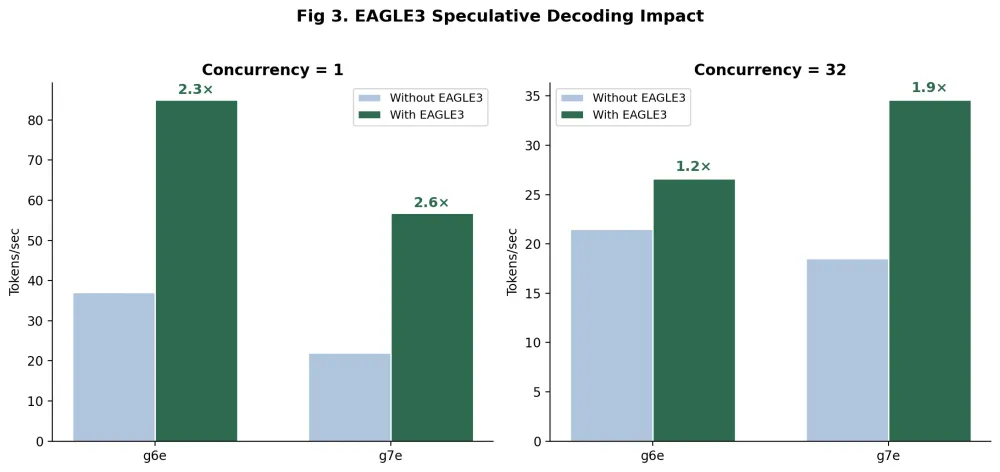
Speedup from EAGLE3 at low and high concurrency. Single-GPU configurations (g7e) retain more speedup at high concurrency due to lower verification overhead.
EAGLE3 is a lightweight (~1.56 GB) draft model that generates speculative token candidates in parallel with the main model. The main model verifies these candidates in a single forward pass, producing multiple tokens per step.
The speedup varies by concurrency: 2.3–2.6x at C=1 (GPU has spare capacity for speculation) tapering to 1.2–1.9x at C=32 (GPU is more saturated). Notably, the single-GPU g7e retains higher speedup at C=32 (1.9x) than the 4-GPU g6e (1.2x) - inter-GPU synchronization amplifies the overhead of speculative verification in multi-GPU setups.
To enable EAGLE3 on SageMaker:
Python
"SM_VLLM_SPECULATIVE_CONFIG": json.dumps({"method": "eagle3","model": "RedHatAI/Qwen3-32B-speculator.eagle3","num_speculative_tokens": 4,})
Note: EAGLE models are trained on the base model's output distribution. If you're serving a LoRA fine-tuned variant, the speculative acceptance rate may be lower. Test with your specific adapter before relying on these speedup numbers in production.
The Blackwell (g7e) Advantage
The ml.g7e.2xlarge is interesting because it runs a 32B parameter model on a single 96 GB GPU with tensor parallelism degree 1. This eliminates a class of overhead that multi-GPU configurations cannot avoid:
- No all-reduce synchronization at every transformer layer
- No cross-GPU memory fragmentation in the KV cache
- No NVLink/PCIe communication bottleneck
This shows up directly in how latency scales under load:
Config | p50 @ C=1 | p50 @ C=32 | Degradation |
|---|---|---|---|
g5 DJL LMI v20 (TP=4) | 24.6s | 38.0s | +54% |
g6e EAGLE3 (TP=4) | 7.0s | 21.5s | +207% |
g7e EAGLE3 (TP=1) | 10.4s | 16.0s | +54% |
The g6e is faster at C=1 (85 tok/s vs 57) but degrades sharply at high concurrency. The g7e maintains more consistent latency because there's no multi-GPU coordination to bottleneck.
Combined with its $4.20/hr price point (vs $7.09 for g5 and $13.12 for g6e), the g7e delivers the best cost-performance ratio at production-level concurrency.
Deployment Code
Native vLLM on g7e (recommended)
Python
import boto3import jsonsm = boto3.client("sagemaker")image_uri = "763104351884.dkr.ecr.us-west-2.amazonaws.com/vllm:0.15.1-gpu-py312-cu129-ubuntu22.04-sagemaker"sm.create_model(ModelName="my-model",PrimaryContainer={"Image": image_uri,"Environment": {"SM_VLLM_MODEL": "Qwen/Qwen3-32B","SM_VLLM_TENSOR_PARALLEL_SIZE": "1","SM_VLLM_DTYPE": "bfloat16","SM_VLLM_MAX_MODEL_LEN": "4096","SM_VLLM_ENABLE_PREFIX_CACHING": "","SM_VLLM_ENABLE_CHUNKED_PREFILL": "","SM_VLLM_MAX_NUM_SEQS": "64","SM_VLLM_GPU_MEMORY_UTILIZATION": "0.9","SM_VLLM_SPECULATIVE_CONFIG": json.dumps({"method": "eagle3","model": "RedHatAI/Qwen3-32B-speculator.eagle3","num_speculative_tokens": 4,}),},},ExecutionRoleArn=role,)
For boolean flags like
--enable-prefix-caching , set the value to an empty string "" . The container entrypoint adds the flag without a value.DJL LMI v20 on g5/g6e (alternative)
LMI v20 defaults to async mode. Key differences from previous versions:
Python
env = {"HF_MODEL_ID": "Qwen/Qwen3-32B","OPTION_ASYNC_MODE": "true","OPTION_ROLLING_BATCH": "disable","OPTION_ENTRYPOINT": "djl_python.lmi_vllm.vllm_async_service","OPTION_TENSOR_PARALLEL_DEGREE": "4","OPTION_MAX_MODEL_LEN": "4096","OPTION_DTYPE": "bf16",}
With LMI v20 async mode, use the Inference Components pattern - create the endpoint first, then attach the model via
create_inference_component . Requests must include the InferenceComponentName header when invoking.Prefix Caching
If your workload has a shared system prompt across requests, prefix caching avoids recomputing the KV cache for those tokens on every request. In our benchmark, the ~478-token system prompt was cached automatically.
The impact is more pronounced with shorter output lengths. With our 560-token outputs (decode-dominated), prefix caching provided a modest improvement. For workloads with longer shared prefixes relative to output length, expect larger gains.
Enable it with a single flag:
Plain text
SM_VLLM_ENABLE_PREFIX_CACHING=""
Source Code
The complete benchmark suite - load testing scripts, deployment helpers, cost analysis, and a streaming chat demo - is available at:
Takeaways
Optimization | How | Impact |
|---|---|---|
Speculative decoding | EAGLE3 draft model (~1.56 GB) | 2.3–2.6x throughput |
Instance selection | g7e.2xlarge (single GPU, Blackwell) | 4x cheaper at scale |
Prefix caching | Shared prompt, one flag | Reduces redundant KV compute |
Container selection | Native vLLM 0.15.1 for Blackwell | Required for CUDA 12.9 |
Auto-scaling | Traffic-aware instance count | 33% cost reduction |
The combination of speculative decoding and Blackwell single-GPU inference delivers the strongest cost-performance ratio we've measured for 32B-class models on SageMaker - and these techniques apply to any vLLM-compatible model, not just Qwen3.
Enjoyed reading this content? Let the author know!
Your likes, comments, shares, and saves help creators reach more builders.

Loading recommendations
Loading article