

Event-Driven Database Ingestion from S3 Data with Amazon MWAA and AWS Glue
An event-driven ELT (Extract, Load, Transform) pipeline using AWS Managed Workflows for Apache Airflow (MWAA) and AWS Glue that automatically processes healthcare data from S3 to PostgreSQL RDS with distributed processing and database transformations.

Introduction
Modern data platforms require fast processing of data as it arrives in object storage, especially in healthcare, financial services, and, in general, in applications where delays can impact critical decision-making. Traditional approaches that rely on scheduled batch jobs introduce unnecessary latency and waste compute resources through constant polling.
This article demonstrates how to build an event-driven data ingestion pipeline using Amazon Managed Workflows for Apache Airflow (MWAA), AWS Glue, AWS Lambda, and Amazon RDS PostgreSQL. When CSV files land in S3, the pipeline automatically triggers, processes multiple files in batches using Glue's distributed computing capabilities, executes database transformations with stored procedures, and archives all processed files, without manual intervention or scheduled polling.
We'll explore how MWAA orchestrates Glue jobs for data processing, how Lambda bridges S3 events to Airflow workflows, and how the system handles edge cases.
Solution Overview
The pipeline implements an ELT (Extract, Load, Transform) pattern that combines the scalability of AWS Glue with the orchestration capabilities of MWAA. Raw data is first loaded into PostgreSQL using Glue's distributed processing engine, then transformed using database-native stored procedures. This hybrid approach leverages Glue's ability to handle large-scale data processing while maintaining the database's computational power for complex transformations.
The following is a diagram representing the logical pipeline implementation:

The solution addresses some key challenges in data ingestion pipelines. It eliminates polling overhead through S3 event notifications that trigger processing immediately when files arrive. Multiple files are batched for processing, improving throughput and resource utilization compared to single-file processing. Sequential DAG execution prevents race conditions while allowing batch processing within each run. In this way the separation of concerns—Lambda for event handling, Glue for data processing, Airflow for orchestration, and PostgreSQL for transformations—creates a maintainable and extendable data flow.
The workflow begins when any CSV file is uploaded to a designated S3 directory. An S3 event notification invokes a Lambda function, which triggers an Airflow DAG with directory-level parameters. The DAG discovers all unprocessed CSV files in the directory, launches a single Glue job to process all files together, executes database transformations sequentially, and archives all processed files. The batch-oriented approach improves efficiency when multiple files arrive simultaneously.
Architecture
The architecture is based on MWAA, where S3 and Lambda work together to trigger DAGs. The Airflow DAG coordinates the other services (such as AWS Glue) to orchestrate data loading and transformations in the database, along with data archival operations when the workflow completes.
The following diagram represents the aws services used:
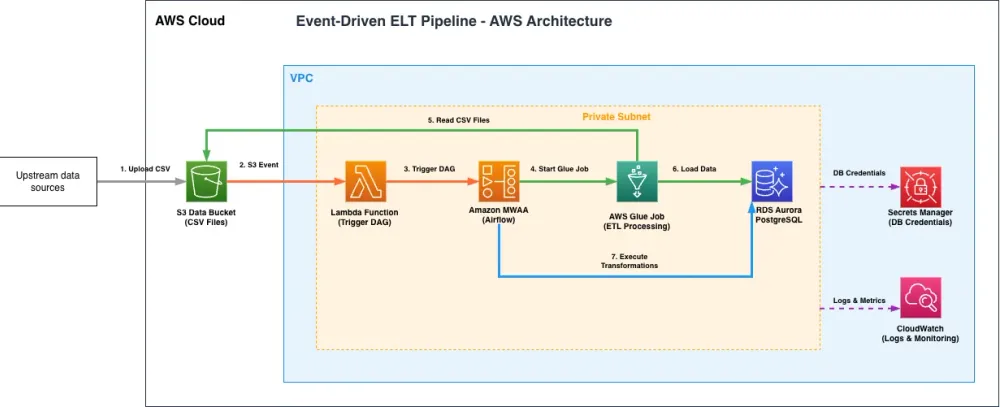
- Amazon S3 serves as the entry point for data files. When CSV files are uploaded to the
admissions/directory, S3 generates event notifications. The pipeline automatically archives processed files to prevent reprocessing and lifecycle policies are included for cost optimization.
- AWS Lambda acts as the bridge between S3 events and MWAA. Rather than passing individual file details, the function extracts the directory path from the uploaded file and triggers the Airflow DAG with directory-level parameters. This approach enables batch processing of multiple files that may have arrived in the same directory. The Lambda function uses MWAA's CLI token authentication method for DAG triggering.
- Amazon MWAA orchestrates the entire data pipeline. The managed Airflow environment runs in a private VPC subnet and includes logic to discover and batch process multiple files. The DAG can handle empty directories by skipping processing when no files are found rather than failing. The environment is configured with
max_active_runs=1to provide sequential batch processing.
- AWS Glue provides the data processing engine. Glue jobs can process multiple CSV files simultaneously using Spark's distributed computing capabilities, improving performance for large datasets. The Glue job implements database-agnostic upsert logic using staging tables, maintaining data consistency while supporting various database engines beyond PostgreSQL.
- Amazon RDS PostgreSQL stores both raw and transformed data in a private subnet with no public access. The database contains the target tables for ingested data and houses stored procedures for business logic transformations. The architecture supports both new record insertion and updates to existing records through the Glue job's write capabilities.
To implement this solution we used AWS CDK to defines the entire infrastructure as code, including the new Glue job configuration, security groups, and IAM policies. The CDK stack creates all necessary resources including VPC, subnets, RDS instance, MWAA environment, Glue job, Lambda function, S3 buckets, and their interconnections.
Implementation Details
The pipeline follows a structured sequence of steps from file upload to data transformation. Each step builds upon the previous one. The implementation consists of four main phases: event detection and triggering, file discovery and batching, distributed data processing, and database transformations.

This simulates a healthcare data pipeline designed to ingest admission data in CSV format:
admission_id | patient_id | patient_name | age | gender | diagnosis | department | ... |
|---|---|---|---|---|---|---|---|
ADM001 | PT1001 | John Smith | 45 | Male | Acute myocardial infarction | Cardiology | ... |
ADM002 | PT1002 | Maria Garcia | 62 | Female | Pneumonia | Pulmonology | ... |
ADM003 | PT1003 | Robert Williams | 38 | Male | Concussion | Emergency | ... |
1. Event-Driven Trigger with Lambda
The Lambda function serves as an event handler that connects S3 to MWAA with directory-level awareness. We used S3 event notification to invoke the Lambda that extracts the directory path and triggers the Airflow DAG:
Python
def lambda_handler(event, context):"""Lambda handler triggered by S3 events"""mwaa_env_name = os.environ['MWAA_ENVIRONMENT_NAME']dag_id = os.environ['AIRFLOW_DAG_ID']for record in event.get('Records', []):s3_info = record.get('s3', {})s3_bucket = s3_info.get('bucket', {}).get('name')s3_key = urllib.parse.unquote_plus(s3_info.get('object', {}).get('key'))# Skip non-CSV files and archived filesif not s3_key.endswith('.csv') or '/archive/' in s3_key:continue# Extract directory from the uploaded files3_directory = '/'.join(s3_key.split('/')[:-1]) + '/' if '/' in s3_key else ''# Build DAG trigger command with directory configurationdag_conf = json.dumps({'s3_bucket': s3_bucket,'s3_directory': s3_directory,'triggered_by_file': s3_key})# Use MWAA CLI token method for triggeringcli_token_response = mwaa_client.create_cli_token(Name=mwaa_env_name)cli_command = f'dags trigger {dag_id} --conf "{dag_conf_escaped}"'# Execute via MWAA CLI endpointtrigger_dag_via_cli(cli_token_response, cli_command)
The Lambda function uses MWAA's CLI token authentication method.
For more details on MWAA CLI token authentication, see the AWS documentation .
2. Batch Processing with Airflow
As mentioned before, the Dag is invoked from the Lambda function after files arrive.
The Airflow DAG is designed for batch processing that maximizes throughput while maintaining data consistency. The DAG processes multiple files in batches while providing sequential execution of batch runs:
Python
dag = DAG('s3_healthcare_to_postgres_elt',default_args=default_args,schedule_interval=None, # Triggered by events, not scheduledmax_active_runs=1,catchup=False,tags=['healthcare', 'elt', 's3', 'postgresql', 'glue'],)
The
max_active_runs=1 setting ensures sequential batch processing. When files arrive while a batch is processing, Airflow queues the new DAG run, which will discover and process any files that arrived during the previous batch execution.The DAG includes file discovery logic that handles various scenarios:
Python
def list_and_prepare_files(**context):"""List CSV files in S3 directory and prepare for batch processing"""s3_bucket = context['ti'].xcom_pull(key='s3_bucket', task_ids='validate_config')s3_directory = context['ti'].xcom_pull(key='s3_directory', task_ids='validate_config')# List all CSV files in directory, excluding archived filess3_hook = S3Hook(aws_conn_id='aws_default')objects = s3_hook.list_keys(bucket_name=s3_bucket, prefix=s3_directory)csv_files = [obj for obj in objectsif obj.endswith('.csv') and '/archive/' not in obj]# Limit to 50 files per batchif len(csv_files) > 50:csv_files = csv_files[:50]# Handle empty directoryif len(csv_files) == 0:context['ti'].xcom_push(key='skip_processing', value=True)return {'skip_processing': True}return {'csv_files': csv_files, 'file_count': len(csv_files)}
This discovers all unprocessed files in the directory and batches them for processing. When no files are found, the DAG skips processing.
The 50-file batch limit is configured for demonstration purposes and should be tuned based on your specific application requirements, file sizes, and data structure complexity. For larger files or more complex transformations, consider reducing the batch size to prevent memory issues. For smaller files with simple structures, the batch size can be increased to improve throughput. This parameter can be externalized to DAG configuration or environment variables for easy adjustment without code changes.
3. Scalable Data Processing with AWS Glue
The DAG leverages AWS Glue for distributed data processing. After discovering files to process, the DAG launches a single Glue job that processes all files in the batch:
Python
# Glue job processes multiple files in a single runload_data = GlueJobOperator(task_id='glue_s3_to_postgres',job_name='healthcare-s3-to-postgresql',script_args={'--S3_BUCKET': '{{ ti.xcom_pull(task_ids="list_files", key="glue_s3_bucket") }}','--S3_DIRECTORY': '{{ ti.xcom_pull(task_ids="list_files", key="glue_s3_directory") }}','--CSV_FILES': '{{ ti.xcom_pull(task_ids="list_files", key="glue_csv_files") | tojson }}',},aws_conn_id='aws_default',dag=dag,)
CSV Files are uploaded and Extract and Loaded as-is in a database staging table with the following structure:
SQL
-- ============================================-- 1. Admissions Table (Raw Data)-- ============================================CREATE TABLE admissions (admission_id VARCHAR(50) PRIMARY KEY,patient_id VARCHAR(50) NOT NULL,patient_name VARCHAR(200),age INTEGER,gender VARCHAR(20),admission_date TIMESTAMP NOT NULL,discharge_date TIMESTAMP,diagnosis_code VARCHAR(20),diagnosis_description TEXT,department VARCHAR(100),attending_physician VARCHAR(200),admission_type VARCHAR(50),insurance_provider VARCHAR(50),total_charges DECIMAL(10, 2),length_of_stay_days INTEGER,readmission_30_days BOOLEAN DEFAULT FALSE,created_at TIMESTAMP DEFAULT CURRENT_TIMESTAMP);
The Glue job implements data processing logic that handles multiple files and performs database-agnostic upsert operations:
Python
# Parse CSV files list and read multiple files at oncecsv_files = json.loads(args['CSV_FILES'])file_paths = [f"s3://{args['S3_BUCKET']}/{file_key}" for file_key in csv_files]# Spark can read multiple CSV files efficientlydf = spark.read \.option("header", "true") \.option("inferSchema", "true") \.csv(file_paths)# Data transformations with type castingdf_transformed = df \.withColumn("admission_date", to_timestamp(col("admission_date"), "yyyy-MM-dd HH:mm:ss")) \.withColumn("total_charges", col("total_charges").cast("decimal(10,2)")) \.withColumn("readmission_30_days",when(lower(col("readmission_30_days")).isin("true", "1", "yes"), True).otherwise(False)) \.withColumn("created_at", current_timestamp())
The Glue job implements an upsert pattern using staging tables and database-native operations. This approach works with any JDBC-compatible database and handles both new records and updates to existing records:
Python
# Create staging table and perform upsertstaging_table = f"admissions_staging_{int(time.time())}"# Load data to staging tabledf_transformed.write \.mode("overwrite") \.format("jdbc") \.option("url", jdbc_url) \.option("dbtable", staging_table) \.save()# Use Spark's JVM for database operationsjvm = spark.sparkContext._jvmconnection = jvm.java.sql.DriverManager.getConnection(jdbc_url, username, password)statement = connection.createStatement()# Perform upsert: delete existing, insert all, cleanupstatement.executeUpdate(f"DELETE FROM admissions WHERE admission_id IN (SELECT admission_id FROM {staging_table})")statement.executeUpdate(f"INSERT INTO admissions SELECT * FROM {staging_table}")statement.executeUpdate(f"DROP TABLE {staging_table}")
4. Database Transformations with Stored Procedures
After the Glue job loads the batch of raw data, the DAG executes two transformation steps using PostgreSQL stored procedures.
The first transformation cleanses and validates all newly loaded data.
To call the database stored procedure from Airflow, you simply need to use an appropriate operator, but make sure you've set up the connection configuration first. To know more about connection in Mwaa you can refer to the AWS Documentation .
Python
transform_1_cleanse = PostgresOperator(task_id='transform_1_data_cleansing',postgres_conn_id='postgres_rds',sql='CALL staging.sp_cleanse_patient_admissions();',dag=dag,)
The stored procedure performs data quality checks on the newly added data, standardizing gender values, validating age ranges and charges, and removing duplicates based on admission IDs. The procedure operates on all records loaded in the current batch:
SQL
-- Transform 1: Data Cleansing and ValidationCREATE OR REPLACE PROCEDURE staging.sp_cleanse_patient_admissions()LANGUAGE plpgsqlAS $BODY$BEGIN-- Update gender values to standardized formatUPDATE admissionsSET gender = CASEWHEN UPPER(gender) IN ('M', 'MALE') THEN 'Male'WHEN UPPER(gender) IN ('F', 'FEMALE') THEN 'Female'ELSE genderENDWHERE gender IS NOT NULL;-- Validate age range (0-120)UPDATE admissionsSET age = NULLWHERE age < 0 OR age > 120;-- Validate charges (>= 0)UPDATE admissionsSET total_charges = 0WHERE total_charges < 0;-- Remove duplicates based on admission_id (keep latest)DELETE FROM admissions a1USING admissions a2WHERE a1.admission_id = a2.admission_idAND a1.created_at < a2.created_at;RAISE NOTICE 'Data cleansing completed';END;$BODY$;
The second transformation generates business aggregations and analytics:
Python
transform_2_aggregate = PostgresOperator(task_id='transform_2_business_aggregations',postgres_conn_id='postgres_rds',sql='CALL analytics.sp_aggregate_admission_metrics();',dag=dag,)
This stored procedure creates analytics tables with daily admission metrics, department statistics, and patient demographics. The aggregations include average length of stay, total charges by admission type, unique patient counts, and physician utilization metrics. These analytics tables are optimized for reporting and dashboard consumption.
SQL
-- Transform 2: Business AggregationsCREATE OR REPLACE PROCEDURE analytics.sp_aggregate_admission_metrics()LANGUAGE plpgsqlAS $BODY$BEGIN-- Create or replace aggregated metrics tableDROP TABLE IF EXISTS analytics.daily_admission_metrics;CREATE TABLE analytics.daily_admission_metrics ASSELECTDATE(admission_date) as admission_date,admission_type,department,COUNT(*) as total_admissions,ROUND(AVG(age)::NUMERIC, 1) as avg_age,ROUND(AVG(length_of_stay_days)::NUMERIC, 1) as avg_length_of_stay,ROUND(AVG(total_charges)::NUMERIC, 2) as avg_charges,COUNT(DISTINCT patient_id) as unique_patients,COUNT(DISTINCT attending_physician) as unique_physiciansFROM admissionsWHERE admission_date IS NOT NULLGROUP BY DATE(admission_date), admission_type, departmentORDER BY admission_date DESC, total_admissions DESC;RAISE NOTICE 'Business aggregations completed';END;$BODY$;
This stored procedure approach demonstrates how aggregations can be managed directly within the database for moderate datasets. For larger datasets or more complex analytical workloads, you should consider leveraging Apache Spark's distributed computing capabilities and/or a dedicated data warehousing solution such as Amazon Redshift, which are better suited for processing large volumes of data efficiently.
Monitoring and Observability
The pipeline provides logging and monitoring capabilities through CloudWatch. MWAA automatically sends DAG execution logs, task logs, scheduler logs, and worker logs to CloudWatch Logs. Lambda functions log all invocations, including S3 event details and DAG trigger responses. RDS provides performance insights and slow query logs for database optimization.
You can also use native functionalities of Airflow to monitor our pipeline. For example using the Gantt feature it's possible to see how much time is taken from each step.

In addition to this, you can see how much time a single step is taking in terms of time, comparing it with previous executions:

Airflow's web interface provides real-time visibility into DAG runs, task status, and execution history. The interface shows queued DAG runs, allowing operators to see how many files are waiting to be processed. Task logs are accessible directly from the web interface:

For production deployments, consider setting up CloudWatch alarms for DAG failures, Lambda errors, and RDS performance metrics. Airflow can be configured to send email notifications on task failures, enabling rapid response to issues.
Infrastructure as Code and Deployment
The entire infrastructure is defined using AWS CDK, enabling reproducible deployments and version control. The CDK stack creates the VPC, subnets, security groups, RDS Aurora Serverless v2 cluster, MWAA environment, Glue job, Lambda function, and S3 buckets with their interconnections.
Key infrastructure components include the MWAA environment configured with minimal resources for cost optimization, using the
mw1.small instance class with 1-2 workers with the possibility to scale vertically and horizontally. The Glue job is configured with appropriate IAM permissions to access both S3 and RDS resources within the VPC. As mentioned, the Lambda function is connected to S3 via event notifications:TypeScript
dataBucket.addEventNotification(s3.EventType.OBJECT_CREATED,new s3n.LambdaDestination(lambdaFunction),{prefix: 'admissions/',suffix: '.csv',});
The project includes a Makefile that simplifies deployment and testing with commands like
make install , make deploy , and make setup-db for infrastructure deployment and database initialization. Testing can be performed using make test to upload sample files and trigger the pipeline.The complete implementation, including all source code, CDK infrastructure definitions, Airflow DAGs, Glue scripts, Lambda functions, and deployment automation, is available in the GitHub repository .
Cost Overview
Component | Monthly Cost (USD) | Notes |
|---|---|---|
Amazon MWAA (mw1.small) | ~$292 | Minimum cost for managed environment |
RDS Aurora Serverless v2 (0.5-1 ACU) | ~$43-90 | Automatic scaling based on workload |
NAT Gateway | ~$32 | Single gateway |
AWS Glue | ~$5-20 | Based on job execution frequency |
AWS Lambda | <$1 | Invocations for moderate workloads |
Amazon S3 | ~$1-5 | Depends on data volume |
Estimated Total | ~$375-440 | |
Costs are estimated for us-east-1 region and may vary based on actual usage and selected AWS region.
Conclusion
This event-driven architecture demonstrates how to build an ingestion pipeline using AWS managed services. By combining S3 event notifications, Lambda, MWAA, and RDS, we created a system that processes files immediately upon arrival.
This pattern can be adapted for various use cases beyond healthcare data and the sequential processing makes it suitable for any scenario where data consistency and ordering matter. Financial services can use it for transaction processing, IoT applications can process sensor data, and e-commerce platforms can handle order files.
Thank you for reading! We'd love to hear about your experiences implementing similar pipelines or any questions you might have. Feel free to leave a comment or reach out to us.
Enjoyed reading this content? Let the author know!
Your likes, comments, shares, and saves help creators reach more builders.

Loading recommendations
Loading article