
Accelerate Medical Content Review with Amazon Bedrock AgentCore
Learn how to deploy an open-source multi-agent application powered by Amazon Bedrock AgentCore that accelerates medical content review. The app cross-checks the uploaded medical content against reference documents, general knowledge, and public databases like PubMed and OpenFDA, and produces a detailed review with identified issues and suggested fixes.

Problem
Medical and promotional content in life sciences passes through a strict review process before it reaches a clinician or a patient. A single brochure or slide deck can cite dozens of clinical claims, drug labels, and statistics, and each one must be checked against the original references and public regulatory sources. A claim, in this context, is a unique, atomic statement about a product and its effect, for example that a therapy reduces a specific symptom by a specific percentage in a specific patient population. Medical, legal, and regulatory (MLR) reviewers do this work today, but the volume keeps growing while the deadlines keep shrinking. Reviewers spend hours flipping between PDFs, FDA labels, PubMed abstracts, and ClinicalTrials.gov records to verify a single page, and a single asset takes around 15 days on average to clear. The cost of getting it wrong is high: in September 2025 the FDA issued more than 100 cease-and-desist letters for misleading promotional content.
Medical Content Review is an open-source sample application built on Amazon Bedrock AgentCore that accelerates the first pass of this workflow. You upload a content PDF along with any supporting reference documents, such as clinical study reports or prescribing information, and a multi-agent system reads every page, cross-checks each claim against your references and public databases, and returns a structured report with severity scores, suggested fixes, and source citations. In this post, we show you how the application works, how to deploy it to your AWS account, and how to extend it with your own data sources.
The application builds on the AgentCore Deep Research sample, which we covered in a companion blog post . If you're new to AgentCore, that post is a good starting point. A production MLR system would add further steps such as statement extraction, pre-approved claims verification, and regulatory code checking; this sample provides the deployable foundation you can extend with those capabilities.
How it works
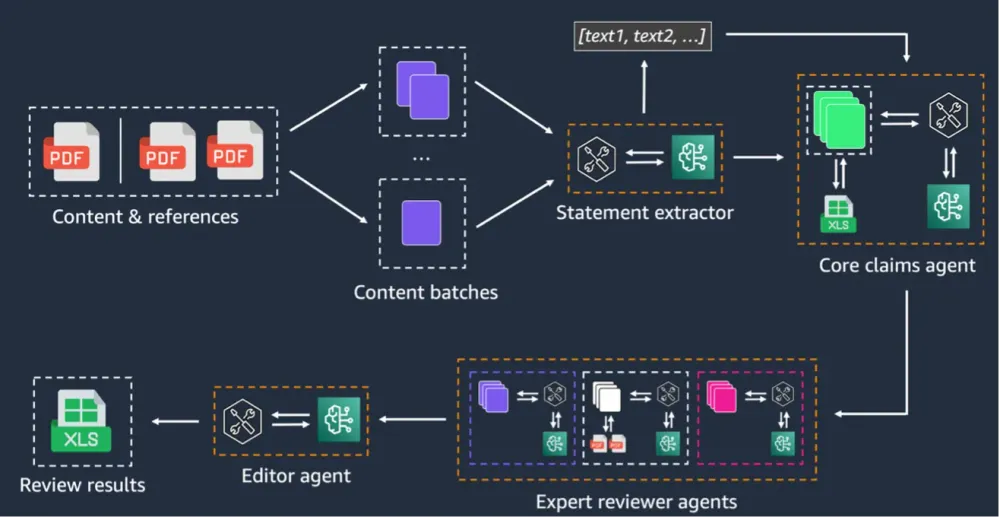
The agent runs a five-step pipeline over the uploaded PDFs. Unlike open-ended research, MLR review is deterministic: every page must be read, every claim must be checked, and nothing can be skipped. The orchestrator enforces the review order, while the specialized reviewer agents do the actual checking.

Figure 1: Medical Content Review interface, showing the uploaded content PDF, reference toggles, and the live findings panel as the agents run.
- OCR - The agent calls
process_pdfonce per uploaded PDF (the content document and every reference) in a single parallel turn. Each call rasterizes the PDF, runs a multimodal Bedrock model over each page (up to five pages at a time), and writes a markdown version to Amazon S3 that preserves tables and prose descriptions of every figure. - Batch - The agent calls
batch_contenton the content markdown, which asks a model to group the pages into coherent review units. References are not batched, only the content document. - Review - For every batch, the orchestrator fans out three specialist sub-agents in a single parallel turn:
- Editorial checks spelling, grammar, exaggerated language, and figure consistency. It has no external tools.
- Internal references cross-checks claims against the uploaded reference markdowns. This catches issues with pre-launch drugs and internal data that public databases will never have.
- External evidence cross-checks claims against PubMed, OpenFDA, ClinicalTrials.gov, and Nova web search. Each source can be toggled on or off from the user interface.
- Aggregate - The agent calls
get_reviews, which collects every per-batch finding from S3, tags it with the reviewer that produced it, sorts the findings by page, and writes the result to a local file inside the runtime container. - Edit - The orchestrator acts as a senior editor. It loads the aggregated findings, deduplicates overlapping flags, merges complementary ones, and writes a final JSON report along with the assigned severity scores.
The output is a JSON list where each finding has multiple elements, including: a page number, the exact quoted text, an issue description, a suggested fix, a source reference, and a severity score from 1 to 100. Findings with a score above 70 are tagged as mandatory fixes; the rest are suggestions.
One design choice worth highlighting: each reviewer persists its findings to S3 and returns only an S3 URI to the orchestrator. The findings never flow through the orchestrator's context during the review phase. A 30-page deck with three reviewers per batch can produce hundreds of findings, and putting them all into one prompt would force the editor model to summarize and drop findings. The orchestrator loads the full set once, in the editor pass, from a local file.
Architecture overview
The application deploys as a single AWS Cloud Development Kit (AWS CDK) stack with three nested stacks with the app components. The following diagram shows how the components fit together.

Figure 2: Medical Content Review architecture on Amazon Bedrock AgentCore.
The frontend is a React application hosted on AWS Amplify Hosting with a split-pane interface: a chat and progress panel on the left and a PDF viewer plus live findings panel on the right. Amazon Cognito handles user authentication with OIDC, plus machine-to-machine OAuth2 for agent-to-Gateway communication.
The orchestrator agent runs on AgentCore Runtime , built with the Strands Agents SDK and powered by Anthropic Claude Sonnet 4.6 on Amazon Bedrock . The runtime streams events back to the frontend in real time over Server-Sent Events. The three reviewer sub-agents are exposed to the orchestrator as tools; internally each one spins up its own narrow Strands agent with only the tools it needs.
AgentCore Gateway exposes the external data source tools as MCP endpoints, each backed by an AWS Lambda function. The external reviewer discovers and calls these tools automatically. AgentCore Memory stores conversation history. Metrics and logs go to Amazon CloudWatch , and traces go to AWS X-Ray .
A separate Amazon API Gateway endpoint, backed by Lambda and Amazon DynamoDB , captures user feedback. User identity is extracted server-side from the JWT
sub claim, never from the request payload, which prevents impersonation through prompt injection.Built-in data sources
The external reviewer ships with four configurable data source tools, each implemented as a Lambda function behind AgentCore Gateway. The following table lists each tool with its category and description.
| Category | Tool | Description |
|---|---|---|
| Biomedical literature | PubMed Search | Peer-reviewed biomedical and life sciences literature from the National Library of Medicine |
| Drug labels | OpenFDA Drug Search | FDA drug label database (indications, warnings, interactions) |
| Clinical studies | ClinicalTrials.gov | Registered clinical study search by condition, intervention, or phase |
| Web search | Nova Web Grounding | Web search using Amazon Nova with inline citations |
You toggle each source on or off in the user interface before starting a review, so the external reviewer only queries the sources that are relevant to your content. If you turn every source off, the external reviewer is removed from the orchestrator's tool list entirely, which is a stricter guard than a prompt instruction.
Prerequisites
Before deploying, make sure you have the following installed:
- Node.js 20 or later
- Python 3.10 or later
- Docker
- AWS Command Line Interface (AWS CLI) configured with appropriate credentials
- AWS CDK CLI (
npm install -g aws-cdk) - uv (Python package manager)
The AWS Identity and Access Management (IAM) user or role you use must have permissions to create the AWS resources described in this post. You also need Amazon Bedrock access enabled for your target region.
Deploy the application
The deployment consists of three steps: clone the repository, configure the tools and settings, and deploy the CDK stack.
Step 1: Clone the repository
1
2
git clone https://github.com/aws-samples/sample-medical-content-review-agent.git
cd sample-medical-content-review-agent
Step 2: Configure your deployment
Copy the example configuration and customize it:
1
2
cd infra-cdk
cp .config_example.yaml config.yaml
Edit
config.yaml to set your stack name, admin email, and tool toggles:1
2
3
4
5
6
7
8
9
10
11
12
13
14
15
16
17
18
19
20
21
stack_name_base: medical-content-review
admin_user_email: your-email@example.com # auto-creates user and emails credentials
backend:
pattern: medical-content-review
deployment_type: docker
model_id: global.anthropic.claude-sonnet-4-6
tools:
pubmed:
enabled: true
default_on: true
openfda:
enabled: true
default_on: true
clinicaltrials:
enabled: true
default_on: true
nova:
enabled: true
default_on: trueThe
enabled field controls whether a tool is deployed, and default_on controls whether it is toggled on by default in the user interface. Tools without API keys work out of the box.Step 3: Deploy the stack
From the
infra-cdk directory, install dependencies and deploy:1
2
3
npm install
npx cdk bootstrap # only required once per account/region
npm run deployThe
npm run deploy command runs cdk deploy to create the backend infrastructure, then deploys the frontend to AWS Amplify Hosting. It creates the Cognito User Pool, pushes the agent container to Amazon Elastic Container Registry (Amazon ECR) , and provisions AgentCore Runtime, Gateway, Memory, and all tool Lambda functions. Deployment takes about 10 to 15 minutes.When complete, you can find the application URL in the AWS Amplify console or in the CDK stack outputs.
Use the application
If you provided
admin_user_email in the configuration, you receive an email with temporary credentials. Open the Amplify URL, sign in, and change your temporary password when prompted.To run a review:
- Drag and drop a medical content PDF onto the upload area, or click to select one.
- Optionally upload reference PDFs (clinical study reports, prior approvals, internal data).
- Toggle the external data sources on or off depending on the document.
- Choose Start AI Review.
The agent streams its progress in real time. A phase checklist shows which step the orchestrator is on, and a per-tool activity log records every PubMed query, OpenFDA lookup, and reviewer call as it happens.
When the review completes, the right pane switches to a findings list sorted by page. Each entry shows the quoted text, the issue, the suggested fix, the source reference, and a severity score. Selecting a finding scrolls the PDF preview to the relevant page. You can download the full report as JSON.
Call the agent with the API
You can also invoke the agent programmatically through AgentCore Runtime, which is useful for integrating the review into existing content-management pipelines. The following code snippet shows the core pattern using the
boto3 client:1
2
3
4
5
6
7
8
9
10
11
12
13
14
15
16
17
18
19
20
21
22
23
24
25
26
27
28
import json
import boto3
client = boto3.client("bedrock-agentcore", region_name="us-east-1")
response = client.invoke_agent_runtime(
agentRuntimeArn=runtime_arn,
payload=json.dumps({
"prompt": "Review this brochure for adherence issues.",
"runtimeSessionId": session_id,
"enabledSources": ["pubmed", "openfda", "clinicaltrials"],
"contentPdfUri": "s3://my-bucket/uploads/brochure.pdf",
"contentPdfName": "brochure.pdf",
"referenceUris": ["s3://my-bucket/uploads/dossier.pdf"],
"referenceNames": ["dossier.pdf"],
}),
payloadContentType="application/json",
sessionId=session_id,
authContext={
"authToken": access_token,
"authTokenType": "ACCESS_TOKEN",
},
)
for event in response["payloadStream"]:
if "chunk" in event:
chunk = json.loads(event["chunk"]["bytes"].decode("utf-8"))
print(chunk)The
enabledSources field controls which data sources the external reviewer calls, and contentPdfUri/referenceUris point to S3 objects the agent reads. See the test scripts in the repository for complete examples.Extend with custom tools
You can add your own data source connectors. Each tool is a standalone Lambda function behind AgentCore Gateway, consisting of a handler and an MCP tool specification:
1
2
3
gateway/tools/your_tool/
  your_tool_lambda.py    # Lambda handler
  tool_spec.json         # MCP tool schema
The tool specification defines the MCP schema the agent uses to understand what the tool does. The Lambda handler receives tool arguments as the event and returns results in a standard format. Add the tool Lambda and Gateway target in the CDK backend stack, add the tool key under
tools: in config.yaml, and run npm run deploy. The reviewer discovers the new tool through MCP automatically. See gateway/tools/ in the repository for working examples.Local development
You can run the agent and frontend locally using Docker Compose while connecting to the deployed AWS resources (Gateway, Memory, Secrets Manager):
1
2
3
4
5
6
export MEMORY_ID=your-memory-id
export STACK_NAME=your-stack-name
export AWS_DEFAULT_REGION=us-east-1

cd docker
docker compose up --build
This starts the agent on port 8080 and the frontend dev server on port 3000 with hot reload. See
docs/LOCAL_DEVELOPMENT.md for details.Clean up
To remove all resources created by the deployment, run the following command:
1
2
cd infra-cdk
npx cdk destroy --force
This deletes the AWS resources including Amazon S3 buckets, Amazon ECR images, and the AgentCore Runtime. If you leave resources running, you might incur charges. Amazon Bedrock AgentCore is pay per use.
Conclusion
In this post, we showed you how to deploy and use Medical Content Review, an open-source sample application that accelerates the first pass of MLR review on Amazon Bedrock AgentCore. The orchestrator plus three reviewer sub-agents pattern keeps each specialist focused, and the Lambda-backed tools behind AgentCore Gateway make it straightforward to add new data sources for your domain.
The application is intended to assist reviewers, not replace them. Final decisions on medical and promotional content must remain with qualified MLR experts; the agents surface candidate issues with supporting evidence so the reviewer can decide quickly.
Disclaimer: This is a technical sample intended for demonstration and inspiration purposes. All outputs should be reviewed by qualified professionals before use.
To get started, clone the repository , deploy to your AWS account, and run a review on a PDF from your own domain. From there, swap in the data sources your MLR team relies on and customize the reviewer prompts for your therapeutic area. To learn more about Amazon Bedrock AgentCore, see the AgentCore documentation . For expert assistance, the AWS Generative AI Innovation Center and AWS Professional Services can help.
We welcome your feedback and contributions on the GitHub repository .
Authors
Elizaveta Zinovyeva is an Applied Scientist at AWS Generative AI Innovation Center based in Berlin. She helps customers across industries integrate generative AI into their existing applications and workflows. She is passionate about AI/ML, finance, and software security topics. Connect with Liza on LinkedIn .
Nikita Kozodoi, PhD, is a Senior Applied Scientist at the AWS Generative AI Innovation Center, where he builds AI and agentic solutions for enterprise customers across industries, including Nasdaq, Ryanair, and adidas. He holds a PhD in machine learning with publications at NeurIPS, KDD, and ECML workshops, and presentations at over 25 tech conferences. Connect with Nikita on LinkedIn .
Aiham Taleb, PhD, is a Senior Applied Scientist at the Generative AI Innovation Center, working directly with AWS enterprise customers on high-impact generative AI use cases. Aiham has a PhD in unsupervised representation learning, with industry experience across machine learning applications including computer vision, natural language processing, and medical imaging. Connect with Aiham on LinkedIn .
Enjoyed reading this content? Let the author know!
Your likes, comments, shares, and saves help creators reach more builders.

Loading recommendations
Loading article