
Hands On With AgentCore Harness: Same Agent, Config vs. Container
Deploying an AgentCore Harness and a Strands Runtime agent side by side with CDK: six construct signatures that had drifted, an authorizer that couldn't be changed in place, an observability script that was silently inert, and what Gateway actually costs in latency and tokens.
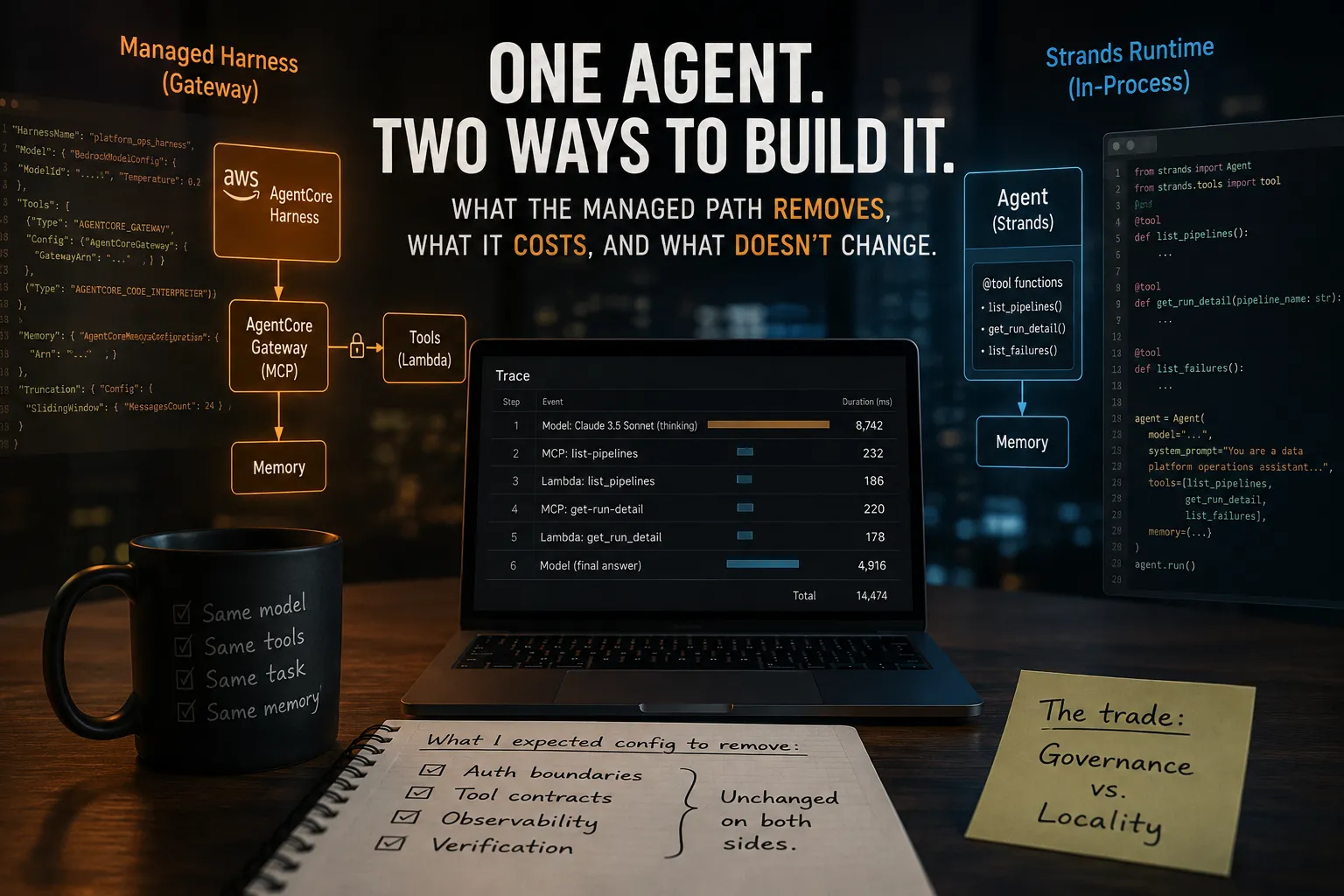
AgentCore's managed harness lets you define an agent as configuration — model, system prompt, tools, memory, truncation policy — with no orchestration code. That claim is true. I deployed one.Valid config, it turns out, was never the hard part.
I built the same agent twice: once as a managed harness, once as a Strands agent in a container on AgentCore Runtime. Four CDK stacks, one live account, both tracks verified end to end. This is what the declarative path actually removes, what it costs, and the five separate validation layers between a clean
cdk synth and an agent that answers a question correctly.The short version
Gateway added measurable per-tool-call latency and, in one paired run, about five times the token count. In exchange, the Gateway-backed managed path moved tool deployment, credentials, and access control out of the agent process. The problems I expected configuration to remove — identity, tool contracts, observability, and verifying what the agent actually did — didn't disappear.
The rest of this is how I got there, including the parts I got wrong.
The setup
Track A, the managed harness. This is the entire agent:
1
2
3
4
5
6
7
8
9
10
11
{
  "HarnessName": "platform_ops_harness",
  "Model": { "BedrockModelConfig": { "ModelId": "...", "Temperature": 0.2 } },
  "SystemPrompt": [{ "Text": "You are a data platform operations assistant..." }],
  "Tools": [
    { "Type": "AGENTCORE_GATEWAY", "Config": { "AgentCoreGateway": { "GatewayArn": "..." } } },
    { "Type": "AGENTCORE_CODE_INTERPRETER" }
  ],
  "Memory": { "AgentCoreMemoryConfiguration": { "Arn": "..." } },
  "Truncation": { "Config": { "SlidingWindow": { "MessagesCount": 24 } } }
}
Track B, hand-wired: the same agent as a Strands app in a container on AgentCore Runtime. About 120 lines of Python plus a Dockerfile.
Both tracks use the same model, the same task, the same backing data, and the same AgentCore Memory resource. One difference is deliberate and matters for the results: Track A reaches its tools through Gateway over MCP; Track B loads equivalent
@tool-decorated functions into the Strands process. Same three tool signatures, same return shapes, different transport.That is not a laboratory-isolated comparison of orchestration loops, and I should be clear about it. It is a comparison of the managed path I actually tested, as a package: harness with application tools exposed through Gateway, versus equivalent tools loaded into the Strands process. A harness can also take inline functions, remote MCP servers, Browser, or Code Interpreter — Gateway was my choice for Track A, not a harness requirement.
The agent answers questions about batch pipeline runs: which failed, why, whether an SLA was breached. Three tools, one of which returns a structured error for unknown pipelines so a real tool call is distinguishable from a fluent guess.
Everything is CDK Python. Four stacks: Foundation (memory, execution role, telemetry), Gateway (MCP tool surface), Harness, Runtime.
Harness playground

Track A running. The trace shows Platform-Ops List Pipelines, then Platform-Ops Get Run Detail on the failed pipeline it found — the answer below is grounded in those calls, not generated from the system prompt.
That screenshot matters more than it looks. An agent with a broken tool path still produces fluent, plausible answers. The only verification I trusted was reading the tool Lambda's CloudWatch logs and confirming
list_pipelines then get_run_detail(pipeline_name="ingest_customer_master") with timestamps matching the invocation. I hit exactly that failure mode later, twice.Five gates, each catching what the last couldn't
Gate 1: the constructs had moved
I wrote the CDK from documentation. Six calls were wrong against installed
aws-cdk-lib 2.265.0:| What I wrote | What exists |
|---|---|
| ManagedMemoryStrategy.user_preference() | ManagedMemoryStrategy (MemoryStrategyType.USER_PREFERENCE, strategy_name=...) |
| event_expiry_duration= | expiration_duration= |
| ToolSchema.from_inline([{dict}]) | typed ToolDefinition / SchemaDefinition |
| Gateway(protocol=, authorizer=) | protocol_configuration=, authorizer_configuration= |
| add_lambda_target(name=) | gateway_target_name= |
| LifecycleConfiguration(idle_session_timeout=) | idle_runtime_session_timeout= |
Plus one that isn't a rename:
Memory's L2 doesn't register its CfnMemory as CDK's default child, so apply_removal_policy() raises CannotApplyRemovalPolicy. You have to reach the underlying construct.The fix that generalizes: read
site-packages/aws_cdk/aws_bedrockagentcore/, not the docs. That's ground truth for the version you actually have.Worth contrasting — the Python SDKs hadn't drifted at all.
bedrock-agentcore 1.22.0 and strands-agents 1.52.0 resolved cleanly and behaved as documented. Same service, same era, and the runtime SDKs held their surface while the CDK L2s moved. If you're building on AgentCore, budget your reconciliation time for the CDK layer.Gate 2: the harness schema was mostly wrong
cdk synth runs local CloudFormation registry validation. It rejected seven property paths at once — and the CLI collapsed them into one warning marked [repeated 5×], which reads like one problem repeated rather than five distinct ones. I nearly fixed one thing and moved on.| What I wrote | What the schema wants |
|---|---|
| Description (top level) | not a valid property at all |
| ModelConfiguration.BedrockModel | Model.BedrockModelConfig |
| ToolConfiguration.Tools[] | flat Tools: [{Type, Name, Config}] |
| AgentCoreGateway.GatewayUrl | GatewayArn — an ARN, not a URL |
| MemoryConfiguration.AgentCoreMemory | Memory.AgentCoreMemoryConfiguration.Arn |
| SlidingWindow.MaxTurns | SlidingWindow.MessagesCount |
| HarnessName: "platform-ops-harness" | pattern ^[a-zA-Z][a-zA-Z0-9_]{0,39}$ — no hyphens |
Also
get_att("HarnessArn") is wrong. The attribute is Arn.The useful discovery here: the CDK CLI bundles the CloudFormation registry locally, in
db.json.gz inside the aws-cdk npm package. Extracting the full harness schema from it needs no AWS credentials — and when I later diffed that against the live registry in my account, it matched exactly. So cdk synth catches harness schema drift offline, before you spend a deploy cycle on it.Gate 3: the control plane rejects what CloudFormation accepts
Template validated. CloudFormation accepted it. Then:
1
2
MCP configuration cannot be empty. Add supportedVersions, searchType or instructions.
(Service: BedrockAgentCoreControl, Status Code: 400)
GatewayProtocol.mcp() with no arguments synthesizes a structurally valid but semantically empty block. Template-schema validation and API-semantic validation are different layers, and nothing local catches the second.One thing I did verify while fixing this: the CDK enum lags the spec.
MCPProtocolVersion in aws-cdk-lib 2.265.0 exposes only MCP_2025_03_26 and MCP_2025_06_18, two published versions behind, while the mcp SDK that strands-agents pulls in may negotiate a newer one. A gateway advertising only what the enum offers can fail a client handshake for reasons that look nothing like a version mismatch.Whether you can widen
supportedVersions later, I can't tell you from experience — I didn't test an update. AWS documents UpdateGateway as able to change the list, and I've seen a bug report claiming the opposite in a specific case. I sidestepped the question by declaring generously at creation, through the L1 escape hatch:1
2
3
4
5
cfn_gw = gateway.node.default_child
cfn_gw.add_property_override(
"ProtocolConfiguration.Mcp.SupportedVersions",
["2025-03-26", "2025-06-18", "2025-11-25", "2026-07-28"],
)
Gate 4: the auth model was architecturally wrong
Gateway deployed clean. Every invocation died with
401 Unauthorized on the MCP handshake.I'd configured a Cognito JWT authorizer, which is a reasonable pattern for an external web client. But the harness is an AWS service principal. It authenticates with SigV4 using its execution role, and has no mechanism to run a Cognito client-credentials flow and present a JWT.
Not a misconfiguration — a category error. Browser-app auth in front of a service-to-service caller. IAM auth was correct here, and Cognito would be correct again for a genuinely external caller.
Then the part that cost me a teardown. On the gateway I'd created, changing
AuthorizerType from JWT to IAM failed with "Authorizer type cannot be updated for an existing gateway." CloudFormation attempted the update in place anyway — the property isn't in createOnlyProperties, so CDK had no reason to force a replacement. I had to delete and recreate the gateway, and because the Harness stack imports its ARN, that stack had to go first and come back after.The CloudFormation reference marks
AuthorizerType as updatable with no interruption, and UpdateGateway accepts an authorizerType parameter. That's not what my account did in August 2026. I'm recording the discrepancy rather than claiming which side is authoritative — but if you're planning to change a gateway's authorizer in place, test it on a throwaway stack first.The diagnosis is worth copying.
InboundAuthorizationFailure = 4, Invocations = 4, exact 1:1, tool Lambda log group completely empty. And zero traces — because the failure happened before anything could emit a span. The observability stack I'd deployed specifically to debug this produced nothing at all. Metrics don't depend on span export, which is what made them the right instrument.Gate 5: model entitlement is invisible to list APIs
Auth fixed. New error:
AccessDeniedException: ... is not available for this account.aws bedrock list-inference-profiles had shown the model. Listing tells you what exists, not what you're entitled to invoke.Reproducing the same error from a different IAM principal with much broader permissions immediately ruled out the execution role's policy. Then:
1
aws bedrock get-foundation-model-availability --model-id <model> --region us-west-2
1
2
3
4
5
6
{
  "agreementAvailability": { "status": "NOT_AVAILABLE" },
  "authorizationStatus": "AUTHORIZED",
  "entitlementAvailability": "AVAILABLE",
  "regionAvailability": "AVAILABLE"
}
Three fields say available. One doesn't.
agreementAvailability is a per-model agreement gate, separate from IAM, and it surfaces at invoke time as AccessDenied with nothing pointing at an agreement.I briefly concluded that API was unreliable, because a model it reported as
NOT_AVAILABLE invoked successfully a few minutes later. That was wrong — I'd enabled it in the console in between and forgotten. The API was accurate throughout.Also worth knowing: the Bedrock console's Model access page has been retired. Access to foundation models is enabled by default now, though first-time Anthropic users may still need to submit use-case details. Any 2025-era tutorial referencing that page sends you somewhere that no longer exists.
The observability tooling was itself broken
Both tracks working, and still zero traces. Ten invocations at 100% sampling over ten minutes produced nothing, which is what made it conclusive rather than a sampling artifact.
1
2
aws xray get-trace-segment-destination
# "Destination": "XRay"
Transaction Search, which powers GenAI Observability, requires the CloudWatchLogs destination. My setup script granted the resource policy and set the indexing rule but never called
update-trace-segment-destination. Without it, the other two steps were inert. Every conclusion I'd drawn from missing traces rested on a prerequisite that was never met.Two more discoveries in fixing it:
Ordering is load-bearing. I put the destination switch first. It failed with
AccessDeniedException, because X-Ray didn't yet have permission to write the spans — the resource policy has to exist first. The order is documented; what isn't obvious is that getting it wrong surfaces as an error that looks like a problem with your credentials.The resource policy was incomplete. Transaction Search needs
logs:PutLogEvents on two log groups, not one — aws/spans and the Application Signals data group. I'd granted only the first, so even correct ordering failed identically. <!-- VERIFY: match this exactly to the ARN in scripts/enable_transaction_search.sh -->After the fix, six traces appeared within about 90 seconds.
What the traces showed
Everything below is from one paired invocation per track. Single runs, three tools, one workload shape. Directionally useful; not a benchmark.
Track A span tree

Track A. The execute_tool span has an mcp tools/call child — the network hop to Gateway. Note the chat spans beneath it: inference bars dwarf the tool bars.
Track B span tree

Track B. The same execute_tool span is a leaf — no mcp tools/call child, no hop. Note the trace totals against Track A's: 3,325 tokens and $0.005 versus 18,656 and $0.021.
Latency
| Observed in one paired invocation | Track A (Gateway/MCP) | Track B (in-process) |
|---|---|---|
| list_pipelines | 0.360s (child hop = 99%) | 0.001s (no child) |
| get_run_detail | 0.077s (child hop = 98%) | 0.001s (no child) |
| Total end-to-end | 7.381s | 5.063s |
The 360× figure is real at the individual tool-call level, and it is not the end-to-end result. The measured MCP hops account for about 0.44s of the 2.3s difference. I can't attribute the remaining 1.9s from a single paired run — it could be inference variance, container scheduling, serialization, harness overhead, or some mix. From these spans, I can only say that the hops explain 0.44s and the rest is unaccounted for.
Tokens and cost
This is the larger effect, and I didn't anticipate it.
| Observed in one paired invocation | Track A | Track B |
|---|---|---|
| Spans | 34 | 26 |
| Input tokens | 18,469 | 3,107 |
| Output tokens | 187 | 218 |
| Reported cost | $0.021 | $0.005 |
Roughly six times the input tokens for the same question against the same model (Claude Haiku 4.5 via Bedrock; the dollar figures are what the GenAI Observability span metrics reported).
The trace suggests MCP discovery and Gateway-related context contribute to that difference — there's a
mcp tools/list span in the Track A trace that has no Track B counterpart. But this experiment doesn't isolate which parts of the prompt account for the additional tokens. I did not inspect the model request payload, and I would not claim in-process tool schemas are sent to the model less often; Strands generates a JSON schema per tool that corresponds to what the model receives either way. What I can say is that the two paths produced very different input token counts for identical work, and that the gap is worth measuring on your own workload before assuming it's negligible.Gateway overhead buys centralized governance
It would be easy to read those tables as "Track A is inefficient." I don't think that's the right conclusion.
Track B's tools are fast because they're local to the agent process. Change a tool and you rebuild the container. Add a second agent that needs the same tool and you implement it twice, or extract a library and version it yourself.
Track A's tools live behind Gateway, which is why they cost a hop and context tokens — and also why they're shared, independently deployable, and governed in one place. Gateway splits auth in two: inbound (who may call the tool surface) and outbound (what credential the tool uses downstream, held by Gateway rather than the agent). That separation is what makes a declarative agent definition safe to commit to Git. It's the reason Track A can be a JSON file at all.
The trade isn't efficiency versus inefficiency. It's governance versus locality.
If I were running several agents against the same tool surface, I'd accept that overhead without much thought — the alternative is duplicated tool implementations and outbound credentials scattered across agent definitions. For one agent whose tools ship with the agent and change with it, I'd have a harder time justifying Gateway purely for reuse I don't need yet. And if I were making dozens of tool calls per turn, or running at volume where a large input-token multiplier is a real line item, I'd want to measure the context cost before committing.
When I'd switch to Runtime
Reach for the container when you need control flow config can't express: multi-agent handoff you orchestrate yourself, a framework the harness doesn't host, deterministic tool sequencing, per-turn interception, custom retry or circuit-breaking inside the loop.
Otherwise the harness. It runs on Strands underneath and can be exported to Strands code, so moving from A to B is a change of control surface rather than a rewrite —
agent/app.py in the repo is still a Strands agent, just one where I own the loop. That exit path is most of why I'd start with the harness.What the harness removes, and what it doesn't
I expected declarative to remove work. It removed the orchestration loop, and not much else.
Both tracks needed the same execution role with the same Bedrock and Memory permissions. Both needed the same tool contracts — and those contracts are prompt engineering, not documentation. A Lambda has no introspectable interface, so the descriptions in
TOOL_SCHEMAS are the entire basis on which the model chooses a tool. "Call this first for broad questions" measurably changes behaviour. Both needed the same observability setup, with the same account-level prerequisite that fails silently.Configuration removed the orchestration code. It didn't remove the surrounding architecture decisions.
That's worth knowing before adopting a managed harness expecting a shortcut past the hard parts. It's a shortcut past the tedious part.
The recurring pattern: validation happens at different layers
Nine of ten failures produced no error at the layer where I could see them. Empty MCP config: valid template, rejected only by the control plane. Wrong authorizer: deployed successfully, failed at every invocation.
AuthorizerType immutability: absent from createOnlyProperties. Model entitlement: listed fine, denied at invoke. Trace destination: zero spans, no error anywhere.The debugging habit that follows is simple.
list-* APIs tell you what exists; get-* and describe-* APIs tell you the current state. Almost every diagnosis above came from a get- call after a list- call had said everything was fine.What I'd do differently
- Extract the resource schema from the bundled CDK registry before writing any config
- Read installed construct signatures instead of documentation
- Decide inbound auth by asking what kind of principal calls this — service principal means IAM, external client means JWT
- Over-declare create-time configuration when I'm unsure whether it can be widened later
- Prove the observability pipeline works on a known-good invocation before trusting its silence as evidence
- Verify tool execution from tool-side logs, never from the answer's plausibility
None of that is specific to AgentCore. It's specific to building on a service young enough that its schema and its behaviour haven't fully converged.
Accurate as of August 2026, against
aws-cdk-lib 2.265.0, CDK CLI 2.1137.0, bedrock-agentcore 1.22.0, strands-agents 1.52.0. This surface moves fast — re-verify before relying on any of it.Enjoyed reading this content? Let the author know!
Your likes, comments, shares, and saves help creators reach more builders.

Loading recommendations
Loading article