
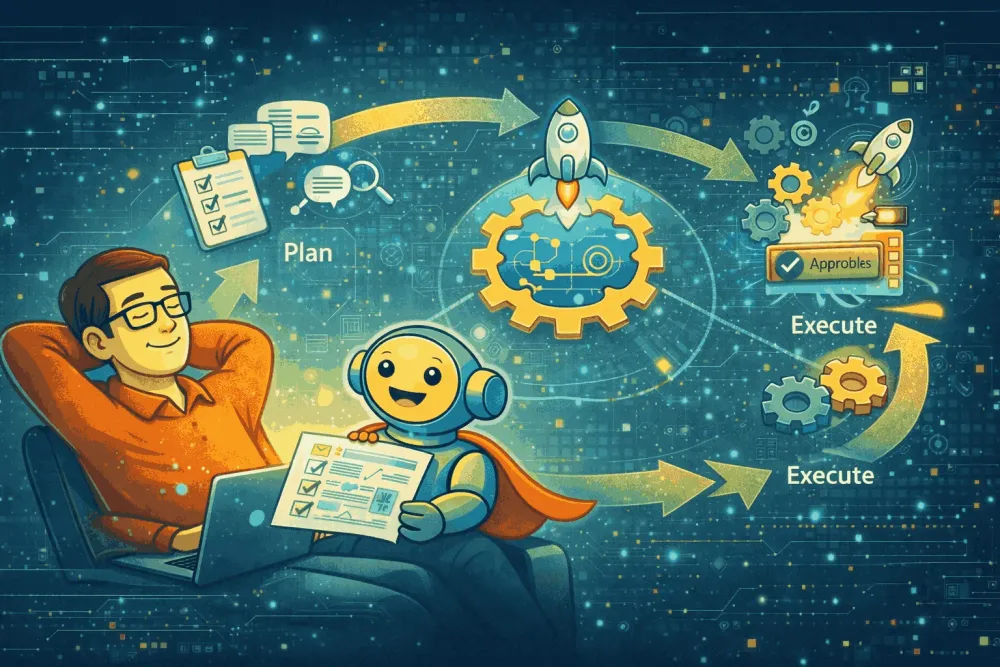
SDLC Who? Meet AI-DLC : AI-DLC in Action with Kiro - Part 2
From importing AI-DLC rules → running Inception approvals → per-unit Construction loops → ship-ready artifacts, here’s how I built a topic-driven Learning Journey app with Kiro using AI-DLC

Part 1 was the map: what AI-DLC is and why it exists.
Part 2 is the walk: what it feels like to build with AI-DLC, step-by-step, without losing control.
And I’m going to start with a confession every builder relates to:
You can absolutely make an AI generate code fast.
What’s harder is making sure the right thing gets built—with traceability, decisions captured, quality boundaries, and deployment thinking baked in.
That’s exactly what AI-DLC is designed for.

So I picked a simple-but-real problem space:
A learning platform where a user types a topic, and the app generates a structured learning journey with stages, study plans, materials, progress tracking, milestones, and motivation nudges.
Not just “AI content.”
A product flow: learning stages, materials per stage, progress, milestones, nudges—the stuff that turns a cool prompt into a usable experience.
Step 0: Before prompts, we set the rules (literally)
AI-DLC works best when your agent has stable rules + repeatable workflow. Instead of hoping the model remembers what to do, you give it a durable “operating system.”
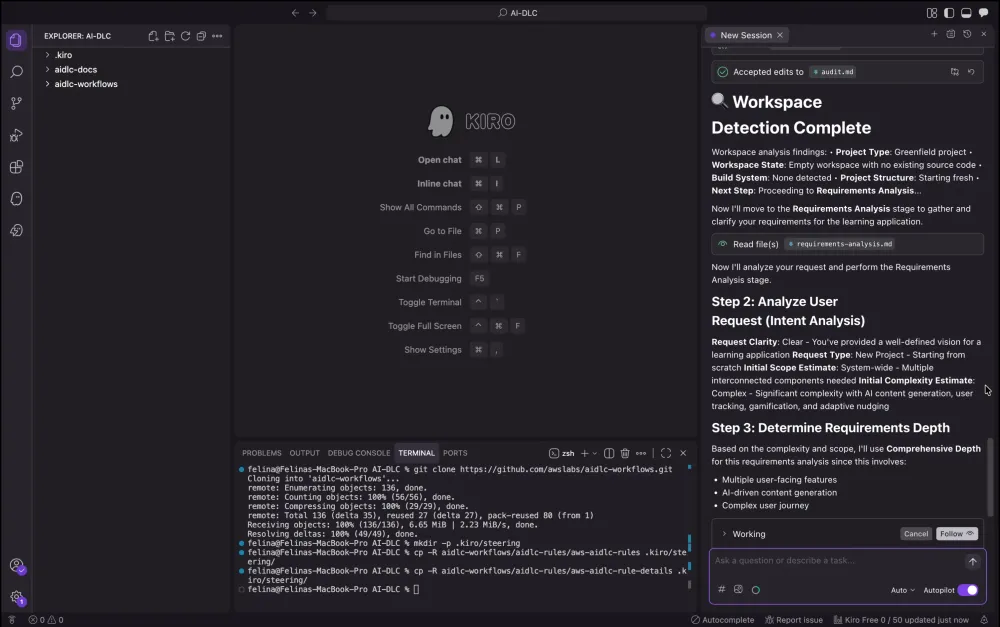
That’s why I started by pulling AWS’s AI-DLC workflow rules from GitHub and installing them as Kiro steering files:
1
2
3
4
5
6
7
git clone https://github.com/awslabs/aidlc-workflows.git

mkdir -p .kiro/steering

cp -R aidlc-workflows/aidlc-rules/aws-aidlc-rules .kiro/steering/

cp -R aidlc-workflows/aidlc-rules/aws-aidlc-rule-details .kiro/steering/
This step is quietly powerful.
Think of it like this:
Steering files turn “AI help” into “AI discipline.”
They keep the workflow repeatable across sessions and reduce drift.


Why AI-DLC felt different: it wrote a trail before it wrote code
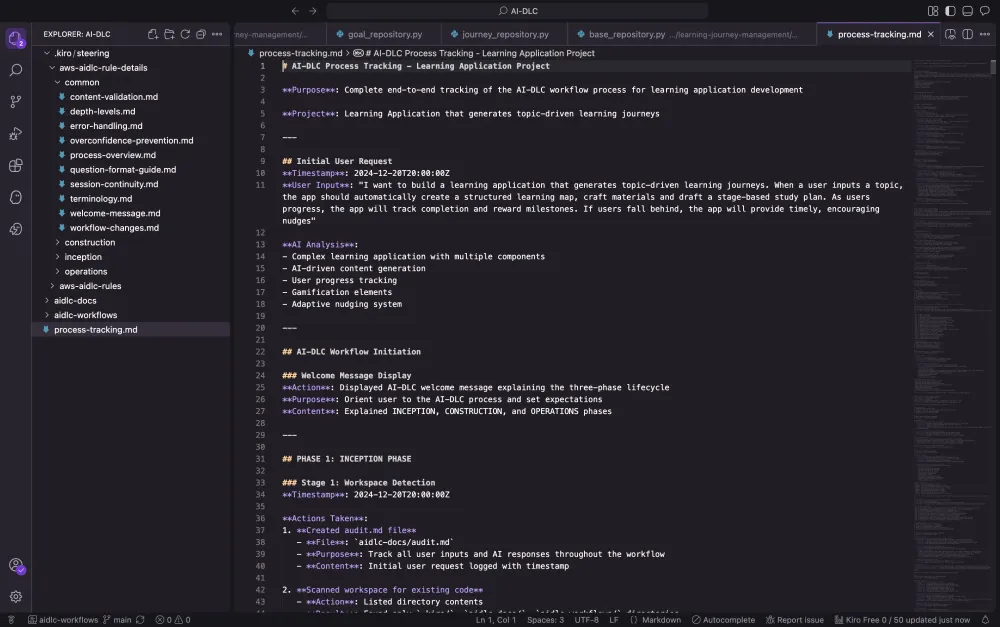
Very early, I requested something specific: track every action end-to-end.
So the workflow created a dedicated process log (process-tracking.md) and kept an audit trail (audit.md) as it progressed.
That seems small—until you’ve tried to explain a build later and realized your “why” is gone.
AI-DLC doesn’t just move fast. It moves with receipts.
INCEPTION: turning an idea into something buildable (with gates)
1) Workspace Detection: confirm reality
The audit trail records a workspace scan with no existing source/build files and classifies the project as Greenfield.
Your state file reflects the same: Existing Code: No and Reverse Engineering Needed: No.
This matters because AI-DLC adapts based on context: greenfield vs retrofit vs reverse engineering.
2) Requirements Analysis: interrogate ambiguity early
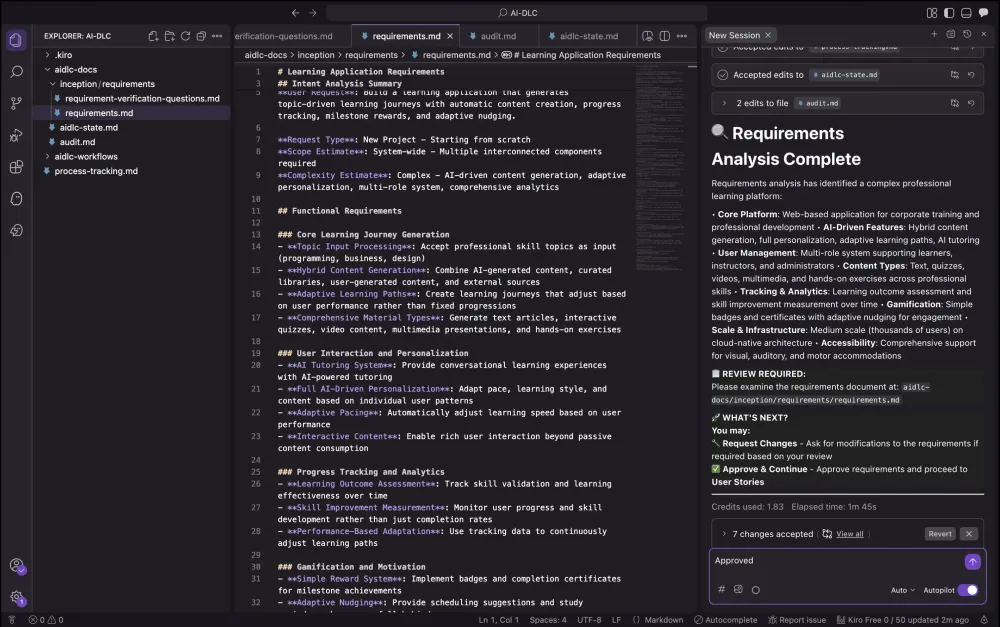
AI-DLC didn’t “assume.” It generated 18 verification questions across functional + non-functional + UX/quality context and created a requirements questions file.
Once answers were provided, it generated a requirements document, flagged that there were no contradictions, and then did the most AI-DLC thing possible:
It paused for approval.
And the approval happened (“Approved”), which the audit trail records as the gate that allowed progression.
This gate is the whole point:
AI can be fast.
Humans must still own intent.
3) State tracking: a lifecycle you can see
Your aidlc-state.md tracks the lifecycle as it moves—Phase by phase, stage by stage.
It’s the simplest “wow” artifact because it makes progress objective.
By the end of Inception, the tracker shows all Inception stages completed: Workspace Detection, Requirements, Stories, Workflow Planning, Application Design, Units Generation.

CONSTRUCTION: where AI-DLC becomes a repeatable engine
AI-DLC doesn’t jump from “requirements” to “code.”
It runs a per-unit loop, which your state file lists explicitly:
Functional Design → NFR Requirements → NFR Design → Infrastructure Design → Code Generation.
This is why AI-DLC trends toward deployment readiness: it forces you to think about NFRs and infra early—not after the fact.
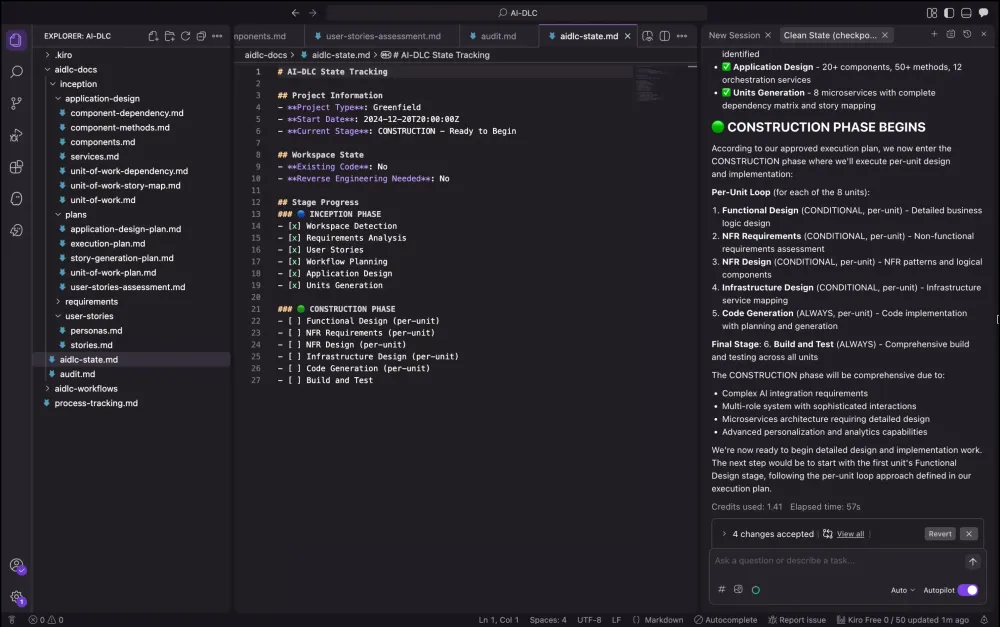
The build reality (what completed vs in-progress)
Your state tracker shows:
- Learning Journey Management Unit: all 5 stages completed, including code generation
- Content Storage Unit: all 5 stages completed, including code generation
- Content Delivery Unit: all stages completed
- User Management: all stages completed
- AI content generation/personalization/tutoring: all stages completed
- Platform services:all stages completed
That state file is important because it keeps the narrative honest: AI-DLC isn’t “I finished everything instantly.” It’s “I always know where I am.”
The “wow” part: code generation didn’t start until the plan was explicit
For the Learning Journey Management Unit, the workflow created a 56-step code generation plan across 7 phases, mapped it to user stories, defined success criteria and quality standards, and documented the phase breakdown.
Those phases weren’t just “build endpoints”:
- domain + business logic
- API layer
- data access + caching
- integrations
- configuration + deployment
- testing + QA
- documentation + deployment
That’s the clearest proof that AI-DLC is not “demo-first.”
It’s delivery-first.
The plan adapted to builder reality
Then frontend was built. The process file records that the plan was updated:
- Java/Spring Boot → Python 3.11 + FastAPI (async)
- JPA/Hibernate → SQLAlchemy async
- JUnit → pytest + pytest-asyncio + httpx
- added realistic mock data with Faker and test factories with factory_boy

This is another AI-DLC “wow” moment:
the workflow stays structured, but it’s not rigid—it adapts while keeping traceability.
Approval gate for code-gen execution
The audit trail also records a separate approval moment to begin code generation execution (“Continue”), explicitly marking the start of the 56-step execution run.
Again: AI executes; humans govern.

What Kiro actually generated (so it wasn’t just planning)
The audit trail documents concrete build outputs during code generation:
Repository layer (async SQLAlchemy)
Step 2 completion created:
- base repository with async CRUD
- journey, goals, milestones, progress, collaboration, and template repositories
- database configuration + async session management
Core services that match the learning journey domain
Step 3 completion created services like:
- journey lifecycle manager
- journey creation orchestrator with AI integration
- progress tracking orchestrator
- adaptive path manager
Goal + certification + template systems
Steps 4–5 completion created:
- goal tracking analytics
- achievement validation / credential generation
- template management with versioning, inheritance, and quality validation
This is not “one file that sorta works.”
It’s a real layered system shape emerging under a governed workflow.

The app itself: what the Learning Journey Platform does
Picture this.
You land on the app, and it doesn’t greet you with a bunch of menus or a complicated setup. It feels more like a blank notebook page—ready for one thing: your topic.
You type something simple.
“Generative AI.” Or “Kubernetes.” Or “Data storytelling.”
And the moment you hit create, the platform does what most learning apps don’t do well:
It doesn’t throw a list of random links at you.
It builds you a journey.

The experience: from one topic to a full learning journey
First, you see the learning path unfold like a ladder—5 to 6 stages, starting from fundamentals and gradually climbing toward practical mastery. One stage at a time. No overwhelm. No “where do I even start?”
Each stage comes with three things that make it feel real and actionable:
1) A clear explanation of what you’re learning
Not a textbook dump—more like a guided introduction that tells you:
- what this stage is about,
- why it matters,
- and what you should be able to do by the end.

2) Curated learning materials
For every stage, the platform assembles a small set of resources—reading, videos, exercises, mini projects, quizzes—enough to learn properly, but not so much that you drown in options.

3) A stage-based study plan
This is the part I love: the app doesn’t just say “learn this.”
It suggests how to learn it, with time estimates so the journey feels doable in the real world.
Suddenly the topic stops being an abstract goal and becomes a plan you can follow.

Progress that feels motivating (not guilt-driven)
As you move forward, you mark stages as complete and watch your progress update.
And then something subtle happens: learning starts to feel like momentum.
Because the app doesn’t just track completion—it rewards it.
Milestones that keep you moving
As you pass major points in the journey, you unlock milestones—small wins that feel like a pat on the back, leading all the way to a completion certificate.
It’s not “gamification for fun.”
It’s gamification for consistency—the thing most learners actually struggle with.
Goals that make it personal
You can also set goals with target dates. That simple feature changes the vibe from:
“I want to learn this someday”
to
“I’m finishing this by this date.”
And the system keeps your goal visible so you don’t lose the thread.
The best part: the app nudges you like a supportive mentor
Life happens. People fall behind. That’s normal.
So the app watches your progress—and if your completion drops below a threshold (like when you’re halfway stuck), it doesn’t punish you.
It nudges you.
Not robotic “Reminder: complete stage 3.”
But encouraging messages designed to pull you back gently:
- “You’ve already started—want to finish one small stage today?”
- “Just 20 minutes can get you back on track.”
- “Momentum beats motivation. Let’s do the next step.”
This is the feature that makes it feel human.

Personas: same journey, different teaching style
Now here’s where it gets interesting.
Before you start, you can choose a persona—basically the “teaching style” you want.
So the same topic can feel very different depending on what you pick:
- a learner-friendly guide that breaks things down simply,
- a more structured instructor-like voice,
- or an admin/organizer style that focuses on tracking and structure.
It’s not just personalization for aesthetics—it changes how the content is framed, and that can make the journey feel much more “for you.”
AI that’s reliable, not fragile
Under the hood, the app uses AWS Bedrock (Nova models) to generate journeys and learning content.
But it’s built with the kind of resilience AI apps need:
If AI responses are slow or temporarily unavailable, the experience doesn’t collapse. The app can fall back to structured templates, so you still get a journey and can still learn.
That’s a small detail—but it’s the difference between:
- “an AI demo”and
- “a learning product you can actually rely on.”
The payoff
So yes—this app generates learning journeys.
But more importantly, it solves the hard part of learning:
Turning a vague goal into a structured path—and helping you stay on it.
That’s what makes it feel like more than a topic generator.
It feels like a guide.

Try it yourself
If you want to feel the difference AI-DLC makes, try it on something small this weekend—just a one-sentence idea. Instead of jumping straight into code, force the lifecycle: let the AI ask clarifying questions, generate the key artifacts (requirements, plan, design), and pause at a few human approval gates before it builds. The magic isn’t that AI writes faster—it’s that you finish with a project that has memory: decisions captured, scope protected, and a workflow you can repeat on the next build. Once you do it once, “prompt and pray” won’t feel enough anymore.
The Builder Takeaway
Part 1 explained the why.
Part 2 was the proof: AI-DLC is a workflow you can actually run—one that turns an idea into a structured build, drives unit-based Construction, and produces a learning journey app with real features (stages, materials, plans, milestones, nudges, personas) backed by Bedrock Nova.

x
If you’ve ever shipped something quickly and then spent days untangling it…
Try AI-DLC once.
Not for hype.
For the calm that comes from knowing exactly what you built—and why.
Enjoyed reading this content? Let the author know!
Your likes, comments, shares, and saves help creators reach more builders.

Loading recommendations
Loading article