
MCP Elicitations with Java & Spring AI
MCP has become a standard for connecting generative AI agents with external systems. Before Elicitations, however, there was no way for an MCP server to get additional details from the user when needed. Everything needed by a tool call had to be provided or accessible by the tool. A new interaction model was needed. With Java, MCP, and Spring AI we can easily add human-in-the-loop interactions to our MCP servers & AI Agents.

I first started working with Model Context Protocol (MCP) 1 year ago when it was brand new. In the past year the MCP specification and implementations have evolved rapidly. It is clear that MCP is foundational infrastructure for the future of agentic systems. So it was very exciting to see MCP moving to the Linux Foundation under the new Agentic AI Foundation!
I co-authored a blog about how AWS has supported MCP: Shaping the future of MCP: AWS’s commitment and vision Part of the blog goes into detail on the new MCP Elicitations feature that AWS helped define and implement. Elicitations enable human-in-the-loop interactions between MCP servers and AI Agents. If an MCP tool call *sometimes* requires additional information from the user, it can elicit that information.
A good example of this is in a flight search agent. Let’s say the user’s profile sometimes doesn’t have a preferred airline, then the flight search tool can ask the user, then continue with its normal logic. This may look like (in a plain text chat-style interface):
1
2
3
4
5
6
7
8
9
10
11
12
13
14
15
> search flights denver to san francisco tomorrow
< Preferred Airline?
> United
Here are the available flights from Denver (DEN) to San Francisco (SFO) for tomorrow, December 13, 2025:
### Direct Flights
1. **United Airlines**
   - Departure: 12:00 PM from DEN
   - Arrival: 3:00 PM at SFO
   - Duration: 3 hours
…
5. **United Airlines (via SEA)**
   - DEN → SEA: 12:00 PM - 2:30 PM
   - SEA → SFO: 3:30 PM - 5:30 PM
   - Total arrival: 5:30 PM at SFO
All flights shown are operated by United Airlines. The earliest arrival is at 3:00 PM with the direct flight, while the latest arrival is at 5:30 PM with either the direct or connecting options.
The Java MCP SDK supports Elicitations so we can pretty easily build MCP servers that take advantage of them. Spring AI wraps the Java MCP SDK, making it easy to build and use MCP servers in AI agents. Let’s walk through the code for the flight search example (complete code example ).
First, in the MCP server we need a Java record to hold the result from the Elicitation:
1
2
3
4
record UserProfile(
        @JsonPropertyDescription("Preferred Airline")
        String preferredAirline
) { }
I’ve also included a property description which is sent in the Elicitation request schema. This enables an MCP client / AI Agent to present the right description of what is needed to the user.
The MCP server also has a
searchFlights tool which takes the expected parameters for the flight search:1
2
3
4
5
6
7
8
9
10
11
12
13
14
15
16
17
18
19
public List<FlightSearchResult> searchFlights(
String departureAirportCode,
String arrivalAirportCode,
LocalDate date,
McpSyncRequestContext context) {
var userProfile = userService.getUserProfile();
if (userProfile.preferredAirline() == null) {
var elicitResult = context.elicit(UserProfile.class);
if (elicitResult.action() == McpSchema.ElicitResult.Action.ACCEPT) {
userProfile = userService.setPreferredAirline(elicitResult.structuredContent().preferredAirline());
}
}
return flightSearchService.searchFlights(departureAirportCode,
arrivalAirportCode, date.atTime(12, 0), userProfile.preferredAirline());
}The
McpSyncRequestContext is automatically passed as a parameter to the tool providing a context to make the elicitation request on. In the tool call, first the user profile is retrieved. Note that in a real-world system this would come from a security context. If the user’s profile doesn’t contain a preferred airline, then an elicitation request is made for that information. When the user has provided the information the search continues as normal.Beyond the backing services for user profiles and actual flight searches (implemented with fake data in the complete example), that is all that is needed for an MCP server tool to request an elicitation. We now need to integrate the elicitation request handling into our AI agent. Some existing pre-packaged agents / code assistants already support this out-of-the-box. For our example, we will build our own agent with Spring AI and do the handling ourselves.
Our agent needs to use an AI model and connect to our MCP server. We define those settings in the
application.properties file:1
2
spring.ai.bedrock.converse.chat.options.model=us.amazon.nova-2-lite-v1:0
spring.ai.mcp.client.streamable-http.connections.flights.url=${flights-mcp.url:http://localhost:8081}For this example we will just have a CLI / terminal application which uses STDIN & STDOUT for user interaction. In this case the elicitation handler is:
1
2
3
4
5
6
7
8
9
10
11
12
public McpSchema.ElicitResult handleElicitationRequest(McpSchema.ElicitRequest request) {
var props = (Map<String, Object>) request.requestedSchema().get("properties");
var userData = new HashMap<String, Object>();
props.forEach( (prop, schema) -> {
var description = ((Map<String, String>) schema).get("description");
System.out.print(description + "? ");
var userInput = scanner.nextLine();
userData.put(prop, userInput);
});
return new McpSchema.ElicitResult(McpSchema.ElicitResult.Action.ACCEPT, userData);
}When an elicitation from the
flights MCP server is received, we iterate through the request schema, ultimately displaying the elicitation property’s description, and asking the user for the value. That value is then returned back to the tool call on the MCP server (the elicitResult above).Finally we can build our agent that connects to the MCP server and provides the interface to the AI model:
1
2
3
4
5
6
7
8
9
10
11
12
13
14
15
16
17
18
public ApplicationRunner applicationRunner(ChatClient.Builder chatClientBuilder,
ToolCallbackProvider callbackProvider) {
return args -> {
var chatClient = chatClientBuilder.defaultTools(new DateTimeTools())
.defaultToolCallbacks(callbackProvider)
.build();
while (true) {
System.out.print("\n> ");
var userInput = scanner.nextLine();
var resp = chatClient.prompt()
.user(userInput)
.call()
.content();
System.out.println(resp);
}
};
}First we construct a
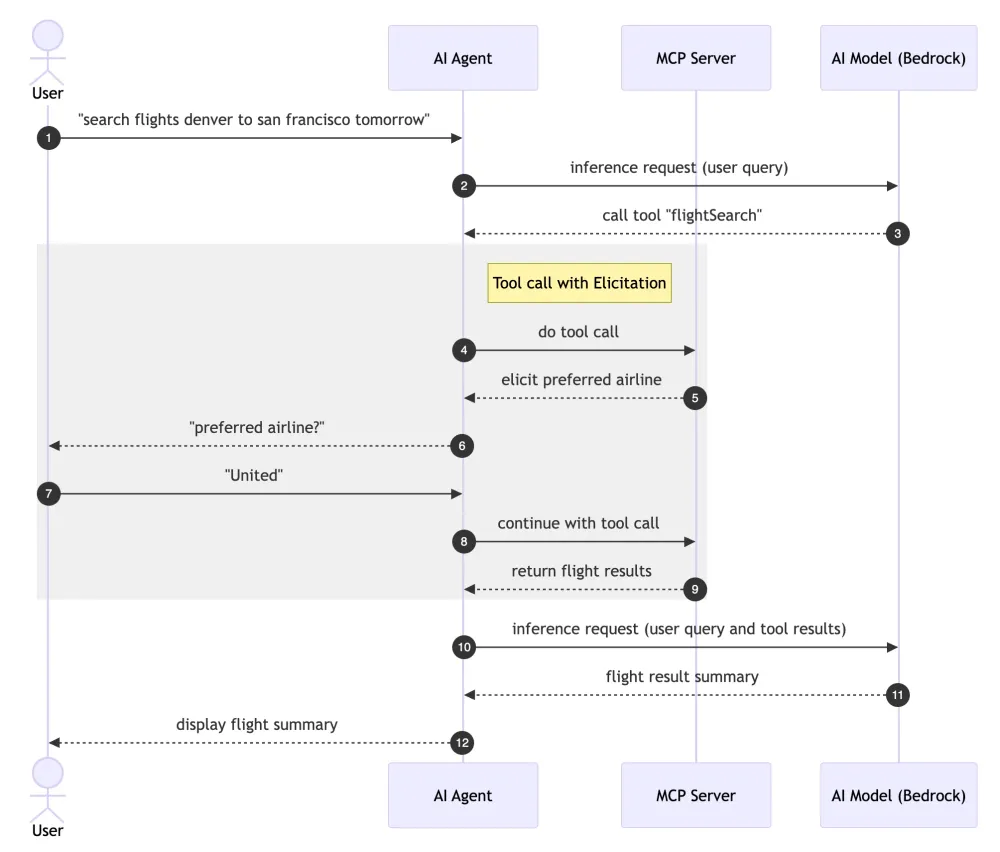
chatClient, enabling communication with the AI model and the MCP server. This handles the tool calling to our MCP server. Then we provide a prompt that allows the user to ask the AI model a question like “search flights denver to san francisco tomorrow” which does the following:
That’s it! Elicitations enable powerful human-in-the-loop interactions with agents and MCP servers. Check out the complete code example and let me know what you think!
Enjoyed reading this content? Let the author know!
Your likes, comments, shares, and saves help creators reach more builders.

Loading recommendations
Loading article