
WorkShop 2 - Building Reliable Enterprise AI with Retrieval-Augmented Generation (RAG) on Amazon Bedrock
A quick guide to building secure, scalable Retrieval-Augmented Generation (RAG) systems using Amazon Bedrock. Learn how to store data in S3, index it with Knowledge Bases, use built-in embeddings and retrieval, and generate accurate, grounded responses with models like Claude and Llama — all without managing vector databases or custom pipelines.


Building Reliable Enterprise AI with Retrieval-Augmented Generation (RAG) on Amazon Bedrock
Large Language Models (LLMs) have revolutionized how we interact with data, but they suffer from a critical limitation in enterprise contexts: Hallucinations.
When an LLM is asked about specific internal data—such as HR policies, financial reports, or proprietary product manuals—it often fills the gap with confident but incorrect guesses. For businesses, this lack of accuracy is a barrier to adoption. You cannot deploy a customer support bot or an internal compliance tool that "invents" facts.
The solution is Retrieval-Augmented Generation (RAG). This architecture grounds your LLM in your own verified data, ensuring answers are accurate, auditable, and secure.
This post details how to build a production-ready RAG solution using Amazon Bedrock, significantly reducing the complexity of managing embeddings, vector databases, and retrieval logic.
1. The Architecture: How Bedrock RAG Works
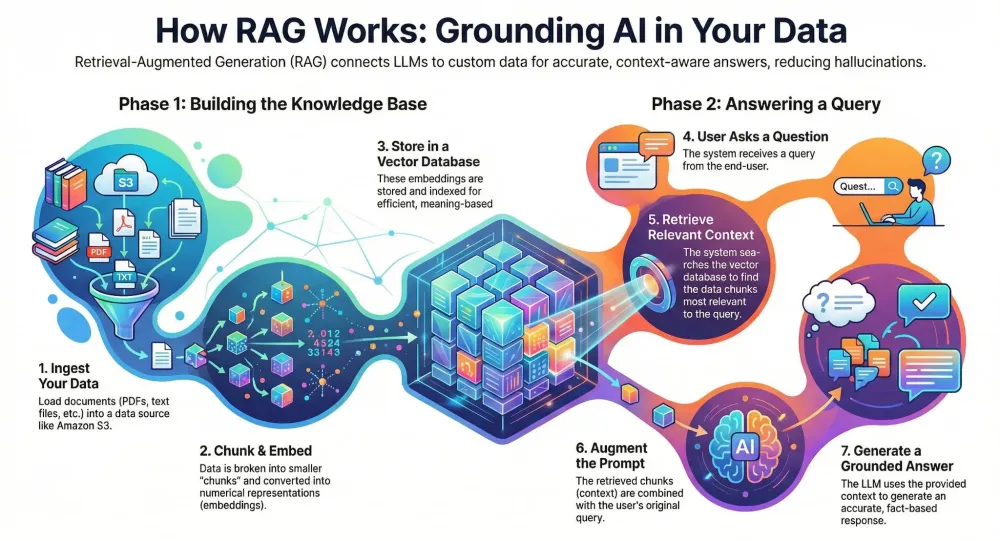
RAG bridges the gap between the LLM's general knowledge and your organization's private data. The workflow consists of two main phases: Ingestion and Inference.
The High-Level Flow
- Data Source (S3): Raw documents (PDFs, text files) are stored in Amazon S3.
- Knowledge Base Ingestion: Amazon Bedrock Knowledge Bases automatically splits documents into chunks, generates vector embeddings, and stores them in a vector index (e.g., OpenSearch Serverless).
- Retrieval: When a user asks a question, Bedrock searches the vector database for the most relevant text chunks.
- Generation: These chunks are injected into the LLM's prompt as context. The LLM generates a factual answer based only on that context.
AWS Services Breakdown
| Service | Role in Architecture |
|---|---|
| Amazon Bedrock | Core orchestration, LLM access (Claude, Titan, Llama), and Knowledge Base management. |
| Amazon S3 | Durable storage for source documents (PDF, DOCX, TXT). |
| Amazon OpenSearch Serverless | Managed vector store for fast similarity search/retrieval. |
| Amazon Bedrock Guardrails | Enforces safety, PII redaction, and topic filtering. |
| AWS Lambda & API Gateway | The serverless compute layer connecting the frontend to Bedrock. |
Note: By using Amazon Bedrock Knowledge Bases, you offload the heavy lifting of chunking strategies and embedding management to AWS, allowing you to focus on application logic.
2. Technical Implementation
Below is a guide to setting up the core components using the AWS SDK for Python (
boto3).Step 1: Ingesting Documents
First, ensure your documents are uploaded to the specific S3 bucket linked to your Knowledge Base.
Python
1
2
3
4
5
6
7
8
9
10
11
12
import boto3

def upload_document(file_path, bucket_name, object_name):
    s3_client = boto3.client('s3')
    try:
        s3_client.upload_file(file_path, bucket_name, object_name)
        print(f"✅ Uploaded {object_name} to {bucket_name}")
    except Exception as e:
        print(f"❌ Upload failed: {e}")

# Example usage
upload_document("employee_handbook.pdf", "my-rag-source-bucket", "docs/handbook.pdf")
Once uploaded, you must trigger a Sync operation on the Bedrock Knowledge Base to update the vector index.
Python
1
2
3
4
5
6
7
8
bedrock_agent = boto3.client('bedrock-agent')

def sync_knowledge_base(kb_id, data_source_id):
    response = bedrock_agent.start_ingestion_job(
        knowledgeBaseId=kb_id,
        dataSourceId=data_source_id
    )
    print(f"Ingestion job started: {response['ingestionJob']['ingestionJobId']}")
Step 2: Querying with "Retrieve and Generate"
The most powerful feature of Bedrock is the
retrieve_and_generate API. It handles the retrieval of context and the prompting of the LLM in a single API call.Python
1
2
3
4
5
6
7
8
9
10
11
12
13
14
15
16
17
18
19
20
21
22
23
24
25
26
27
28
29
30
31
import boto3

# Initialize the Bedrock Agent Runtime client
bedrock_runtime = boto3.client("bedrock-agent-runtime", region_name="us-east-1")

def query_rag_application(user_query, kb_id):
    try:
        response = bedrock_runtime.retrieve_and_generate(
            input={
                'text': user_query
            },
            retrieveAndGenerateConfiguration={
                'type': 'KNOWLEDGE_BASE',
                'knowledgeBaseConfiguration': {
                    'knowledgeBaseId': kb_id,
                    'modelArn': 'arn:aws:bedrock:us-east-1::foundation-model/anthropic.claude-3-sonnet-20240229-v1:0'
                }
            }
        )

        return response['output']['text']

    except Exception as e:
        return f"Error processing query: {str(e)}"

# Example Execution
answer = query_rag_application(
    "What is the company policy on remote work?",
    "KB_ID_12345"
)
print(answer)
Step 3: Applying Guardrails
To ensure the model doesn't discuss off-limit topics or reveal PII, wrap the interaction with Bedrock Guardrails.
Python
1
2
3
4
5
6
7
8
9
10
# Guardrails are applied at the model invocation level
response = bedrock_runtime.invoke_model(
    modelId='anthropic.claude-3-sonnet-20240229-v1:0',
    body=json.dumps({
        "prompt": formatted_prompt_with_context,
        "max_tokens": 500
    }),
    guardrailIdentifier="guardrail-id-123",
    guardrailVersion="DRAFT"
)
3. Visualizing the Workflow

4. Scaling and Optimization Strategy
Moving from a prototype to an enterprise-grade application requires planning for scale and cost.
Handling Data Growth
- Incremental Ingestion: Do not re-sync the entire bucket every time. Configure your ingestion jobs to handle only added or modified files in S3.
- Vector Store Choice: Amazon OpenSearch Serverless automatically scales compute and storage independently, making it ideal for fluctuating RAG workloads without managing clusters.
Performance & Latency
- Chunking Strategy: The default chunking is effective, but for complex documents, consider "Hierarchical Chunking" (Parent-Child indexing) to retain document context while retrieving specific details.
- Inference Latency: Use provisioned throughput for Bedrock models if you have sustained high traffic, ensuring consistent response times.
Cost Optimization
- Embedding Models: Use Amazon Titan Embeddings v2. It offers a smaller dimension size (resulting in lower storage costs) with high accuracy.
- Retrieval Depth: Tune the
numberOfResults(Top-K) parameter. Retrieving 20 chunks increases costs and latency; usually, the top 5–7 chunks are sufficient for accurate answers.
5. Conclusion
Retrieval-Augmented Generation on Amazon Bedrock transforms generic LLMs into specialized domain experts. By leveraging Managed Knowledge Bases, you eliminate the overhead of building custom data pipelines and managing vector infrastructure.
Combined with Guardrails for safety and Serverless architecture for scalability, developers can now deploy internal Q&A bots, compliance assistants, and customer support agents that are not only intelligent but also grounded in truth.
Resources
- Amazon Bedrock Knowledge Bases Documentation
- https://github.com/aws-samples/rag-workshop-amazon-bedrock-knowledge-bases
Enjoyed reading this content? Let the author know!
Your likes, comments, shares, and saves help creators reach more builders.

Loading recommendations
Loading article