
Cloud Ops and Security Architecture Explained: IAM, VPC, Zero Trust, Monitoring & Compliance
Cloud security architecture is now the backbone of every modern cloud deployment. This guide covers AWS-first security design, IAM best practices, VPC segmentation, encryption, monitoring, compliance, and Zero Trust principles: with 10 real, enterprise-level projects you can implement immediately.

The Complete Cloud Security Architecture & Operations Guide: From Foundations to Enterprise Implementation
Your journey into cloud security architecture begins not with firewalls or certificates, but with understanding why security matters in cloud environments.
Cloud Ops Infra & Security : Beginner Friendly Glossary
Technical Term | Simple Definition / Summary | Analogy |
|---|---|---|
IAM (Identity and Access Management) | This is the ID Card and Keyring for your security in AWS. It determines who (a user or service) can access which resources (like databases, storage). | The Security Guard and Key Manager of a large office or apartment building. |
VPC (Virtual Private Cloud) | This is your own private, isolated network space within the Cloud (AWS). You control what comes in and what goes out of this space. | Your Private Apartment or Gallery inside a giant Cloud City (AWS), which you have secured with your own walls. |
Zero Trust | A security principle: "Never trust, always verify." Every access request is treated as if it were coming from outside the network. | A house where there is a security checkpoint at every single room door, not just the main entrance. |
Principle of Least Privilege (PoLP) | Giving any user, program, or service only the minimum permissions necessary to perform its job—no more, no less. | Giving a librarian the key only to the book stacks, not the key to the vault. |
MFA (Multi-Factor Authentication) | Using two or more different types of verification (like a password and a code sent to your phone) to prove your identity. | Opening a bank locker that requires both your card (something you have) and your PIN (something you know). |
Cloud Ops (Cloud Operations) | The daily tasks of running, monitoring, and maintaining your apps and services properly in AWS. | The Maintenance and Engineering Team of a modern building, ensuring power, water, and AC run 24/7. |
Monitoring | Tracking how your cloud systems (applications, servers, network) are performing and checking if any issues are arising. | The Speedometer, Fuel Gauge, and Warning Lights on a car dashboard that tell you if everything is fine or if something needs checking. |
Compliance | Ensuring adherence to the laws, rules, and industry standards (like GDPR or PCI) that apply to your business data and systems. | A restaurant following all government health and safety codes required by law. |
Federation | Using a company's existing identity system (like Google Workspace or Okta) to log in to AWS, instead of creating separate AWS usernames and passwords. | Using a single University ID card for entry to the library, gym, and hostel. |
This guide transforms you from foundational concepts to implementable enterprise-grade practices through 10 practical projects, grounded in AWS-first architecture with Azure considerations where unique capabilities exist.
Understanding Cloud Security: The Foundation Layer
What is Cloud Security?
Cloud security encompasses the policies, controls, and technologies that protect your data, applications, and infrastructure deployed in cloud environments.
Unlike traditional on-premises security, which operates within a single perimeter, cloud security operates across distributed infrastructure, multiple availability zones, and shared responsibility models.
picture taken from https://www.ac3.com.au/resources/a-fresh-look-at-the-aws-shared-responsibility-model

picture was taken from: https://www.businesswire.com/news/home/20190624005387/en/New-2019-Cloud-Security-Research-Reveals-Key which is mentioned in article https://www.cloudwize.io/blog/think-you-shouldnt-do-continuous-cloud-compliance-and-security-think-again/
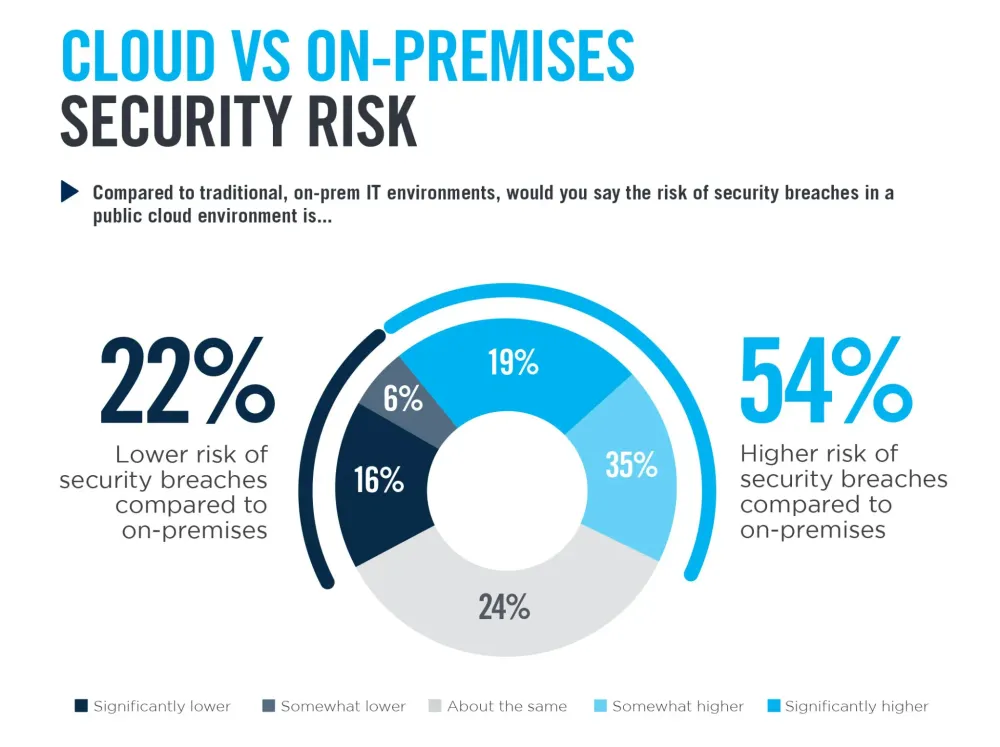
Why does it matter? According to industry research, 99% of cloud security failures through 2025 are customer-caused misconfigurations, not platform vulnerabilities.
This statistic reveals the real battleground: understanding and correctly implementing controls.
When do you need it? From the moment you create your first AWS account. Security isn't something you bolt on after deployment:-it's an architectural decision made day one.
How does it work? Cloud security operates on seven interconnected foundations: identity and access management, detection systems, infrastructure protection, data protection, incident response, application security, and governance. Each layer works independently, but their collective strength creates defense in depth.

The cloud security landscape has shifted from "trust the perimeter" to "zero trust everything." This means every request to access resources:-whether from inside or outside your organization:->gets treated as untrusted by default until authenticated, authorized, and continuously verified.
Read https://www.microsoft.com/insidetrack/blog/implementing-a-zero-trust-security-model-at-microsoft/

Identity and Access Management: The Guardian at the Gate
What is IAM? Why It Matters.
Identity and Access Management (IAM) is the cornerstone of cloud security. It answers three critical questions: Who are you? What can you do? Should you be allowed to do it right now? AWS IAM handles this for AWS resources; Azure Active Directory (Azure AD) handles this for Microsoft cloud and federated scenarios. They're fundamentally different tools solving different problems.
AWS IAM operates as a service-based access management system specifically designed for AWS resources. When you create an EC2 instance, an S3 bucket, or a Lambda function, IAM controls who gets to interact with these resources. It uses role-based access control (RBAC), resource-based policies, and identity-based policies.
Azure AD extends your on-premises Active Directory identity to the cloud, functioning as a modern identity provider. It's built for user authentication across enterprise applications, Microsoft 365, and third-party SaaS platforms.
Feature | AWS IAM | Azure AD |
|---|---|---|
Primary use case | Controls access to AWS resources and services | Manages user identities and federation for cloud apps |
Authentication model | Service-centric, focused on AWS accounts and roles | Acts as an identity provider for cloud and hybrid environments |
MFA support | Supports multi-factor auth, but with a narrower set of options | Rich MFA options, including advanced scenarios |
SSO capability | Offers AWS-specific single sign-on for accounts and apps | Native single sign-on across Microsoft and many SaaS apps |
Conditional access | Basic condition-based controls via policies and permissions | Advanced conditional access policies in higher tiers |
Integration scope | Best integrated within AWS plus selected SAML/OIDC apps | Broad integration with Microsoft stack, SaaS, and other clouds |
Best suited for | Teams running workloads primarily inside AWS | Organizations with hybrid or multi-cloud and Microsoft-heavy environments |
- The critical distinction: AWS IAM manages AWS resources.
- Azure AD manages users and their cloud app access.
- Organizations often need both in multi-cloud environments.
AWS IAM Best Practices: The Least-Privilege Foundation
1. Temporary credentials over long-term access keys.
This is non-negotiable.
Access keys should be temporary, expiring within hours or minutes, not stored indefinitely in configuration files.
Use AWS STS (Security Token Service) to generate temporary credentials with specific permissions scoped to the task at hand.
2. Enforce multi-factor authentication (MFA) universally.
MFA requires users to prove their identity through two methods: something they know (password) and something they have (hardware token, phone app, security key).
AWS supports multiple MFA mechanisms; choose based on your security posture and user experience tolerance.
3. Apply the principle of least privilege (PoLP).
This means users and services get exactly the permissions they need to perform their job, no more.
If a developer needs to read from S3 and write logs to CloudWatch, don't give them full AWS admin access.
Use IAM Access Analyzer to generate fine-grained policies based on actual access patterns.
4. Use federation with identity providers for human users.
Instead of creating individual IAM users for each employee, federate with your corporate identity provider (Azure AD, Okta, Ping Identity).
This centralizes user lifecycle management:-
onboarding, permissions changes, and offboarding happen once in your identity provider.
5. Regular review and removal of unused resources.
Orphaned users, roles, and permissions become attack vectors. AWS IAM Access Analyzer can identify public and cross-account access automatically.
Azure AD Authentication in AWS Multi-Cloud Scenarios
Why integrate Azure AD with AWS? Because your organization probably already uses Azure AD for employee identities. Instead of duplicating users across systems, configure SAML federation: employees authenticate via Azure AD and receive temporary AWS credentials.
The flow: Employee opens sign-in URL → Azure AD authenticates and validates group membership → SAML assertion returned → Employee assumes pre-defined AWS IAM role → Temporary credentials granted → AWS Console access enabled.
This approach scales seamlessly across multiple AWS accounts and eliminates the burden of managing separate AWS users.
Network Security: Designing the Virtual Perimeter
VPC Architecture: Your Security Foundation
A Virtual Private Cloud (VPC) is your isolated network segment in AWS. It's your responsibility to secure it; AWS secures the underlying infrastructure.
Fundamental VPC components:
- Subnets: Logical partitions within your VPC. Public subnets route traffic to the internet; private subnets do not. Place your web servers in public subnets, databases in private subnets.
- Security Groups: Stateful firewalls operating at the instance level. They allow traffic matching defined rules; all other traffic is implicitly denied. A security group attached to an EC2 instance controls what traffic reaches that instance.
- Network ACLs: Stateless firewalls operating at the subnet level. They apply rules in numbered order to all traffic entering/leaving subnets. You can define both allow and deny rules.
Why both security groups and NACLs? Because they operate at different layers and serve different purposes. Security groups are stateful (if you allow outbound traffic, responses automatically return). NACLs are stateless (every direction needs explicit rules). Use security groups for fine-grained instance-level control; use NACLs as a subnet-level safety net.
Best practice architecture:
- Public subnets in multiple Availability Zones for load balancers and jump hosts
- Private subnets for application servers
- Isolated subnets for databases with no internet routes
- NAT gateways in public subnets to allow private instances outbound internet access
Firewall Rules: From AWS to Azure
AWS Network Firewall provides Layer 3-7 inspection. Define stateful firewall rules specifying which traffic is allowed based on IP addresses, ports, protocols, and application signatures. Combine with threat intelligence feeds to detect and block known malicious IPs.
Azure Firewall operates similarly but in the Azure ecosystem. It supports three rule types: Application rules (based on FQDNs), Network rules (based on IPs/ports), and NAT rules (for address translation). Rule collections have priority ordering; Azure processes them in ascending order, applying the first match.
Key difference: AWS Network Firewall integrates seamlessly with AWS services and VPCs; Azure Firewall integrates with Azure Virtual Networks. Both support centralized management across multiple environments.

Zero Trust Network Access (ZTNA) is the modern evolution. Don't assume users inside the network are safe. Implement micro-segmentation: divide your network into small zones and enforce access policies at each boundary. Require users to authenticate for every action, not just at login.
Encryption: Data Protection at Rest and in Transit
SSL/TLS: The Protocol Securing Your Data
Hypertext Transfer Protocol Secure (HTTPS) runs on SSL/TLS, the cryptographic protocol ensuring data confidentiality and integrity as it travels networks. The TLS handshake happens invisibly: client proposes supported versions and cipher suites → server selects strongest options → certificates exchanged → session keys generated → encrypted tunnel established.
Certificate management matters. In AWS, import certificates into AWS Certificate Manager (ACM), which handles certificate lifecycle management automatically. Load Balancers perform TLS termination:-> incoming HTTPS traffic and forwarding to backend servers over HTTP or TLS, depending on your security requirements.
Best practice: Terminate TLS at the edge (load balancer), reducing computational burden on application servers. If end-to-end encryption is required, use TLS passthrough mode where the load balancer forwards encrypted traffic directly to backend instances.
Data Encryption: Foundations and Strategy
Encryption at rest protects data stored on disks or in databases. AWS EBS volumes support AWS Key Management Service (KMS) encryption; S3 supports server-side encryption; RDS supports Transparent Data Encryption (TDE). Always encrypt sensitive data at rest. The computational cost is negligible; the security benefit is enormous.
Encryption in transit protects data moving between systems. Use TLS for all network communications. AWS s2n-tls is a simplified, audited TLS implementation used across AWS services. Ensure your organization's applications use TLS 1.2 or higher:->lower versions have known vulnerabilities.
Key management discipline: Never hardcode encryption keys in source code. Use AWS Secrets Manager for credentials and API keys; use AWS Systems Manager Parameter Store for configuration. Rotate keys regularly. Audit key access. Implement least-privilege access to key management functions.
Monitoring, Logging, and Detection: Seeing What's Happening
CloudWatch: Your Observability Command Center
Amazon CloudWatch is AWS's primary monitoring and logging service. It collects metrics (CPU utilization, network throughput, application-level metrics), logs (application logs, system logs, VPC Flow Logs), and alarms.
Structured logging is non-negotiable. Instead of free-form text logs, emit JSON-structured logs with consistent fields: timestamp, log level, request ID, user identity, action performed, result. This makes searching and analyzing logs efficient.
Metric filters transform logs into actionable signals. Create a filter matching suspicious patterns (e.g., failed authentication attempts), then trigger an alarm when the count exceeds a threshold. Examples: EC2 instance changes, IAM policy modifications, Security Group changes, root account usage, unauthorized API calls.
Log retention policies balance visibility and cost. Store recent logs (last 30 days) for quick analysis, transition older logs to Glacier for long-term retention and compliance, and delete data older than your regulatory retention period.
Real-Time Alerting and Response
CloudWatch Alarms notify your team immediately when something demands attention. Set thresholds based on business context:->a spike in error rates for a critical service warrants immediate notification, while low-severity informational logs don't.
SNS integration delivers alerts to the right people: urgent incidents via PagerDuty, operational notifications via Slack, compliance-relevant events via email.
Trend analysis reveals patterns you'd miss with point-in-time monitoring. Is error rate increasing gradually? Is your database connection pool approaching capacity? CloudWatch Logs Insights queries enable detective work: "Show me failed requests in the last hour grouped by source IP".
Compliance and Regulatory Frameworks: Meeting Standards
ISO 27001, SOC 2, and GDPR: Understanding the Alphabet Soup
ISO 27001 is a globally recognized standard for information security management systems. It requires organizations to implement 114 prescribed controls covering asset management, access control, cryptography, and incident response. Certification requires independent audit.
SOC 2 (Service Organization Control 2) is relevant for cloud service providers. It evaluates controls across five trust service criteria: security, availability, processing integrity, confidentiality, and privacy. Unlike ISO 27001's prescribed controls, SOC 2 lets organizations design custom controls meeting these principles. Certification comes as Type I (point-in-time assessment) or Type II (controls evaluated over 6-12 months).
GDPR (General Data Protection Regulation) is a legal requirement for organizations processing EU citizens' data, not a security standard. It mandates explicit user consent for data collection, the right to be forgotten, breach notification within 72 hours, and data protection impact assessments.
Key insight: ISO 27001 and SOC 2 focus on operational security; GDPR focuses on data privacy and user rights. Organizations often implement all three: ISO 27001 for internal security discipline, SOC 2 to prove security to customers, GDPR to comply with law.
Implementing Compliance Controls in AWS
AWS provides native tools aligning with compliance frameworks:
- AWS Config monitors resource configurations against desired state. Define rules enforcing security group restrictions, encryption requirements, logging enablement. Non-compliant resources are flagged automatically.
- CloudTrail logs every API call in your account:-who called what action on which resource and when. Store CloudTrail logs in S3 with MFA delete protection. Integrate with CloudWatch for real-time analysis.
- AWS Security Hub aggregates security findings from AWS services, third-party tools, and industry compliance checks. It provides a unified dashboard of your security posture and compliance readiness.
- Data Encryption meets GDPR's data protection requirements. Implement encryption at rest and in transit, plus access controls limiting who can decrypt data.
Troubleshooting Cloud Security Issues: A Layered Approach
OSI Model: Your Troubleshooting Map
The Open Systems Interconnection (OSI) model describes how network communication works across seven layers. Understanding these layers enables systematic troubleshooting.
Layer 1 - Physical: Physical cables, network interface cards, power supplies. Issues: damaged cables, hardware failures. Tools: cable testers, interface diagnostics.
Layer 2 - Data Link: MAC addresses, VLANs, switch port configurations. Issues: MAC address conflicts, mismatched VLANs, spanning tree problems. Tools: Wireshark, ARP cache inspection.
Layer 3 - Network: IP addresses, routing, IP protocol. Issues: routing loops, unreachable networks, misconfigured gateways. Tools: ping, traceroute, IP configuration verification.
Layer 4 - Transport: TCP/UDP, port numbers, connection states. Issues: blocked ports, firewall rules, connection timeouts. Tools: netstat, firewall rule inspection.
Layer 5 - Session: Session establishment and termination. Issues: authentication failures, session timeouts.
Layer 6 - Presentation: Data format, encryption, compression. Issues: encryption failures, codec mismatches.
Layer 7 - Application: HTTP, DNS, SMTP, application-specific protocols. Issues: DNS resolution failures, application misconfiguration, code bugs.
Troubleshooting discipline: Start at the physical layer if connectivity is broken. If connectivity works but applications fail, move up to application layer. Use tools appropriate to each layer.
Wireshark: Packet-Level Investigation
Wireshark captures and analyzes network packets:->the actual bytes traveling your network. It runs the network interface in promiscuous mode, capturing all traffic, not just traffic destined for your system.
Key capabilities:
- Capture filters limit what's recorded:
host 10.0.0.5captures only traffic from that IP,port 443captures HTTPS traffic
- Display filters focus analysis on specific packets after capture:
tcp.port==80 and ip.src==192.168.0.0/16
- Three-pane view: Top pane shows all captured packets, middle pane shows detailed protocol breakdown of selected packet, bottom pane shows raw hexadecimal data
Real-world use case: Your application can't reach a database. Is DNS resolving correctly? Is the IP reachable? Are packets being dropped? Wireshark shows exactly what's on the wire, eliminating guesswork.
tcpdump and netstat: Command-Line Tools
tcpdump is Wireshark's command-line cousin. It captures packets and saves to files for analysis:
tcpdump -i eth0 -w capture.pcap host 10.0.0.5 . Use when GUI tools aren't available or you need scripted automation.netstat shows network statistics: active connections, listening ports, protocol statistics. Detect unexpected outbound connections or services listening on unexpected ports. Modern systems use
ss (socket statistics) which provides similar output.Project 1: Cloud Security Architecture Design (Multi-Tier)
Objective: Design and document a secure, multi-tier cloud architecture for a hypothetical e-commerce application.
Scope: Three-tier architecture (web, application, database) deployed across multiple Availability Zones with security controls at each tier.
Implementation Steps:
- Create VPC with subnets: Design CIDR blocks for VPC (
10.0.0.0/16) and subnets for each tier across two AZs
- Configure security groups: Web tier allows HTTP/HTTPS from public internet; app tier allows traffic only from web tier; database tier allows traffic only from app tier
- Deploy infrastructure: Launch EC2 instances in each tier, configure RDS database with encrypted storage and backup retention
- Implement monitoring: Enable VPC Flow Logs, CloudWatch detailed monitoring, CloudTrail logging
- Document architecture: Create network diagram showing security groups, NACLs, routing, and data flow
Expected outcomes: Layered security demonstrating defense-in-depth, isolated tiers with restricted communication, centralized monitoring, and compliance-ready audit trail.
Project 2: IAM Policy Design and Implementation
Objective: Implement least-privilege IAM policies for different roles in your organization.
Implementation Steps:
- Define roles: Create IAM roles for: Developer (needs EC2, S3, CloudWatch access), Database Administrator (needs RDS access), CI/CD Pipeline (needs EC2, S3, CodeDeploy permissions)
- Generate policies: Use AWS IAM Access Analyzer to generate policies based on access history
- Apply restrictions: Add conditions limiting access by time, IP source, and resource tags
- Enable MFA: Require MFA for sensitive operations like deleting S3 buckets or modifying IAM policies
- Audit access: Run monthly reports identifying unused roles and orphaned users
Expected outcomes: Fine-grained access control, reduced blast radius if credentials are compromised, compliance-ready audit trail showing who accessed what.
Project 3: Network Security with Firewalls and Security Groups
Objective: Implement defense-in-depth network security with AWS security groups and NACLs.
Implementation Steps:
- Configure security groups: Define inbound rules (HTTP 80, HTTPS 443 for web tier; restricted IPs for administrative access)
- Design NACLs: Create NACLs denying specific attack patterns (e.g., deny all UDP, deny specific ports)
- Implement NAT gateways: Allow private instances outbound internet access while remaining unreachable from internet
- Test security posture: Attempt to connect to instances from unauthorized IPs; verify failures
- Document policies: Create security group matrix showing allowed communication between tiers
Expected outcomes: Layered firewall rules, prevented unauthorized access attempts, documented security posture.
Project 4: Encryption Implementation: SSL/TLS and Data Protection
Objective: Implement encryption throughout your infrastructure:-certificates, encrypted storage, encrypted databases.
Implementation Steps:
- Certificate management: Request certificate from AWS Certificate Manager for your domain
- TLS termination: Configure load balancer to terminate HTTPS connections and forward HTTP to backend instances
- Database encryption: Enable RDS encryption at rest using AWS KMS
- EBS encryption: Enable encryption for all EBS volumes
- Secrets management: Store API keys and database passwords in AWS Secrets Manager
- Audit encryption: Verify all sensitive data storage and communication is encrypted
Expected outcomes: End-to-end encryption meeting industry standards, no unencrypted transmission of sensitive data, centralized key management.
Project 5: Troubleshooting Cloud Security Issues Using Layered Approach
Objective: Systematically troubleshoot security and connectivity issues using OSI model framework.
Implementation Steps:
- Simulate issues: Create intentional misconfigurations (security group blocking traffic, network ACL misconfiguration, routing loop)
- Layer 1-2 troubleshooting: Verify VPC/subnet configuration, ENI attachment, routing tables
- Layer 3-4 troubleshooting: Use ping and traceroute to verify network reachability; inspect firewall rules
- Layer 7 troubleshooting: Use application-level tools and logs to diagnose application-specific issues
- Capture and analyze: Use Wireshark to capture packets and verify expected communication patterns
Expected outcomes: Systematic troubleshooting methodology, reduced MTTR (mean time to resolution), confidence in diagnosing complex issues.
Project 6: Cloud Security Best Practices Implementation
Objective: Implement comprehensive AWS security best practices following Well-Architected Framework.
Implementation Steps:
- Enable CloudTrail: Log all API activities to S3 with MFA delete protection
- Configure CloudWatch: Create metric filters for suspicious activities (failed logins, policy changes, root account usage)
- Implement Config Rules: Deploy AWS Config to evaluate compliance with security baselines
- Enable GuardDuty: Activate threat detection for your VPCs
- Security Hub integration: Centralize security findings and compliance status
- Documentation: Create security runbooks for common scenarios
Expected outcomes: Comprehensive security monitoring, rapid incident detection, compliance-ready audit trail.
Project 7: Network Security Fundamentals (TCP/IP & Protocols)
Objective: Understand and implement security at network protocol level.
Implementation Steps:
- TCP/IP foundations: Map out your IP addressing scheme, subnets, CIDR notation
- Protocol selection: Understand when to use TCP (reliable, ordered) vs. UDP (fast, unreliable)
- Application layer: Configure DNS security, HTTP/HTTPS security, SMTP security
- Packet analysis: Use tcpdump to capture and analyze specific protocol behaviors
- Security validation: Verify that only expected protocols are active on your network
Expected outcomes: Deep understanding of network layer security, ability to diagnose protocol-level issues, optimized network configuration.
Project 8: Cloud Security Compliance (Mapping to Standards)
Objective: Map your AWS infrastructure to compliance requirements and implement appropriate controls.
Implementation Steps:
- Requirement mapping: List your compliance requirements (ISO 27001, SOC 2, GDPR, industry-specific)
- AWS native tools: Implement AWS Config, Security Hub, CloudTrail meeting requirements
- Evidence collection: Document control implementation, generate compliance reports
- Gap analysis: Identify unmet requirements and remediation plans
- Audit readiness: Ensure documentation is audit-ready
Expected outcomes: Demonstrated compliance with standards, audit-ready documentation, control evidence trail.
Project 9: Cloud Security Monitoring and Logging (CloudWatch & Azure Monitor)
Objective: Design comprehensive monitoring and logging capturing all security-relevant events.
Implementation Steps:
- Log centralization: Stream all CloudTrail logs, VPC Flow Logs, application logs to CloudWatch
- Structured logging: Ensure applications emit JSON-structured logs with consistent fields
- Metric creation: Define custom metrics for business-relevant events (failed transactions, unauthorized access attempts)
- Alerting: Create alarms triggering on security events with appropriate escalation
- Analysis: Use CloudWatch Logs Insights for investigation queries
- Azure Monitor (if applicable): Configure similar monitoring in Azure environment for multi-cloud visibility
Expected outcomes: Real-time security visibility, rapid incident detection, compliance-ready audit trail, cross-cloud monitoring.
Project 10: Cloud Security Automation (Python & APIs)
Objective: Automate security tasks using Python and AWS APIs, reducing manual effort.
Implementation Steps:
- Automation opportunities: Identify repetitive tasks (compliance checking, log analysis, policy enforcement)
- Python basics: Learn boto3 (AWS SDK for Python) for programmatic access to AWS services
- Automate IAM reviews: Script finding unused roles, orphaned users, overly permissive policies
- Automate remediation: Implement automated response (isolate compromised instances, revoke compromised credentials)
- Integration: Integrate automation into Lambda functions triggered by security events or scheduled regularly
- Documentation: Document automation logic and failure modes
Example use case: When GuardDuty detects malicious activity, automatically isolate the instance by removing it from load balancer, disable compromised IAM credentials, and alert security team.
Expected outcomes: Reduced manual security operations, faster response to threats, scalable security controls.
Conclusion: Building Your Security Mindset
Cloud security isn't a checkbox:->it's a journey toward resilience and trust. The professionals who excel at cloud security understand that security and functionality aren't opposing forces; they're intertwined. A well-architected system is secure by design. A secure system is resilient to attacks. A resilient system maintains business continuity even when threats materialize.
Start with the foundations: understand IAM, implement least privilege, monitor everything. Master network security through practical VPC design. Encrypt relentlessly. Then automate. The organizations building the most secure clouds aren't writing more security policies:->they're automating compliance so developers can move fast without creating vulnerabilities.
Your role bridges technical depth with business judgment. You understand why encryption matters and how to implement it cost-effectively. You know that a misconfigured S3 bucket exposes data more often than sophisticated attacks. You've internalized that security must be convenient, or talented people will work around it.
As you implement these projects and move through your cloud security career, remember: the most dangerous threats aren't the ones you see coming. They're the ones hiding in plain sight:-misconfigurations, abandoned resources, overly permissive access. Your observability wins battles; your automation prevents wars. Build systems that are secure by default, monitored relentlessly, and resilient under pressure.
The cloud security landscape evolves faster than any single person can absorb. Stay curious. Study breach reports. Understand what failed. Test your incident response before you need it. Build community:-share your learnings and learn from others' hard-earned scars. This field rewards practitioners who combine deep technical skills with humble wisdom about how things actually fail in production.
Reference Documentation
Key AWS Services Referenced:
- AWS Identity and Access Management (IAM)
- Amazon Virtual Private Cloud (VPC)
- AWS CloudWatch
- AWS Certificate Manager
- AWS Secrets Manager
- AWS CloudTrail
- AWS Security Hub
- AWS Config
- Amazon GuardDuty
Tools & Technologies:
- Wireshark: Network packet analysis
- tcpdump: Command-line packet capture
- netstat/ss: Network connection statistics
- Python boto3: AWS SDK for Python
- Azure Active Directory: Identity management
- Azure Firewall: Network security
Security Frameworks & Standards Referenced:
- AWS Well-Architected Framework (Security Pillar)
- Zero Trust Architecture (NIST 800-207 principles)
- ISO 27001 Information Security Management
- SOC 2 Trust Service Criteria
- GDPR Data Protection Regulation
Enjoyed reading this content? Let the author know!
Your likes, comments, shares, and saves help creators reach more builders.

Loading recommendations
Loading article