

Build Production AI Agents with Managed Long-Term Memory
Learn to deploy production-ready multi-modal AI agents with Amazon Bedrock AgentCore Memory. Replace custom vector storage with fully managed long-term memory.

🎯 Part 5: Production-Ready Memory with Amazon Bedrock AgentCore
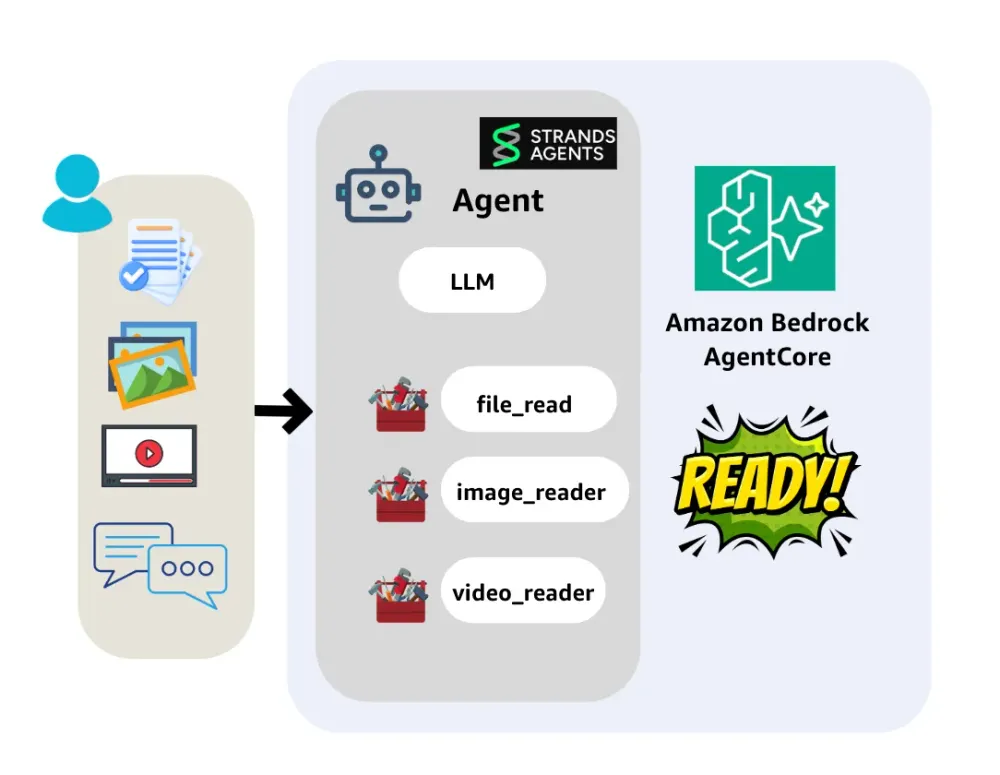
In Part 4 , you built a multi-modal travel agent that processes destination photos, booking documents, and video tours. The agent stored user preferences in Amazon S3 Vectors, requiring you to manage vector indices, storage configuration, and retrieval logic.
Amazon Bedrock AgentCore Memory provides a managed alternative. This service handles cross-session persistence, embedding generation, storage, and optimization automatically. You configure memory strategies through API calls instead of building custom infrastructure.
This tutorial shows you how to:
- Replace S3 Vectors with Amazon Bedrock AgentCore Memory
- Configure cross-session memory persistence
- Deploy agents to production with the AgentCore CLI
- Test memory functionality across different sessions
📦 Prerequisites
Before you begin:
- AWS account with Amazon Bedrock and AgentCore access
- Python 3.10+ installed
- AWS CLI configured with credentials
⚙️ Install Amazon Bedrock AgentCore SDK and Dependencies
Create a virtual environment and install the required packages:
git clone https://github.com/aws-samples/sample-multimodal-agent-tutorialcd deploy-to-production/deployment
# Create virtual environment (optional, can use parent directory)python3 -m venv ../.venvsource ../.venv/bin/activate  # Windows: ..\.venv\Scripts\activate
# Install dependenciespip install strands-agents strands-agents-tools bedrock-agentcore aws-opentelemetry-distro boto3
# Verify installationagentcore --help
Installed packages:
- strands-agents: Agent framework for building AI agents
- bedrock-agentcore: Amazon Bedrock AgentCore SDK
- aws-opentelemetry-distro: Observability and tracing
- boto3: AWS SDK for Python
Configure AgentCore Memory with Strands Agents
Running agentcore configure with memory settings creates the memory resource automatically. The AgentCore CLI sets the
BEDROCK_AGENTCORE_MEMORY_ID environment variable during agentcore launch. Your agent code reads this variable without manual configuration.Memory automatically stores:
- Travel preferences and interests
- Dietary restrictions
- Budget considerations
- Past travel experiences
- User context and facts
- Create Memory Client and Storage
Create Memory Client and Storage
from bedrock_agentcore.memory import MemoryClientfrom bedrock_agentcore.memory.integrations.strands.config import AgentCoreMemoryConfig, RetrievalConfig
# Create memory clientclient = MemoryClient(region_name="us-west-2") #your region
# Create memory storebasic_memory = client.create_memory(    name="BasicTestMemory",    description="Basic memory for testing short-term functionality")
# Configure memory with retrieval settingsmemory_config = AgentCoreMemoryConfig(    memory_id=basic_memory.get('id'),    session_id=session_id,    actor_id=actor_id,    retrieval_config={        f"/users/{actor_id}/facts": RetrievalConfig(top_k=3, relevance_score=0.5),        f"/users/{actor_id}/preferences": RetrievalConfig(top_k=3, relevance_score=0.5)    })
Configuration parameters:
-
memory_id: Unique identifier for the memory store
-
session_id: Groups related conversations together
-
actor_id: Identifies individual users across sessions
-
top_k: Number of relevant memories to retrieve
-
relevance_score: Minimum similarity threshold (0.0-1.0)
Integrate Memory with Strands Agents Framework
What Changed from Part 4?
Before (Part 4 with S3 Vectors):
# You managed S3 buckets, indices, and retrievalfrom s3_memory import s3_vector_memory
agent = Agent(    model=model,    tools=[image_reader, file_read, video_reader, s3_vector_memory],    # Custom memory tool you built)
After (Part 5 with AgentCore Memory):
_agent = Agent( model=BedrockModel(model_id="us.anthropic.claude-3-5-sonnet-20241022-v2:0"), tools=[image_reader, file_read,video_reader_local], system_prompt=system_prompt, session_manager=session_manager # Memory handled automatically)
Build the Agent Entry Point
The
invoke function serves as the main entry point for your AgentCore Runtime agent:@app.entrypointdef invoke(payload, context): """AgentCore Runtime entry point with lazy-loaded agent""" # Extract user prompt prompt = payload.get("prompt", "Hello!")
# Get session/actor info for memory actor_id = context.request_headers.get('X-Amzn-Bedrock-AgentCore-Runtime-Custom-Actor-Id', 'whatsapp-user') session_id = context.session_id or 'whatsapp-session'
# Get agent with memory agent = get_or_create_agent(actor_id, session_id)
# Handle multimodal input (images) if "media" in payload: media = payload["media"] if media.get("type") == "image": # Process image with agent tools image_data = base64.b64decode(media["data"]) # ... image processing logic
# Process and return response result = agent(prompt) return {"result": result.message}
Function responsibilities:
- Receives user prompts and context from AgentCore Runtime
- Extracts session and actor IDs for memory management
- Creates or retrieves agent instances with memory configuration
- Processes user messages and returns responses
Handle Multi-Modal Inputs
Send Images to Your Agent
Use this payload structure to send images:
import base64
# Read and encode imagewith open("destination.jpg", "rb") as f:    image_data = base64.b64encode(f.read()).decode('utf-8')
# Create payloadpayload = {    "prompt": "What can you tell me about this destination?",    "media": {        "type": "image",        "format": "jpeg",  # or "png", "jpg", "gif", "webp"        "data": image_data  # base64-encoded string    }}
HImage processing workflow:
- Client sends image as base64 in payload
- Agent decodes and saves temporarily to
/tmp/
- Agent instructs itself to use
image_readertool with the temp file path
- Tool reads the file and sends bytes directly to Claude model
- Model analyzes the image and responds
Send Videos to Your Agent
Videos follow the same pattern but are processed by the
video_reader_local tool:import base64
# Read and encode videowith open("travel_vlog.mp4", "rb") as f: video_data = base64.b64encode(f.read()).decode('utf-8')
# Create payloadpayload = { "prompt": "Analyze this travel video and suggest similar destinations", "media": { "type": "video", "format": "mp4", # or "mov", "avi", "mkv", "webm" "data": video_data # base64-encoded string }}
Video limitations:
- Maximum size: ~20MB (for local processing)
- Visual content only (no audio analysis)
- Supported formats: mp4, mov, avi, mkv, webm
Send Text-Only Messages
For text-only interactions, send the prompt directly:
payload = { "prompt": "I want to visit Japan. What should I know?"}
🚀 Deploy Your AI Agent to Production
Configure Agent Memory Strategies
Run the AgentCore CLI configuration command:
agentcore configure -e multimodal_agent.py
The CLI prompts you for configuration:
✓ Agent name: travel-agent✓ Enable memory? Yes✓ Enable long-term memory extraction? Yes✓ Memory strategies: user_preferences, semantic

Launch Agent with AgentCore CLI
Deploy your configured agent to production:

AgentCore automatically:
- Creates managed memory storage
- Configures extraction pipelines
- Sets up cross-session persistence
- Provides production endpoint
Save your agent ARN for testing:
export AGENT_ARN="arn:aws:bedrock-agentcore:us-east-1:123456789012:agent/travel-agent"
✅ Test Multi-Modal Agent Memory
Navigate to the test directory:
sample-test/ # Set your agent ARN (get from agentcore status or agentcore launch output)export AGENT_ARN="your-agent-arn-from-step-2"
Test Short-Term Memory Within Sessions
Short-term memory captures turn-by-turn interactions within a single session. Agents maintain immediate context without requiring users to repeat information.
cd sample-testpython test_short_memory.py
This script tests:
- Information storage within a session
- Memory recall in the same session
- Session-based context retention
Test Long-Term Memory Across Sessions
Long-term memory automatically extracts and stores key insights from conversations. This includes user preferences, important facts, and session summaries across multiple sessions.
cd sample-testpython test_long_memory.py
This script tests:
- Information storage in one session
- Memory extraction and persistence
- Cross-session memory recall
- User-specific memory isolation
Test Image and Video Processing
Test image analysis:
python test_image.py path/to/image.jpg
I sent this image:

This is part of the response I received from the agent:


Test video analysis:
# Run the video test with a sample videopython test_video.py path/to/video.mp4
This is part of the response I received from the agent:


This script tests:
- Video analysis with the agent (visual only, no audio)
- Memory of video content in follow-up questions
- Multimodal payload format (text + video)
- Maximum video size: ~20MB
Use the Interactive Jupyter Notebook:
For an interactive testing experience
cd sample-testpip install jupyterjupyter notebook test_agentcore_memory.ipynb
The notebook demonstrates:
- ✅ Cross-session memory persistence
- ✅ Multimodal content (images and videos)
- ✅ Memory survival across kernel restarts
- ✅ User isolation testing
- ✅ Pretty-printed conversations
Important Session Management Notes.Session ID requirements:
- Session IDs must be 33+ characters for proper session management
- Same user ID enables cross-session memory
- Different session IDs simulate different conversations
Delete Resources & Clean Up
Delete all AWS resources created by the toolkit:
cd deploymentagentcore destroy
Note: This will delete the agent runtime but not the memory store. To delete the memory store, go to the Bedrock Console → AgentCore → Memory.
Learn More About Amazon Bedrock AgentCore
Explore the complete AgentCore blog series:
🎓 What You Learned
- ✅ Replace custom S3 vector storage with managed AgentCore Memory
- ✅ Configure cross-session persistence in ~15 lines of code
- ✅ Use built-in memory strategies (preferences, semantic, summaries)
- ✅ Deploy production-ready agents with the AgentCore CLI
- ✅ Test memory persistence across different sessions
- ✅ Reduce operational complexity by 75%
🗂️ Series Recap
Throughout this series, you built increasingly sophisticated multi-modal agents:
- Part 1 : Process images, documents, and videos
- Part 2 : Add FAISS memory for local development
- Part 3 : Scale with S3 Vectors (custom infrastructure)
- Part 4 : Build production travel assistant
- Part 5 (This Post): Simplify with AgentCore Memory (managed service)
Each part maintained the core principle: powerful AI agents should remain accessible to build.
📚 Resources
Documentation:
Code Samples:
Learning Resources:
- AWS Free Tier - Up to $200 in credits
❤️ Found This Helpful?
❤️ Heart it - Helps others discover this tutorial
¡Gracias! 🇻🇪🇨🇱
Enjoyed reading this content? Let the author know!
Your likes, comments, shares, and saves help creators reach more builders.

Loading recommendations
Loading article