
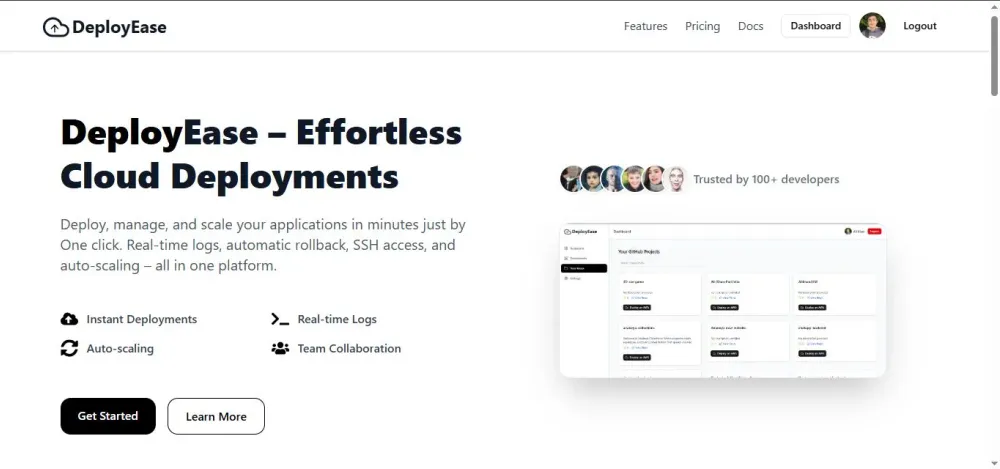
DeployEase: A One-Click AWS EC2 Deployment & Automation Platform for Developers
DeployEase is a lightweight deployment and management platform built to simplify the process of deploying apps on AWS EC2

Abstract
Deploying web applications to AWS EC2 typically requires deep knowledge of Linux commands, SSH, Nginx, security groups, environment configuration, and cloud networking.
For many developers especially beginners this creates a steep learning curve.
For many developers especially beginners this creates a steep learning curve.
DeployEase is a lightweight deployment and management platform built to simplify this process.
It allows developers to:
It allows developers to:
- Deploy Node.js, Python, React, or static apps to AWS EC2
- Configure Nginx automatically
- Manage multiple applications on a single instance
- Access EC2 through a built-in web terminal
- View real-time deployment logs
- Add AWS Load Balancing and Auto-Scaling in just one click
- One Click Increase Volume (Auto File Resizing without manual configuration)
All of this happens through a single dashboard without needing to manually interact with AWS CLI or servers.
1. Introduction
Modern developers want speed. AWS offers unmatched flexibility, but deploying applications to EC2 still requires:
- Launching instances
- Configuring security groups
- Writing Nginx config
- Installing dependencies
- Managing environment variables
- Debugging via SSH
- Managing logs manually
For beginners, this can be an overwhelming barrier.
DeployEase aims to bridge that gap.
DeployEase aims to bridge that gap.
2. The Problem
Even simple deployments require cloud engineering or DevOps knowledge.
Developers commonly struggle with:
- Setting up EC2 instances correctly
- Opening ports through security groups
- Installing runtime environments (Node.js / Python)
- Configuring and enabling Nginx reverse proxies
- Managing multiple apps on one instance
- Debugging via SSH
- Handling environment variables safely
Many talented developers fail to deploy apps because AWS is too “manual”.
3. Introducing DeployEase
DeployEase provides a graphical dashboard that handles the entire deployment process automatically.
With one click, the platform:
- Creates an EC2 instance
- Configures security groups
- Installs required runtime & dependencies
- Clones your GitHub repo
- Creates
.envfile - Sets up Nginx reverse proxy
- Serves multiple apps from one instance
- Streams live deployment logs
- Provides a built-in SSH terminal
This is designed to help:
- Web developers with little DevOps experience
- Students and beginners
- Hackathon participants
- Freelancers who want fast cloud deployments
4. How DeployEase Works (High-Level Architecture)

DeployEase Working Diagram
Key Modules
- Frontend Dashboard (Next.js)
- Backend Deployment Engine (Node.js)
- Real-Time Socket Server
- Live SSH Terminal Module
- AWS EC2 + Nginx + Security Groups

DeployEase Full Archetecture Diagram
5. Key Features
1. One-Click AWS Deployments
Deploy directly by selecting a GitHub repo.
Provide:
Provide:
- App type
- AWS credentials
- Port
- Main file
- Optional subfolder
- Environment variables
Then the system fully automates EC2 setup.
2. Automated Nginx Configuration
DeployEase writes & manages:
- Server blocks
- Reverse proxy configs
- Location blocks
- Static hosting paths
- Multi-app hosting on one EC2 instance
Developers never touch
/etc/nginx/sites-enabled manually.3. Live Web-Based SSH Terminal
A full-featured terminal connected via WebSockets, allowing you to:
- Debug
- Install packages
- View logs
- Edit files
- Run commands
Exactly like EC2’s AWS Console terminal.
4. Real-Time Deployment Logs
During deployment, the socket server streams:
- EC2 setup logs
- Dependency installation output
- Nginx config logs
- Repo cloning logs
- Backend engine logs
Users can monitor everything live.
5. Multi-App Hosting on a Single EC2
DeployEase supports hosting:
- Frontend + backend
- Multiple microservices
- Static + API app
6. Auto-Scalling
DeployEase supports auto-scaling with just one click you just need to provide
max instances
min instances
We handle the rest:
- Createing Launch template
- Creating Target Group
- Creating Application Load Balancer
- And finaly return you the url with which you can acess your deployments
7. Planned Features (Novelty Enhancements)
- HTTPS / SSL Auto Integration
Automatic certificate generation & Nginx configuration.
- CI/CD Integration
Automatic rebuilds & re-deployments on push.
- Versioning & Rollbacks
Allow users to revert to older deploy builds.
- Docker Support
Deploy containerized apps with pre-built templates.
These upcoming features make DeployEase suitable for production-level DevOps automation.
6. Related Work
Most existing platforms solve deployment but not AWS-specific automation.
Heroku / Render / Railway / Vercel
- Easy deployment but not AWS-specific
- No EC2-level control
- No server SSH access
- No Nginx configs
- No multi-app hosting on one instance
AWS Elastic Beanstalk
Powerful but requires:
- AWS knowledge
- Configuration files
- Understanding of cloud internals
No unified lightweight dashboard with SSH + multi-app Nginx + real-time logs.
Terraform / Pulumi
Infrastructure-as-code tools requiring domain knowledge.
Not targeted at beginners or one-click flows.
Not targeted at beginners or one-click flows.
Ansible / Chef
Server automation tools needing playbooks & scripts, not beginner-friendly dashboards.
DeployEase Differentiator
A fully AWS-focused, beginner-friendly, GUI-based deployment tool combining:
- EC2 provisioning
- Nginx configuration
- Multi-app hosting
- Live logs
- Web SSH
into one simple dashboard.
7. Future Scope
DeployEase will evolve into a full DevOps automation platform with:
- Autoscaling clusters
- Load-balanced architecture
- Container support
- CI/CD workflow
- Team management & shared deployments
The long-term goal is to provide a “Developer-Friendly AWS Layer” similar to a personal cloud platform.
8. Conclusion
DeployEase demonstrates how powerful AWS can become when paired with automation and a user-friendly interface. It lowers the entry barrier for developers, allowing them to deploy applications without needing deep DevOps or cloud expertise.
This project contributes toward:
- Simplifying cloud adoption
- Making AWS more accessible
- Helping developers deploy faster
- Bridging the gap between coding and cloud deployment
Enjoyed reading this content? Let the author know!
Your likes, comments, shares, and saves help creators reach more builders.

Loading recommendations
Loading article