
Build GraphRAG Applications with Amazon Neptune and Amazon Bedrock
GraphRAG revolutionizes AI knowledge retrieval by combining Amazon Neptune's graph technology with Bedrock's foundation models, delivering responses that understand not just what information is similar, but how it's all connected - making AI answers smarter and more accurate.
Introduction
Traditional Retrieval-Augmented Generation (RAG) applications excel at finding semantically similar information through vector similarity search, but they often miss critical contextual relationships that could dramatically improve response accuracy. When you ask a question about business prospects, for example, a standard RAG system might retrieve optimistic sales forecasts while completely overlooking related supply chain disruptions that would fundamentally change the answer. This limitation stems from RAG's reliance on vector embeddings that prioritize semantic similarity over the complex web of relationships that define real-world scenarios.
The challenge becomes even more pronounced when dealing with enterprise knowledge bases where the most relevant information isn't always the most similar in meaning. Critical insights often emerge from understanding cause-and-effect relationships, temporal dependencies, organizational hierarchies, and other contextual connections that traditional vector-based approaches struggle to capture. Organizations need a more sophisticated approach that combines the semantic understanding of large language models with the relationship modeling capabilities of graph databases.
GraphRAG represents a paradigm shift in knowledge retrieval by integrating graph technology with generative AI to provide both similarity-based and relationship-based context. Unlike traditional RAG systems that rely solely on vector similarity, GraphRAG constructs knowledge graphs from your data, enabling AI systems to traverse relationships and discover relevant but dissimilar information that provides crucial context for generating accurate responses.
Amazon Neptune, AWS's fully managed graph database service, paired with Amazon Bedrock's foundation models, provides a powerful platform for implementing GraphRAG solutions. Neptune's support for both property graphs and RDF, combined with its integration capabilities with vector stores like Amazon OpenSearch Serverless, enables you to build sophisticated knowledge retrieval systems that understand both semantic similarity and contextual relationships.
In this post, we'll explore how to build production-ready GraphRAG applications using Amazon Neptune and Amazon Bedrock. We'll start by examining the fundamental differences between traditional RAG and GraphRAG approaches, then dive into the technical architecture patterns that make GraphRAG effective. You'll learn to implement a complete GraphRAG solution using the open-source GraphRAG Toolkit, including data ingestion strategies, graph construction techniques, and query optimization approaches. We'll also cover advanced implementation patterns using Amazon Bedrock Knowledge Bases for GraphRAG and the Neptune MCP Server for building conversational analytics applications. By the end of this post, you'll have the knowledge and code examples needed to transform your organization's unstructured data into an intelligent, relationship-aware knowledge system that delivers more accurate and explainable AI responses.
II. Understanding Graph-Based Knowledge Representation
Graph databases store data as nodes and edges rather than tables and rows, creating natural representations of connected information. In Amazon Neptune, nodes represent entities like people, products, or concepts, while edges capture relationships such as
Person FOLLOWS Person or Company PARTNERS_WITH Company. Each node and edge contains properties that store metadata, enabling rich data modeling that mirrors how business domains actually connect.Knowledge graphs build on this foundation by combining data from multiple sources into unified, semantically meaningful structures. Traditional databases store isolated records, but knowledge graphs explicitly model entity relationships, creating webs of interconnected information that machines can traverse and understand. A knowledge graph might connect customer entities to purchase history, preferred products, and social connections while linking those products to suppliers, categories, and market trends within a single queryable structure.
This relationship-focused approach provides contextual understanding beyond vector similarity search. Vector embeddings excel at finding semantically similar content but often miss critical contextual relationships that change information meaning. In business intelligence scenarios, vector search might retrieve optimistic sales forecasts based on keyword similarity while missing related supply chain disruptions stored elsewhere. Graph traversal discovers these connected but dissimilar pieces by following relationship paths from sales forecasts to supplier relationships to logistics challenges, providing complete pictures that similarity search overlooks.
Graph-based knowledge representation demonstrates its power when implementing GraphRAG solutions with Amazon Neptune. Neptune supports both property graphs using Gremlin and openCypher, and RDF graphs using SPARQL, enabling complex domain relationship modeling while maintaining flexibility to integrate with vector stores like Amazon OpenSearch Serverless. In addition, Neptune Analytics, an in-memory graph database engine, also supports storing vectors directly within the graph. The combined approach of using both a vector and a graph store allows AI applications to leverage semantic similarity for initial retrieval and graph traversal for discovering related context, resulting in more accurate responses that understand both similar information and meaningful relationships between different information pieces.
III. Implementing GraphRAG with Amazon Neptune and Bedrock
Setting up your GraphRAG solution requires configuring several AWS services and installing the necessary tools. Create an Amazon Neptune database cluster through the AWS Console using the wizard. Provision an Amazon OpenSearch Serverless collection using the Easy Create method which automatically configures networking and security settings, to handle embeddings alongside your graph data. Ensure your development environment has access to Amazon Bedrock with Claude 4.5 Sonnet and Titan Text Embeddings 2.0, or similar foundation models enabled in your region.
Install the GraphRAG Toolkit using pip with
pip install graphrag-toolkit, which includes LlamaIndex components and essential dependencies. The toolkit requires specific URL formats for your data stores: use neptune-db://your-cluster-endpoint for Neptune Database or neptune-graph://your-graph-id for Neptune Analytics, and aoss://your-opensearch-endpoint for OpenSearch Serverless. Configure your AWS credentials and ensure your execution role has appropriate permissions for Neptune, OpenSearch, and Bedrock services.1
2
3
4
5
6
7
8
9
#GRAPH_ENDPOINT is the primary/writer endpoint of your Neptune cluster
GRAPH_ENDPOINT = "my-cluster.my-cluster-name.region.neptune.amazonaws.com"
#VECTOR_ENDPOINT is the OpenSearch endpoint of your OpenSearch Serverless collection
VECTOR_ENDPOINT = "https://collection-id.region.aoss.amazonaws.com"
#GRAPH_STORE is formatted specifically for use with the GraphRAG toolkit
GRAPH_STORE = f"neptune-db://{GRAPH_ENDPOINT}"
#VECTOR_STORE is formatted specifically for use with the GraphRAG toolkit
VECTOR_STORE = f"aoss://{VECTOR_ENDPOINT}"After configuring the correct endpoints for your graph and vector stores, you can initialize a
LexicalGraphIndex which will be used to perform the extraction and build stages.1
2
3
4
5
6
7
8
9
10
11
# Initialize the graph and vector stores
graph_store = GraphStoreFactory.for_graph_store(GRAPH_STORE)
vector_store = VectorStoreFactory.for_vector_store(VECTOR_STORE)
# Initialize the graph index
graph_index = LexicalGraphIndex(
graph_store,
vector_store
)Once the graph index has been initialized, you can start to ingest your data. The following example ingests data from different web pages relating to the Neptune public documentation using the
SimpleWebReader LlamaIndex component. 1
2
3
4
5
6
7
8
9
10
11
doc_urls = [
'https://docs.aws.amazon.com/neptune/latest/userguide/intro.html',
'https://docs.aws.amazon.com/neptune-analytics/latest/userguide/what-is-neptune-analytics.html',
'https://docs.aws.amazon.com/neptune-analytics/latest/userguide/neptune-analytics-features.html',
'https://docs.aws.amazon.com/neptune-analytics/latest/userguide/neptune-analytics-vs-neptune-database.html'
]
docs = SimpleWebPageReader(
html_to_text=True,
metadata_fn=lambda url:{'url': url}
).load_data(doc_urls)With the data now represented as a list of LlamaIndex documents , you can initiate the extraction and build process.
1
graph_index.extract_and_build(docs, show_progress=True)
For additional examples on how to combine the extraction and build stages, explore the sample notebook on the GraphRAG Toolkit GitHub repository.
The GraphRAG Toolkit transforms unstructured data into a structured knowledge graph through a multi-stage process that extracts entities, relationships, and contextual information. Configure your chunking strategy (by default the toolkit uses the SentenceSplitter approach), then define entity classifications relevant to your domain rather than relying on generic categories. The toolkit performs entity extraction and fact extraction using your chosen large language model, identifying specific entities like organizations, products, or concepts, along with the relationships between them.
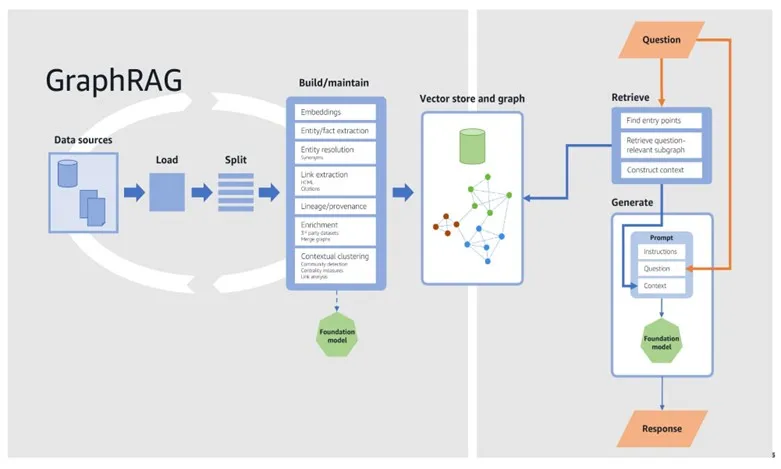
Figure 1: Comprehensive GraphRAG architecture flow diagram showing end-to-end data processing pipeline from data sources through retrieval and generation phases. Highlights key components like embeddings, entity extraction, vector store, graph building, and foundation model integration. Demonstrates the complex workflow of graph-based retrieval augmented generation.
Entity resolution ensures that duplicate entities merge correctly across different document chunks, while lineage tracking maintains provenance information showing which source documents contributed to each graph element. The system creates a three-layer lexical graph model consisting of lineage, summarization, and entity-relationship layers. Configure batch processing parameters carefully—typically 2-4 workers with moderate batch sizes work well with Neptune to avoid concurrent modification exceptions during graph construction.
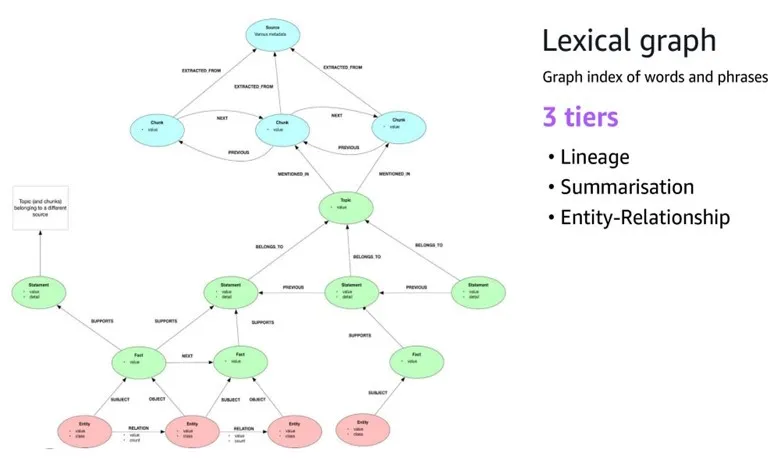
Figure 2: Lexical graph architecture diagram illustrating a three-tier knowledge graph structure. Shows hierarchical relationships between source metadata, chunks, topics, statements, facts, and entities. Demonstrates how complex textual information can be transformed into a structured, interconnected knowledge representation with clear lineage and semantic connections
GraphRAG queries combine vector similarity search with graph traversal to provide comprehensive context for large language model responses. The toolkit first uses vector similarity search to identify relevant starting points in your knowledge graph, then performs one or two-hop traversals to discover related but potentially dissimilar information in the local neighborhood. This hybrid approach ensures you capture both semantically similar content and contextually relevant relationships that traditional RAG might miss.
IV. Advanced GraphRAG Techniques and Best Practices
When building production GraphRAG systems, your graph schema design becomes critical for capturing nuanced relationships in enterprise data. The GraphRAG Toolkit creates a sophisticated three-layer lexical graph model that extends beyond simple entity-relationship patterns. At the foundation, entities connect through typed relationships. The real power emerges in the middle summarization layer where topics, statements, and facts create a rich semantic network. This hierarchical approach allows your system to understand not just that "Example Corp partners with AnyCompany Logistics" but also the contextual implications of that partnership when supply chain disruptions occur.
Multi-dimensional relationship representation requires careful consideration of temporal, causal, and hierarchical connections within your knowledge graph. Using Amazon Neptune property graph capabilities, you can model complex scenarios where a single business relationship might have multiple facets. Contractual, operational, and strategic dimensions each contribute different context to AI-generated responses. Design your entity resolution and fact extraction processes to capture these nuanced relationships during initial graph construction. This ensures your LLM has access to full relationship context when generating responses.
Query optimization in GraphRAG systems demands a different approach than traditional vector-based RAG implementations. The GraphRAG Toolkit retrieval process combines vector similarity search to identify entry points with graph traversal to explore one and two-hop neighborhoods. This creates a hybrid query pattern that can become computationally expensive at scale. When configuring your system, carefully balance the number of worker threads and batch sizes. Setting too many concurrent workers can lead to modification exceptions in Neptune Database as multiple threads attempt to write to the same graph space simultaneously.
Distributed graph processing strategies become essential when dealing with large-scale knowledge graphs that exceed single-instance capabilities. Amazon Neptune Analytics provides auto-scaling capabilities that can handle massive graph datasets. Neptune Database offers read replicas for distributing query loads.
Graph-based grounding provides a powerful mechanism for reducing hallucinations by anchoring LLM responses in verifiable relationship data. The lineage layer in the GraphRAG Toolkit lexical graph model maintains explicit connections between generated statements and their source documents. This enables your system to provide citations and trace the provenance of every claim in an AI-generated response. This approach transforms the traditional nature of LLM responses into explainable, auditable outputs that business users can trust and verify.
Relationship-based fact-checking mechanisms leverage the interconnected nature of knowledge graphs to validate the consistency of AI-generated content. When your GraphRAG system generates a response about business prospects, it can traverse related nodes to identify potentially contradictory information. This includes positive sales forecasts connected to supply chain disruption data. By implementing contextual verification through graph traversal, you create a self-correcting system that surfaces conflicting information and provides more balanced, accurate responses.
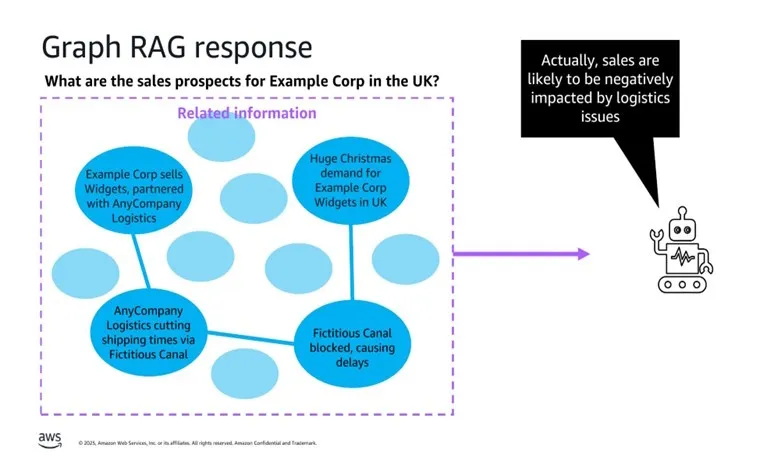
Figure 3: Knowledge graph relationship diagram showing how graph-based reasoning can provide more nuanced context compared to traditional vector search. Illustrates how interconnected entities and relationships can reveal deeper insights, such as uncovering logistics issues that impact business performance beyond surface-level semantic similarity.
Conclusion
In this blog post, we showed how to build GraphRAG applications using Amazon Neptune and Amazon Bedrock to overcome the limitations of traditional vector-based RAG systems. By combining graph technology with generative AI, you can retrieve both semantically similar and contextually related information, leading to more accurate and explainable responses.
We explored the open-source GraphRAG Toolkit's lexical graph architecture which provides a sophisticated three-layer model with lineage tracking, summarization capabilities, and entity-relationship mapping that enables comprehensive knowledge representation from unstructured data.
Key implementation insights include configuring appropriate batch sizes and worker threads to avoid concurrent modification exceptions, leveraging the toolkit's checkpoint functionality for robust data ingestion, and utilizing both vector similarity search and graph traversal for optimal context retrieval. The hybrid approach of combining Amazon OpenSearch Serverless for vector storage with Neptune Database for graph relationships provides the flexibility to scale each component independently.
Consider extending this solution for domain-specific applications like supply chain risk analysis, financial fraud detection, or scientific literature review, where understanding complex relationships is crucial. You can also integrate the GraphRAG Toolkit MCP agent with conversational AI platforms to build sophisticated question-answering systems that provide explainable results with clear data lineage.
To get started, explore the GraphRAG Toolkit GitHub repository for sample notebooks and implementation guides. For the conversational analytics approach, check out the Neptune MCP Server repository . Visit the Amazon Neptune and Amazon Bedrock service pages to learn more about the underlying technologies.
Enjoyed reading this content? Let the author know!
Your likes, comments, shares, and saves help creators reach more builders.

Loading recommendations
Loading article