
Streaming AI Agent Responses to the Frontend with AWS AppSync
AI agents with 30+ second response times hurt user experience. This post demonstrates how to stream agent responses to your frontend using AWS AppSync subscriptions, eliminating loading spinners and providing real-time updates as your agent processes requests and calls tools.

AI agents are becoming increasingly prevalent in modern applications. But when response times stretch to 30 seconds or more, user experience suffers significantly.
When your agent needs to call multiple tools, query knowledge bases, or process complex requests, response times can quickly become a UX nightmare. Users stare at loading spinners while your agent does its work behind the scenes.
The solution? Streaming. But while streaming is straightforward in the backend, getting those real-time updates to your frontend is where things get interesting.
This blog post shows how to leverage AWS AppSync 's subscription mechanism to stream AI agent responses directly to your frontend.
The Challenge: Agent Response Times
AI agents face inherent latency challenges:
- Tool calls take time: Querying APIs, searching knowledge bases, running calculations
- Multiple reasoning steps: Agents often need several iterations to solve complex problems
- Model inference: Even optimized models need time to generate responses
Here's what actually happens during an agent interaction:
┌─────────────┐ ┌─────────────┐ ┌─────────────┐ ┌──────────────┐ ┌─────────────┐│ User │ │ Agent │ │ Tools │ │Knowledge Base│ │ LLM │└─────────────┘ └─────────────┘ └─────────────┘ └──────────────┘ └─────────────┘ │ │ │ │ │ │ "Design app" │ │ │ │ │──────────────────▶│ │ │ │ │ │ │ │ │ │ ⏳ Waiting... │ Reasoning │ │ │ │ │──────────────────────────────────────────────────────────▶│ │ │◀──────────────────────────────────────────────────────────│ │ │ │ │ │ │ ⏳ Waiting... │ Query KB │ │ │ │ │──────────────────────────────────────▶│ │ │ │◀──────────────────────────────────────│ │ │ │ │ │ │ │ ⏳ Waiting... │ Call tool │ │ │ │ │──────────────────▶│ │ │ │ │◀──────────────────│ │ │ │ │ │ │ │ │ ⏳ Waiting... │ Generate response │ │ │ │ │──────────────────────────────────────────────────────────▶│ │ │◀──────────────────────────────────────────────────────────│ │ │ │ │ │ │◀──────────────────│ │ │ │ │ Complete response │ │ │ │ │ │ │ │ │The user sees nothing for 20-30 seconds while the agent works through multiple steps. This creates a poor user experience where users don't know if the system is working or stuck.
Backend Streaming: The Easy Part
Modern LLM APIs support streaming out of the box. Amazon Bedrock 's
converse_stream API makes this easy:import boto3
bedrock = boto3.client('bedrock-runtime')
response = bedrock.converse_stream( modelId="us.anthropic.claude-sonnet-4-20250514-v1:0", messages=[{"role": "user", "content": [{"text": "Explain quantum computing"}]}])
# Stream tokens as they arrivefor event in response['stream']: if 'contentBlockDelta' in event: delta_text = event['contentBlockDelta']['delta']['text'] print(delta_text)from strands import Agent
agent = Agent( model=bedrock_model, tools=my_tools)
def streaming_callback(**kwargs): if "data" in kwargs: chunk = kwargs["data"] print(chunk)
agent(user_message, callback_handler=streaming_callback)While backend streaming is straightforward, the real challenge is delivering these content chunks to the frontend in real-time.
Enter AWS AppSync
AWS AppSync is a managed GraphQL service that excels at real-time data synchronization. While many developers know it for GraphQL APIs and basic CRUD operations, its subscription mechanism is perfect for streaming scenarios. GraphQL subscriptions allow clients to receive real-time updates when data changes, eliminating the need for polling.
Here's the key insight: treat each streaming chunk as a GraphQL mutation that triggers a subscription.
Architecture
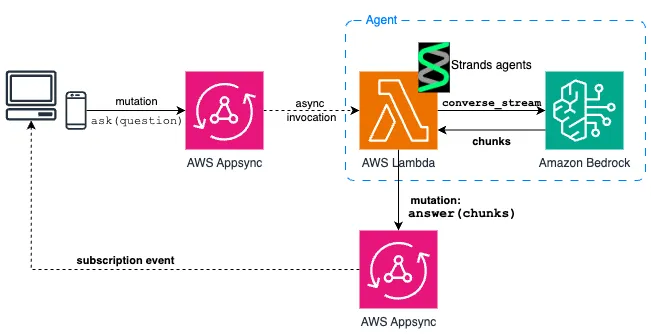
The flow is the following:
- Frontend creates a sessionId that will be used during the conversation and subscribe to any new message sent to this session. Sessions group related messages in a conversation and ensure users only receive updates for their own interactions.
- Frontend sends a message via GraphQL mutation:
ask("sessionId", "Hello, can you help me...")
- AppSync triggers an AWS Lambda function (the agent). In this case the agent is built with strands but can be any other library that support streaming (llama-index, langchain, ...).
- Agent streams its responses by calling AppSync mutations for each chunk.
- Frontend receives real-time updates via the GraphQL subscription.
Implementation
The GraphQL Schema
First, a simple GraphQL schema with mutations and subscriptions is needed:
type Message {  id: ID!  sessionId: ID!  role: String!  content: String!  createdAt: AWSDateTime!}
type Mutation {  # User sends a message  ask(sessionId: ID!, message: String!): Message
  # Agent streams responses  answer(sessionId: ID!, messageId: ID!, content: String!): Message}
type Subscription {  # Frontend subscribes to real-time updates  onMessageAdded(sessionId: ID!): Message @aws_subscribe(mutations: ["answer"])}
The key is the
@aws_subscribe directive: whenever the answer mutations executes, subscribers get notified.Agent Implementation: The Streaming Logic
Here's where it gets interesting. To enable streaming, the agent needs to call back to AppSync for each chunk:
import boto3from gql import gql, Clientfrom gql.transport.requests import RequestsHTTPTransportfrom strands import Agentfrom strands.models import BedrockModel
class StreamingAgent:    def __init__(self):        # GraphQL client to call AppSync        self.graphql_client = Client(            transport=RequestsHTTPTransport(                url=os.environ["GRAPHQL_ENDPOINT"],                # Use another authentication method for production workflow (Cognito, OpenId Connect)                headers={"x-api-key": os.environ["GRAPHQL_API_KEY"]}            ),            fetch_schema_from_transport=False        )
        # GraphQL mutation for streaming responses        self.answer_mutation = gql("""            mutation Answer($sessionId: ID!, $messageId: ID!, $content: String!) {                answer(sessionId: $sessionId, messageId: $messageId, content: $content) {                    id                    sessionId                    role                    content                    createdAt                }            }        """)
        # Create the strands agent        bedrock_model = BedrockModel(            region_name="us-east-1",            model_id="us.anthropic.claude-sonnet-4-20250514-v1:0",            max_tokens=4096,            temperature=0.1,            cache_prompt="default",            cache_tools="default"        )
        self.agent = Agent(            model=bedrock_model,            tools=[],  # Add your tools here            system_prompt="You are a helpful AI assistant."        )
    def stream_response(self, session_id: str, message_id: str, content: str):        """Send streaming chunk to frontend via AppSync"""        self.graphql_client.execute(            self.answer_mutation,            variable_values={                "sessionId": session_id,                "messageId": message_id,                "content": content            }        )
    def create_streaming_callback(self, session_id: str):        """Create callback for strands agent"""        current_message_id = None        accumulated_content = ""
        def callback(**kwargs):            nonlocal current_message_id, accumulated_content
            # New message starting            if "event" in kwargs and "messageStart" in kwargs["event"]:                current_message_id = str(uuid.uuid4())                accumulated_content = ""
            # Streaming chunk received            elif "data" in kwargs and current_message_id:                chunk = kwargs["data"]                accumulated_content += chunk
                # Send cumulative content to frontend                self.stream_response(session_id, current_message_id, accumulated_content)
        return callback
    def process_message(self, session_id: str, message: str):        """Process user message with streaming"""        callback = self.create_streaming_callback(session_id)
        # Agent processes with streaming callback        self.agent(message, callback_handler=callback)
Chunked vs Cumulative Streaming
There are two ways to send streaming updates:
Chunked Streaming sends individual pieces:
- Agent sends:
"Hello"→" world"→"!"
- Frontend receives three separate messages
- Must concatenate:
"Hello" + " world" + "!" = "Hello world!"
Cumulative Streaming sends the complete content so far:
- Agent sends:
"Hello"→"Hello world"→"Hello world!"
- Frontend receives complete updates
- Just display the latest:
"Hello world!"
Initially, chunked streaming appeared efficient; however, it introduced ordering issues, since GraphQL subscriptions do not guarantee message order. For examples, messages could arrive as
"Hello" → "!" → "world" , breaking the result and user experience.Switching to cumulative streaming resolved these ordering challenges. The extra payload from cumulative streaming is minimal when compared to the gains in reliability and simplified logic:
- No ordering issues: Each message is complete and self-contained
- Simpler frontend: Just display the latest content, no concatenation logic
- More resilient: Missing messages don't break the experience
- Better UX: Users always see coherent, complete content
Note that AppSync subscriptions have a 240KB message size limit, so for very long responses, you may need to implement message splitting (240KB is around 72 000 tokens of english words).
Frontend: Real-time Updates
The frontend leverages AWS Amplify and its native integration with Appsync APIs (see doc ) to subscribe to updates and displays them in real-time:
import { generateClient } from "aws-amplify/api";
const client = generateClient();
const onMessageAdded = /* GraphQL */ `  subscription OnMessageAdded($sessionId: ID!) {    onMessageAdded(sessionId: $sessionId) {      id      sessionId      role      content      createdAt    }  }`;
// Subscribe to streaming updatesconst subscription = (  client.graphql({    query: onMessageAdded,    variables: { sessionId },  }) as Observable<any>).subscribe({  next: ({ data }) => {    if (data?.onMessageAdded) {      const message = data.onMessageAdded;
      // Update UI with new/updated message      updateMessage(message);    }  },});
Sending a question to the backend using the
ask mutation is quite straightforward:const askQuestion = /* GraphQL */ ` mutation Ask($sessionId: ID!, $message: String!) { ask(sessionId: $sessionId, message: $message) { id sessionId role content createdAt } }`;
// Send a messageconst sendMessage = async (content: string) => { await client.graphql({ query: askQuestion, variables: { sessionId, message: content }, });};Benefits of This Architecture
Immediate user feedback: Users see progress instantly instead of waiting 30+ seconds, creating a responsive and modern experience
Automatic scaling: AppSync handles WebSocket connections, scaling, and connection management without additional infrastructure
Simple setup: No need to build custom WebSocket servers like with API Gateway WebSocket APIs, which require managing connections yourself.
AppSync: Going further
Some developers dismiss AppSync as a simple GraphQL CRUD API, but it offers much broader capabilities:
- Authorization: Fine-grained access control with Amazon Cognito , AWS IAM , OpenId Connect or custom authorizers (AWS Lambda)
- Private APIs: VPC-only access for internal applications
- WAF integration: Protect against common web attacks with AWS WAF
- Monitoring: Amazon CloudWatch logs&metrics and AWS X-Ray tracing out of the box
- Backend for Frontend (BFF) enabler: HTTP resolvers let you aggregate multiple backend APIs into a single GraphQL interface, perfect for mobile and web frontends ( doc )
- Custom domain names: Use your own domain name with Route 53 integration
- Caching: Built-in response caching with TTL controls
AppSync isn't just for streaming - these features make it a solid choice for enterprise applications.
Conclusion
Streaming AI agent responses to the frontend is simplified using AWS AppSync's subscription mechanism, which transforms lengthy, multi-step reasoning agents into responsive real-time conversational systems.
Enjoyed reading this content? Let the author know!
Your likes, comments, shares, and saves help creators reach more builders.

Loading recommendations
Loading article