
Automate Kubernetes version monitoring and upgrades with Amazon EKS Auto Mode
Discover how to build an automated solution that monitors your Amazon EKS clusters for new Kubernetes versions, sends notifications when updates are available, and optionally triggers automated upgrades with simplified node management through EKS Auto Mode.

Introduction:
Updating your Amazon Elastic Kubernetes Service (Amazon EKS) version is crucial for maintaining the security, stability, performance, and compatibility of your Kubernetes clusters, while also ensuring that you can leverage the latest features and capabilities offered by the platform. Keeping Kubernetes clusters up to date with the latest versions is a common challenge for many organizations. Without proper version monitoring, you might miss important updates, leading to delayed upgrades and potential security vulnerabilities. In this post, I'll show you how to build an automated solution that monitors your Amazon EKS clusters for new Kubernetes versions whether you're running a handful of clusters or scaling to 50+ clusters across different environments, sends notifications when updates are available, and optionally triggers cluster upgrades for development environments.
Amazon EventBridge Scheduler is a serverless scheduler that allows you to create, run, and manage tasks from one central, managed service. With EventBridge Scheduler, you can create schedules using cron and rate expressions for recurring patterns, or configure one-time invocations. You can set up flexible time windows for delivery, define retry limits, and set the maximum retention time for failed API invocations.
EKS Upgrade insights are built upon best practices learned by EKS over the course of managing hundreds of thousands of Kubernetes clusters. You can use the EKS APIs and Console to check for upgrade readiness issues detected in your environment at any time against all future Kubernetes versions supported by EKS.
Key features that make EKS Auto Mode ideal for automated cluster upgrades
Amazon EKS Auto Mode significantly simplifies cluster lifecycle management through several powerful features:
- Coordinated upgrades
- Automatically handles the orchestration between control plane updates and node replacements
- Maintains workload availability by respecting pod disruption budgets during the upgrade process
- Eliminates the need for manual coordination of component versions
- Built-in component management
- Removes the operational overhead of manually updating critical cluster components
- Automatically manages essential components like Amazon VPC CNI, Karpenter, AWS EBS CSI driver, CoreDNS, kube-proxy, and AWS Load Balancer Controller
- Integrates these components as native service functionality rather than separate add-ons
- Intelligent node replacement
- Automatically replaces nodes with new versions as they expire
- Ensures smooth transition by maintaining application availability
- Handles the complexity of rolling updates across node pools
- Reduced operational responsibilities
- Minimizes the number of components requiring manual intervention
- Streamlines the upgrade process to focus mainly on application-specific components
- Allows teams to focus on their workloads rather than infrastructure management
Solution Overview:
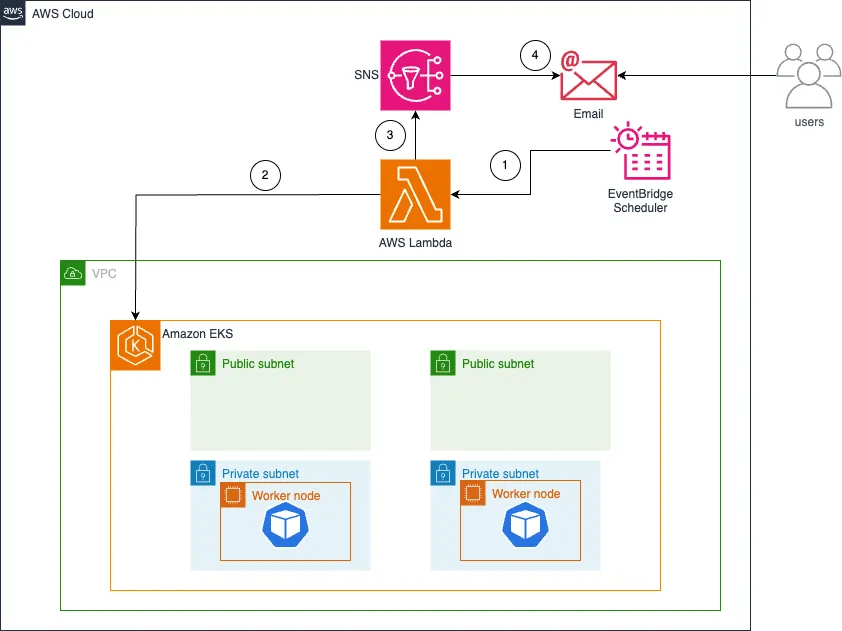
This solution uses several AWS services to create an automated version monitoring system:
- AWS Lambda to check EKS versions
- Amazon EventBridge Scheduler for automated execution
- Amazon Simple Notification Service (SNS) for delivering notifications to the cluster admins.
- AWS CloudFormation for infrastructure deployment

- EventBridge Scheduler is configured to run daily at a specific time (in this example, 12:00 AM)
- Lambda function calls EKS API to check cluster version or trigger cluster upgrade
- Lambda function calls SNS API with the activity status
- SNS delivers email notifications to subscribers
Walkthrough
Let's walk through implementing both monitoring and automated upgrade options. The solution uses AWS CloudFormation for infrastructure as code, making it easy to deploy and maintain. We'll create a Lambda function that checks for new EKS versions daily, with the option to automatically upgrade development clusters if desired.
The implementation follows these key steps:
- Deploy a CloudFormation template that sets up the core infrastructure
- Configure SNS notifications for version updates
- (Optional) Enable automatic upgrades for development clusters by tagging them appropriately
For production environments, we recommend starting with Option 1 (monitoring only) and thoroughly testing the upgrade process in development environments before considering any automation. The CloudFormation template includes parameters that let you easily switch between monitoring-only and automated upgrade modes.
Prerequisites
For this walkthrough, you should have the following:
- An active Amazon Web Services (AWS) account .
- At least one Amazon EKS Auto Mode cluster
- Install and configure the latest version of the AWS CLI (v2) . To check your version, run:
aws --version. - Permissions to create AWS Lambda functions, EventBridge rules, and Amazon Simple Notification Service (SNS) topics
- Ensure your EKS clusters are tagged appropriately for environment identification. The solution looks for:
- A tag with key 'Environment', 'environment', or 'Env' with values containing 'dev' or 'development' (case insensitive)
- Alternatively, cluster names containing 'dev' or 'development' (case insensitive)
- These tags are required for the automated upgrade feature to identify development clusters
Deploy the solution with AWS CloudFormation
The first step is to create AWS CloudFormation template with the sample template.yaml below:
1
2
3
4
5
6
7
8
9
10
11
12
13
14
15
16
17
18
19
20
21
22
23
24
25
26
27
28
29
30
31
32
33
34
35
36
37
38
39
40
41
42
43
44
45
46
47
48
49
50
51
52
53
54
55
56
57
58
59
60
61
62
63
64
65
66
67
68
69
70
71
72
73
74
75
76
77
78
79
80
81
82
83
84
85
86
87
88
89
90
91
92
93
94
95
96
97
98
99
100
101
102
103
104
105
106
107
108
109
110
111
112
113
114
115
116
117
118
119
120
121
122
123
124
125
126
127
128
129
130
131
132
133
134
135
136
137
138
139
140
141
142
143
144
145
146
147
148
149
150
151
152
153
154
155
156
157
158
159
160
161
162
163
164
165
166
167
168
169
170
171
172
173
174
175
176
177
178
179
180
181
182
AWSTemplateFormatVersion: '2010-09-09'
Description: 'EKS Version Checker and Upgrade Using Lambda with EventBridge Scheduler'

Parameters:
  NotificationEmail:
    Type: String
    Description: Email address to receive EKS upgrade notifications
  EnableAutoUpgrade:
    Type: String
    AllowedValues: ['true', 'false']
    Default: 'false'
    Description: Enable automatic upgrades for development clusters

Resources:
  LambdaExecutionRole:
    Type: AWS::IAM::Role
    DeletionPolicy: Delete
    Properties:
      AssumeRolePolicyDocument:
        Version: '2012-10-17'
        Statement:
          - Effect: Allow
            Principal:
              Service: lambda.amazonaws.com
            Action: sts:AssumeRole
      ManagedPolicyArns:
        - arn:aws:iam::aws:policy/service-role/AWSLambdaBasicExecutionRole
      Policies:
        - PolicyName: EKSReadAccess
          PolicyDocument:
            Version: '2012-10-17'
            Statement:
              - Effect: Allow
                Action:
                  - eks:DescribeCluster
                  - eks:ListClusters
                  - eks:DescribeClusterVersions
                  - eks:UpdateClusterVersion
                  - eks:ListInsights
                  - sns:Publish
                Resource: '*'

  EKSVersionCheckerFunction:
    Type: AWS::Lambda::Function
    DeletionPolicy: Delete
    Properties:
      FunctionName: eks-version-checker
      Runtime: python3.11
      Handler: index.lambda_handler
      Role: !GetAtt LambdaExecutionRole.Arn
      Timeout: 120
      Environment:
        Variables:
          CLUSTER_NAME: !Ref ClusterName
          SNS_TOPIC_ARN: !Ref EKSUpgradeNotificationTopic
      Code:
        ZipFile: |
          import boto3
          import os

          def lambda_handler(event, context):
              eks = boto3.client('eks')
              sns = boto3.client('sns')
              sns_topic_arn = os.environ['SNS_TOPIC_ARN']

              clusters = eks.list_clusters()['clusters']
              latest_version = eks.describe_cluster_versions()['clusterVersions'][0]['clusterVersion']

              results = []

              for cluster_name in clusters:
                  cluster_info = eks.describe_cluster(name=cluster_name)['cluster']
                  current_version = cluster_info['version']
                  tags = cluster_info.get('tags', {})

                  # Check if dev cluster
                  env = tags.get('Environment') or tags.get('environment') or tags.get('Env')
                  is_dev = (env and ('dev' in env.lower() or 'development' in env.lower())) or \
                          ('dev' in cluster_name.lower() or 'development' in cluster_name.lower())

                  if not is_dev:
                      continue

                  if latest_version <= current_version:
                      results.append({'cluster': cluster_name, 'status': 'up_to_date'})
                      continue

                  # Check upgrade insights
                  insights = eks.list_insights(
                      clusterName=cluster_name,
                      filter={'categories': ['UPGRADE_READINESS']}
                  )

                  non_passing = [i for i in insights['insights'] if i['insightStatus']['status'] != 'PASSING']

                  if non_passing:
                      message = f"EKS cluster '{cluster_name}' upgrade blocked: {len(non_passing)} failing insights\nCurrent version: {current_version}\nLatest version: {latest_version}"
                      sns.publish(
                          TopicArn=sns_topic_arn,
                          Subject=f"EKS Cluster Upgrade Blocked due to Potential Issue - {cluster_name}",
                          Message=message
                      )
                      results.append({'cluster': cluster_name, 'status': 'blocked', 'issues': len(non_passing)})
                      continue

                  # Upgrade if enabled
                  if os.environ.get('ENABLE_AUTO_UPGRADE') == 'true':
                      eks.update_cluster_version(name=cluster_name, version=latest_version)
                      message = f"EKS cluster '{cluster_name}' upgrade initiated: {current_version} → {latest_version}"
                      sns.publish(
                          TopicArn=sns_topic_arn,
                          Subject=f"EKS Cluster Upgrade Initiated - {cluster_name}",
                          Message=message
                      )
                      results.append({'cluster': cluster_name, 'status': 'upgrading'})
                  else:
                      message = f"EKS cluster '{cluster_name}' upgrade available: {current_version} → {latest_version}"
                      sns.publish(
                          TopicArn=sns_topic_arn,
                          Subject=f"EKS Cluster Upgrade Available for {cluster_name}",
                          Message=message
                      )
                      results.append({'cluster': cluster_name, 'status': 'available'})

              return {'statusCode': 200, 'body': {'processed_dev_clusters': results}}

  SchedulerRole:
    Type: AWS::IAM::Role
    DeletionPolicy: Delete
    Properties:
      AssumeRolePolicyDocument:
        Version: '2012-10-17'
        Statement:
          - Effect: Allow
            Principal:
              Service: scheduler.amazonaws.com
            Action: sts:AssumeRole
      Policies:
        - PolicyName: InvokeLambda
          PolicyDocument:
            Version: '2012-10-17'
            Statement:
              - Effect: Allow
                Action: lambda:InvokeFunction
                Resource: !GetAtt EKSVersionCheckerFunction.Arn

  EKSUpgradeNotificationTopic:
    Type: AWS::SNS::Topic
    DeletionPolicy: Delete
    Properties:
      TopicName: eks-upgrade-notifications

  EmailSubscription:
    Type: AWS::SNS::Subscription
    DeletionPolicy: Delete
    Properties:
      Protocol: email
      TopicArn: !Ref EKSUpgradeNotificationTopic
      Endpoint: !Ref NotificationEmail

  DailySchedule:
    Type: AWS::Scheduler::Schedule
    DeletionPolicy: Delete
    Properties:
      Name: eks-version-checker-daily
      ScheduleExpression: 'cron(0 0 * * ? *)'
      FlexibleTimeWindow:
        Mode: 'OFF'
      Target:
        Arn: !GetAtt EKSVersionCheckerFunction.Arn
        RoleArn: !GetAtt SchedulerRole.Arn

Outputs:
  LambdaFunctionArn:
    Description: ARN of the EKS Version Checker Lambda function
    Value: !GetAtt EKSVersionCheckerFunction.Arn
  ScheduleName:
    Description: Name of the EventBridge Schedule
    Value: !Ref DailySchedule
  SNSTopicArn:
    Description: ARN of the SNS notification topic
    Value: !Ref EKSUpgradeNotificationTopic
Use the AWS CloudFormation template in a call to the deploy command. This deployment will launch AWS resources for this solution.
1
aws cloudformation deploy --template-file "template.yaml" --stack-name eks-version-checker --capabilities CAPABILITY_IAM --parameter-overrides EnableAutoUpgrade=true NotificationEmail=your-email@example.com
Replace
your-email@example.com with your own email.Call the describe-stacks command to verify the AWS CloudFormation stack named
eks-version-checker was successfully created:1
aws cloudformation describe-stacks --stack-name eks-version-checker --query "Stacks[0].StackStatus" --output textDo not proceed until the value
CREATE_COMPLETE is returned.After completion, create an SNS subscription:
- Navigate to the SNS console
- Select the topic created by CloudFormation
- Create a subscription with your email address
Verifying the Setup
- Prior to the configured schedule, you can review your EKS clusters for their current versions. The EKS cluster below is running version 1.32.
- After the configured schedule, e.g. the following day, confirm you receive a notification
Sample email notification received after cluster version check and upgrade was initiated:

Cluster status showing upgrade has been triggered by the automation:

Sample email notification received after cluster version check on an up-to-date EKS cluster:

Cleanup
To avoid ongoing charges, delete the CloudFormation stack if you no longer need this solution:
- Navigate to the CloudFormation console
- Select the stack
- Choose "Delete stack"
- Confirm the deletion
Beyond Amazon EKS Auto Mode’s managed upgrade experience, teams operating EKS Auto Mode or EKS standard environments with multiple clusters may also benefit from a more orchestration-driven approach. A complementary solution described in this post demonstrates how to extend this solution to automate end-to-end EKS (Standard or Auto Mode) cluster upgrades, including control plane updates, managed node group upgrades, and add-on version alignment, while preserving authentication settings and respecting Pod Disruption Budgets. This serverless workflow provides centralized visibility and notification across clusters, making it especially useful for organizations with heterogeneous environments or bespoke upgrade requirements. When combined with EKS Auto Mode, this pattern offers an additional option for customers who need fine-grained control over upgrade timing and execution.
Conclusion
In this post, I showed how you can build an automated solution for monitoring EKS version updates and optionally triggering upgrades using AWS Lambda, EventBridge Scheduler, and SNS. This solution offers two options: a basic monitoring system for your cluster and an advanced option that can automatically upgrade development clusters.
It's important to note that while automatic upgrades can accelerate testing of new cluster versions, they are not recommended for production environments. Always thoroughly test upgrades in a controlled environment before applying them to production clusters.
To learn more, check out:
Enjoyed reading this content? Let the author know!
Your likes, comments, shares, and saves help creators reach more builders.

Loading recommendations
Loading article