
Automating AWS Systems Manager Parameter Store Backup and Cross-Region Replication at Scale
Enterprise organizations frequently struggle with AWS Systems Manager Parameter Store management at scale. This post shares automated solutions that reduce manual backup processes from weeks to hours while maintaining security and compliance standards.

Introduction
As a Solutions Architect working with enterprise customers, organizations frequently struggle with AWS Systems Manager Parameter Store management at scale. While Parameter Store provides excellent secure, hierarchical storage for configuration data and secrets, many customers resort to manual processes for backup and cross-region replication that can take weeks to complete.
This post shares automated solutions that reduce this effort from weeks to hours while maintaining security and compliance standards. These patterns have been successfully implemented across organizations managing dozens of AWS accounts.
Problem Statement
Enterprise organizations managing AWS Systems Manager Parameter Store at scale face significant operational challenges that impact business continuity and operational efficiency:
• Manual Operational Overhead: Teams spend weeks manually rebuilding Parameter Store values across accounts during migrations, disaster recovery scenarios, or organizational restructuring. This manual approach is error-prone, time-consuming, and doesn't scale with organizational growth.
• Lack of Native Backup Capabilities: Parameter Store lacks built-in backup and restore functionality, creating operational gaps for disaster recovery planning. Organizations must develop custom solutions to ensure business continuity across regions and accounts.
• Multi-Account Complexity: Coordinating parameter synchronization across organizational boundaries becomes exponentially complex as the number of AWS accounts grows. Without centralized management, maintaining consistency and compliance becomes nearly impossible.
• API Constraints and Reliability: Parameter Store API rate limits and quotas require careful handling for reliable automation. Many initial implementations fail to account for these constraints, leading to throttling errors and incomplete operations.
Solution Architecture
The solution addresses these challenges through a scalable, automated approach that transforms weeks of manual work into hours of reliable, automated processes. The architecture provides three implementation patterns based on organizational maturity and requirements:
Multi-Account Parameter Store Backup Architecture
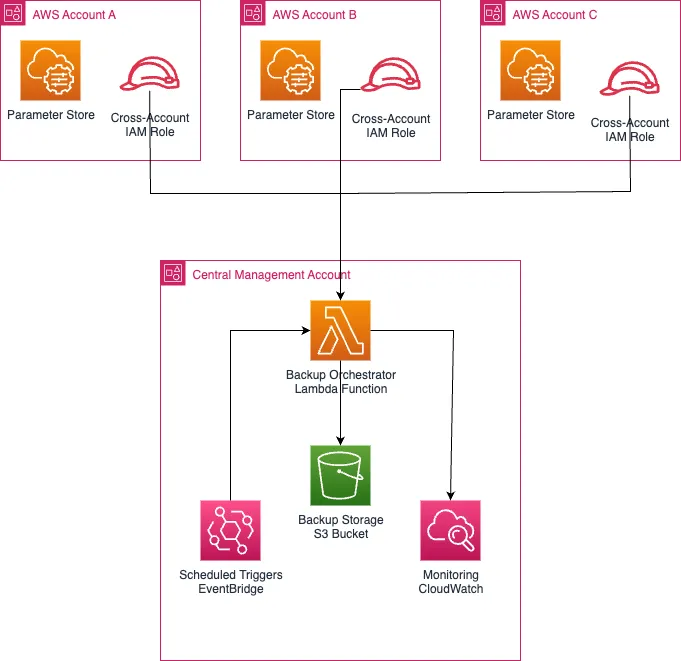
Key Architecture Decisions:
• Orchestration (AWS Lambda): Serverless, cost-effective, handles rate limiting automatically
• Storage (Amazon S3): Durable, versioned, supports cross-region replication
• Security (Cross-Account IAM Roles): Least privilege access, fully auditable
• Scheduling (Amazon EventBridge): Native AWS integration, flexible cron expressions
• Monitoring (Amazon CloudWatch): Comprehensive metrics, dashboards, and alerting
• Storage (Amazon S3): Durable, versioned, supports cross-region replication
• Security (Cross-Account IAM Roles): Least privilege access, fully auditable
• Scheduling (Amazon EventBridge): Native AWS integration, flexible cron expressions
• Monitoring (Amazon CloudWatch): Comprehensive metrics, dashboards, and alerting
Cross-Region Disaster Recovery Architecture
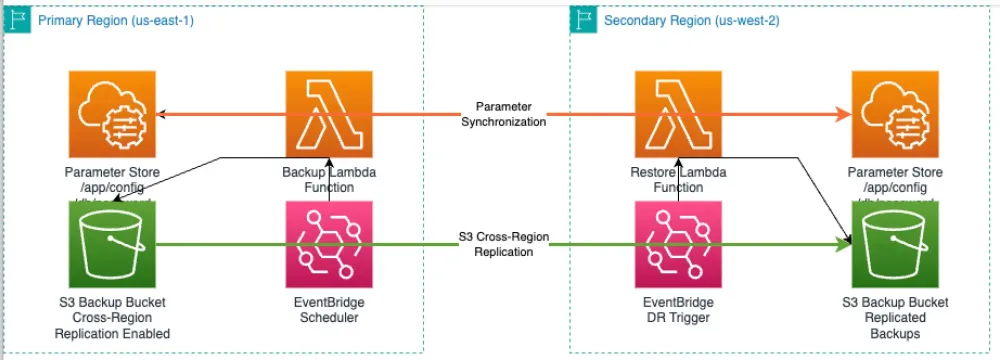
DR Strategy:
- S3 Cross-Region Replication: Automated backup synchronization between regions
- Region-Specific Restore: Lambda functions for targeted parameter restoration
- Encryption Consistency: Maintains SecureString parameter encryption across regions
Implementation Approaches
Approach 1: Immediate Relief - CLI-Based Automation
For customers needing immediate results, enhanced CLI scripts handle rate limiting and error recovery. This approach has helped several customers transition from weeks of manual work to automated processes within days:
1
2
3
4
5
6
7
8
9
10
11
12
13
14
15
16
17
18
19
20
21
22
23
24
25
26
27
28
29
30
31
32
33
34
35
36
37
38
39
40
41
42
43
44
45
46
47
48
49
50
# Enhanced multi-account Parameter Store backup
# Developed by Abhijeet Patil for enterprise customers
ACCOUNTS_FILE="accounts.txt"
ROLE_NAME="ParameterStoreBackupRole"
S3_BUCKET="central-paramstore-backups"
FAILED_ACCOUNTS=()
while read -r account_id; do
echo "Processing account: $account_id"
# Assume cross-account role with error handling
if ! CREDS=$(aws sts assume-role \
--role-arn "arn:aws:iam::$account_id:role/$ROLE_NAME" \
--role-session-name "ParamBackup-$account_id" \
--query 'Credentials.[AccessKeyId,SecretAccessKey,SessionToken]' \
--output text 2>/dev/null); then
echo "Error: Failed to assume role for account $account_id"
FAILED_ACCOUNTS+=($account_id)
continue
fi
# Export credentials and backup with pagination
export AWS_ACCESS_KEY_ID=$(echo $CREDS | cut -f1)
export AWS_SECRET_ACCESS_KEY=$(echo $CREDS | cut -f2)
export AWS_SESSION_TOKEN=$(echo $CREDS | cut -f3)
# Backup with rate limiting (10 TPS limit)
BACKUP_FILE="backup_${account_id}_$(date +%Y%m%d).json"
if aws ssm get-parameters-by-path \
--path "/" --recursive --with-decryption \
--max-results 10 \
--output json > $BACKUP_FILE 2>/dev/null; then
# Upload with encryption and metadata
aws s3 cp $BACKUP_FILE \
s3://$S3_BUCKET/accounts/$account_id/ \
--metadata account-id=$account_id,backup-date=$(date +%Y%m%d)
echo "✓ Successfully backed up account: $account_id"
else
echo "✗ Failed to backup parameters for account $account_id"
FAILED_ACCOUNTS+=($account_id)
fi
# Cleanup and rate limiting
rm -f $BACKUP_FILE
unset AWS_ACCESS_KEY_ID AWS_SECRET_ACCESS_KEY AWS_SESSION_TOKEN
sleep 1
done < $ACCOUNTS_FILE
Approach 2: Enterprise Scale - Lambda Automation
For enterprise environments, a serverless Lambda-based solution provides automated, scheduled backups with comprehensive error handling and monitoring.
Solution Design:
- Lambda Orchestrator: Centralized function that discovers accounts via AWS Organizations
- Cross-Account Access: Assumes IAM roles in target accounts for parameter extraction
- Automated Scheduling: EventBridge triggers daily backups with configurable schedules
- Error Handling: Comprehensive logging, retry logic, and CloudWatch metrics
- Management Account Handling: Configurable inclusion following AWS best practices
Key Features:
- Rate Limiting: Built-in 10 TPS compliance for Parameter Store APIs
- Encryption: Maintains SecureString parameter encryption in backups
- Metadata: S3 objects include account ID, backup date, and parameter counts
- Monitoring: CloudWatch dashboard with success/failure metrics and trends
- Dashboard Widgets: Pre-configured charts for backup success rates and failure tracking
- Scalability: Handles 200+ accounts with concurrent processing
Implementation: Complete Lambda function code, CloudFormation templates, and deployment instructions are available in Implementation Guide section.
Security, Performance, and Cost Optimization
Through extensive work with highly regulated customers, security, performance, and cost efficiency must be built into every aspect of the solution:
IAM Role Configuration
Cross-account roles should be implemented with strict security controls. The recommended pattern includes:
1
2
3
4
5
6
7
8
9
10
11
12
13
14
15
16
17
18
19
20
{
  "Version": "2012-10-17",
  "Statement": [
    {
      "Effect": "Allow",
      "Principal": {
        "AWS": "arn:aws:iam::CENTRAL-ACCOUNT:root"
      },
      "Action": "sts:AssumeRole",
      "Condition": {
        "StringEquals": {
          "sts:ExternalId": "unique-external-id-per-account"
        },
        "IpAddress": {
          "aws:SourceIp": ["10.0.0.0/16"]
        }
      }
    }
  ]
}
API Rate Limiting
API throttling is a common implementation challenge. Parameter Store has specific rate limits that must be respected:
- GetParametersByPath: 10 TPS per account per region
- PutParameter: 40 TPS per account per region
- DescribeParameters: 40 TPS per account per region
The implementation includes exponential backoff and proper sleep intervals to stay within these limits.
Cost Considerations
Current AWS pricing analysis in USD for US East (N. Virginia) as of August 2025:
Parameter Store Costs:
- Standard Parameters: Free (no charges for storage or API calls)
- Advanced Parameters: 0.05 per parameter per month calculated as 0.000070 per hour
- API Interactions: 0.05 per 10,000 API calls for Advanced Parameters
Lambda Execution Costs:
- Requests: 0.20 per 1M requests (0.0000002 per request)
- Compute: 0.0000166667 per GB-second (first 6B GB-seconds/month)
- Typical monthly cost: <$2 for most enterprise implementations (daily backups across 10 accounts)
S3 Storage Costs:
- Standard Storage: 0.023 per GB/month (first 50 TB)
- Intelligent Tiering: Automatic cost optimization for varying access patterns
- Lifecycle policies: Transition to cheaper storage classes after 30 days
Regional Variations:
- Pricing shown for US East (N. Virginia) - costs may vary by region
- Cross-region data transfer: $0.02 per GB for replication
- Consider regional pricing differences when deploying across multiple regions
Cost Optimization Strategies:
- Use S3 Intelligent Tiering for long-term backup storage
- Implement lifecycle policies to transition old backups to cheaper storage classes
- Optimize Lambda memory allocation (512MB provides optimal price/performance ratio)
- Use VPC endpoints to eliminate NAT Gateway costs (~$45/month savings per AZ)
Implementation Recommendations and Expected Outcomes
Expected Benefits:
- Time Reduction: Automation typically reduces manual backup processes from weeks to hours
- Reliability: Proper error handling and retry logic significantly improve backup success rates
- Cost Efficiency: Automated processes reduce operational overhead compared to manual approaches
- Compliance: Built-in audit trails and encryption support regulatory requirements
- Scalability: Architecture supports organizations with hundreds of AWS accounts
Implementation Best Practices:
Start Small, Scale Smart
- Begin with CLI-based solution for immediate relief from manual processes
- Implement Lambda automation once the approach has been validated
- Add comprehensive monitoring via CloudWatch dashboards and alerts
- Optimize based on specific usage patterns and organizational requirements
Security Best Practices
- Use external IDs in cross-account role trust policies
- Implement least privilege IAM permissions from day one
- Enable comprehensive logging with CloudTrail for audit requirements
- Use VPC endpoints for Systems Manager API calls in private subnets
- Enable S3 bucket encryption at the bucket level for automatic encryption of all objects
- Management Account Handling: By default, the solution follows AWS best practices by skipping management account backup. This can be overridden by setting
IncludeManagementAccount=trueif organizational requirements mandate management account backup.
Conclusion and Next Steps
After implementing this solution with numerous enterprise customers, I can confidently say it transforms Parameter Store management from a weeks-long manual burden into an efficient, reliable, and secure automated workflow. The solution scales seamlessly from immediate CLI-based relief to enterprise-grade serverless automation.
The key to successful implementation is establishing proper rate limiting, error handling, and security controls from the beginning. This foundation allows organizations to scale confidently while maintaining compliance and operational excellence.
For organizations facing similar Parameter Store management challenges, the recommended approach includes:
- Start with the CLI solution to get immediate relief from manual processes
- Engage your AWS Solutions Architect to customize the approach for your environment
- Consider AWS Professional Services for complex multi-account implementations
- Join the AWS community to share experiences and learn from other implementations
For questions about Parameter Store automation implementation, reach out through the AWS community forums or connect with your AWS account team to discuss specific requirements.
Implementation Guide
Step 1: Create the Lambda Function Code
Save this as
index.py for your Lambda function:1
2
3
4
5
6
7
8
9
10
11
12
13
14
15
16
17
18
19
20
21
22
23
24
25
26
27
28
29
30
31
32
33
34
35
36
37
38
39
40
41
42
43
44
45
46
47
48
49
50
51
52
53
54
55
56
57
58
59
60
61
62
63
64
65
66
67
68
69
70
71
72
73
74
75
76
77
78
79
80
81
82
83
84
85
86
87
88
89
90
91
92
93
94
95
96
97
98
99
100
101
102
103
104
105
106
107
108
109
110
111
112
113
114
115
116
117
118
119
120
121
122
123
124
125
126
127
128
129
130
131
132
133
134
135
136
137
138
139
140
141
142
143
144
145
146
147
148
149
150
151
152
153
154
155
156
157
158
159
160
161
162
163
164
165
166
167
168
169
170
171
172
173
174
175
176
177
178
179
180
181
182
183
184
185
186
187
188
189
190
191
192
193
194
195
196
197
198
199
200
import json
import boto3
import logging
import os
from datetime import datetime
from typing import List, Dict
logger = logging.getLogger()
logger.setLevel(logging.INFO)
def lambda_handler(event, context):
"""Multi-account Parameter Store backup orchestrator"""
logger.info("=== LAMBDA FUNCTION STARTED ===")
# Configuration from environment variables
backup_bucket = os.environ['BACKUP_BUCKET']
role_name = os.environ['CROSS_ACCOUNT_ROLE_NAME']
external_id = os.environ['EXTERNAL_ID']
include_mgmt_account = os.environ.get('INCLUDE_MANAGEMENT_ACCOUNT', 'false').lower() == 'true'
logger.info(f"Include management account: {include_mgmt_account}")
# Initialize AWS clients
sts_client = boto3.client('sts')
s3_client = boto3.client('s3')
organizations_client = boto3.client('organizations')
cloudwatch = boto3.client('cloudwatch')
try:
# Get list of accounts from AWS Organizations
accounts_response = organizations_client.list_accounts()
accounts = [acc for acc in accounts_response['Accounts'] if acc['Status'] == 'ACTIVE']
backup_results = []
successful_backups = 0
failed_backups = 0
# Get management account ID for comparison
management_account_id = context.invoked_function_arn.split(':')[4]
for account in accounts:
account_id = account['Id']
# AWS Best Practice: Skip management account for multi-account workloads
# Management accounts should focus on governance, not operational workloads
if account_id == management_account_id:
if not include_mgmt_account:
logger.info(f"Skipping management account: {account_id} (AWS best practice)")
logger.info("Set INCLUDE_MANAGEMENT_ACCOUNT=true to override this behavior")
continue
else:
logger.info(f"Including management account: {account_id} (user override enabled)")
try:
# For management account (if enabled), use direct access
if account_id == management_account_id and include_mgmt_account:
backup_data = backup_management_account_parameters(account_id)
else:
# Standard cross-account role assumption for member accounts
role_arn = f"arn:aws:iam::{account_id}:role/{role_name}"
credentials = sts_client.assume_role(
RoleArn=role_arn,
RoleSessionName=f"ParamBackup-{account_id}",
ExternalId=external_id
)['Credentials']
backup_data = backup_account_parameters(credentials, account_id)
# Store backup in S3 with metadata
timestamp = datetime.now().strftime('%Y%m%d_%H%M%S')
s3_key = f"accounts/{account_id}/backup_{timestamp}.json"
s3_client.put_object(
Bucket=backup_bucket,
Key=s3_key,
Body=json.dumps(backup_data, indent=2),
ServerSideEncryption='aws:kms',
Metadata={
'account-id': account_id,
'account-type': 'management' if account_id == management_account_id else 'member',
'backup-date': timestamp,
'parameter-count': str(len(backup_data.get('Parameters', [])))
}
)
parameter_count = len(backup_data.get('Parameters', []))
backup_results.append({
'account_id': account_id,
'account_type': 'management' if account_id == management_account_id else 'member',
'status': 'success',
'parameter_count': parameter_count,
's3_key': s3_key
})
successful_backups += 1
logger.info(f"Successfully backed up {parameter_count} parameters for account {account_id}")
except Exception as e:
logger.error(f"Failed to backup account {account_id}: {str(e)}")
backup_results.append({
'account_id': account_id,
'status': 'failed',
'error': str(e)
})
failed_backups += 1
# Publish CloudWatch metrics
cloudwatch.put_metric_data(
Namespace='ParameterStore/Backup',
MetricData=[
{
'MetricName': 'SuccessfulBackups',
'Value': successful_backups,
'Unit': 'Count'
},
{
'MetricName': 'FailedBackups',
'Value': failed_backups,
'Unit': 'Count'
}
]
)
return {
'statusCode': 200,
'body': json.dumps({
'message': f'Backup completed: {successful_backups} successful, {failed_backups} failed',
'management_account_included': include_mgmt_account,
'results': backup_results
})
}
except Exception as e:
logger.error(f"Backup orchestration failed: {str(e)}")
return {
'statusCode': 500,
'body': json.dumps({'error': str(e)})
}
def backup_account_parameters(credentials: Dict, account_id: str) -> Dict:
"""Backup parameters from a member account using assumed role credentials"""
ssm_client = boto3.client(
'ssm',
aws_access_key_id=credentials['AccessKeyId'],
aws_secret_access_key=credentials['SecretAccessKey'],
aws_session_token=credentials['SessionToken']
)
return _fetch_all_parameters(ssm_client, account_id)
def backup_management_account_parameters(account_id: str) -> Dict:
"""Backup parameters from management account using direct access"""
# Use default credentials (Lambda execution role) for management account
ssm_client = boto3.client('ssm')
return _fetch_all_parameters(ssm_client, account_id)
def _fetch_all_parameters(ssm_client, account_id: str) -> Dict:
"""Common function to fetch all parameters with pagination"""
all_parameters = []
next_token = None
while True:
try:
params = {
'Path': '/',
'Recursive': True,
'WithDecryption': True,
'MaxResults': 10 # Respect API rate limits (10 TPS for GetParametersByPath)
}
if next_token:
params['NextToken'] = next_token
response = ssm_client.get_parameters_by_path(**params)
parameters = response.get('Parameters', [])
# Convert datetime objects to strings for JSON serialization
for param in parameters:
if 'LastModifiedDate' in param and param['LastModifiedDate']:
param['LastModifiedDate'] = param['LastModifiedDate'].isoformat()
all_parameters.extend(parameters)
next_token = response.get('NextToken')
if not next_token:
break
except Exception as e:
logger.error(f"Error fetching parameters for account {account_id}: {str(e)}")
break
return {
'AccountId': account_id,
'BackupTimestamp': datetime.now().isoformat(),
'Parameters': all_parameters
}
Step 2: Create Cross-Account IAM Role Template
Save this as
cross-account-role.yaml and deploy in each target account:1
2
3
4
5
6
7
8
9
10
11
12
13
14
15
16
17
18
19
20
21
22
23
24
25
26
27
28
29
30
31
32
33
34
35
36
37
38
39
40
41
42
43
44
45
46
47
48
49
50
AWSTemplateFormatVersion: '2010-09-09'
Description: 'Cross-account role for Parameter Store backup'
Parameters:
ManagementAccountId:
Type: String
Description: "Management account ID where Lambda function runs"
ExternalId:
Type: String
Description: "External ID for secure cross-account access"
MinLength: 8
MaxLength: 64
Resources:
CrossAccountBackupRole:
Type: AWS::IAM::Role
Properties:
RoleName: !Sub "${AWS::StackName}-cross-account-backup-role"
AssumeRolePolicyDocument:
Version: '2012-10-17'
Statement:
- Effect: Allow
Principal:
AWS: !Sub "arn:aws:iam::${ManagementAccountId}:root"
Action: sts:AssumeRole
Condition:
StringEquals:
sts:ExternalId: !Ref ExternalId
Policies:
- PolicyName: ParameterStoreReadPolicy
PolicyDocument:
Version: '2012-10-17'
Statement:
- Effect: Allow
Action:
- ssm:GetParameter*
- ssm:DescribeParameters
Resource: "*"
- Effect: Allow
Action:
- kms:Decrypt
- kms:DescribeKey
Resource:
- arn:aws:kms:*:*:alias/aws/ssm
Outputs:
RoleArn:
Description: "ARN of the cross-account backup role"
Value: !GetAtt CrossAccountBackupRole.Arn
Step 3: Create Main Infrastructure Template
Save this as
main-infrastructure.yaml for the management account:1
2
3
4
5
6
7
8
9
10
11
12
13
14
15
16
17
18
19
20
21
22
23
24
25
26
27
28
29
30
31
32
33
34
35
36
37
38
39
40
41
42
43
44
45
46
47
48
49
50
51
52
53
54
55
56
57
58
59
60
61
62
63
64
65
66
67
68
69
70
71
72
73
74
75
76
77
78
79
80
81
82
83
84
85
86
87
88
89
90
91
92
93
94
95
96
97
98
99
100
101
102
103
104
105
106
107
108
109
110
111
112
113
114
115
116
117
118
119
120
121
122
123
124
125
126
127
128
129
130
131
132
133
134
135
136
137
138
139
140
141
142
143
144
145
146
147
148
149
150
151
152
153
154
155
156
157
158
159
160
161
162
163
164
165
166
167
168
169
170
171
172
173
174
175
176
177
178
179
180
181
182
183
184
185
186
187
188
AWSTemplateFormatVersion: '2010-09-09'
Description: 'Multi-Account Parameter Store Backup Solution'
Parameters:
ExternalId:
Type: String
Description: "External ID for cross-account role trust policy"
MinLength: 8
MaxLength: 64
BackupSchedule:
Type: String
Default: "cron(0 2 * * ? *)"
Description: "Cron expression for backup schedule (default: daily at 2 AM UTC)"
RetentionDays:
Type: Number
Default: 30
MinValue: 1
MaxValue: 365
Description: "Number of days to retain backups"
IncludeManagementAccount:
Type: String
Default: "false"
AllowedValues: ["true", "false"]
Description: "Include management account in backup (AWS best practice: false)"
Resources:
# S3 Bucket for Backup Storage
BackupBucket:
Type: AWS::S3::Bucket
Properties:
BucketName: !Sub "${AWS::StackName}-ps-backup-${AWS::AccountId}"
VersioningConfiguration:
Status: Enabled
BucketEncryption:
ServerSideEncryptionConfiguration:
- ServerSideEncryptionByDefault:
SSEAlgorithm: AES256
LifecycleConfiguration:
Rules:
- Id: DeleteOldBackups
Status: Enabled
ExpirationInDays: !Ref RetentionDays
NoncurrentVersionExpirationInDays: 7
PublicAccessBlockConfiguration:
BlockPublicAcls: true
BlockPublicPolicy: true
IgnorePublicAcls: true
RestrictPublicBuckets: true
# Lambda Execution Role
LambdaExecutionRole:
Type: AWS::IAM::Role
Properties:
RoleName: !Sub "${AWS::StackName}-lambda-execution-role"
AssumeRolePolicyDocument:
Version: '2012-10-17'
Statement:
- Effect: Allow
Principal:
Service: lambda.amazonaws.com
Action: sts:AssumeRole
ManagedPolicyArns:
- arn:aws:iam::aws:policy/service-role/AWSLambdaBasicExecutionRole
Policies:
- PolicyName: ParameterStoreBackupPolicy
PolicyDocument:
Version: '2012-10-17'
Statement:
- Effect: Allow
Action:
- sts:AssumeRole
Resource: !Sub "arn:aws:iam::*:role/${AWS::StackName}-cross-account-backup-role"
- Effect: Allow
Action:
- s3:PutObject
- s3:PutObjectAcl
- s3:GetObject
Resource: !Sub "${BackupBucket}/*"
- Effect: Allow
Action:
- organizations:ListAccounts
- organizations:DescribeAccount
Resource: "*"
- Effect: Allow
Action:
- kms:Decrypt
- kms:DescribeKey
- kms:Encrypt
- kms:GenerateDataKey
Resource: !Sub "arn:aws:kms:*:${AWS::AccountId}:key/*"
- Effect: Allow
Action:
- cloudwatch:PutMetricData
Resource: "*"
- Effect: Allow
Action:
- ssm:GetParameter*
- ssm:DescribeParameters
Resource: "*"
# Lambda Function
BackupLambdaFunction:
Type: AWS::Lambda::Function
Properties:
FunctionName: !Sub "${AWS::StackName}-parameter-store-backup"
Runtime: python3.12
Handler: index.lambda_handler
Role: !GetAtt LambdaExecutionRole.Arn
Timeout: 900
MemorySize: 512
Environment:
Variables:
BACKUP_BUCKET: !Ref BackupBucket
CROSS_ACCOUNT_ROLE_NAME: !Sub "${AWS::StackName}-cross-account-backup-role"
EXTERNAL_ID: !Ref ExternalId
INCLUDE_MANAGEMENT_ACCOUNT: !Ref IncludeManagementAccount
Code:
ZipFile: |
# Replace this comment with the complete Lambda function code from Step 1
# Due to CloudFormation inline code limitations, you may need to:
# 1. Create a deployment package: zip index.py lambda-package.zip
# 2. Upload to S3 and reference: S3Bucket/S3Key instead of ZipFile
# 3. Or use AWS CLI: aws lambda update-function-code --zip-file fileb://lambda-package.zip
# EventBridge Rule for Scheduled Backups
BackupScheduleRule:
Type: AWS::Events::Rule
Properties:
Name: !Sub "${AWS::StackName}-backup-schedule"
Description: "Scheduled trigger for Parameter Store backups"
ScheduleExpression: !Ref BackupSchedule
State: ENABLED
Targets:
- Arn: !GetAtt BackupLambdaFunction.Arn
Id: "BackupLambdaTarget"
# Permission for EventBridge to invoke Lambda
LambdaInvokePermission:
Type: AWS::Lambda::Permission
Properties:
FunctionName: !Ref BackupLambdaFunction
Action: lambda:InvokeFunction
Principal: events.amazonaws.com
SourceArn: !GetAtt BackupScheduleRule.Arn
# CloudWatch Dashboard
BackupDashboard:
Type: AWS::CloudWatch::Dashboard
Properties:
DashboardName: !Sub "${AWS::StackName}-parameter-store-backup"
DashboardBody: !Sub |
{
"widgets": [
{
"type": "metric",
"properties": {
"metrics": [
["ParameterStore/Backup", "SuccessfulBackups"],
[".", "FailedBackups"]
],
"period": 300,
"stat": "Sum",
"region": "${AWS::Region}",
"title": "Backup Success/Failure Rate"
}
}
]
}
Outputs:
BackupBucketName:
Description: "S3 bucket name for Parameter Store backups"
Value: !Ref BackupBucket
LambdaFunctionArn:
Description: "ARN of the backup Lambda function"
Value: !GetAtt BackupLambdaFunction.Arn
CrossAccountRoleName:
Description: "Name of the cross-account role to create in target accounts"
Value: !Sub "${AWS::StackName}-cross-account-backup-role"
DashboardURL:
Description: "CloudWatch Dashboard URL"
Value: !Sub "https://${AWS::Region}.console.aws.amazon.com/cloudwatch/home?region=${AWS::Region}#dashboards:name=${AWS::StackName}-parameter-store-backup"
Step 4: Deployment Commands
Deploy cross-account roles in target accounts:
1
2
3
4
5
6
7
aws cloudformation create-stack \
  --stack-name parameter-store-cross-account-role \
  --template-body file://cross-account-role.yaml \
  --parameters \
    ParameterKey=ManagementAccountId,ParameterValue=123456789012 \
    ParameterKey=ExternalId,ParameterValue=your-unique-external-id \
  --capabilities CAPABILITY_NAMED_IAM
Deploy main infrastructure in management account:
1
2
3
4
5
6
7
8
9
10
11
12
13
14
15
16
17
# First, create and upload Lambda deployment package
zip lambda-package.zip index.py
aws s3 cp lambda-package.zip s3://your-deployment-bucket/

# Then deploy the stack
aws cloudformation create-stack \
  --stack-name parameter-store-backup \
  --template-body file://main-infrastructure.yaml \
  --parameters \
    ParameterKey=ExternalId,ParameterValue=your-unique-external-id \
    ParameterKey=IncludeManagementAccount,ParameterValue=false \
  --capabilities CAPABILITY_NAMED_IAM

# Update Lambda function code after stack creation
aws lambda update-function-code \
  --function-name parameter-store-backup-parameter-store-backup \
  --zip-file fileb://lambda-package.zip
Quick Reference
Key Implementation Points
• Management Account: Skipped by default (AWS best practice), override with
• Security: External IDs for cross-account roles, least privilege IAM permissions
• Rate Limiting: 10 TPS for GetParametersByPath, 40 TPS for PutParameter
• Monitoring: CloudWatch metrics (SuccessfulBackups, FailedBackups) and dashboard
IncludeManagementAccount=true• Security: External IDs for cross-account roles, least privilege IAM permissions
• Rate Limiting: 10 TPS for GetParametersByPath, 40 TPS for PutParameter
• Monitoring: CloudWatch metrics (SuccessfulBackups, FailedBackups) and dashboard
Common Issues
• Access Denied: Verify cross-account roles deployed with matching External ID
• No Parameters Found: Check Parameter Store permissions and KMS access for SecureString
• CloudFormation Errors: Use S3 deployment package for Lambda code, ensure CAPABILITY_NAMED_IAM
• No Parameters Found: Check Parameter Store permissions and KMS access for SecureString
• CloudFormation Errors: Use S3 deployment package for Lambda code, ensure CAPABILITY_NAMED_IAM
Production Considerations
• Scaling: EventBridge supports multiple schedules, Lambda handles concurrent executions
• Security: VPC endpoints for private deployments, customer-managed KMS keys
• Cost: S3 Intelligent Tiering, Lambda memory optimization, lifecycle policies
• Security: VPC endpoints for private deployments, customer-managed KMS keys
• Cost: S3 Intelligent Tiering, Lambda memory optimization, lifecycle policies
Enjoyed reading this content? Let the author know!
Your likes, comments, shares, and saves help creators reach more builders.

Loading recommendations
Loading article