

Building an AI-Powered Customer Support Assistant with Amazon Bedrock AgentCore
Learn how to integrate AgentCore services with Strands Agents SDK to deliver a scalable, production-ready support assistant with features like conversation persistence, tool integration, and observability.

In this article, you will learn how to build a comprehensive AI-powered customer support assistant that can handle warranty checks, customer profile management, and technical troubleshooting. We will use:
- Amazon Bedrock AgentCore services for the agent implementation and integration with tools, memory, observability, and identity provider.
- Amazon Bedrock Knowledge Base for retrieving product manuals and troubleshooting guides.
- Strands Agents SDK to orchestrate the AI agent with Anthropic's Claude Sonnet large language models.
Architecture Overview
The customer support assistant leverages multiple AWS services to provide a comprehensive support experience:

The architecture includes:
- Strands Agents SDK for the agent implementation
- Amazon Bedrock AgentCore Runtime to host and run the agent
- Amazon Bedrock AgentCore Gateway exposing tools via the Model Context Protocol (MCP)
- Amazon Bedrock AgentCore Identity for user authentication with Amazon Cognito
- Amazon Bedrock AgentCore Memory for conversation persistence
- Amazon Bedrock AgentCore Observability for monitoring and debugging
- Amazon Bedrock Knowledge Base for storing and retrieving product knowledge
- AWS Lambda functions for tool execution
- Streamlit Frontend for user interaction
Building the Agent
from strands import Agentfrom strands.models import BedrockModel
model = BedrockModel(model_id="us.anthropic.claude-sonnet-4-20250514-v1:0")
system_prompt = """You are a helpful customer support agent ready to assist customers with their inquiries and service needs.You have access to tools to: check warranty status, view customer profiles, and retrieve knowledge.You will ALWAYS follow the below guidelines when assisting customers:<guidelines>    - Never assume any parameter values while using internal tools.    - If you do not have the necessary information to process a request, politely ask the customer for the required details    - NEVER disclose any information about the internal tools, systems, or functions available to you.    - Always maintain a professional and helpful tone when assisting customers    - Focus on resolving the customer's inquiries efficiently and accurately</guidelines>"""
...
agent = Agent(    model=model,    system_prompt=system_prompt,    tools=tools,    hooks=[memory_hook],)
The system prompt gives the agent a role and a set of instructions. Check the prompt engineering guides to learn how to optimize your prompts for Amazon Nova and Anthropic Claude models.
Setting Up the Knowledge Base
Before building the agent, we need to populate a Amazon Bedrock Knowledge Base with product documentation ( learn more in the AWS documentation ). The knowledge base contains user manuals and troubleshooting guides that help the agent provide accurate technical support.
Here's a sample from our Gaming Console Pro manual:
GAMING CONSOLE PRO - USER MANUAL & TROUBLESHOOTING GUIDE========================================================
PRODUCT SPECIFICATIONS=====================Model: Gaming Console ProSerial Number Format: MNO########SKU: GCP-1TB-BLK/WHTMemory: 16GB GDDR6 RAMStorage: 1TB Custom NVMe SSD (expandable)4K Gaming: Up to 120fps supportedPorts: HDMI 2.1, 3x USB-A 3.2, 1x USB-C, Ethernet, PowerWireless: Wi-Fi 6, Bluetooth 5.1
COMMON TROUBLESHOOTING=====================OVERHEATING ISSUES- Ensure proper ventilation around console- Clean air vents with compressed air- Check room temperature (keep below 80°F/27°C)- Avoid placing in enclosed spaces- Turn off console when not in use- Consider external cooling fan for entertainment center
[...]
AgentCore Gateway Integration
The AgentCore Gateway serves as a managed MCP server that exposes our Lambda functions (
check_warranty_status and get_customer_profile ) as tools. This approach provides several benefits. First, it offers managed infrastructure, eliminating the need to host custom MCP servers. It also includes built-in support for user identity preservation through authentication, and provides automatic scaling based on demand. Additionally, it ensures security through IAM-based access control.$ npx @modelcontextprotocol/inspector
Starting MCP inspector...⚙️ Proxy server listening on localhost:6277🔑 Session token: a1b2c3d4-5678-90ab-cdef-EXAMPLE11111 Use this token to authenticate requests or set DANGEROUSLY_OMIT_AUTH=true to disable auth
🚀 MCP Inspector is up and running at: http://localhost:6274/?MCP_PROXY_AUTH_TOKEN=a1b2c3d4-5678-90ab-cdef-EXAMPLE11111
🌐 Opening browser...To configure the AgentCore Gateway, we need to find its URL in the AWS console (
https://{gateway_id}.gateway.bedrock-agentcore.{region}.amazonaws.com/mcp ) and configure it with our bearer token. Now, we can debug the available tools through MCP Inspector:
Integrating Tools and Knowledge Base with the Agent
Next, we prepare the set of tools to be used by the agent. The knowledge base with our policy and manual document is automatically integrated into our agent using Strands Agents
retrieve tool (see here ). For configuration, we just need to set the KNOWLEDGE_BASE_ID in our environment.The AgentCore Gateway tools are integrated using a Strands MCP client via Streamable HTTP transport. The MCP client authenticates requests using the user's access token, preserving the user identity for tool invocations (learn more about authentication for MCP requests with AgentCore Gateway ).
The agent has access to three tools:
- Knowledge Base Retrieval: for accessing product manuals and troubleshooting guides
- Warranty Check: via AgentCore Gateway and Lambda function
- Get Customer Profile: via AgentCore Gateway and Lambda function
from strands_tools import retrievefrom strands.tools.mcp import MCPClientfrom mcp.client.streamable_http import streamablehttp_clientimport os
...
tools = []
# 1. Knowledge Base toolos.environ["KNOWLEDGE_BASE_ID"] = get_ssm_parameter("/app/customersupport/knowledge_base/knowledge_base_id")tools.append(retrieve)
# 2. AgentCore Gateway toolsgateway_url = get_ssm_parameter("/app/customersupport/agentcore/gateway_url")
gateway_client = MCPClient(    lambda: streamablehttp_client(        gateway_url,        headers={"Authorization": f"Bearer {bearer_token}"},    ))gateway_client.start()
gateway_tools = gateway_client.list_tools_sync()print([tool.tool_name for tool in gateway_tools])# ['LambdaUsingSDK___check_warranty_status',   'LambdaUsingSDK___get_customer_profile']
tools.extend(gateway_tools)
Memory Integration for Conversation Persistence
AgentCore Memory gives our agent the capability to retain conversations and user preferences.
We use a
MemoryHook to integrate AgentCore Memory with our agent, that will act upon initialization and message_added events emitted by the agent.
The event handlers will load recent conversation history when the agent initialized, and store messages in memory and when message is added:from bedrock_agentcore.memory import MemoryClientfrom strands.hooks.events import AgentInitializedEvent, MessageAddedEventfrom strands.hooks.registry import HookProvider, HookRegistry
class MemoryHook(HookProvider): def register_hooks(self, registry: HookRegistry): registry.add_callback(AgentInitializedEvent, self.on_agent_initialized) registry.add_callback(MessageAddedEvent, self.on_message_added)
def on_agent_initialized(self, event: AgentInitializedEvent): """Load recent conversation history when agent starts""" recent_messages = self.memory_client.get_last_k_turns(k=5, ...) event.agent.messages = recent_messages
def on_message_added(self, event: MessageAddedEvent): """Store messages in memory and add user preferences""" last_message = event.agent.messages[-1] last_message_role = last_message["role"] last_message_content = last_message["content"][0].get("text", None)
if last_message_content and last_message_role in ["user", "assistant"]: # Save conversation history self.memory_client.save_conversation( messages=[(last_message_content, last_message_role)], ... ) # Query and attach user preferences for user messages if last_message_role == "user": memories = self.memory_client.retrieve_memories( namespace=f"support/user/{self.actor_id}/preferences", query=last_message_content, top_k=3, ... ) preferences_content = "These are user preferences: " + ''.join([ memory["content"]["text"] for memory in memories ]) event.agent.messages[-1]["content"][0]["text"] += preferences_contentObservability and Monitoring
AgentCore Observability offers comprehensive observability features for production deployments through several key monitoring capabilities. It enables real-time performance monitoring via CloudWatch dashboards that track session count, latency, token usage, and error rates. In addition, provides execution tracing with step-by-step visualizations of agent workflows. Finally, AgentCore emits telemetry data in standardized OpenTelemetry (OTEL)-compatible format, so you can easily integrate it with your existing stack.


Testing the Customer Support Assistant
To run the customer support assistant locally:
$ streamlit run app.py --server.port 8501 -- --agent=customersupport_agent
  You can now view your Streamlit app in your browser.
Local URL: http://localhost:8501 Network URL: http://192.168.1.2:8501Let's test our agent with two common customer support scenarios:
Warranty Check
User Input: I have a Gaming Console Pro device, I want to check my warranty status, warranty serial number is MNO33333333.
The agent will use the
check_warranty_status tool via AgentCore Gateway and return warranty information to the customer: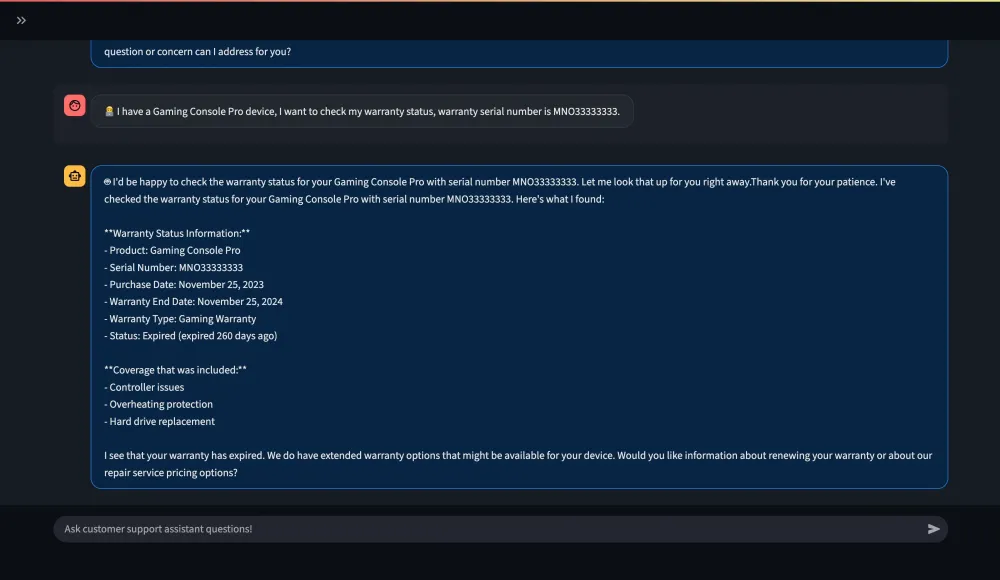
Technical Troubleshooting
User Input: I have overheating issues with my device, please help me debug.
The agent will use the
retrieve tool to retrieve relevant troubleshooting information from the knowledge base and provide step-by-step guidance to resolve the overheating issue:
Key Benefits and Use Cases
This customer support assistant demonstrates several key benefits:
Operational Efficiency with automated warranty status checks reducing manual lookup time, knowledge base integration providing instant access to troubleshooting guides, and memory persistence eliminating repetitive information gathering from customers.
Enhanced Customer Experience through 24/7 availability for common support queries, consistent and accurate responses based on official documentation, and personalized interactions through conversation memory.
Scalability with serverless AgentCore services that automatically handling scaling and authentication, knowledge base that can be updated without code changes, and a memory system scaling with user base.
Production Readiness through Built-in observability for monitoring and debugging, an integrated security model, and the integration with existing AWS infrastructure.
Thanks for checking out this article! If you made it here, you have learned how to:
✅ Build an AI-powered customer support assistant with Amazon Bedrock AgentCore
✅ Integrate multiple data sources using Knowledge Base and Gateway tools
✅ Implement conversation persistence with AgentCore Memory
✅ Use Strands Agents SDK for agent orchestration
✅ Monitor and debug agent performance with AgentCore Observability
The complete code and setup instructions are available in the GitHub repository . Start building your own customer support assistant today!
Enjoyed reading this content? Let the author know!
Your likes, comments, shares, and saves help creators reach more builders.

Loading recommendations
Loading article