
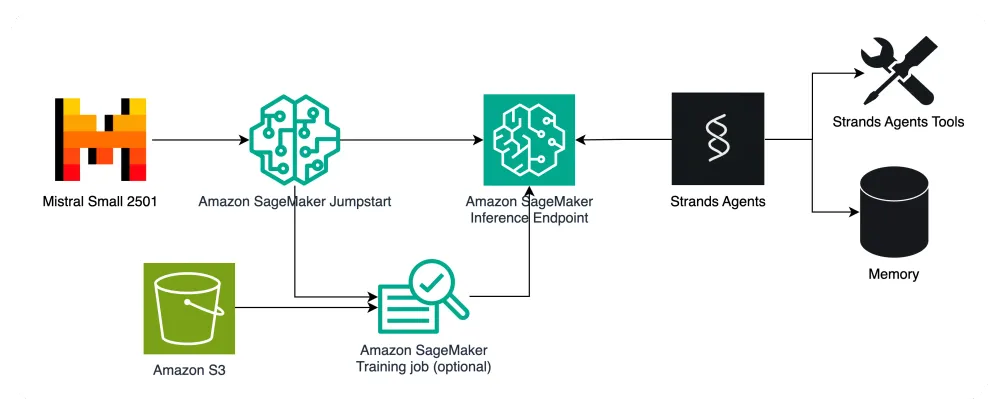
Using Amazon SageMaker AI with Strands Agents Python SDK
This blog covers Amazon SageMaker AI endpoint usage and Strands Agents Python SDK integration steps for building AI agents with custom Large Language Models.

Strands Agents is a newly released Python open-source SDK (Software Development Kit) that takes a model-driven approach to building and running AI agents. The project aims to simplify the process of building AI agents by removing complex orchestration requirements and leveraging the native capabilities of modern language models. It allows building and running AI agents in just a few lines of code, scaling from simple to complex agent use cases, and from local development to production deployment. It connects two main pieces: the model and the tools — like the two strands of DNA (hence, the name).
It can run anywhere, and supports any model with reasoning and tool use capabilities: Strands Agents supports models from various providers, including Amazon Bedrock, Anthropic, Ollama, and other providers through LiteLLM. Our customers have asked us to include Amazon SageMaker AI in the list of native model providers supported by Strands Agents SDK. We’re excited to announce that, as of Strands Agents v1.2.0, support for Amazon SageMaker AI endpoint is available natively in the SDK.
LLM Inference with Amazon SageMaker AI

Amazon SageMaker AI is a fully managed machine learning (ML) service. With SageMaker AI, data scientists and developers can quickly and confidently build, train, and deploy ML models into a production-ready hosted environment. It provides a UI experience for running ML workflows that makes SageMaker AI ML tools available across multiple integrated development environments (IDEs). With Amazon SageMaker AI, you can start getting predictions, or inferences, from either pre-trained models, available through Amazon SageMaker JumpStart, or your own custom models that you can train with Amazon SageMaker Training jobs. SageMaker AI provides a broad selection of ML infrastructure and model deployment options to help meet all your ML inference needs. With SageMaker AI Inference, you can scale your model deployment, manage models more effectively in production, and reduce operational burden. SageMaker AI provides you with various inference options, such as real-time endpoints for getting low latency inference, serverless endpoints for fully managed infrastructure and auto-scaling, and asynchronous endpoints for batches of requests. By leveraging the appropriate inference option for your use case, you can ensure efficient and model deployment and inference.
Amazon SageMaker AI provides compelling value for machine learning inference workloads through several key advantages. The platform delivers significant cost optimization benefits, offering up to 75% cost savings through automatic scaling and a flexible pay-per-use pricing model, along with diverse instance types tailored to specific workload requirements. From a performance perspective, SageMaker leverages high-performance infrastructure specifically designed for machine learning, supporting both GPU and CPU-based inference with low latency serving through optimized containers. The platform provides a simplified deployment process, built-in model monitoring and metrics, and seamless integration with the broader AWS ecosystem. Scalability is another crucial strength, as SageMaker AI offers automatic scaling based on traffic patterns, multi-model endpoints for efficient resource sharing, and global deployment capabilities. Additionally, its robust MLOps features include essential capabilities such as model versioning, A/B testing, drift detection monitoring, and automated model updates. These comprehensive features enable organizations to deploy ML models efficiently while effectively managing costs and maintaining high performance levels. By handling the complex infrastructure requirements, SageMaker AI allows teams to concentrate on developing and improving their ML applications rather than getting bogged down in operational concerns.
Using Amazon SageMaker AI as model provider for your AI Agents provides the advantage of being able to leverage a fully fledged MLOps/FMOps platform, with best-in-class features for fine-tuning, evaluating, and deploying customized Language Models. This introduces the capability of creating AI agents with small language models which are fine-tuned to a specific task (task fine-tuned AI agents) or model with a distilled knowledge around a specific topic/domain.
In our example, we will use
mistral-small-24b-instruct-2501 , which is available on Amazon SageMaker JumpStart, without performing any fine-tuning. This model can be deployed either via the UI, or with the API:Python
from sagemaker.jumpstart.model import JumpStartModelmodel = JumpStartModel(model_id="huggingface-llm-mistral-small-24B-Instruct-2501",model_version="2.0.1")predictor = model.deploy(accept_eula=True,initial_instance_count=1,instance_type="ml.g5.12xlarge",serializer=JSONSerializer(), deserializer=JSONDeserializer())
Once the endpoint is up and running, take note of the endpoint name, as this will be required later by the Strands Agents SDK. If you want to invoke your endpoint with the SageMaker Python SDK, you can do so like this:
Python
payload = {"inputs": {"messages": [{"role": "user", "content": "What time is it in Paris?"}],"tools": tools,"tool_choice": "auto","max_tokens": 1024,"temperature": 0.1,"top_p": 0.9,}}response = predictor.predict(json.dumps(payload).encode("utf-8"))print(response)
Alternatively, you can use the AWS Python SDK (
boto3 ):Python
import boto3sagemaker_runtime = boto3.client("sagemaker-runtime")# component_name = input("Enter your inference component name (leave empty if not using a component): ") or Nonemessages = [{"role": "user", "content": "What is the weather in Bari, Italy?"}]response = sagemaker_runtime.invoke_endpoint(EndpointName=endpoint_name,# InferenceComponentName=component_name or None,ContentType="application/json",Body=json.dumps({"messages": messages,"tools":tools}))response = json.loads(response["Body"].read().decode("utf-8"))print(response)
Building an AI agent with Strands Agents SDK

Building an AI agent with Strands Agents SDK is a straightforward process that centers around three fundamental components: a model, tools, and a prompt. To create an agent, developers first need to define these elements in their code. The model can be selected from various supported options, including Amazon Bedrock models with tool use and streaming capabilities, Anthropic's Claude model family, Ollama for local development, or other providers through LiteLLM. For tools, developers can choose from thousands of published Model Context Protocol (MCP) servers or utilize Strands' 20+ pre-built example tools for tasks like file manipulation, API requests, and AWS API interactions. Any Python function can be transformed into a tool using the Strands
@tool decorator. The prompt consists of both a natural language prompt defining the agent's task and a system prompt providing general instructions and desired behavior. Once these components are defined, the agent operates in a loop, interacting with its model and tools until the task is completed. The Strands agentic loop leverages the advanced capabilities of modern LLMs to reason, plan, and select tools appropriately. To learn more about Strands Agents, head over to the announcement blog .Our first step is to install the latest version of the Strands Agents Python SDK:
Bash
pip install strands-agents "strands-agents[sagemaker]" strands-agents-tools --upgrade
To use Amazon SageMaker AI as model provider in Strands Agents SDK, you can use the following class:
Python
from strands.models.sagemaker import SageMakerAIModelimport boto3# Provide all the invocation parametersmodel_config = {"max_tokens": 1024*5,"temperature": 0.1,...}# Create the SageMaker AI Model objectsagemaker_model = SageMakerAIModel(endpoint_name="YOUR-ENDPOINT-NAME-HERE",inference_component_name="YOUR-INFERENCE-COMPONENT-NAME-HERE",boto_session=boto3.Session(),**model_config)
Then, you can create and invoke an agent based on this model provider with a simple call:
Python
from strands import Agentagent = Agent(model=sagemaker_model)agent("Who is the current Prime Minister of Italy?")
As you can clearly see from this example, the model would need to require some tools to avoid an outdated response. Strands Agents SDK supports built-in and custom tools. For example, we can implement a simple web search like this:
Python
# Define custom tool@tool()def web_search(query:str, max_results=5)->dict:results = ""with DDGS() as ddgs:results = [r for r in ddgs.text(query, max_results=max_results)]return results# Define the agent with the toolsagent = Agent(model=sagemaker_model, tools=[web_search])# Invokeuser_input = "Who is the Italy Prime Minister, as of May 2025?"response = agent(user_input)
Conclusions
Strands Agents is an open source project licensed under the Apache License 2.0. We are excited to now build Strands in the open with you. We welcome contributions to the project, including adding support for additional providers’ models and tools, collaborating on new features, or expanding the documentation. If you find a bug, have a suggestion, or have something to contribute, join us on GitHub . To learn more about Strands Agents and to start building your first AI agent with Strands, visit our documentation .
Enjoyed reading this content? Let the author know!
Your likes, comments, shares, and saves help creators reach more builders.

Loading recommendations
Loading article