
Fractional GPU Sharing on Amazon EKS using NVIDIA KAI Scheduler and Accelerated EC2 Instances
Authors: Sanjeev Ganjihal, Sai Teja Penugonda, Nitish Kulkarni


Introduction
In the race to scale AI and machine learning, organizations are grappling with a critical inefficiency: GPU utilization in production workloads. The bottleneck isn't acquiring more GPUs - it's unlocking the full potential of those already in hand. GPU infrastructure represents the largest capital expenditure in modern AI operations, yet most organizations unknowingly waste their computational capacity. The culprit isn't hardware limitations - it's Kubernetes' approach to GPU scheduling that treats these expensive resources like indivisible assets. The financial implications are staggering: while a single NVIDIA H100 commands $30,000-40,000, typical AI workloads utilize merely 30-50% of its capacity. Across enterprise clusters running hundreds of GPUs, this inefficiency translates to millions in stranded infrastructure investment. Organizations essentially purchase Ferrari-grade performance while operating at bicycle speeds - not due to workload constraints, but because of fundamental limitations in how Kubernetes orchestrates these critical resources. NVIDIA’s KAI Scheduler , open-sourced in April 2025 following the Run:AI acquisition, fundamentally re-imagines GPU resource management for Kubernetes. Unlike traditional schedulers that enforce rigid one-pod-per-GPU constraints, KAI introduces intelligent fractional sharing that matches resource allocation to actual workload requirements. This Kubernetes-native solution transforms static GPU assignments into dynamic, workload-adaptive orchestration. The breakthrough lies in KAI's real-time resource optimization. Through continuous fair-share calculations and automatic quota adjustments, it eliminates the manual intervention typically required for GPU cluster management. For Amazon EKS environments, this translates to immediate, measurable improvements: transforming underutilized GPU clusters into high-efficiency computing resources that can effectively double capacity without additional hardware investment.
Why GPU Sharing Matters
Traditional Kubernetes GPU allocation operates on a binary model: either your workload gets an entire GPU or it gets nothing. This creates a fundamental mismatch with how modern AI workloads actually consume resources.
The Resource Efficiency Crisis
The gap between GPU allocation and actual utilization represents one of the most significant inefficiencies in modern AI infrastructure. Llama 3.1 8B-Instruct, a production-ready language model, requires approximately 16-24GB of GPU memory for inference consuming less than 30% of an 80GB A100's capacity while monopolizing the entire device. Similarly, Llama 3 70B, when optimized with FP8 precision, needs roughly 21GB of memory yet typically receives allocation across multiple A100s where it could theoretically coexist with other workloads. Development teams experimenting with smaller transformer models often utilize just 10-15% of available GPU resources during active prototyping phases, while research groups conducting parallel fine-tuning experiments on different datasets maintain separate hardware queues instead of sharing high-end GPUs. This fundamental mismatch between Kubernetes' binary allocation model and the nuanced resource requirements of modern LLMs creates a paradox where organizations operate GPU clusters at 30-40% utilization while simultaneously experiencing resource bottlenecks and extended job queues.
The Technical Challenge: Kubernetes GPU Limitations
Scheduler Awareness Gap
- The default kube-scheduler lacks any concept of fractional GPU sharing or memory-based allocation. It cannot track partial GPU utilization, leading to potential conflicts when attempting to place multiple workloads on the same physical device. This limitation forces organizations into inefficient overprovisioning or complex workarounds.
State Tracking Complexity
- Kubernetes provides no native mechanism to advertise or track partial GPU occupancy. Without visibility into actual resource utilization, intelligent scheduling decisions become impossible, forcing administrators to rely on static allocation policies that waste resources.
Developer Experience Barriers
- Without specialized tooling, implementing GPU sharing requires complex custom controllers, intricate resource management logic, and extensive operational overhead—making it impractical for most development teams to implement effectively.
Introduction to KAI Scheduler
Core Components
- Scheduler: The main component that makes informed placement decisions based on resource availability and requirements.
- Binder: Handles the actual binding of pods to nodes with appropriate GPU resources.
- PodGrouper: Automatically detects and connects with popular AI frameworks like Kubeflow, Ray, and Argo.
Key Features of KAI Scheduler
- GPU Sharing: Allows multiple workloads to efficiently share GPUs through time-slicing.
- Hierarchical Queuing System: Implements a multi-level resource allocation structure through queue hierarchies.
- Dynamic Fair-Share Allocation: Continuously recalculates resource allocation based on current workload demands.
- Resource Guarantees: Ensures teams receive their allocated resources while redistributing idle capacity.
- Batch/Gang Scheduling: Ensures all pods in a group are scheduled simultaneously or not at all.
Architecture
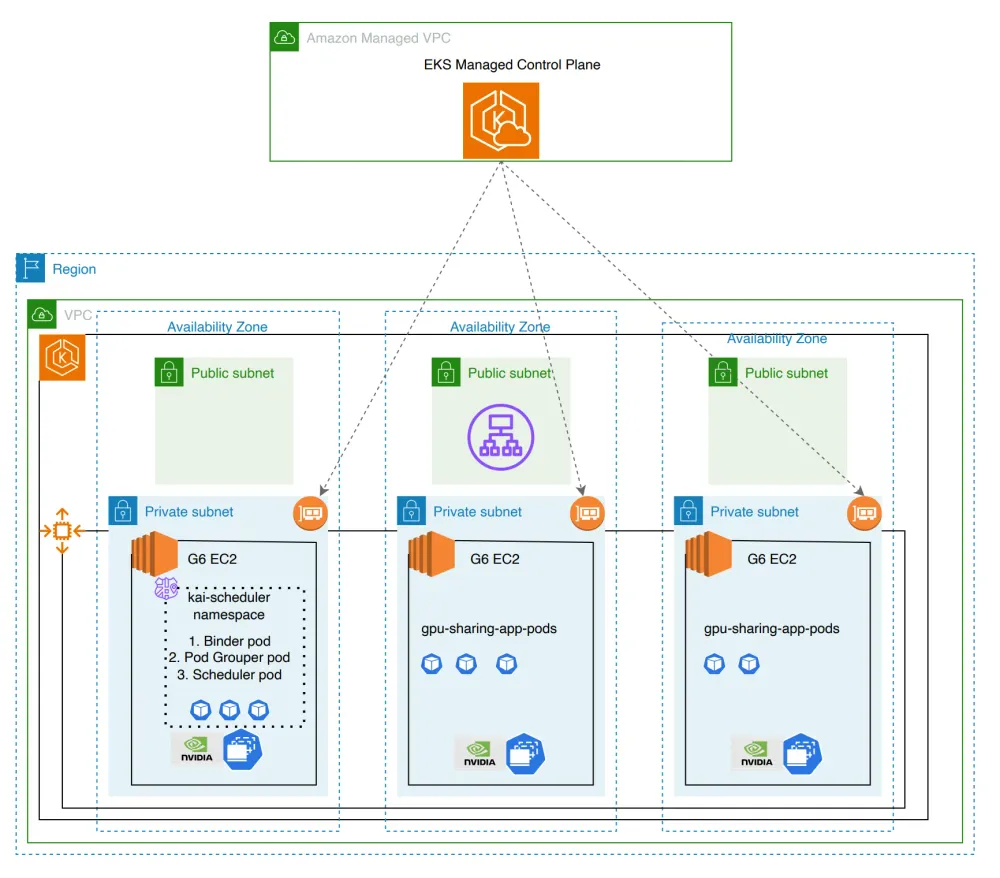
Pre-requisites:
Solution Deep Dive
Create an EKS cluster with 3 nodes:
1
eksctl create cluster --nodes 3 --node-type=g6.xlarge --install-nvidia-plugin=false --node-ami-family AmazonLinux2023
Run this command:
1
kubectl get nodes
You should see a cluster with 3 nodes

Install NVDA GPU Operator using helm
1
2
3
4
5
6
7
8
9
10
# Add NVIDIA helm repository if not already added
helm repo add nvidia https://nvidia.github.io/gpu-operator || true
helm repo update

# Install GPU Operator
helm install --wait gpu-operator \
  -n gpu-operator --create-namespace \
  nvidia/gpu-operator \
  --version=v25.3.1 \
  --set cdi.enabled=true
Validate the NVDA GPU Operator pods using the following command
1
kubectl get pods -n gpu-operator
Install KAI scheduler
1
2
3
4
5
6
7
# Install/upgrade KAI Scheduler
helm upgrade -i kai-scheduler \
  oci://ghcr.io/nvidia/kai-scheduler/kai-scheduler \
  -n kai-scheduler --create-namespace \
  --version v0.7.6 \
  --set global.gpuSharing=true \
  --set binder.additionalArgs[0]=--cdi-enabled=true
Note: Latest version is v0.7.6. Locate the latest versions from kai-scheduler releases page
Validate KAI scheduler installation by running this command
1
kubectl get pods -n kai-scheduler
Configure Scheduling Queue in KAI Scheduler
1
2
3
4
5
6
7
8
9
10
11
12
13
14
15
16
17
18
19
20
21
22
23
24
25
26
27
28
29
30
31
32
33
34
35
36
37
38
39
40
kubectl apply -f - << 'EOF'
apiVersion: scheduling.run.ai/v2
kind: Queue
metadata:
  name: default
spec:
  resources:
    cpu:
      quota: -1
      limit: -1
      overQuotaWeight: 1
    gpu:
      quota: -1
      limit: -1
      overQuotaWeight: 1
    memory:
      quota: -1
      limit: -1
      overQuotaWeight: 1
---
apiVersion: scheduling.run.ai/v2
kind: Queue
metadata:
  name: test
spec:
  parentQueue: default
  resources:
    cpu:
      quota: -1
      limit: -1
      overQuotaWeight: 1
    gpu:
      quota: -1
      limit: -1
      overQuotaWeight: 1
    memory:
      quota: -1
      limit: -1
      overQuotaWeight: 1
EOF
Check if the GPU is exposed to the kubelet by validating if the GPU status is visible in nodes allocatable :
1
kubectl get nodes -o json | jq -r '.items[] | select(.status.capacity."nvidia.com/gpu" != null) | {name: .metadata.name, capacity: .status.capacity}'
Fractional GPU sharing
Lets deploy these pods which take fractional gpu's of 0.5 each. The YAML manifest code will deploy the sample workload and demonstrate the fractional GPU functionality, where 5 pods are configured with
gpu-fraction: "0.5", each requesting 50% of a GPU, enabling efficient sharing of GPU resources on the same hardware.1
2
3
4
5
6
7
8
9
10
11
12
13
14
15
16
17
18
19
20
21
22
23
24
25
26
27
28
29
30
31
32
33
34
35
36
37
38
39
40
41
42
43
44
45
46
47
48
49
50
51
52
53
54
55
56
57
58
59
60
61
62
63
64
65
66
67
68
69
70
71
72
73
74
75
76
kubectl apply -f - << 'EOF'
apiVersion: v1
kind: Pod
metadata:
name: gpu-sharing-pod-1
labels:
kai.scheduler/queue: test
annotations:
gpu-fraction: "0.5"
spec:
schedulerName: kai-scheduler
containers:
- name: ubuntu
image: ubuntu
args: ["sleep", "infinity"]
---
apiVersion: v1
kind: Pod
metadata:
name: gpu-sharing-pod-2
labels:
kai.scheduler/queue: test
annotations:
gpu-fraction: "0.5"
spec:
schedulerName: kai-scheduler
containers:
- name: ubuntu
image: ubuntu
args: ["sleep", "infinity"]
---
apiVersion: v1
kind: Pod
metadata:
name: gpu-sharing-pod-3
labels:
kai.scheduler/queue: test
annotations:
gpu-fraction: "0.5"
spec:
schedulerName: kai-scheduler
containers:
- name: ubuntu
image: ubuntu
args: ["sleep", "infinity"]
---
apiVersion: v1
kind: Pod
metadata:
name: gpu-sharing-pod-4
labels:
kai.scheduler/queue: test
annotations:
gpu-fraction: "0.5"
spec:
schedulerName: kai-scheduler
containers:
- name: ubuntu
image: ubuntu
args: ["sleep", "infinity"]
---
apiVersion: v1
kind: Pod
metadata:
name: gpu-sharing-pod-5
labels:
kai.scheduler/queue: test
annotations:
gpu-fraction: "0.5"
spec:
schedulerName: kai-scheduler
containers:
- name: ubuntu
image: ubuntu
args: ["sleep", "infinity"]
EOFVerify the GPU Sharing pods status
1
kubectl get pods -n default
Check NVIDIA and RUNAI environment variables across all GPU sharing pods
1
2
3
4
5
for pod in gpu-sharing-pod-{1..5}; do
  echo "=== $pod ==="
  kubectl exec -n default "$pod" -- env | grep -E "NVIDIA|RUNAI"
  echo
done
The deployed GPU-sharing pods demonstrate efficient resource utilization: four pods are currently running, each allocated 0.5 GPU resources, collectively consuming 2 full GPUs. The fifth pod (gpu-sharing-pod-5) remains in a Pending state due to insufficient allocatable GPU capacity on the cluster nodes to fulfill its 0.5 GPU resource requirement.
Fraction GPU Memory Sharing
This deployment creates three pods that utilize GPU memory-based sharing, with each pod requesting 4000MB of GPU memory through annotations rather than fractional GPU allocation. The setup demonstrates memory-constrained GPU sharing where pods compete for available GPU memory resources instead of GPU compute fractions.
1
2
3
4
5
6
7
8
9
10
11
12
13
14
15
16
17
18
19
20
21
22
23
24
25
26
27
28
29
30
31
32
33
34
35
36
37
38
39
40
41
42
43
44
45
46
47
48
49
kubectl apply -f - << 'EOF'
apiVersion: v1
kind: Pod
metadata:
  name: gpu-sharing-mem-1
  labels:
    runai/queue: test
    kai.scheduler/queue: test
  annotations:
    gpu-memory: "4000"
spec:
  schedulerName: kai-scheduler
  containers:
  - name: ubuntu
    image: ubuntu
    args: ["sleep", "infinity"]
---
apiVersion: v1
kind: Pod
metadata:
  name: gpu-sharing-mem-2
  labels:
    runai/queue: test
    kai.scheduler/queue: test
  annotations:
    gpu-memory: "4000"
spec:
  schedulerName: kai-scheduler
  containers:
  - name: ubuntu
    image: ubuntu
    args: ["sleep", "infinity"]
---
apiVersion: v1
kind: Pod
metadata:
  name: gpu-sharing-mem-3
  labels:
    runai/queue: test
    kai.scheduler/queue: test
  annotations:
    gpu-memory: "4000"
spec:
  schedulerName: kai-scheduler
  containers:
  - name: ubuntu
    image: ubuntu
    args: ["sleep", "infinity"]
EOF
Verify the GPU memory sharing of the pods
1
kubectl get pods -n default
1
kubectl describe pod gpu-sharing-mem-1
The kubectl describe command provides comprehensive pod details including the gpu-memory annotation that specifies allocated GPU memory in MiB (4000 MiB = ~4 GB). The subsequent loop efficiently extracts and displays the exact GPU memory allocation for each memory-sharing pod using JSONPath queries, providing a clear overview of resource distribution across all pods configured for memory-based GPU sharing.
1
2
3
4
for pod in gpu-sharing-mem-{1..3}; do
  echo "=== $pod ==="
  kubectl get pod "$pod" -n default -o jsonpath="{.metadata.annotations.gpu-memory}" && echo
done
Current GPU Memory Utilization Analysis:
The cluster currently hosts 3 running memory-sharing pods, yet available GPU memory remains on the 2-node cluster, indicating suboptimal resource utilization. This presents optimization opportunities through:
- Enhanced Memory Sharing: Increase memory allocation density among existing pods to better consume available GPU memory
- Hybrid Resource Allocation: Deploy additional pods using fractional GPU sharing to maximize remaining GPU capacity
This dual approach of memory-based and fraction-based GPU sharing can significantly improve cluster efficiency by fully utilizing available GPU resources without exceeding capacity limits.
Check current status of all GPU memory sharing pods
1
kubectl get pods -n default
Concurrent GPU Resource Allocation:
The deployment successfully demonstrates KAI Scheduler's ability to orchestrate both memory-based and fractional GPU sharing simultaneously. The
kubectl get pods output reveals that memory-sharing pods (gpu-sharing-mem-1, gpu-sharing-mem-2, gpu-sharing-mem-3) operate concurrently with fractional GPU pods (gpu-sharing-pod-1), proving that these two sharing mechanisms can coexist on the same GPU hardware. This hybrid approach enables optimal resource utilization by allowing workloads to consume GPU resources based on their specific requirements—whether memory-constrained or compute-constrained—while maximizing overall cluster efficiency.KAI Scheduler Limitations
- Soft Isolation Constraints
- KAI-Scheduler implements logical resource allocation without hardware-level enforcement, creating several important limitations:
- Resource Boundaries Are Advisory:
- While KAI-Scheduler logically assigns GPU resources (such as 20% memory allocation), it cannot physically prevent applications from exceeding these limits. The system operates on trust rather than enforcement.
- Application Cooperation Required:
- Effective resource management depends on applications voluntarily respecting their allocated boundaries. A Pod assigned 20% GPU memory could attempt to consume the full available capacity without technical barriers preventing this behavior.
- Shared Resource Vulnerability:
- Multiple workloads sharing a single GPU remain susceptible to resource contention. One application consuming beyond its allocation can degrade performance for all other workloads on the same device.
- Optimization Through Application Configuration:
- Achieving optimal resource utilization requires applications to incorporate allocation-aware configurations, such as framework-specific memory limits or custom resource management settings that align with KAI-Scheduler's assignments.
This soft isolation approach prioritizes flexibility and compatibility over strict resource guarantees, making proper application design and monitoring essential for maintaining system stability and performance predictability.
Conclusion:
NVIDIA's KAI Scheduler changes GPU resource management in Kubernetes by enabling fractional GPU sharing and memory-based allocation. This removes the one-pod-per-GPU limitation, allowing multiple workloads to share GPU hardware. The approach addresses GPU underutilization in AI infrastructure and can increase effective capacity without additional hardware. For enterprises using Amazon EKS, KAI Scheduler improves resource efficiency, reduces infrastructure costs, and increases operational flexibility.
Enjoyed reading this content? Let the author know!
Your likes, comments, shares, and saves help creators reach more builders.

Loading recommendations
Loading article