
Agentic GenAI App Using Bedrock, MCP servers on EKS
Scalable AI chat app using Amazon Bedrock, StrandsAgent & MCP servers on EKS. Agentic workflows + GenAI + K8s for dynamic, resilient conversations.


As part of my recent GenAI exploration, I built a chat application that integrates powerful AI capabilities using Amazon Bedrock, StrandsAgent, and Model Context Protocol (MCP) servers — where MCP servers are orchestrated on a scalable Amazon EKS cluster. In this post, I’ll walk through the high-level architecture and share how the components come together to create an intelligent, scalable chat experience.
🧠 Tech Stack Overview
- Frontend: Web application built with Django.
- AI Runtime: Amazon Bedrock for managed foundation model inference.
- Agent Framework: StrandsAgent to orchestrate agentic workflows and tool use.
- MCP Servers: Stateless model context protocol servers deployed in EKS to serve context-aware logic and tools.
- Container Orchestration: Amazon Elastic Kubernetes Service (EKS) for auto-scaling and managing MCP server infrastructure.
⚙️ System Flow
- User Input → Sent via Django frontend.
- StrandsAgent receives the input and determines the necessary agentic steps.
- The agent may invoke tools or call MCP servers for additional data.
- Amazon Bedrock is used for the actual LLM inference.
- Responses are composed and sent back to the user.
📦 EKS for MCP Server Scaling
- MCP servers are containerized and deployed into an EKS-managed node group.
- Kubernetes Horizontal Pod Autoscaler (HPA) is configured based on CPU/memory utilization, allowing the MCP servers to scale under load.
- Load balancing is handled via AWS ALB Ingress Controller, exposing the MCP endpoints securely.
- Security groups are configured per pod using the Amazon VPC CNI plugin with security group for pods (SGP) feature for fine-grained network access.
🖥️ Features
- Strands Agent Integration: Connect to Amazon Bedrock using Strands framework
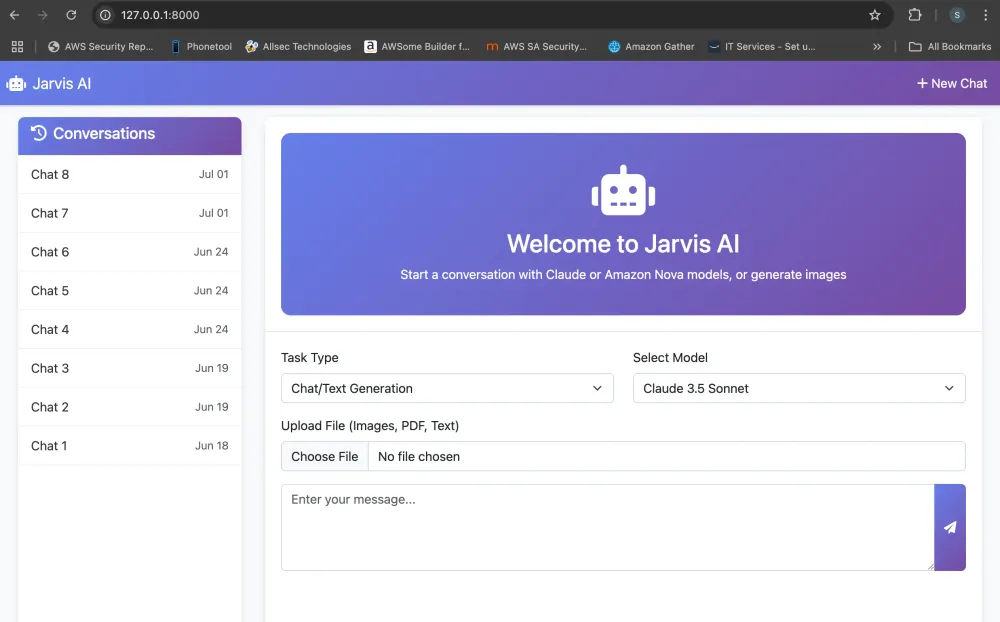
- Image Generation: Generate images using Amazon Nova Canvas with beautiful chat display
- LLM Models: Support for Claude and Amazon Nova models
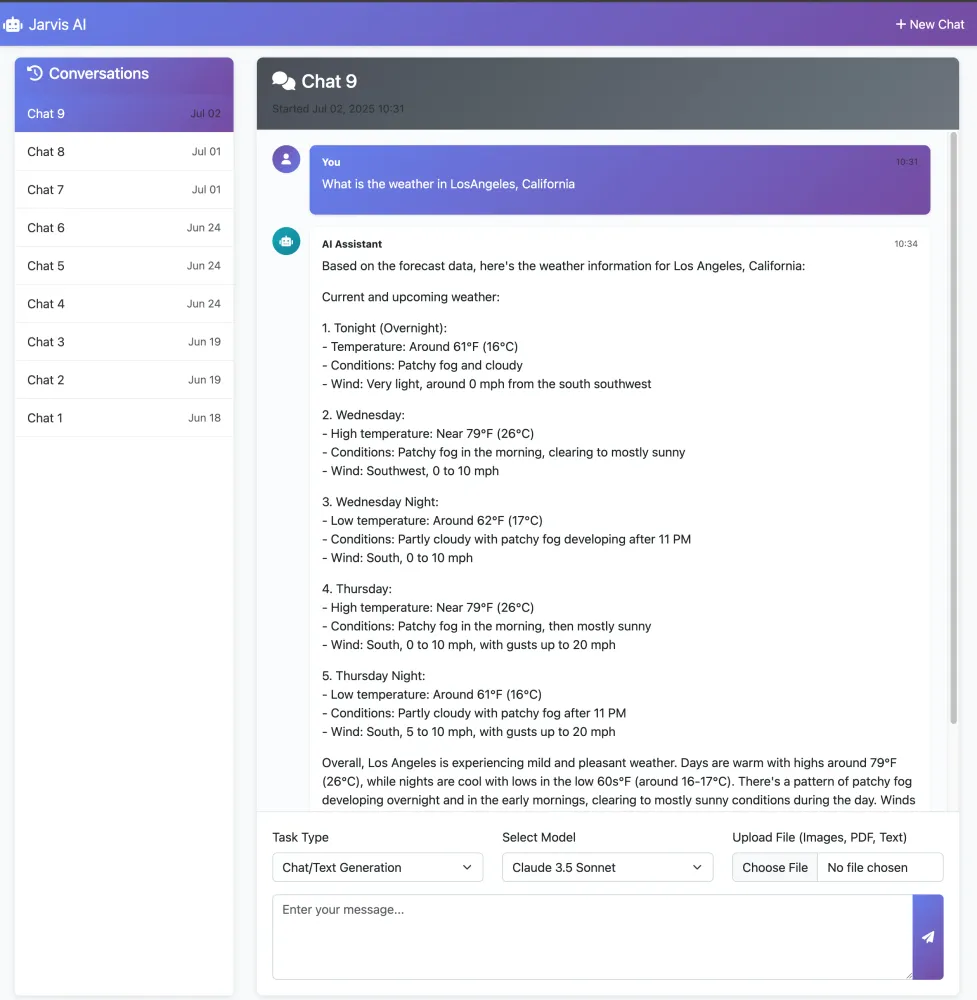
- MCP Server Integration: MCP servers running in the EKS cluster that are scalable and fronted by the AWS ALB.
- File Processing: Upload and analyze PDFs, images, and text files
- Conversation Management: Track conversation history with rich message types
- Real-time UI: Typing indicators, message animations, and interactive image controls
- Image Display: Full-screen modal, download, copy URL, and sharing capabilities
Project Structure
1
2
3
4
5
6
7
8
9
10
11
12
13
14
15
16
17
18
19
20
21
22
23
24
25
26
27
28
29
30
31
32
33
34
35
36
37
38
39
40
41
42
43
44
45
46
47
48
49
50
51
52
bedrock_app/
├── bedrock_interface/          # Main application
│   ├── __init__.py
│   ├── admin.py               # Admin interface configuration
│   ├── apps.py               # App configuration
│   ├── bedrock_service.py    # Strands integration & image generation
│   ├── forms.py              # Form definitions
│   ├── migrations/           # Database migrations
│   │   ├── __init__.py
│   │   ├── 0001_initial.py
│   │   ├── 0002_message_file_path.py
│   │   └── 0003_message_generated_image_path_message_message_type.py
│   ├── models.py             # Database models
│   ├── templates/            # HTML templates
│   │   └── bedrock_interface/
│   │       ├── base.html
│   │       ├── conversation_detail.html
│   │       └── home.html
│   ├── templatetags/         # Custom template filters
│   │   ├── __init__.py
│   │   └── file_filters.py
│   ├── tests.py             # Unit tests
│   ├── urls.py              # URL routing
│   └── views.py             # View logic
├── bedrock_project/          # Django project settings
│   ├── __init__.py
│   ├── asgi.py              # ASGI configuration
│   ├── settings.py          # Project settings
│   ├── urls.py              # Project URL configuration
│   └── wsgi.py              # WSGI configuration
├── mcp_servers/             # MCP server implementations
│   ├── deploy.sh            # EKS deployment script
│   ├── Dockerfile          # MCP servers container configuration
│   ├── echo_mcp.py         # Echo functionality server
│   ├── k8s/                # Kubernetes configurations
│   │   └── deployment.yaml # EKS deployment configuration
│   ├── README.md           # MCP servers documentation
│   ├── requirements.txt    # MCP server dependencies
│   ├── server.py           # Main MCP server runner
│   ├── setup-iam.sh        # IAM role setup script
│   ├── trust-policy.json   # IAM trust policy
│   └── weather_mcp.py      # Weather data server
├── tests/                   # Test suite
│   ├── README.md           # Testing documentation
│   ├── test_file_processing.py
│   ├── test_image_generation.py
│   └── test_working_app.py
├── docker-compose.yml       # Docker Compose configuration
├── Dockerfile              # Main application container configuration
├── manage.py              # Django management script
├── README.md              # Project documentation
├── requirements.txt       # Project dependencies
Prerequisites
- Python 3.8+
- Django 5.2.3
- AWS account with access to Amazon Bedrock
- AWS CLI configured with appropriate permissions
- Required Python packages: boto3, botocore, gunicorn, strands-agents, strands-agents-tools, mcp, fastapi, fastmcp, uvicorn
Phase 1
Deploying the MCP servers to EKS cluster
MCP Servers Configuration
This project contains two Model Context Protocol (MCP) servers that can be configured and deployed in Kubernetes specifically in the AWS EKS clusters
MCP Servers
1. Weather MCP - Provides weather forecasts and alerts using the National Weather Service API.
2.** Echo MCP - Simple echo server that has two tools.
Deployment
The MCP servers are containerized and can be deployed on Amazon EKS. The deployment file for EKS
k8s/deployment.yaml is included to help you get started. The MCP servers are exposed via an Application Load Balancer using AWS ALB Ingress Controller.Steps
1
cd mcp_servers
1.Creating the EKS cluster
1
2
3
4
5
eksctl create cluster --name mcp-servers \
  --nodegroup-name mcp-worker-nodes \
  --node-type t3.medium \
  --nodes 3 --nodes-min 1 --nodes-max 4 \
  --region us-west-1
a. VPC CNI, CoreDNS, KubeProxy
1
2
3
4
5
6
7
8
# VPC CNI plugin
eksctl utils update-cluster-logging --name mcp-servers --region us-west-1 --approve

# Core DNS
eksctl utils update-coredns --cluster mcp-servers --region us-west-1 --approve

# KubeProxy
eksctl utils update-kube-proxy --cluster mcp-servers --region us-west-1 --approve
b. AWS LoadBalancer controller
1
2
3
4
5
6
7
8
9
10
11
12
13
14
15
16
17
18
19
20
21
22
23
24
25
26
27
28
#1 Create IAM policy
curl -o iam-policy.json https://raw.githubusercontent.com/kubernetes-sigs/aws-load-balancer-controller/main/docs/install/iam_policy.json

aws iam create-policy \
  --policy-name AWSLoadBalancerControllerIAMPolicy \
  --policy-document file://iam-policy.json

#2 Create IAM role & service account

eksctl create iamserviceaccount \
  --cluster mcp-servers \
  --namespace kube-system \
  --name aws-load-balancer-controller \
  --attach-policy-arn arn:aws:iam::<AWS_ACCOUNT_ID>:policy/AWSLoadBalancerControllerIAMPolicy \
  --approve

#3 Install AWS Load Balancer Controller

helm repo add eks https://aws.github.io/eks-charts
helm repo update

helm install aws-load-balancer-controller eks/aws-load-balancer-controller \
  -n kube-system \
  --set clusterName=mcp-servers \
  --set serviceAccount.create=false \
  --set serviceAccount.name=aws-load-balancer-controller \
  --set region=us-west-1 \
  --set vpcId=<YOUR_VPC_ID>
2. Creating the ECR repository for storing the docker image
1
aws ecr create-repository --repository-name mcp-server --region us-west-1
3. Create the IAM role for the service account
1
./setup-iam.sh
4. .env file
1
2
3
4
5
6
7
AWS_ACCOUNT_ID=<your AWS Account ID>
AWS_REGION=<AWS REGION>
OIDC_PROVIDER_ID=<OIDC Provider ID> #can be obtained from the eks cluster that is crated above
K8S_NAMESPACE=mcp-servers
K8S_SERVICE_ACCOUNT=mcp-service-account
CLUSTER_NAME=mcp-servers # your cluster name
ECR_REPO=${AWS_ACCOUNT_ID}.dkr.ecr.${AWS_REGION}.amazonaws.com/mcp-servers
Step 2
Kubernetes Deployment
1
./deploy.sh
MCP Endpoints
When running the server in the EKS cluster
{ALB_DNS}/weather-mcp/mcp- Weather services{ALB_DNS}/echo-mcp/mcp- Echo services{ALB_DNS}/health- Health check
Phase 2
Running the application locally
Clone the Repository
1
2
git clone https://github.com/SAKETHREDDY1/bedrock-mcp-eks.git
cd bedrock_app
Create and activate virtual environment
1
2
python3 -m venv venv
source venv/bin/activate
Install the dependencies
1
pip install -r requirements.txt
Configure AWS Credentials
1
aws configure
Run the application
1
python manage.py runserver
After running the application you should be able to access the application at http://127.0.0.1:8000/ in your browser
Key Benefits
- LLM-Driven Intelligence: Bedrock allows access to multiple top-tier foundation models securely.
- Agentic Reasoning: StrandsAgent enables complex workflows without hand-coding logic.
- Scalability & Resilience: EKS ensures the MCP backend services scale automatically and remain highly available.
- Modularity: Easily extend the chat by plugging in more tools or data sources via MCP.
Conclusion:
- The integration of Bedrock with EKS-hosted MCP servers creates a flexible foundation for building scalable AI applications that could be leveraged across multiple use cases and customer segments
- The architecture pattern demonstrated could serve as a reference implementation for other teams building GenAI applications on AWS
Enjoyed reading this content? Let the author know!
Your likes, comments, shares, and saves help creators reach more builders.

Loading recommendations
Loading article