

Claude PDF Support on Amazon Bedrock
Claude on Amazon Bedrock now processes PDFs natively with full visual understanding of charts, graphs, and tables. Complete guide with Python code examples.

🚀 Ready to dive in? Explore our interactive Jupyter notebook with complete code samples, hands-on examples, and performance benchmarks to get started with native PDF support today.
Introduction
Document processing has long been a challenge for enterprises dealing with complex PDFs containing charts, graphs, tables, and mixed layouts. Today, we're exploring Claude's native PDF support on Amazon Bedrock, a capability that fundamentally transforms how AI can understand documents by preserving visual context alongside text.
Our comprehensive notebook demonstrates this breakthrough capability through real-world examples, showing how Claude on Bedrock can now see and understand PDFs the way humans do, without any preprocessing required.
The Problem with Traditional PDF Processing
For years, processing PDFs meant extracting text and hoping for the best. Charts became meaningless numbers. Graphs lost their visual story. Tables turned into jumbled text. Critical information embedded in visual elements simply disappeared.
In our testing with a technical report containing performance charts and data visualizations, traditional text extraction captured only part of the document's actual information using Converse document chat. The bar charts comparing model performance? Gone. The line graphs showing usage patterns over time? Invisible. The carefully formatted tables? Scrambled and confused.
What Changes with Native PDF Support
Claude's native PDF support on Amazon Bedrock changes everything. Instead of receiving extracted text, Claude processes the actual PDF pages as images combined with text extraction, maintaining complete document fidelity.
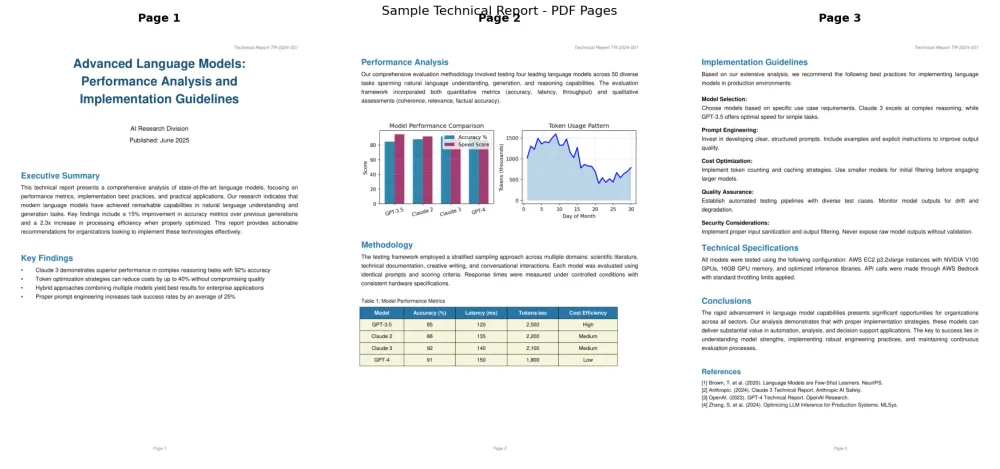
When we tested the same technical report with native PDF support, Claude could accurately describe:
- The specific values in bar charts (like "Claude 3 achieving 92% accuracy")
- Trends in line graphs (identifying peaks of 1,500 tokens early in the month)
- Complete table structures with all relationships preserved
- The spatial context that connects captions to figures
This isn't incremental improvement, it's a fundamental shift in capability.
Want to Get Started Quickly in Python?
Here's a simple example that demonstrates the power of native PDF support with visual understanding:
import jsonimport boto3import base64
# Read and encode the PDFwith open("sample_technical_report.pdf", "rb") as pdf_file:    encoded_pdf = base64.b64encode(pdf_file.read()).decode("utf-8")
# Prepare the request with prompt caching enabledrequest_body = {    "anthropic_version": "bedrock-2023-05-31",    "messages": [        {            "role": "user",            "content": [                {                    "type": "document",                    "source": {                        "type": "base64",                        "media_type": "application/pdf",                        "data": encoded_pdf                    },                    "title": "Technical Report",                    "citations": {"enabled": True},                    "cache_control": {"type": "ephemeral"}  # Enable prompt caching!                },                {                    "type": "text",                    "text": "What charts or graphs are shown in this document? Describe what you see in any visual elements."                }            ]        }    ],    "max_tokens": 500}
# Make the API callresponse = bedrock_client.invoke_model(    modelId="us.anthropic.claude-sonnet-4-20250514-v1:0",    contentType='application/json',    accept='application/json',    body=json.dumps(request_body))
# Parse and display the responseresponse_body = json.loads(response['body'].read())print("Claude's Analysis:")
for block in response_body.get('content', []):    if block.get('type') == 'text':        print(block.get('text', ''))
Understanding the Token Economics
One of the first things you'll notice is the difference in token usage:
- For three pages of traditional text extraction using Converse Document Chat: approximately 1,000 tokens
- For three pages of Claude PDF support with visual understanding: approximately 7,000 tokens
Why the increase? Because Claude is actually seeing your document, every chart, every diagram, every visual element, not just reading extracted text. Those extra tokens represent genuine visual understanding that was previously impossible.
But here's where it gets interesting: prompt caching. When you analyze the same document multiple times (common in real-world applications), subsequent analyses use cached tokens at a 90% discount. Our testing shows that analyzing a document can cost five times less than two full analyses without caching.
The Critical Implementation Detail
There's one crucial technical detail that can make or break your implementation: the Converse API's citation requirement.
Amazon Bedrock offers two APIs for PDF processing, InvokeModel and Converse. While InvokeModel gives you straightforward access to PDF capabilities, the Converse API has a peculiarity: it operates in two distinct modes:
- Document Chat mode: Basic text extraction only
- Claude PDF Chat mode: Full visual understanding
To access Claude's visual capabilities through Converse, you must enable citations. Without this flag, Converse silently falls back to basic text extraction, and you'll wonder why Claude can't see your charts. This isn't optional, it's required for visual understanding in Converse.
Here's how to properly use the Converse API with native PDF support:
with open("sample_technical_report.pdf", "rb") as pdf_file:    pdf_bytes = pdf_file.read()
# Prepare the messagemessages = [    {        "role": "user",        "content": [            {                "document": {                    "name": "Technical Report",                    "format": "pdf",                    "source": {                        "bytes": pdf_bytes  # Raw bytes, not base64!                    },                    "citations": {"enabled": True}  # REQUIRED for Claude's PDF support in Converse!                }            },            {                "text": "What visual elements (charts, graphs, diagrams) are present in this document? Describe what they show."            }        ]    }]
# Make the converse callresponse = bedrock_client.converse(    modelId="us.anthropic.claude-sonnet-4-20250514-v1:0",    messages=messages,    inferenceConfig={        "maxTokens": 500,        "temperature": 0.5    })
# Display the responseprint("Claude's Analysis:")output = response.get('output', {})
if 'message' in output:    content = output['message'].get('content', [])    for item in content:        if 'text' in item:            print(item['text'], end="")        elif 'citationsContent' in item:            print(f"'{item['citationsContent']['content'][0]['text']}'", end="")
Real-World Performance Insights
Our notebook includes extensive performance testing that reveals fascinating patterns:
Processing Speed: Full visual analysis of a 3-page technical PDF completes in seconds, not minutes. This includes understanding two charts, a data table, and formatted text across multiple sections.
Scalability: With prompt caching, the economics become compelling. The first analysis might use 6,793 tokens, but subsequent queries against the same document leverage cached tokens. For applications that repeatedly analyze documents (think compliance reviews or research analysis), this represents massive cost optimization.
Citation Capabilities: Beyond Basic Extraction
One of the most powerful features is precise citation extraction. Every piece of information Claude extracts can be traced back to its exact location in the document with page-level precision.
In our testing, Claude could not only quote specific passages but also indicate exactly where they appeared: "Token optimization strategies can reduce costs by up to 40% - Source: Technical Report, Pages 1-2." This level of attribution is essential for:
- Legal document review requiring source verification
- Academic research demanding proper citations
- Compliance workflows needing audit trails
- Any application where "trust but verify" is critical
Practical Applications Across Industries
The notebook demonstrates use cases that span industries:
Financial Services: Quarterly reports often contain complex charts showing revenue trends, market share visualizations, and performance comparisons. Native PDF support can extract not just the numbers but understand the visual story they tell.
Healthcare and Research: Scientific papers routinely include graphs of experimental results, diagrams of processes, and tables of data. Researchers can now query these visual elements directly: "What does Figure 3 show about the treatment efficacy?"
Manufacturing and Engineering: Technical specifications include diagrams, schematics, and visual quality metrics. Engineers can ask about specific components shown in diagrams or trends in quality control charts.
Legal and Compliance: Beyond text extraction, understanding document layout and structure helps identify key sections, related clauses, and cross-references that pure text extraction would miss.
Choosing the Right Approach
Our testing revealed clear patterns for when to use each API:
Use InvokeModel when:
- You need maximum control over the request
- Citations are optional for your use case
- You're building a one-shot analysis tool
- You want direct prompt caching control
Use Converse when:
- You're building conversational interfaces
- You need multi-turn document discussions
- You want simplified message handling
- (But remember: citations are required for visual understanding)
Best Practices from Our Testing
Through extensive experimentation documented in the notebook, several best practices emerged:
Ask Visual Questions: Generic prompts like "summarize this document" underutilize the capability. Instead, ask specifically about visual elements: "What trends do the charts show?" or "What data is presented in the tables?"
Leverage Prompt Caching: For documents you'll analyze repeatedly, enabling prompt caching is essential. The 90% read token pricing reduction transforms the economics of document analysis at scale.
Validate Visual Understanding: When accuracy is critical, ask Claude to describe what it sees in charts and diagrams. This helps verify that visual elements are being interpreted correctly.
The Streaming Experience
For better user experience, especially with longer documents, the notebook demonstrates streaming responses. Users see analysis results immediately rather than waiting for complete processing. This is particularly valuable for interactive applications where responsiveness matters.
Looking Forward
Native PDF support represents a paradigm shift in document intelligence. We're moving from asking "What text is in this document?" to "What does this document mean?",including all its visual elements, relationships, and context.
The capability opens new possibilities:
- Automated report analysis that understands visualizations
- Research tools that can query figures and diagrams
- Compliance systems that preserve complete document context
- Educational applications that can explain visual content
Getting Started
Ready to explore native PDF support for your use case? Our comprehensive notebook on GitHub provides:
- Complete working examples for both InvokeModel and Converse APIs
- Performance benchmarking tools
- Cost optimization strategies with prompt caching
- Error handling patterns
- Advanced techniques for complex documents
Visit the implementation notebook to see these capabilities in action and start building your own document intelligence applications.
Conclusion
Native PDF support on Amazon Bedrock isn't just a feature, it's an enabler for entirely new categories of document understanding applications. By preserving visual context and providing precise citations, Claude can now understand documents as completely as humans do, opening possibilities we're just beginning to explore.
What document intelligence challenges could this solve in your organization? The notebook provides everything you need to find out.
Enjoyed reading this content? Let the author know!
Your likes, comments, shares, and saves help creators reach more builders.

Loading recommendations
Loading article