
Microsoft Bitnet 1.58-bit LLMs on AWS Lambda
Deploying Microsoft Bitnet 1.58-bit 2 billion parameter LLMs on AWS Lambda

What you'll learn (tl;dr) In ~12 minutes you'll see how to deploy Microsoft's BitNet 1.58-bit quantized 2 billion parameter LLM on AWS Lambda, the container-based architecture, and performance benchmarks across different memory configurations using the microsoft/bitnet-b1.58-2B-4T model.
What is BitNet
Microsoft's BitNet
microsoft/bitnet-b1.58-2B-4T is a 1.58-bit quantized model that uses ternary values 1. At ~1.1GB, it fits within Lambda's memory and storage constraints.Model Characteristics
Microsoft's BitNet
microsoft/bitnet-b1.58-2B-4T uses 1.58-bit quantization with ternary values 1:- Model size: ~1.1GB including dependencies
- CPU inference: No GPU required
- Memory requirements: Fits within Lambda's memory limits
- Text processing: Designed for natural language tasks
Lambda bills per millisecond and doesn't provide GPU access, making CPU-optimized models necessary.
Architecture
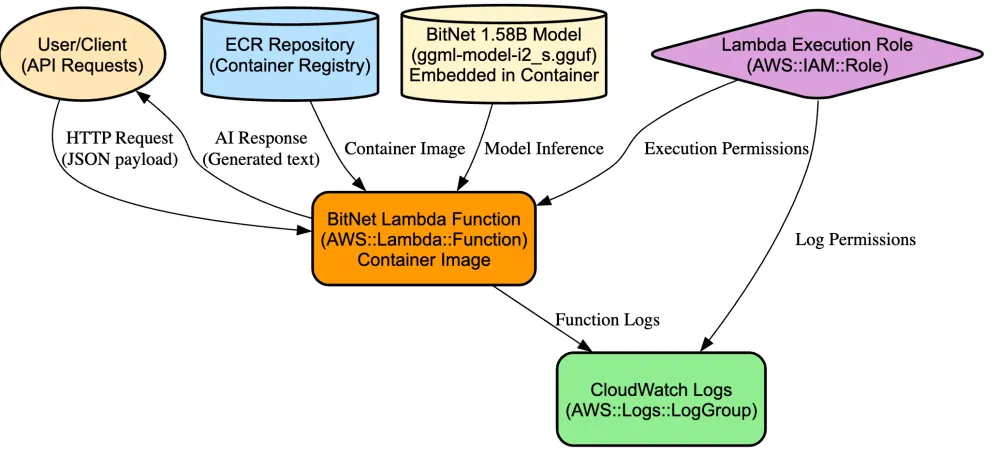
The deployment uses serverless execution with the model embedded in the container image:
- No network calls during inference - Model and code are in the same container
- Single deployment unit - No external model storage dependencies
- Consistent behavior - Same environment across all invocations
Multi-Stage Docker Build
The deployment uses a multi-stage Docker build that separates compilation from runtime.
Stage 1: Builder Environment
Creates a development environment to compile BitNet from source. Uses
python:3.9-bullseye with cmake, build-essential, git, and clang.The critical step is generating ARM-optimized computational kernels. Lambda runs on ARM64 processors, so BitNet's code generation utility pre-compiles optimized matrix multiplication kernels for this architecture.
Compilation includes Lambda-specific optimizations: OpenMP disabled (
-DGGML_OPENMP=OFF) because Lambda's sandboxed environment doesn't support shared memory operations. ARM template optimizations enabled (-DBITNET_ARM_TL1=ON) for ARM64 instruction sets. Static linking (-DBUILD_SHARED_LIBS=OFF) embeds all dependencies into the binary.Stage 2: Runtime Environment
Creates a minimal production environment using
python:3.9-slim. Installs only AWS Lambda Runtime Interface Client (awslambdaric) and requests library.Copies only the compiled
llama-server binary and BitNet model file from the builder stage. The final container includes the optimized binary without build tools, source code, or compilation artifacts.1
2
3
4
5
6
7
8
9
10
11
12
13
14
15
16
17
18
19
20
21
22
23
24
25
26
27
28
29
30
31
32
33
34
# Stage 1: Builder - Heavy build environment
FROM python:3.9-bullseye as builder
# Install build dependencies
RUN apt-get update && \
apt-get install -y cmake build-essential git clang && \
rm -rf /var/lib/apt/lists/*
# Copy BitNet source and model
COPY temp/BitNet /app/BitNet
COPY temp/models/BitNet-b1.58-2B-4T/ggml-model-i2_s.gguf /app/BitNet/models/BitNet-b1.58-2B-4T/
# Generate ARM-optimized kernels for Lambda's ARM64 runtime
RUN python utils/codegen_tl1.py --model bitnet_b1_58-3B --BM 160,320,320 --BK 64,128,64 --bm 32,64,32
# Build with Lambda-specific optimizations
RUN cmake -B build -DBITNET_ARM_TL1=ON -DCMAKE_C_COMPILER=clang -DCMAKE_CXX_COMPILER=clang++ \
-DBUILD_SHARED_LIBS=OFF -DGGML_OPENMP=OFF
RUN cmake --build build --config Release
# Stage 2: Runtime - Minimal production environment
FROM python:3.9-slim
# Install only runtime dependencies
RUN pip install --no-cache-dir awslambdaric requests
# Copy only the compiled binary and model from builder stage
COPY --from=builder /app/BitNet/build/bin/llama-server /app/bin/
COPY --from=builder /app/BitNet/models/BitNet-b1.58-2B-4T/ggml-model-i2_s.gguf /app/models/
# Copy Lambda handler and set up runtime
COPY app/lambda_handler.py /var/task/
WORKDIR /var/task
CMD ["python", "-m", "awslambdaric", "lambda_handler.lambda_handler"]Build Process
This multi-stage approach reduces final image size and ensures Lambda compatibility by including ARM64 optimizations and removing problematic dependencies like OpenMP. Each deployment requires full compilation, but this produces a container optimized for Lambda's constraints.
Lambda Runtime Optimizations
The Lambda environment requires specific threading configurations to prevent model initialization failures:
1
2
3
4
5
# Critical environment overrides for Lambda
os.environ['OMP_NUM_THREADS'] = '1'
os.environ['OMP_THREAD_LIMIT'] = '1'
os.environ['GGML_OPENMP'] = 'OFF'
os.environ['KMP_DUPLICATE_LIB_OK'] = 'TRUE'
These settings prevent the threading conflicts that plague many ML workloads in Lambda's sandboxed environment.
Getting Started
The complete working implementation is available at github.com/manu-mishra/one-bit-llm-on-lambda and further readings are available at my blog . The deployment process is streamlined into three modular scripts:
1. Initialize and Download
1
2
3
git clone https://github.com/manu-mishra/one-bit-llm-on-lambda.git
cd one-bit-llm-on-lambda
./scripts/1-initialize.sh
Important: You need a Hugging Face token to download the BitNet model:
- Get your token from: https://huggingface.co/settings/tokens
- Create a token with "Read" permissions
- The script includes retry logic if authentication fails
Downloads BitNet source and model (~1.1GB) from Microsoft's Hugging Face repository.
2. Deploy Infrastructure
1
2
cd cdk && python -m venv .venv && source .venv/bin/activate && pip install -r requirements.txt && cd ..
./scripts/2-deploy-lambda.sh
Uses AWS CDK to provision AWS Lambda, Amazon ECR, IAM roles, and supporting infrastructure.
3. Test Inference
1
./scripts/3-test-lambda.sh
Tests the deployment with a sample prompt. For performance testing across memory configurations:
1
./scripts/5-benchmark.sh
The repository includes AWS CDK infrastructure code, Docker configuration, testing utilities, and documentation.
Performance Results
2gb configuration for lambda showcased the best results, read the full results here (link) :
Observations:
Observations:
- Cold start times: 12-13 seconds across memory configurations
- Warm inference scales with token count
- Memory above 2GB shows minimal improvement
Inference Parameters
1
2
3
4
5
6
7
8
{
  "prompt": "User: Explain 1-bit quantization benefits\n\nAssistant:",
  "n_predict": 32,
  "temperature": 0.7,
  "top_p": 0.9,
  "top_k": 40,
  "repeat_penalty": 1.1
}
These parameters control response generation. The model handles conversational AI, code generation, and text analysis tasks.
Implementation Notes
This deployment pattern shows that:
- Quantized models can run on Lambda's CPU infrastructure
- Container-based deployment enables ML workloads on Lambda
- Performance scales with token generation requirements
- Cold start times are consistent across memory configurations
The approach works for applications with sporadic inference needs where 12-13 second cold starts are acceptable.
What's Next?
BitNet + Lambda deployment has specific trade-offs. 1.58-bit quantization enables serverless deployment but has accuracy limitations compared to full-precision models. This makes it suitable for specific use cases.
Areas of development include:
- Quantization techniques: Improving model accuracy while maintaining efficiency
- Application matching: Finding use cases where the efficiency/accuracy trade-off works
- Hybrid workflows: Combining lightweight models with full-precision models for different tasks
- Model routing: Automatically selecting appropriate model sizes based on request complexity
The field is developing, and current approaches may be replaced by better quantization methods or deployment patterns.
Key takeaway: 1.58-bit quantization enables LLM deployment on Lambda's CPU infrastructure. This approach has specific use cases and performance characteristics, demonstrating one path for serverless AI inference without GPU requirements.
Enjoyed reading this content? Let the author know!
Your likes, comments, shares, and saves help creators reach more builders.

Loading recommendations
Loading article