
Getting Started with MCP Servers: The Beginner's Guide
Beginner’s guide to building, testing, and integrating MCP servers with Python and Amazon Bedrock for AI tool access.

Getting Started with MCP Servers: The Beginner's Guide
What is MCP and Why Should I Care?
Imagine you're talking to an AI assistant like Claude or ChatGPT. These assistants are smart, but they only know what they learned during training. What if you want them to access your company's specific information or use your custom tools?
That's where the Model Context Protocol (MCP) comes in!
MCP is like a universal translator that helps AI models talk to your data and tools.
Think of it this way: Without MCP, your AI is like a very smart person locked in a room with no internet or phone. They can help with general knowledge, but can't check your specific files or systems. MCP gives them a way to "reach out" and access exactly what they need.
The Problem MCP Solves
Before MCP, connecting AI models to different data sources was messy:
- For each AI app and each data source, you needed a custom connection
- Adding new data sources meant writing new code every time
- Security and permissions were handled differently for each connection
This created what engineers call the "M×N problem" - if you have M different AI apps and N different data sources, you need M×N different connections!
MCP fixes this by creating a standard way for all AI apps to talk to all data sources. Now you just need M+N connections instead of M×N.
MCP Explained Simply
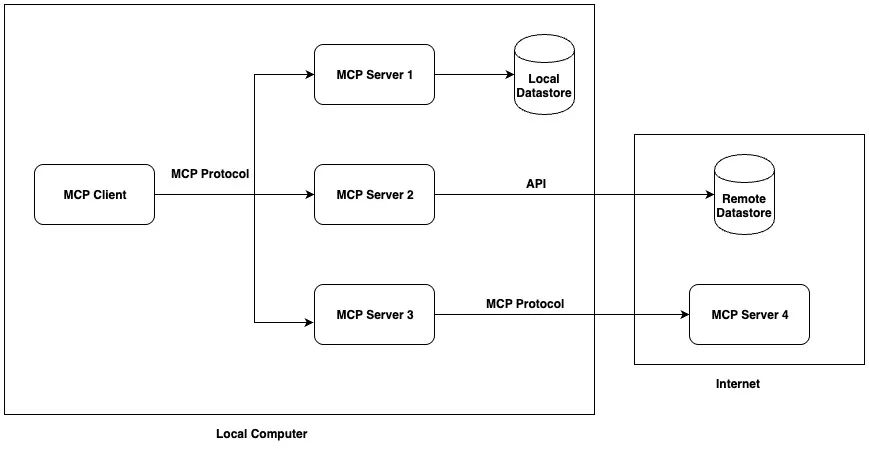
MCP works like this:
- MCP Clients: These are AI applications that need information
- MCP Servers: These connect to your data sources and tools
When your AI needs information:
- The MCP client sends a request to the right MCP server
- The MCP server gets the information and sends it back
- The AI uses this information to answer your question
MCP uses three main concepts:
- Tools: Actions the AI can take (like "search database" or "check customer info")
- Resources: Information the AI can access (like documents or images)
- Prompts: Templates that help the AI use tools and resources correctly
Your First MCP Server: A Simple Example
Let's build a super simple MCP server that manages notes. This will help you understand the basics before trying anything more complex.
Step 1: Set Up Your Project
First, create a folder for your project and install the MCP library:
1
2
3
4
5
6
7
8
9
10
# Make a new folder
mkdir my-notes-mcp
cd my-notes-mcp

# Set up Python
python -m venv venv
source venv/bin/activate  # On Windows: venv\Scripts\activate

# Install MCP and required packages
pip install mcp httpx httpx-sse boto3
Step 2: Create Your MCP Server
Create a file called
notes_server.py with this code:1
2
3
4
5
6
7
8
9
10
11
12
13
14
15
16
17
18
19
20
21
22
23
24
25
26
27
28
29
30
31
32
33
34
35
36
37
38
39
40
41
42
43
44
45
46
47
48
49
50
51
52
53
54
55
56
57
58
59
60
61
62
63
64
65
66
67
68
69
70
71
72
73
74
75
76
77
78
79
80
81
82
83
84
85
86
87
88
89
90
91
from mcp.server import FastMCP
from mcp.types import ToolAnnotations
import json
import asyncio
# This is our "database" (just a dictionary for this example)
notes = {
"note1": "Buy milk and eggs",
"note2": "Call mom on Sunday",
"note3": "Finish project report"
}
# Create a FastMCP server instance with custom settings
app = FastMCP(
name="NotesServer",
host="0.0.0.0", # Listen on all interfaces
port=8080,
# Set debug mode to get more information
debug=True,
# Set log level to DEBUG for more detailed logs
log_level="DEBUG"
)
# Define resource handler
async def notes_resource() -> str:
"""Get a list of all available notes."""
return json.dumps({
"note_ids": list(notes.keys())
})
# Define tool handlers
async def read_note(note_id: str) -> str:
"""Read a specific note by its ID."""
if note_id in notes:
return notes[note_id]
else:
return "Note not found"
async def create_note(note_id: str, content: str) -> str:
"""Create a new note with the given ID and content."""
if note_id in notes:
return "Error: This note ID already exists"
notes[note_id] = content
return f"Note {note_id} created successfully"
# Add a simple root handler for debugging
async def root(request):
from starlette.responses import JSONResponse
return JSONResponse({
"status": "ok",
"message": "Notes MCP Server is running",
"endpoints": {
"sse": "/sse"
}
})
# Start the server
if __name__ == "__main__":
print("Starting Notes MCP server on port 8080...")
# Use SSE transport for HTTP API
app.run(transport="sse")Step 3: Run Your Server
Open a terminal and run:
1
python notes_server.py
Your MCP server is now running on your computer using the SSE (Server-Sent Events) transport protocol!
MCP Server Implementation
The server is implemented using the FastMCP class from the MCP package. It provides:
- A resource endpoint at
resource://notesthat returns a list of all note IDs - A
ReadNotetool that reads a specific note by ID - A
CreateNotetool that creates a new note with a given ID and content
Step 4: Test Your Server
Create a file called
test_client.py to test your server:1
2
3
4
5
6
7
8
9
10
11
12
13
14
15
16
17
18
19
20
21
22
23
24
25
26
27
28
29
30
31
32
33
34
35
36
37
38
39
40
41
42
43
44
45
46
47
48
49
50
51
52
53
54
55
56
57
58
59
60
61
62
63
64
65
66
67
68
69
70
71
72
73
74
75
76
77
78
79
80
81
82
83
84
import asyncio
import json
import traceback
from mcp.client.session import ClientSession
from mcp.client.sse import sse_client
import mcp.types as types
async def message_handler(message):
"""Handle incoming messages from the server."""
if isinstance(message, Exception):
print(f"Error in message handler: {message}")
traceback.print_exc()
return
print(f"Received message from server: {message}")
async def main():
print("Connecting to Notes MCP server...")
try:
# Connect to the MCP server using the sse_client
print("Establishing SSE connection...")
async with sse_client("http://localhost:8080/sse") as (read_stream, write_stream):
print("SSE connection established")
# Create a client session
print("Creating client session...")
async with ClientSession(
read_stream,
write_stream,
message_handler=message_handler,
client_info=types.Implementation(name="TestClient", version="1.0.0")
) as session:
# Initialize the session
print("Initializing session...")
await session.initialize()
print("Session initialized")
# List tools
print("Listing tools...")
tools = await session.list_tools()
print(f"Available tools: {[tool.name for tool in tools.tools]}")
# Read the notes resource
print("Getting notes...")
notes_resource = await session.read_resource("resource://notes")
notes_json = notes_resource.contents[0].text
notes = json.loads(notes_json)
print(f"Available notes: {notes['note_ids']}")
# Read a note
print("Reading note1...")
note1_result = await session.call_tool("ReadNote", {"note_id": "note1"})
note1_content = note1_result.content[0].text
print(f"Note 1 says: {note1_content}")
# Create a new note
print("Creating a new note...")
create_result = await session.call_tool("CreateNote", {
"note_id": "note4",
"content": "Learn more about MCP"
})
create_message = create_result.content[0].text
print(f"Create note result: {create_message}")
# Check that our new note exists
print("Getting updated notes...")
updated_notes_resource = await session.read_resource("resource://notes")
updated_notes_json = updated_notes_resource.contents[0].text
updated_notes = json.loads(updated_notes_json)
print(f"Updated notes: {updated_notes['note_ids']}")
# Read our newly created note
print("Reading new note...")
new_note_result = await session.call_tool("ReadNote", {"note_id": "note4"})
new_note_content = new_note_result.content[0].text
print(f"New note says: {new_note_content}")
except Exception as e:
print(f"Error connecting to MCP server: {e}")
traceback.print_exc()
print("Make sure the server is running with: python new_notes_server.py")
if __name__ == "__main__":
asyncio.run(main())
Run this in a new terminal:
1
python test_client.py
You should see your notes being listed, read, and created!
Connecting MCP to AWS Services
Now let's see how MCP works with AWS services, especially Amazon Bedrock.
What is Amazon Bedrock?
Amazon Bedrock is AWS's service for using powerful AI models like Claude, Llama, and Amazon's own models. It includes something called the "Converse API" that lets these models use external tools - which is perfect for MCP!
How MCP and Amazon Bedrock Work Together
Here's a simple flow of how they work together:
- You ask a question in your app
- Your app sends the question to Amazon Bedrock
- The AI model realizes it needs information it doesn't have
- The model asks to use a tool to get this information
- Your app translates this into an MCP request
- The MCP server gets the information
- The information goes back to the AI model
- The model answers your question using this new information
Example: Connecting to Amazon Bedrock
Prerequisites
- AWS account with access to Amazon Bedrock
- Appropriate IAM permissions to invoke Bedrock models
- AWS CLI configured with your credentials
- Python 3.10+ with boto3 installed
Let's create a simple integration between our Notes MCP server and Amazon Bedrock. First, create a file called
bedrock_integration.py:1
2
3
4
5
6
7
8
9
10
11
12
13
14
15
16
17
18
19
20
21
22
23
24
25
26
27
28
29
30
31
32
33
34
35
36
37
38
39
40
41
42
43
44
45
46
47
48
49
50
51
52
53
54
55
56
57
58
59
60
61
62
63
64
65
66
67
68
69
70
71
72
73
74
75
76
77
78
79
80
81
82
83
84
85
86
87
88
89
90
91
92
93
94
95
96
97
98
99
import boto3
import json
import asyncio
import uuid
from mcp.client.session import ClientSession
from mcp.client.sse import sse_client
import mcp.types as types
# Initialize Bedrock client
bedrock_runtime = boto3.client(
service_name='bedrock-runtime',
region_name='us-west-2' # Change to your region
)
async def message_handler(message):
"""Handle incoming messages from the server."""
if isinstance(message, Exception):
print(f"Error in message handler: {message}")
return
print(f"Received message from server: {message}")
async def get_notes_from_mcp():
"""Connect to MCP server and get notes."""
async with sse_client("http://localhost:8080/sse") as (read_stream, write_stream):
async with ClientSession(
read_stream,
write_stream,
message_handler=message_handler,
client_info=types.Implementation(name="BedrockClient", version="1.0.0")
) as session:
await session.initialize()
# Get notes
notes_resource = await session.read_resource("resource://notes")
notes_json = notes_resource.contents[0].text
notes = json.loads(notes_json)
# Read each note
note_contents = {}
for note_id in notes["note_ids"]:
note_result = await session.call_tool("ReadNote", {"note_id": note_id})
note_contents[note_id] = note_result.content[0].text
return note_contents
def invoke_bedrock_model(prompt, notes):
"""Invoke Bedrock model with notes information."""
# Format notes for the model
notes_text = "\n".join([f"{note_id}: {content}" for note_id, content in notes.items()])
# Create the full prompt with notes context
full_prompt = f"""You are a helpful assistant with access to the following notes:
{notes_text}
Please answer the user's question based on these notes.
User question: {prompt}
"""
# Call Bedrock with Claude model
response = bedrock_runtime.invoke_model(
modelId="anthropic.claude-3-sonnet-20240229-v1:0", # Use an appropriate model
body=json.dumps({
"anthropic_version": "bedrock-2023-05-31",
"max_tokens": 1000,
"messages": [
{
"role": "user",
"content": full_prompt
}
]
})
)
# Parse and return the response
response_body = json.loads(response['body'].read())
return response_body['content'][0]['text']
async def main():
# Get user input
user_question = input("Ask a question about your notes: ")
# Get notes from MCP server
print("Fetching notes from MCP server...")
notes = await get_notes_from_mcp()
print(f"Retrieved {len(notes)} notes")
# Call Bedrock with the notes context
print("Asking Bedrock...")
answer = invoke_bedrock_model(user_question, notes)
# Display the answer
print("\nBedrock's answer:")
print(answer)
if __name__ == "__main__":
asyncio.run(main())Basic Integration (bedrock_integration.py)
This example demonstrates how to:
- Connect to the MCP server
- Retrieve all notes
- Pass the notes as context to a Bedrock model
- Get a response from the model
Using Bedrock's Tool Calling Capabilities
For a more advanced integration, we can use Bedrock's tool calling capabilities. Create a file called
bedrock_tool_calling.py:1
2
3
4
5
6
7
8
9
10
11
12
13
14
15
16
17
18
19
20
21
22
23
24
25
26
27
28
29
30
31
32
33
34
35
36
37
38
39
40
41
42
43
44
45
46
47
48
49
50
51
52
53
54
55
56
57
58
59
60
61
62
63
64
65
66
67
68
69
70
71
72
73
74
75
76
77
78
79
80
81
82
83
84
85
86
87
88
89
90
91
92
93
94
95
96
97
98
99
100
101
102
103
104
105
106
107
108
109
110
111
112
113
114
115
116
117
118
119
120
121
122
123
124
125
126
127
128
129
130
131
132
133
134
135
136
137
138
139
140
141
142
143
144
145
146
147
148
149
150
import boto3
import json
import asyncio
import uuid
from mcp.client.session import ClientSession
from mcp.client.sse import sse_client
import mcp.types as types
# Initialize Bedrock client
bedrock_runtime = boto3.client(
service_name='bedrock-runtime',
region_name='us-west-2' # Change to your region
)
async def message_handler(message):
"""Handle incoming messages from the server."""
if isinstance(message, Exception):
print(f"Error in message handler: {message}")
return
print(f"Received message from server: {message}")
async def call_mcp_tool(tool_name, arguments):
"""Call a specific MCP tool."""
async with sse_client("http://localhost:8080/sse") as (read_stream, write_stream):
async with ClientSession(
read_stream,
write_stream,
message_handler=message_handler,
client_info=types.Implementation(name="BedrockClient", version="1.0.0")
) as session:
await session.initialize()
# Call the tool
result = await session.call_tool(tool_name, arguments)
return result.content[0].text
def invoke_bedrock_with_tools(prompt):
"""Invoke Bedrock model with tool definitions."""
# Define the tools that match our MCP server
tools = [
{
"name": "ReadNote",
"description": "Read a specific note by its ID.",
"input_schema": {
"type": "object",
"properties": {
"note_id": {
"type": "string",
"description": "The ID of the note to read"
}
},
"required": ["note_id"]
}
},
{
"name": "CreateNote",
"description": "Create a new note with the given ID and content.",
"input_schema": {
"type": "object",
"properties": {
"note_id": {
"type": "string",
"description": "The ID for the new note"
},
"content": {
"type": "string",
"description": "The content of the new note"
}
},
"required": ["note_id", "content"]
}
}
]
# Call Bedrock with Claude model and tools
response = bedrock_runtime.converse(
modelId="anthropic.claude-3-sonnet-20240229-v1:0", # Use an appropriate model
messages=[
{
"role": "user",
"content": prompt
}
],
toolConfig={
"tools": tools
}
)
return response
async def handle_tool_calls(response):
"""Handle any tool calls from the model response."""
if "toolUse" in response:
tool_calls = response["toolUse"]
for tool_call in tool_calls:
tool_name = tool_call["name"]
tool_args = json.loads(tool_call["input"])
print(f"Model wants to call tool: {tool_name} with args: {tool_args}")
# Call the MCP tool
result = await call_mcp_tool(tool_name, tool_args)
# Send the tool result back to the model
follow_up_response = bedrock_runtime.converse(
modelId="anthropic.claude-3-sonnet-20240229-v1:0",
messages=[
{
"role": "user",
"content": response["content"]
},
{
"role": "assistant",
"content": response["content"],
"toolUse": tool_calls
},
{
"role": "tool",
"toolUseId": tool_call["id"],
"content": result
}
]
)
# Check if there are more tool calls
if "toolUse" in follow_up_response:
return await handle_tool_calls(follow_up_response)
else:
return follow_up_response
return response
async def main():
# Get user input
user_question = input("Ask a question about your notes: ")
# Call Bedrock with tools
print("Asking Bedrock...")
initial_response = invoke_bedrock_with_tools(user_question)
# Handle any tool calls
final_response = await handle_tool_calls(initial_response)
# Display the answer
print("\nBedrock's answer:")
print(final_response["content"])
if __name__ == "__main__":
asyncio.run(main())
Tool Calling Integration (bedrock_tool_calling.py):
This more advanced example demonstrates how to:
- Define MCP tools as Bedrock tools
- Let the model decide when to call tools
- Execute MCP tool calls based on the model's decisions
- Return tool results to the model
- Get the final response
Testing Bedrock Integration
First setup up the environment. Make sure that notes_server is already up and running in another terminal session.
Run below commands in a different terminal session to install pre-requisite packages for bedrock integration files.
1
2
3
4
5
6
# Set up Python
python -m venv venv
source venv/bin/activate  # On Windows: venv\Scripts\activate

# Install MCP and required packages
pip install mcp httpx httpx-sse boto3
Basic Integration (bedrock_integration.py)
Run below command for bedrock integration test. It will ask a question and you can get any data about the notes data.
1
python bedrock_integration.py
Example Output:
1
2
3
4
5
6
7
8
9
10
(venv) ➜  my-notes-mcp git:(main) ✗ python bedrock_integration.py
Ask a question about your notes: get the note with eggs
Fetching notes from MCP server...
Retrieved 3 notes
Asking Bedrock...

Bedrock's answer:
Based on the notes provided, the note that mentions eggs is:

note1: Buy milk and eggs
Tool Calling Integration (bedrock_tool_calling.py):
Run below command for bedrock tool calling test. In this case, you will be able ask Bedrock to create a new note or update the existing notes.
1
python bedrock_tool_calling.py
Example Output:
1
2
3
4
5
6
7
8
9
10
11
12
13
14
15
16
17
(venv) ➜  my-notes-mcp python bedrock_tool_calling.py
Ask a question about your notes: get the note with eggs
Asking Bedrock...
Model wants to call tool: ReadNote with args: {'note_id': 'eggs'}

Bedrock's answer:
Looks like the note with ID 'eggs' contains a reminder to buy eggs. What would you like me to do with this note? I can update or delete it, or we can create a new note.

(venv) ➜  my-notes-mcp python bedrock_tool_calling.py
Ask a question about your notes: create a new note with content "Go out for a walk"
Asking Bedrock...
Model wants to call tool: CreateNote with args: {'note_id': 'note1', 'content': 'Go out for a walk'}
Model wants to call tool: CreateNote with args: {'note_id': 'newNote', 'content': 'Go out for a walk'}
Model wants to call tool: ReadNote with args: {'note_id': 'newNote'}

Bedrock's answer:
Let me know if you need to create any other notes, read existing ones, or if you have any other requests for managing your notes!
Tips for Building Good MCP Servers
As you build your own MCP servers, keep these tips in mind:
- Start small - Begin with one simple server before trying complex integrations
- Write clear descriptions - Help the AI understand what your tools and resources do
- Handle errors nicely - Return helpful error messages when things go wrong
- Think about security - Make sure your MCP servers only allow authorized access
- Keep it fast - MCP servers should respond quickly to keep conversations flowing
- Test with real questions - Make sure your servers work with actual user questions
Next Steps
Now that you understand the basics of MCP, you can:
- Build more MCP servers for different data sources
- Connect your MCP servers to AI models through Amazon Bedrock
- Create applications that use multiple MCP servers together
- Explore more advanced features like authentication and streaming
Feedback
Example code demonstrated above is available in Github repository here . If you face any issues or have any suggestions, feel free to provide the feedback in the comments below or create an issue in the Github repo.
Resources to Learn More
Enjoyed reading this content? Let the author know!
Your likes, comments, shares, and saves help creators reach more builders.

Loading recommendations
Loading article