
Automating Security Checks with AWS Terraform MCP Server
AWS Q CLI + Terraform guide: Configure MCP Server for automated security scans & infra management. Covers setup, OS integration & security automation.


Introduction:
As a Solution Architect working with AWS, I've discovered how the AWS Terraform MCP Server can help build and manage infrastructure more effectively and securely. Today, I'd like to share my experience setting up this powerful tool that combines infrastructure as code best practices with security compliance.
Prerequisites:
- Install Amazon Q CLI (essential for MCP server interaction)
- Installing uv from Astral
plaintext
# On macOScurl -LsSf https://astral.sh/uv/install.sh | sh# On Windowspowershell -ExecutionPolicy ByPass -c "irm https://astral.sh/uv/install.ps1 | iex"
- Install Python using
uv python install 3.10
- Installing Terraform CLI:
Bash
# On macOSbrew tap hashicorp/tapbrew install hashicorp/tap/terraform# On Windows powershell# Using Chocolatey package managerchoco install terraform
- Installing Checkov Security Scanner:
Bash
# On macOSpip install checkov# On Windows# Using pippip install checkov# Or using PowerShellpython -m pip install checkov
Configuring MCP Server
Configure the MCP server in your MCP client configuration:
Bash
# On macOScd ~/.aws/amazonq/nano mcp.json# On Windows# Open PowerShell and create the required directory (if it doesn't exist):New-Item -ItemType Directory -Force -Path "$env:USERPROFILE\.aws\amazonq"# Create and edit mcp.json file (you can use Notepad or any text editor):notepad "$env:USERPROFILE\.aws\amazonq\mcp.json"
Add the following configuration in mcp.json file (same for both OS):
JSON
{"mcpServers": {"awslabs.terraform-mcp-server": {"command": "uvx","args": ["awslabs.terraform-mcp-server@latest"],"env": {"FASTMCP_LOG_LEVEL": "ERROR"},"disabled": false,"autoApprove": []}}}
Using the MCP Server
To scan your existing Infrastructure, navigate to your Terraform directory:
Bash
cd /path/to/terraform/codecheckov -d . --framework terraform
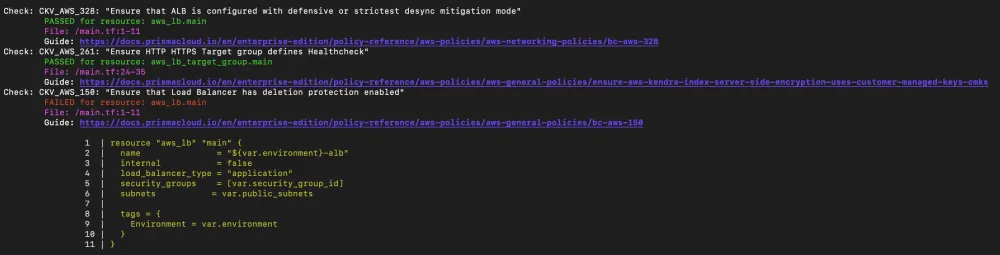
Alternatively, use Docker-based Configuration, to integrate the MCP server into a workflow, rather than local setup (after a successful
docker build -t awslabs/terraform-mcp-server )JSON
{"mcpServers": {"awslabs.terraform-mcp-server": {"command": "docker","args": ["run","--rm","--interactive","--env","FASTMCP_LOG_LEVEL=ERROR","awslabs/terraform-mcp-server:latest"],"env": {},"disabled": false,"autoApprove": []}}}
Key Features and Benefits :
- Security-First Infrastructure Development:
- Automated Checkov security scanning with real-time vulnerability detection
- AWSCC provider prioritisation for consistent API behavior
- Built-in compliance checks aligned with AWS Well-Architected Framework
- Proactive security issue identification and remediation
- Comprehensive Development Framework:
- Prescriptive Terraform best practices for AWS applications
- AWS-IA GenAI Modules for specialised AI/ML workload deployment
- Terraform Registry Module Analysis for optimised module implementation
- Structured development workflows with validation checkpoints
- Advanced Infrastructure Management:
- Terragrunt workflow execution for complex, multi-account deployments
- Seamless AWS provider documentation integration
- Automated security remediation with compliance guidance
- Streamlined resource provisioning and configuration
Conclusion:
The AWS Terraform MCP Server stands as a powerful infrastructure management solution that revolutionizes how organizations build and maintain their AWS infrastructure.The MCP server represents a significant advancement in infrastructure as code management, combining security, automation, and best practices into a unified platform. It serves as a cornerstone for organizations seeking to build robust, secure, and scalable infrastructure on AWS, whether deploying basic resources or implementing sophisticated AI/ML workloads.
Enjoyed reading this content? Let the author know!
Your likes, comments, shares, and saves help creators reach more builders.

Loading recommendations
Loading article