

Context filtering with Confluence data source in Amazon Bedrock Knowledge Bases
Discover how Parcel Perform built a secure, context-filtered AI chatbot using Amazon Bedrock Knowledge Bases and Confluence labels.

Co-authored with Yudho Ahmad Diponegoro (Sr. Solutions Architect at AWS), Jun Kai Loke (AI/GenAI Specialist Solutions Architect at AWS), and Oliver Graeser (Head of Data & Insights at Parcel Perform)
Amazon Bedrock Knowledge Bases is a fully managed capability that helps you implement the entire retrieval augmented generation (RAG) workflow. It can be a powerful tool for teams building and scaling generative AI applications, as proven by Parcel Perform , the leading AI Delivery Experience Platform for e-commerce businesses worldwide.
I work for Parcel Perform as its GenAI Team Lead. I have been leveraging Amazon Bedrock Knowledge Bases extensively to support the development of Parcel Perform’s AI-powered chatbot, AI Navigator. AI Navigator is an in-platform AI agent that helps Parcel Perform users understand delivery data and navigate platform functions. Users can ask natural language questions about shipments or workflow setups to get answers, be directed to relevant platform areas, and discover new features for improved operations.
One of the common hurdles I've faced, much like many others in the generative AI space, is effectively controlling what information a model sees and responds with. Specifically, I needed to filter the context passed to the model so each user only receives responses based on content they are authorized to access. In Parcel Perform's AI Navigator, this is crucial because users with different subscription tiers have varying levels of document access; not all information is meant for everyone. For instance, internal subscribers require operational or technical content, while external users are limited to public-facing information, a distinction essential for ensuring the accuracy and privacy of the chatbot's responses.
In this article, I’ll walk you through my experience tackling the challenge of context filtering using Amazon Bedrock Knowledge Bases for our AI chatbot (which I'll refer to as AI Navigator throughout the discussion). I’ll share what approaches worked well for Parcel Perform, where I had to make adjustments, and the reasoning behind the decisions. I hope that these insights can help others working through similar challenges in building secure and accurate AI applications.
The AI Navigator infrastructure
The AI Navigator allows both internal and external users to access information, originally stored in Confluence, with natural language. Parcel Perform uses Amazon Bedrock Knowledge Base to manage the data ingestion from Confluence, to convert the data chunks into vector embedding, to store the vectors in a vector database, and to serve data access through natural language. The Retrieve API in Amazon Bedrock Knowledge Bases provides a managed way of performing the semantic search for a given question and generating the final answer.
The AI Navigator is implemented in a combination of frontend and backend components. The backend component uses LangChain framework with Bedrock (Knowledge Bases) Retriever to simplify and standardized development. The retriever calls the Retrieve API to obtain the answer for a given question, leveraging both the LLM and the vectorized data ingested from Confluence.
Since different user groups have different access requirements, there is a need to implement a proper control so that when given a question, the knowledge base will only be able to search information from the set of data which the user is authorized to access.
Solving the context filtering requirement
Through research of AWS documentation , I discovered that it is possible to add separate files in Amazon S3 to specify the metadata attributes for the data files, which will then be included in the embeddings in the vector database managed by Amazon Bedrock Knowledge Base. When calling the Retrieve API, a filter can be specified to only include vector embeddings with matching metadata attributes to the ones specified in the filter. This is called metadata filtering.
While the metadata filtering could have been what I needed to solve the requirement, it was specifically limited to Amazon S3 as data sources. Since the data source used was Confluence, I proceeded with deeper research on implementing a similar solution for the Confluence data source.
I also thought about an approach where I can create multiple knowledge bases where each knowledge base in Amazon Bedrock Knowledge Bases will be tailored to specific roles or departments. This approach would allow the backend component to direct users to the most relevant knowledge base before they initiate their search. While this remained a feasible option, I decided to go with the metadata filtering approach after my next discovery.
The documents in Confluence already had label tags . In my discovery, these label tags were preserved when the documents were ingested into a knowledge base in Amazon Bedrock Knowledge Bases. I took an example of a document retrieved from the knowledge base as shown in the following.
1
2
3
4
5
6
7
8
9
10
11
12
13
14
15
16
17
18
19
20
{
'location': {'confluenceLocation': {'url': 'https://XXXXXXXXXX.atlassian.net/wiki/spaces/XXXXXXXXXX/pages/XXXXXXXXXX/Create+a+Return'},
  'type': 'CONFLUENCE'},
 'score': 0.5116612,
 'source_metadata': {
  'x-amz-bedrock-kb-labels': 'return',
  'x-amz-bedrock-kb-category': 'Page',
  'x-amz-bedrock-kb-parentId': 'XXXXXXXXXX',
  'x-amz-bedrock-kb-modifiedAt': '2025-03-26T05:24:57.124Z',
  'x-amz-bedrock-kb-data-source-id': 'XXXXXXXXXX',
  'x-amz-bedrock-kb-version': '2',
  'x-amz-bedrock-kb-spaceKey': 'XXXXXXXXXX',
  'x-amz-bedrock-kb-source-uri': 'https://XXXXXXXXXX.atlassian.net/wiki/spaces/XXXXXXXXXX/pages/XXXXXXXXXX/Create+a+Return',
  'x-amz-bedrock-kb-createdAt': '2025-03-26T04:37:00.191Z',
  'x-amz-bedrock-kb-status': 'current',
  'x-amz-bedrock-kb-title': 'Create a Return',
  'x-amz-bedrock-kb-author': 'Vy Le',
  'x-amz-bedrock-kb-spaceName': 'XXXXXXXXXX'
 }
}
After checking with Confluence setup, I realized that x-amz-bedrock-kb-labels is equivalent with the label tag at the end of each document in Confluence. So I saw that the sensible (and easiest) approach was to add the label into the Confluence document, and filter the document based on that.
On retrieval, the metadata could be added to RetrievalConfig like the following:
1
2
3
4
5
6
7
8
9
10
11
12
13
14
15
16
17
from langchain_aws.retrievers.bedrock import AmazonKnowledgeBasesRetriever

retriever_filter = AmazonKnowledgeBasesRetriever(
    knowledge_base_id="XXXXXXXXXX",
    retrieval_config=RetrievalConfig(
        vectorSearchConfiguration=VectorSearchConfig(
            numberOfResults=5,
            filter={
                "equals": {
                    "key": "x-amz-bedrock-kb-labels",
                    "value": "return"  # add your filter here
                }
            },
            overrideSearchType="HYBRID"
        )
    )
)
This way, the search will be limited to only the documents whose metadata satisfies the filter criteria.
After testing, I went ahead to use this mechanism to implement the context filtering for user access control purposes when using the knowledge base through AI Navigator.
Steps
Here I summarize the steps that you can follow to allow context filtering on information stored in the Amazon Bedrock Knowledge Bases from documents in Confluence.
- Add proper labels into your documents in Confluence as shown by the following screenshot. In this example, I add the “return” category into this document so that on retrieval I can limit the search to only include documents from this category.
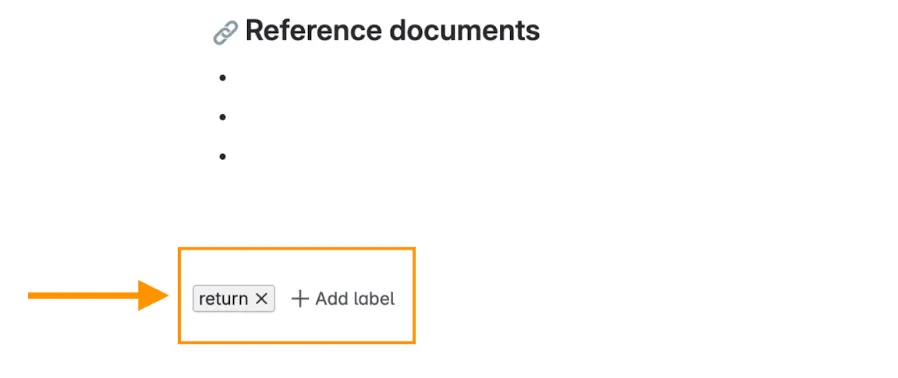
- Set up a knowledge base in Amazon Bedrock Knowledge Bases and connect it to a Confluence data source .
- Ingest the data with StartIngestionJob API call or by clicking the “Sync” button located at the AWS UI console on Amazon Bedrock Knowledge Bases for this particular data source.
- Add proper metadata filters in the configuration when retrieving information from Amazon Bedrock Knowledge Bases
Conclusion
Amazon Bedrock Knowledge Bases allows the use of metadata to filter context when retrieving documents. When Amazon Bedrock Knowledge Bases are used with Confluence as data source, the document label tags in Confluence can be used to classify the documents, including who can access the documents. On retrieval, filter can be specified when calling Retrieve API, RetrieveAndGenerate API, or RetrieveAndGenerateStream API to limit the vector search to the specified metadata.
The AI Navigator's backend uses the user's profile to filter documents, ensuring only content relevant to their account is shown. The vector searching will honor the filter and only return results with metadata values adhering to the filter. This granular control is essential for maintaining data privacy and relevance.
While metadata filtering usage for context filtering has been clearly demonstrated in the other AWS blog post , this particular blog post provides details on how it can be done with Confluence data sources, which focuses on the use of label tags. If you're interested in learning more about our product, you can visit our website at www.parcelperform.com or get in touch with me via LinkedIn .
Enjoyed reading this content? Let the author know!
Your likes, comments, shares, and saves help creators reach more builders.

Loading recommendations
Loading article