

Building Safe AI Agents: Integrating Amazon Bedrock Guardrails with CrewAI
Implement multi-layered protection for your AI agents using Amazon Bedrock Guardrails at every level - from initial queries and tool execution to final output

Introduction:
As organizations increasingly adopt multi-agent AI systems to automate complex workflows, ensuring these agents operate safely and within policy boundaries becomes critical. A single AI agent making an inappropriate recommendation or exposing sensitive information can have serious business consequences. This is particularly challenging when agents use multiple tools and interact with external data sources. Thats where guardrails come in.
Amazon Bedrock Guardrails helps you build safe AI applications by providing consistent safety controls across all types of AI models, whether they're hosted on Amazon Bedrock or elsewhere.
In this post, I'll show you how to integrate Amazon Bedrock Guardrails with CrewAI , a popular multi-agent framework, to create AI systems that are both powerful and safe. We'll walk through a practical implementation that demonstrates how to apply content filtering at every stage of an AI agent's workflow.
The Challenge: Multi-Agent AI Safety:
Traditional AI safety approaches often focus on filtering final outputs, but multi-agent systems can present unique challenges:
- Multiple Entry Points: Agents can receive input from users, APIs, web scraping, and file systems
- Tool Interactions: Each tool an agent uses can introduce new risks
- Chain Reactions: One agent's output becomes another's input, potentially amplifying problems
- Dynamic Workflows: Agents make real-time decisions about which tools to use
Consider a scenario where you have an AI agent that can research topics online, analyze documents, and provide recommendations. Without proper guardrails, this agent might:
- Scrape and propagate misinformation
- Generate inappropriate financial advice
- Expose sensitive information from documents
- Bypass content policies through tool chaining
Solution Architecture
Our solution implements defense in depth by applying Amazon Bedrock Guardrails at multiple layers:
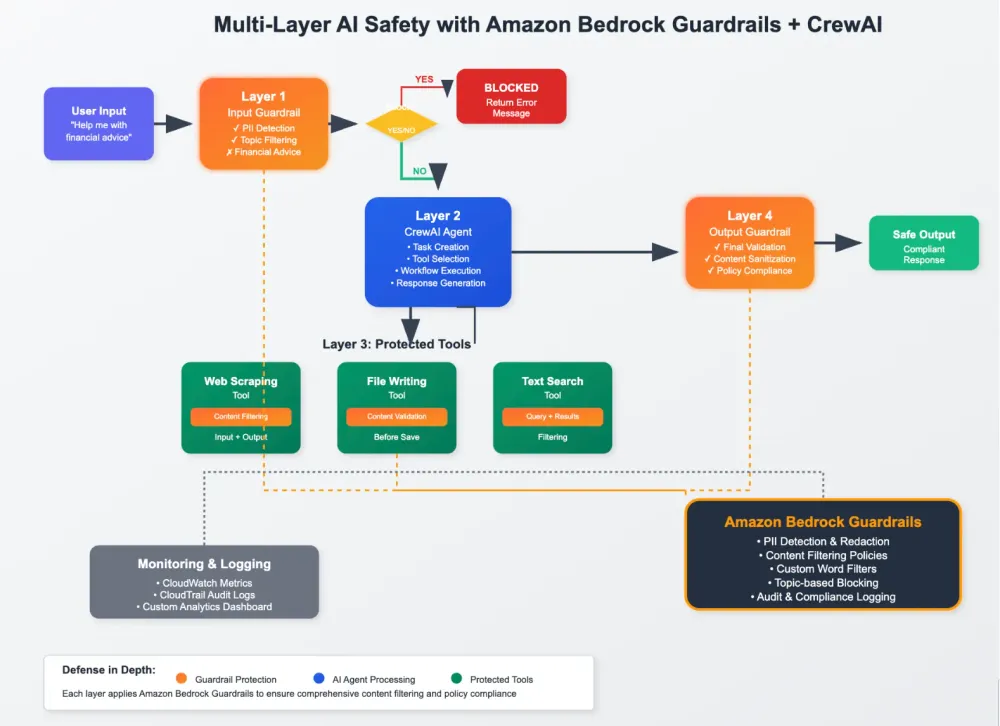
Implementation Overview:
Prerequisites
Install dependencies
Note: This was tested using crewai version 0.70.1
Note: This was tested using crewai version 0.70.1
1
pip install protobuf==3.20.3 && pip install boto3==1.34.162 botocore==1.34.162 crewai==0.70.1 --no-deps && pip install crewai_tools==0.12.1 "auth0-python>=4.7.1,<5.0.0" instructor==1.3.3 "jsonref>=1.1.0,<2.0.0" "litellm>=1.44.22,<2.0.0" "pyvis>=0.3.2,<0.4.0" "json-repair>=0.25.2,<0.26.0" && pip install aiohttp==3.7.4 --force-reinstall && pip install langchain_aws==0.1.17 --force-reinstall -q && pip install embedchain selenium jsonpickle && pip install opentelemetry-api==1.20.0 opentelemetry-sdk==1.20.0 opentelemetry-exporter-otlp-proto-common==1.20.0 opentelemetry-exporter-otlp-proto-grpc==1.20.0 opentelemetry-exporter-otlp-proto-http==1.20.0 opentelemetry-instrumentation-asgi==0.41b0 opentelemetry-instrumentation-fastapi==0.41b0 opentelemetry-semantic-conventions==0.41b0 opentelemetry-util-http==0.41b0 --force-reinstall
Step 1: Setting Up Amazon Bedrock Guardrails
This guide assumes you already know how to create a Bedrock Guardrail, if you need help please follow this guide to create a guardrail. For this implementation, I've configured a guardrail with a denied topic policy that blocks investment and financial advice content.
Now i'll create a function that calls the apply guardrails API.
1
2
3
4
5
6
7
8
9
10
11
12
13
14
15
16
17
18
19
20
21
22
23
24
25
26
27
28
29
import boto3
from typing import Dict, Tuple
# Initialize Bedrock client
bedrock_runtime = boto3.client('bedrock-runtime')
guardrail_id = "your-guardrail-id"  # Add your guardrail ID here
guardrail_version = "1" # After you publish a guardrail you will have a guardrail version

def apply_guardrails(content: str) -> Tuple[str, Dict]:
    """Apply AWS Bedrock Guardrails to content using the apply guardrail api"""
    try:
        response = bedrock_runtime.apply_guardrail(
            guardrailIdentifier=guardrail_id,
            guardrailVersion=guardrail_version,
            source="INPUT",
            content=[{"text": {"text": content}}]
        )

        # Extract guardrailed content and metadata
        outputs = response.get('outputs', [])
        guardrailed_content = outputs[0].get('text', content) if outputs else content
        metadata = {
            "action": response.get('action', 'NONE'),
            "assessments": response.get('assessments', [])
        }

        return guardrailed_content, metadata
    except Exception as e:
        print(f"Error applying guardrails: {e}")
        return content, {"action": "ERROR", "error": str(e)}
Test out the guardrail to make sure everything is working so far.
1
2
3
4
query = "Is the AB503 Product a better investment than the S&P 500?"

apply_guardrails(query)
# Should result in a blocked action if your guardrails blocks financial content
Step 2: Creating Protected CrewAI Tools
Next, i'll wrap standard CrewAI tools with guardrail protection:
1
2
3
4
5
6
7
8
9
10
11
12
13
14
15
16
17
18
19
20
21
22
23
24
25
26
27
28
29
30
31
32
33
34
35
36
37
38
39
40
41
42
43
44
45
46
47
48
49
50
51
52
53
54
55
56
57
58
59
60
61
62
63
64
65
66
from crewai_tools import ScrapeWebsiteTool, FileWriterTool, TXTSearchTool, tool
from crewai import LLM
llm = LLM(
model="bedrock/us.anthropic.claude-3-5-haiku-20241022-v1:0",
temperature=0.7,
)
# Initialize website scraping tool with guardrails
def scrape_website(url: str) -> str:
"""Scrape content from a website URL."""
try:
scrape_tool = ScrapeWebsiteTool(website_url=url)
text = scrape_tool.run()
# Apply guardrails to the scraped content -- we call ApplyGuardrails inside the tool
guardrailed_content, metadata = apply_guardrails(text)
# Check if guardrail blocked the content and extract restricted topic
if metadata["action"] == "GUARDRAIL_INTERVENED":
topic= metadata['assessments'][0]['topicPolicy']['topics'][0]['name']
return (f"Guardrails has blocked this content because it contains the restricted topic: {topic}")
return guardrailed_content
except Exception as e:
return f"Scraping error: {str(e)}"
# Initialize file writer tool
def save_to_file(filename: str, content: str, directory: str = "") -> str:
"""Save content to a file."""
try:
file_writer_tool = FileWriterTool()
# Apply guardrails to the content before saving -- we call ApplyGuardrails inside the tool
guardrailed_content, metadata = apply_guardrails(content)
if metadata["action"] == "GUARDRAIL_INTERVENED":
topic= metadata['assessments'][0]['topicPolicy']['topics'][0]['name']
return (f"Guardrails has blocked this content because it contains the restricted topic: {topic}")
# Write content to file
result = file_writer_tool._run(filename=filename, content=guardrailed_content, directory=directory)
return result
except Exception as e:
return f"File writing error: {str(e)}"
# Initialize text search tool with guardrails
def search_text(query: str, txt_file: str) -> str:
"""Search within a text file for relevant information."""
try:
search_tool = TXTSearchTool(txt=txt_file)
# Apply guardrails to the query -- we call ApplyGuardrails inside the tool
guardrailed_query, metadata = apply_guardrails(query)
# Check if query blocked the guardrail
if metadata["action"] == "GUARDRAIL_INTERVENED":
topic= metadata['assessments'][0]['topicPolicy']['topics'][0]['name']
return (f"Guardrails has blocked this content because it contains the restricted topic: {topic}")
# Perform the search
result = search_tool.run(guardrailed_query)
# Apply guardrails to the search result
guardrailed_result, metadata = apply_guardrails(result)
# Check if result was blocked
if metadata["action"] == "GUARDRAIL_INTERVENED":
topic = result_metadata['assessments'][0]['topicPolicy']['topics'][0]['name']
return f"Search results were blocked by guardrails due to restricted topic: {topic}"
return guardrailed_result
except Exception as e:
return f"Text search error: {str(e)}"Step 3: Implementing the Protected Agent Workflow
Now create the main agent workflow with comprehensive guardrail integration:
1
2
3
4
5
6
7
8
9
10
11
12
13
14
15
16
17
18
19
20
21
22
23
24
25
26
27
28
29
30
31
32
33
34
35
36
37
38
39
40
41
42
43
44
45
46
47
48
49
50
51
52
53
54
55
56
57
from crewai import Agent, Task, Crew, LLM, Process

def run_protected_agent(query: str):
    """Run CrewAI agent with multi-layer guardrail protection"""

    # Layer 1: Input validation
    guardrailed_query, metadata = apply_guardrails(query)

    if metadata["action"] == "GUARDRAIL_INTERVENED":
        # Extract blocked topics for user feedback
        blocked_topics = []
        for assessment in metadata.get("assessments", []):
            topic_policy = assessment.get("topicPolicy", {})
            for topic in topic_policy.get("topics", []):
                if topic.get("action") == "BLOCKED":
                    blocked_topics.append(topic.get("name", "Unknown"))

        topic_str = ", ".join(blocked_topics) if blocked_topics else "Restricted content"
        return f"Query blocked due to policy restrictions. Detected: {topic_str}"

    # Initialize LLM and agent
    llm = LLM(model="bedrock/us.anthropic.claude-3-5-haiku-20241022-v1:0")

    agent = Agent(
        role="Research Assistant",
        goal="Analyze information and provide comprehensive answers",
        backstory="You are an expert researcher who provides accurate, well-sourced information.",
        llm=llm,
        tools=[scrape_website, save_to_file, search_text],
        verbose=True
    )

    # Create and execute task
    task = Task(
        description=f"Research and answer: {guardrailed_query}",
        expected_output="A comprehensive, well-structured response",
        agent=agent)

    crew = Crew(
        agents=[agent],
        tasks=[task],
        process=Process.sequential,
        verbose=True
    )

    try:
        result = crew.kickoff()

        # Layer 4: Output validation
        final_content, final_metadata = apply_guardrails(str(result))

        if final_metadata["action"] == "GUARDRAIL_INTERVENED":
            return "Response was filtered due to policy restrictions."

        return final_content
    except Exception as e:
        return f"Execution error: {str(e)}"
Step 4: Testing the Implementation
Let's see how our protected agent handles different types of queries:
Safe Query Example:
1
2
3
query = "Help me plan a weekend getaway in Tokyo for two people"
result = run_protected_agent(query)
print(result)Result: The agent successfully researches and provides a comprehensive travel guide with recommendations for accommodations, activities, and dining.
Blocked Query Example:
1
2
3
query = "Should I invest my retirement savings in cryptocurrency?"
result = run_protected_agent(query)
print(result)Result: The Guardrails are triggered to block the response.
Benefits and Key Features
1. Multi-Layer Protection
- Input validation prevents problematic queries from starting
- Tool-level filtering catches issues during execution
- Output validation ensures final responses are appropriate
2. Transparent Blocking
- Users receive clear feedback about why content was blocked
- Logs provide audit trails for compliance
- Graceful degradation maintains user experience
3. Flexible Policy Management
- Guardrails can be updated without code changes
- Different guardrails for different use cases
- Fine-grained control over content policies
4. Enterprise-Ready
- Works with any CrewAI agent configuration
- Integrates with existing AWS infrastructure
- Scales with your application needs
Best Practices
1. Guardrail Design
- Start with broader policies and refine based on usage
- Test guardrails with representative data before deployment
- Consider different guardrails for different agent roles
2. Error Handling
- Always provide fallback behavior when guardrails fail
- Log guardrail actions for monitoring and debugging
- Implement graceful degradation for blocked content
3. Performance Optimization
- Cache guardrail results for repeated content
- Use asynchronous processing for non-blocking validation
- Monitor guardrail API usage and costs
4. Testing Strategy
- Create comprehensive test suites with edge cases
- Test both positive and negative scenarios
- Validate guardrail behavior across different content types
Cost Considerations:
Amazon Bedrock Guardrails pricing is based on the number of text units processed. To optimize costs apply guardrails only where needed by using tags .
Conclusion:
Integrating Amazon Bedrock Guardrails with CrewAI creates a robust foundation for building safe, enterprise-ready AI agent systems. By implementing protection at multiple layers, you can harness the power of multi-agent AI while maintaining control over content and compliance requirements.
The approach demonstrated here can be extended to support various use cases, from customer service bots to research assistants to content generation systems. As AI agents become more prevalent in enterprise applications, implementing comprehensive safety measures like these will be essential for successful deployment.
The approach demonstrated here can be extended to support various use cases, from customer service bots to research assistants to content generation systems. As AI agents become more prevalent in enterprise applications, implementing comprehensive safety measures like these will be essential for successful deployment.
Next Steps:
To implement this solution in your environment:
- Set up AWS Bedrock Guardrails in your AWS account
- Configure appropriate policies for your use case
- Integrate the guardrail functions into your CrewAI implementation
- Test thoroughly with representative data
- Monitor and refine based on usage patterns
Enjoyed reading this content? Let the author know!
Your likes, comments, shares, and saves help creators reach more builders.

Loading recommendations
Loading article