
AI-Powered Document Summarizer with Claude 3.7 on AWS
Automate document summaries using AWS serverless and Claude AI. Turn complex docs into quick insights. Scale effortlessly, deploy instantly, save time.

Introduction: Transforming Document Processing with AI
We're all drowning in information. Reports, articles, research papers, and business documents pile up faster than anyone can read them. But what if you could automatically extract the key points from any document in seconds? That's exactly what this system does: a Serverless document summarization system powered by Claude 3.7 Sonnet, one of the most sophisticated language models available on AWS Bedrock.
Let's walk through how this system is built, from the key architectural decisions to the nitty-gritty implementation details. Whether you're writing code, designing systems, or making business decisions, you'll find practical insights on using AI to revolutionize document processing.
The Challenge: From Information Overload to Actionable Insights
Organizations everywhere share a common pain point: making sense of vast document collections. Traditional approaches have serious limitations:
- Manual review is painfully slow and doesn't scale
- Rule-based systems are rigid and miss important context
- Older AI models often produce mediocre results
This solution tackles these challenges head-on by combining serverless architecture with cutting-edge AI, creating a system that automatically generates nuanced, accurate summaries of any document, regardless of its complexity.
Solution Architecture: Smart, Scalable, and Cost-Effective
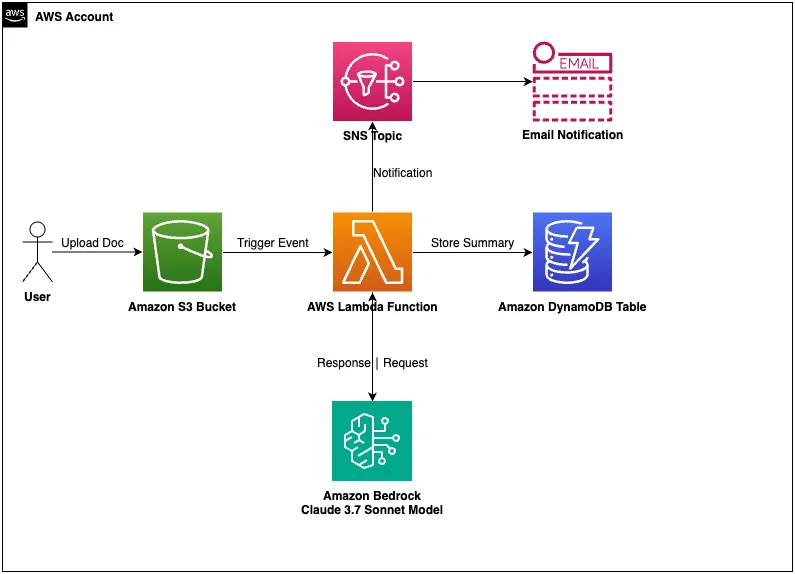
This serverless solution has below key components:
- Document Upload: Drop your documents (PDF, TXT, DOCX) into an Amazon S3 bucket
- Automatic Processing: A Lambda function springs into action the moment a file lands
- AI Magic: Claude 3.7 Sonnet works its magic through Amazon Bedrock
- Instant Results: Summaries land in DynamoDB, and you get notified via SNS
Why did I choose this approach? It's:
- Light on your wallet (pay-as-you-go)
- Infinitely scalable (from one document to thousands)
- Maintenance-free (no server headaches)
- Rock-solid secure (with encryption and tight access controls)
Implementation:
This guide will walk you through setting up and deploying the AI-powered Document Summarization Application on AWS, which uses Claude 3.7 Sonnet on Amazon Bedrock for intelligent document summarization.
Prerequisites
Before you begin, make sure you have the following:
AWS Account: You need an AWS account with appropriate permissions to create resources.
AWS CLI: Install and configure the AWS Command Line Interface. Refer this document for more details.
AWS CLI: Install and configure the AWS Command Line Interface. Refer this document for more details.
1
2
pip install awscli
aws configure
AWS SAM CLI: Install the AWS Serverless Application Model CLI.
1
pip install aws-sam-cli
Python 3.13: The Lambda function uses Python 3.13.
Amazon Bedrock Access: Ensure you have access to Amazon Bedrock and the Claude 3.7 Sonnet model.
Amazon Bedrock Access: Ensure you have access to Amazon Bedrock and the Claude 3.7 Sonnet model.
Deployment Steps:
1. Clone the Repository
Clone or download this repository to your local machine.
2. Enable Amazon Bedrock Access
Before deploying the application, make sure you have enabled Amazon Bedrock in your AWS account:
- Go to the AWS Management Console
- Navigate to Amazon Bedrock
- Complete the onboarding process if you haven't already
- Go to "Model access" in the left navigation
- Find "Claude 3.7 Sonnet" and click "Access model"
- Accept the terms and conditions
- Wait for access to be granted (this may take a few minutes)
3. Deploy the Application
Run the AI setup script to deploy the application:
1
2
chmod +x setup.sh
./setup.sh
The script will:
- Check if Amazon Bedrock is enabled in your account
- Verify access to the Claude 3.7 Sonnet model
- Build the application using AWS SAM
- Deploy the CloudFormation stack
- Create the necessary resources (S3 bucket, Lambda function, DynamoDB table, SNS topic)
- Provide you with the resource names and ARNs
4. Subscribe to Notifications
To receive notifications when documents are processed:
- Use the SNS topic ARN provided after deployment
- Subscribe your email or other endpoint to the topic:
1
2
3
4
aws sns subscribe \
    --topic-arn <TOPIC_ARN> \
    --protocol email \
--notification-endpoint your-email@example.com- Confirm the subscription by clicking the link in the email you receive
5. Upload Documents
Upload documents to the S3 bucket to trigger the AI processing:
1
aws s3 cp your-document.pdf s3://<BUCKET_NAME>/
The application supports the following document types:
- PDF (.pdf)
- Text files (.txt)
- Word documents (.docx)
6. View AI-Generated Summaries
You can view the AI-generated document summaries in the DynamoDB table:
1
aws dynamodb scan --table-name AIDocumentSummaries
Testing the Application
Upload a Sample Document
To test the application with a sample document:
Create a sample text file:
1
2
3
4
5
6
7
8
9
10
11
12
13
14
15
16
17
18
19
20
21
cat > sample_document.txt << EOL
# Sample Document for AI Summarization
## Introduction
This is a sample document to test the AI-powered document summarization application using Claude 3.7 Sonnet on Amazon Bedrock.
## Key Points
1. The application uses serverless architecture on AWS
2. Documents are uploaded to an S3 bucket
3. A Lambda function processes the documents
4. Claude 3.7 Sonnet on Amazon Bedrock generates intelligent summaries
5. Summaries are stored in DynamoDB
6. Notifications are sent via SNS
## Benefits
- Automated document processing
- High-quality AI-generated summaries with Claude's advanced language capabilities
- Larger context window handling (up to 150,000 characters)
- Improved comprehension and summarization accuracy
- Scalable serverless architecture
- Real-time notifications
## Conclusion
This sample demonstrates how Claude 3.7 Sonnet can be used to extract meaningful insights from documents automatically.
EOL
Upload the sample document:
1
aws s3 cp sample_document.txt s3://<BUCKET_NAME>/
Wait for the notification (this may take a minute or two)
Check the DynamoDB table for the summary:
1
aws dynamodb scan --table-name AIDocumentSummaries
Monitoring and Troubleshooting
Monitoring Lambda Execution
To monitor the Lambda function execution:
- Go to the AWS Management Console
- Navigate to CloudWatch
- Go to "Log groups"
- Find the log group for your Lambda function:
/aws/lambda/ai-document-summarization-app-DocumentProcessorFunction - View the logs to see the execution details
Common Issues and Solutions
Bedrock Access Error:
- Error: "User is not authorized to access this resource"
- Solution: Ensure you have enabled Amazon Bedrock and have access to the Claude 3.7 Sonnet model
Document Processing Error:
- Error: "Error processing document"
- Solution: Check the CloudWatch logs for detailed error messages
Model Invocation Error:
- Error: "Error invoking model"
- Solution: Verify that the Claude 3.7 Sonnet model is available in your region and you have access to it
Document Format Error:
- Error: "Error reading document content"
- Solution: Ensure the document is in a supported format and is properly encoded
Checking Bedrock Model Access
To verify that you have access to the Claude 3.7 Sonnet model:
1
aws bedrock list-foundation-models --query "modelSummaries[?modelId=='anthropic.claude-3-7-sonnet-20250219-v1:0']" --output text
If this command returns information about the model, you have access. If it returns an empty result or an error, you need to request access to the model.
Customization
Modifying the Prompt
To customize the prompt used for summarization:
- Edit
src/document_processor_ai.py - Modify the
promptvariable in thegenerate_summary_with_bedrock()function:
1
2
3
4
5
6
prompt = f"""
Please provide a comprehensive summary of the following document.
Focus on [YOUR CUSTOM INSTRUCTIONS HERE].
DOCUMENT:{document_content}
SUMMARY:
"""
Adjusting Model Parameters
To adjust the Claude 3.7 Sonnet model parameters:
- Edit
src/document_processor_ai.py - Modify the parameters in the
request_bodydictionary:
1
2
3
4
5
6
7
8
9
10
11
request_body = {
    "anthropic_version": "bedrock-2023-05-31",
    "max_tokens": 4000,  # Adjust the maximum length of the summary
"temperature": 0.2,  # Adjust for creativity (higher) vs. determinism (lower)
"messages": [
        {
            "role": "user",
            "content": prompt
        }
    ]
}
Cleanup
To remove all resources created by this application:
1
aws cloudformation delete-stack --stack-name ai-document-summarization-app
Additional Resources
- Amazon Bedrock Documentation
- Claude 3.7 Sonnet Model Information
- AWS Serverless Application Model (SAM) Documentation
- Amazon S3 Documentation
- Amazon DynamoDB Documentation
- Amazon SNS Documentation
Conclusion: The Future of Document Processing Is Here
Combining Serverless architecture with Claude 3.7 Sonnet isn't just a neat trick – it's a game-changer in how we handle information. Tasks that used to bog down your best people for hours now happen automatically in seconds, with impressive quality and accuracy.
By implementing this solution, you're not just automating a task. You're fundamentally transforming how your organization interacts with information. The result? Faster insights, better decisions, and more time for the creative and analytical work that humans do best.
Comment your feedback below or create an issue/feature request for this solution on the Github repository .
Enjoyed reading this content? Let the author know!
Your likes, comments, shares, and saves help creators reach more builders.

Loading recommendations
Loading article