
Efficient large context management in Strands Agents
Building agents that maintain analytical continuity beyond context window limits

Imagine: your AI agent has been working on a complex analysis for hours. It's pulled data from multiple sources, run various calculations, identified patterns, and made several key discoveries.
Then it hits a wall. It found something interesting but it can't remember the earlier context.
Which datasets were involved? What were the baseline findings?
The context window filled up. Your agent essentially forgot hours of work!
Extended AI agents sessions can hit this wall easily, and analytical workflows suffer the most because continuity matters.
SummarizingConversationManager (released in Strands Agents v0.1.8 ) addresses this challenge by implementing context compression. Rather than simply truncating old messages when the context window fills up, it creates a summary that preserve the essential information from the previous messages: 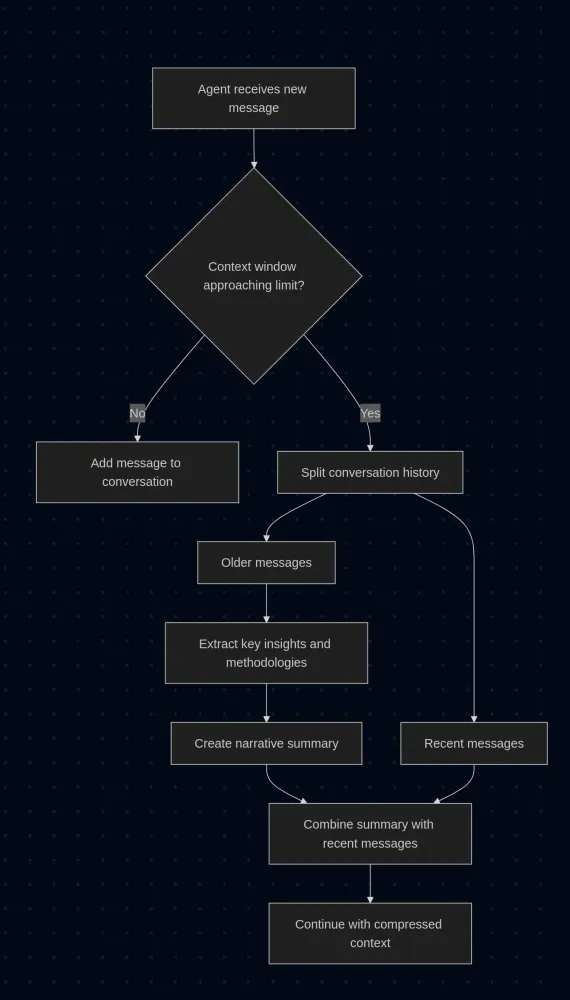
This approach maintains a coherent conversational flow while reducing context size. In a way, it operates like a real analyst: it remembers the most important bits and discards the details to make space for new data.
Let's see how you can use it!
Configuration options for summarizing context management
A key principle of
Strands Agents is that it lets you build powerful workflows with minimal code, and the SummarizingConversationManager follows the same philosophy. It comes configured with sensible defaults and works immediately for most use cases:Python
from strands import Agentfrom strands.agent.conversation_manager import SummarizingConversationManageragent = Agent(conversation_manager=SummarizingConversationManager())
With this configuration, when the agent hits the context limit it automatically summarizes previous conversations to extend the available context space.
But let's explore how you can have more control over the summarization process.
Delegating summarization to specialized agents
One approach is to use a separate agent specifically for creating summaries. This allows you to optimize the summarization independently from your main agent's configuration. For instance, you might want to use a model that's particularly good at distilling complex technical information:
Python
from strands import Agentfrom strands.memory import SummarizingConversationManagersummarizer_agent = Agent(model="gpt-4")conversation_manager = SummarizingConversationManager(summarizer_agent=summarizer_agent)agent = Agent(conversation_manager=conversation_manager,model="gpt-4",)
This separation also means you can give the summarizer agent specific instructions or prompts that differ from your main agent's role. The summarizer might focus on extracting methodological details and quantitative results, while your main agent maintains its broader analytical perspective.
Controlling summary granularity
With
summary_ratio we can determine how much compression occurs during summarization. This value represents the target ratio between the summary length and the original content length.Higher
summary_ratio values produce more aggressive compression, resulting in brief, high-level summaries that capture only the most essential points. Lower values create more detailed summaries that preserve additional context and nuance:Python
conversation_manager = SummarizingConversationManager(summary_ratio=0.3 # detailed summaries, less compression)# versusconversation_manager = SummarizingConversationManager(summary_ratio=0.7 # brief summaries, more compression)
The optimal ratio depends on your use case. Exploratory data analysis might benefit from detailed summaries that preserve methodological nuances, while routine reporting workflows might work well with more compressed summaries.
Preserving recent context
You wouldn't want your agent to immediately summarize the conversation you just had. Recent exchanges contain the freshest context and often drive the current direction of your analysis. The
preserve_recent_messages parameter controls how many of the most recent messages remain untouched by summarization.When you set this parameter, those recent messages stay in their original form, maintaining the natural conversational flow and ensuring that immediate context remains accessible:
Python
conversation_manager = SummarizingConversationManager(preserve_recent_messages=5 # keep last 5 messages in full detail)
This parameter requires some consideration of the agent's typical patterns. If it tends to have many short exchanges, you might want to preserve more messages. For workflows with longer, more substantial exchanges, fewer preserved messages should be sufficient.
Custom summarization instructions
You can also provide specific instructions for how summaries should be created through the
summary_prompt parameter. This allows you to tailor the summarization process to your particular domain or workflow:Python
conversation_manager = SummarizingConversationManager(summary_prompt="Focus on data processing steps, statistical methods used, and key findings. Preserve any code snippets or parameter values that were discussed.")
Complete configuration example
Here's how these parameters work together in a realistic scenario. This configuration might be appropriate, for example, for a data science workflow where you need to maintain methodological details while managing long analytical sessions:
Python
from strands import Agentfrom strands.memory import SummarizingConversationManager# Dedicated summarizer for technical contentsummarizer_agent = Agent(model="gpt-4",system_prompt="You specialize in creating technical summaries that preserve methodological details and quantitative findings.")conversation_manager = SummarizingConversationManager(summarizer_agent=summarizer_agent,summary_ratio=0.4, # relatively detailed summariespreserve_recent_messages=6, # keep recent context intactsummary_prompt="Summarize the analytical approach, key methodologies, important parameters, and significant findings. Maintain technical accuracy and preserve any code patterns or configurations discussed.")agent = Agent(conversation_manager=conversation_manager,model="gpt-4",)
This setup creates a system where the agent can maintain awareness of analytical workflows over extended periods. The summarizer agent focuses specifically on creating accurate summaries, while the main agent can continue its work without losing important context from earlier in the conversation.
A note on large-context foundation models
If new models support huge context windows, why bother with summarization? Sure, you could throw millions of tokens at the problem and let your agent handle an endless conversation history (like Claude 3.5 Sonnet with 200K tokens, Gemini 1.5 Pro with 1M tokens, or GPT-4 Turbo with 128K tokens).
But most of that context can easily become irrelevant noise, and agents slow down if they need to process massive amounts of data on every request. Costs also spike because you're paying for a lot of tokens that might not add much value. And paradoxically, performance often degrades. In a ocean of context agents struggle to identify what actually matters.
Think about how you work on complex projects. You don't reread every email, every draft, every brainstorming session. You keep the key insights, the important decisions. You compress intelligently. That's exactly what
SummarizingConversationManager does.Maybe agents don't need to remember everything, just the right things!
Resources
Enjoyed reading this content? Let the author know!
Your likes, comments, shares, and saves help creators reach more builders.

Loading recommendations
Loading article