
AgentExpress: Turn Your Use Case into a Governed Multi-Agent System in Minutes
An open-source AWS sample that turns a natural language use case into a deployable multi-agent system in minutes: an AI Assistant designs it, you review it on a visual canvas, Cedar policies and guardrails govern it, and it deploys with CDK or Terraform.
Series: AgentExpress: Build a Governed Multi-Agent System in Minutes (1 article)
- 1AgentExpress: Turn Your Use Case into a Governed Multi-Agent System in Minutes This article


AgentExpress is an open-source AWS sample (MIT-0). It is a reference pattern, not an AWS service or a supported product. Review and harden it before you use it with real data.
Imagine a claims team that wants a multi-agent system for claims processing. They can describe the process in one breath. Read the claim. Pull out the key facts. Check the policy wording. Look for red flags. Get a sign-off. Write to the customer. Nobody in the room is confused about what the agents should do.
Then the project starts, and the process turns out to be the easy part. Someone has to decide how the agents hand off to each other. Someone has to connect the policy documents to the right agent. Someone has to build a pause for approval that survives a browser reload. Then come guardrails, sign-in, roles, infrastructure as code, tracing, and the question every manager asks first: what does one run cost?
None of that is claims handling. It is the effort of stitching these pieces into one working system, and that effort is usually far larger than the process itself.
The problem
Many teams adopting agentic AI face the same obstacles:
- Choosing a framework and wiring agents: Which framework should they use, and how do agents pass results along when some steps run in sequence and others in parallel?
- Connecting tools securely: How do they reach knowledge bases, APIs, MCP servers, and SaaS tools safely? Each one needs its own integration, sign-in, and error handling.
- Controlling access: Who can run what, and which tools can each agent call? Early prototypes often lack identity checks and role-based access control (RBAC).
- Deciding where people sign off: Which steps need a human review, and how does a run wait for that decision and then pick up where it stopped?
- Deploying and observing: How do they deploy it, trace each run, and see what it costs? When something fails, teams often can't see why.
- Depending on engineers: Domain experts know how the process should work, but they can't change the workflow without an engineer.
The approach
Teams know what they want their agents to do. The hard part is building it. AgentExpress is a sample that removes the blank page.
- Describe it: Explain your process in plain English. Link a page or attach documents for context.
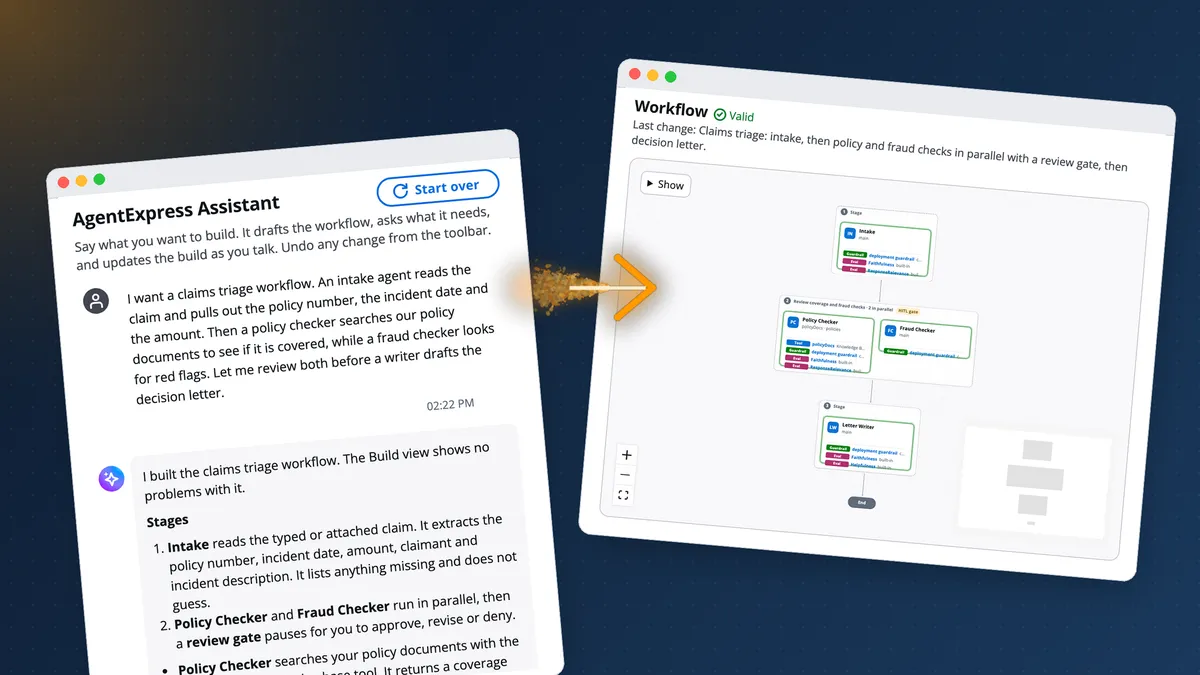
- Watch it take shape: As the AgentExpress Assistant replies, the workflow appears on screen beside the chat. It includes the agents, their prompts, the tools and their code, the stages, the review gates and the guardrails.
- Refine it: Make changes in conversation or on a visual canvas.
- Deploy it: Ship it to your own AWS account with AWS CDK or Terraform, as a stack of its own.
Behind the scenes:
- One declarative file:
workflow.jsondrives the agents, topology, tools, gates, RBAC and AgentCore features.
- No glue code: One shared console lets teams design and deploy workflows, and each deployed build gets its own web app to run and inspect them. No one writes orchestration or infrastructure code.
- Start small, grow later: Every build includes AgentCore Runtime, run checkpoints in Memory, and tracing. From there, you can turn on custom guardrails, evaluations, skills, triggers and much more.
Governance, security and cost tracking are part of every build:
- Sign-in and access: Everyone signs in through Amazon Cognito or the team's own identity provider. Role-based rules decide who can run and change each build.
- Tool calls: Agents call their tools through the AgentCore Gateway, where Cedar policies block anything not explicitly permitted.
- Guardrails: Amazon Bedrock Guardrails can screen what goes into and comes out of each agent.
- Human-in-the-loop review: Review gates add a sign-off wherever the process needs one. Paused runs are checkpointed in AgentCore Memory, so nothing is lost while the reviewer decides.
- Least privilege: Each component has its own scoped IAM role. Secrets stay in AWS Secrets Manager, not in the code.
- Cost from day one: Every run is traced with its tokens, latency and estimated cost. That answers the manager's first question: what does one run cost?
Two planes: one to design, one to run
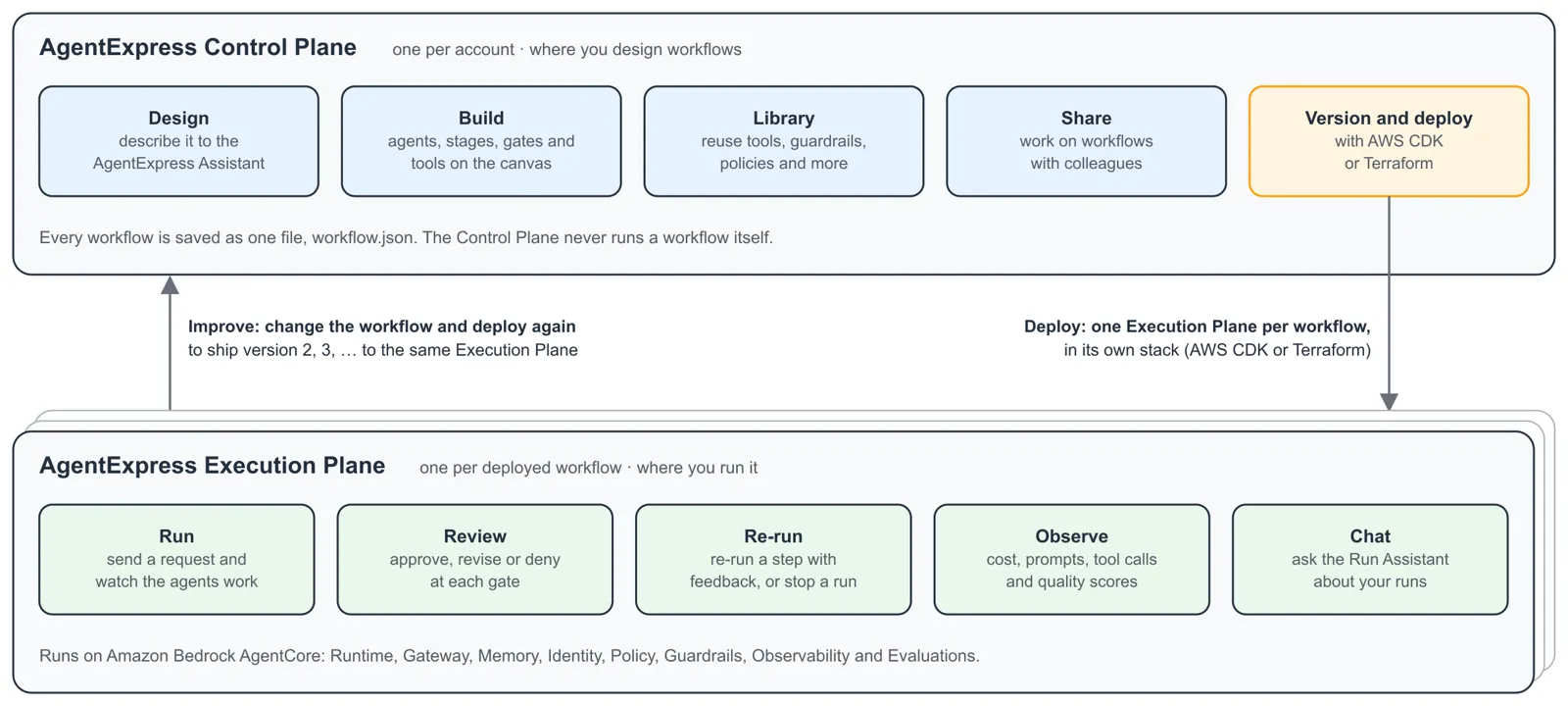
AgentExpress is split into two parts. A single control plane, with one shared web console, is where you design, build and deploy workflows. Each build you deploy gets its own execution plane, with its own web app, where you run and observe it.
The control plane is shared by everyone in the account. People sign in there to work on builds. It holds:
- The AgentExpress Assistant and the Builder canvas
- A shared library and team workspaces
- Every build's version history
- The AWS accounts that builds can deploy into
The execution plane is where a deployed workflow runs. Each one lives in its own stack, with its own sign-in, runtimes and tables. Here people:
- Start runs and decide at review gates
- Re-run steps that need another pass
- Check cost, traces and evaluations
- Ask the Run Assistant questions about their runs
A deploy connects the two. It freezes the build as its next version and creates or updates that build's execution plane. Deploying again moves the same execution plane to the new version, and old runs keep the graph they ran on.
The AgentExpress Assistant
The Assistant is a chat in the control plane that designs and edits the workflow as you talk to it. A workflow is shaped by four things: the input, the output, the sources, and the steps or sign-off. If your prompt covers at least three of them, the Assistant drafts the whole workflow at once. If the prompt is thin, it asks up to three questions and suggests an answer for each.
What it does:
- Builds more than prompts: It creates agents, steps, tools and their code, skills, interceptors, triggers, prompt caching, network settings and hosted MCP servers.
- Uses your context: Say "build this based on" and add a link, and it reads the page. It also takes attached files and
s3://paths in allowed buckets.
- Shows what it decided: Changed agents are highlighted. Defaults used lists what it filled in. Needs your input lists the values only you can give, such as an endpoint, an ARN or a key.
- Checks as it goes: Every change is checked against the deploy rules. If a change breaks a rule, the Assistant fixes it before it replies.
- Offers a second opinion: With Review changes on Auto (the default), a second model reviews larger or security-relevant changes before they're saved. On Always, it reviews every request. It only advises.
- Keeps versions: Every saved change becomes a named version you can restore. Undo and redo work across both chat and canvas edits.
- Leaves deployment to you: This boundary is deliberate. The Assistant can't deploy or publish.
The Builder
Anything the Assistant drafts, you can also edit by hand in the Builder, the control plane's visual editor. On the canvas, you drag agents onto stages and drop tools and AgentCore features onto agents.
The Builder also gives you:
- Steps without a model: Call a tool, run code in a sandbox, read a document, write a file or deliver the run's files.
- A shared library: Tools, skills, memory, guardrails, identities, policies, interceptors and evaluators that any build can reuse. Change an item once, and every build that uses it picks up the change.
- Checks as you edit: Problems are marked on the canvas, using the same rules as the deploy.
- Sharing and teams: Share a build with people, groups or everyone who signs in. Or work in team workspaces with owner, editor and viewer roles.
- Work in code: Export a build, edit it with a coding agent and the
agentexpress-authorKiro skill, then import it back.
Agents and runtimes
Each agent in a build can run where it fits best:
- Inside the orchestrator or on its own: An agent can run as part of the orchestrator or on its own AgentCore Runtime. Both can run inside your VPC.
- No-code Harness agents: An agent can be an AgentCore Harness agent. It needs no code and can use other model providers, such as OpenAI, Gemini or LiteLLM. A step can also use a harness you already run, by its ARN.
- A2A agents: A step can call an A2A agent that another team runs.
- Your choice of framework: Agents can use plain Python, Strands or LangGraph, and model calls go through a shared client.
- Model routing: Rules can pick an agent's model by input size or by a pattern in the request, with up to three fallback models. People with override rights can also pick the models for a single run.
- Prompt caching: You can cache the system prompt, tool definitions or conversation, depending on what the model supports. Caching works on Claude, Amazon Nova and OpenAI models.
Tools
Agents reach data and systems through tools. Each tool becomes a target on the build's AgentCore Gateway, with a Cedar policy generated from
workflow.json . A build can use seven tool types:Tool type | What it connects |
|---|---|
kb | An Amazon Bedrock Knowledge Base over your files, an S3 bucket or an existing knowledge base, on S3 Vectors or your own vector store, with web, Confluence, SharePoint and Salesforce sources and reranking |
websearch | AgentCore Web Search, in the Regions the framework supports |
mcp | Any remote MCP server, or your own MCP server code hosted on AgentCore Runtime |
openapi | A REST API from an OpenAPI schema |
lambda | A Lambda function, or code written in the build |
apigateway | An Amazon API Gateway REST API stage |
smithy | An AWS service API from its Smithy model, limited to the actions and resources you allow |
On top of these:
- Built-in tools: Code Interpreter, Browser, a document generator for PDF, PPTX and DOCX, and read-only AWS pricing lookups are ready to attach.
- SaaS connectors: Ten OAuth connectors come as ready-made OpenAPI tools: Salesforce, Slack, Jira, Confluence, ServiceNow, GitHub, Microsoft 365, Google Workspace, Zendesk and HubSpot.
- Authentication: A tool can act as the signed-in person, or it can use an API key, SigV4 or OAuth2.
AgentCore features
A build can use these AgentCore features:
- Policy: Cedar policies deny every tool call through the build's Gateway unless a rule permits it. You can run them in ENFORCE or LOG_ONLY mode and add custom rules. Tools that act as the signed-in person are authorized by their own provider instead.
- Guardrails: Amazon Bedrock Guardrails can screen input, output or both, for the whole build or for each agent.
- Memory: Paused runs are checkpointed. Agents can also keep long-term memory using semantic, summary, user-preference, episodic or custom strategies.
- Identity and sign-in: People sign in with Amazon Cognito, Auth0, Okta or Microsoft Entra ID. Tools reach other systems through OAuth2 and API-key credential providers.
- Interceptors: A Lambda function can run before each tool request to the Gateway and after each answer. You can use it to audit calls, block them, check arguments or redact PII.
- Evaluations: Ten built-in evaluators can score each run on qualities such as correctness, faithfulness, helpfulness and harmfulness. You can add your own LLM judges and run evaluations automatically or on demand.
In the execution plane: runs, people and observability
Once a build is deployed, people work with its runs in the execution plane:
- Review gates: A gate can follow any agent or stage, in always, threshold or auto mode. The reviewer can approve, revise or deny.
- Agent questions and tool approvals: An agent can stop partway through a step to ask a person a question, then carry on. A tool can wait for approval on each call.
- Branch rules: A step's output can decide what runs next, skip a stage or end the run.
- Re-run: Re-run an agent with a note, along with everything after it. You fix one step without starting the run over, and every run version is kept.
- Sharing a run: Share a read-only link to one run with a colleague signed in to the same app. The link expires, and you can revoke it at any time.
- Run Assistant: Each execution plane comes with a chat about runs, cost and agents. It can approve, revise or deny gates, re-run agents and run evaluations, with the same access rights as the person asking. It can't cancel a run.
Every run is observable from the first call:
- Tracing: OpenTelemetry spans record the tokens, latency and estimated cost of each call.
- Inspection: A prompt and I/O inspector shows what each agent was sent and returned, along with prompt-cache hits and savings.
- Export: Runs can be sent to Langfuse, Datadog, Grafana Cloud, Honeycomb or any OTLP backend.
- Operations: Live config with rollback, spend and run limits, analytics and an activity log help you run builds day to day.
Security
The sample includes these controls as a starting point:
- Sign-in on every API call: A JWT authorizer protects
/api/*, and webhook triggers are verified by HMAC signature.
- Tool access that follows the config: Cedar permits are generated from the tool list, and everything else is denied. An injected prompt can't widen what an agent is allowed to call.
- Pinned machine tokens: Agents call the Gateway with machine tokens pinned to the calling client, not with a person's sign-in.
- Assistants with limits: Both assistants can only do what the signed-in person's role allows.
- Least privilege: Each component has its own scoped IAM role. You can add an optional permissions boundary and role path.
- No secrets in code: Runtimes read their secrets from AWS Secrets Manager.
- Data and edge protection: Point-in-time recovery, TLS-only encrypted buckets, API logging and throttling, CloudFront security headers and immutable Amazon ECR images are included.
- Scanned and tested: The code is scanned with cdk-nag and checkov, and each accepted finding is documented. More than 5,300 automated tests cover the Python, UI, CDK and Terraform code.
AgentExpress is a sample, not a hardened product. Before it touches real data, work through the repo's Harden before production list. It covers:
- Restricting who can deploy, since the deploy project can create IAM roles
- Adding a custom domain and AWS WAF
- Replacing the sample guardrail and Cedar rules
- Limiting prompt capture in telemetry
Guardrail PII filters are a control, not compliance.
AgentExpress in action: a claims triage example
Back to the claims team. A builder opens the AgentExpress console, creates a build called Claims triage, and gives the Assistant this prompt:
Plain text
I want a claims triage workflow. An intake agent reads the claim andpulls out the policy number, the incident date and the amount. Then apolicy checker searches our policy documents to see if it is covered,while a fraud checker looks for red flags. Let me review both beforea writer drafts the decision letter.
The prompt already says what comes in, which checks run and where a person signs off. So the Assistant asks no follow-up questions. Its reply streams in while the workflow preview fills in, marked Valid. The reply walks through each stage, including a knowledge base tool called
policyDocs that only the Policy Checker uses. It also lists the defaults it chose, such as guardrails on each agent's input and output.
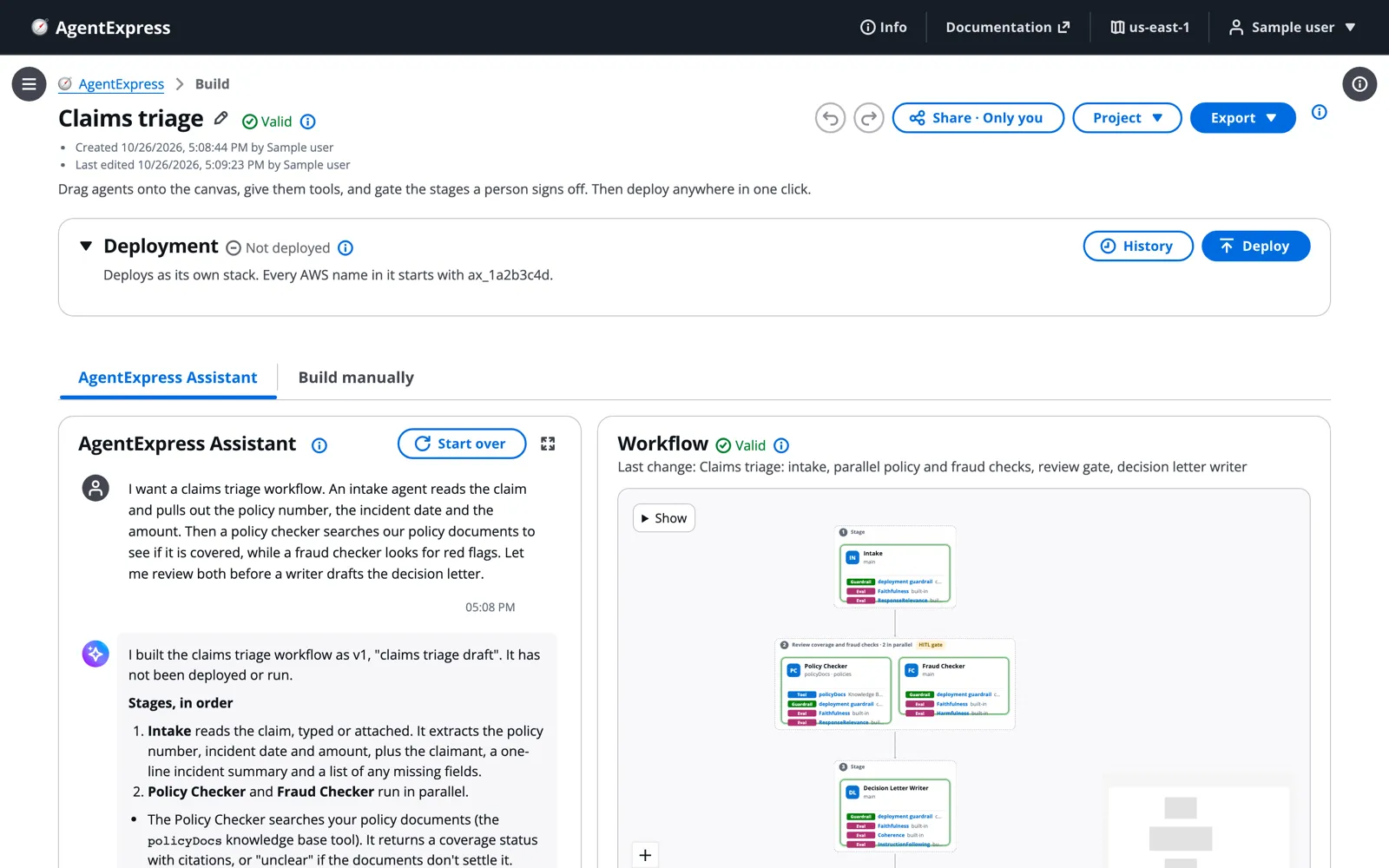
Build manually shows the same workflow on the canvas. You can make changes in either place: in the chat ("make the fraud checker stricter about dates") or on the canvas.

The Policy Checker needs something to read, so the builder uploads a one-page, fictional home-insurance policy to
policyDocs . Uploads are copied into the knowledge base at deploy time. The control plane won't deploy a build whose uploaded corpus has no documents, so an agent can't ship with nothing to search.

Deploying takes one dialog. Pick the target account, choose AWS CDK or Terraform, and confirm. The deploy takes roughly 8 to 10 minutes and runs in the control plane, so you can close the page while it finishes. The result is the build's own execution plane.
The first run starts from a fictional claim, shortened here:
Plain text
Claim from Alex Morgan (sample data). Policy number EM-H-482913,Example Mutual Home Cover. A pipe under the kitchen sink burst anddamaged the floor and two cabinets. Claiming 4,850 in total, withphotos, the plumber's invoice and the repair quote.
Intake pulls out the facts, and the two checkers run side by side. Then the run pauses for human-in-the-loop review. Because the gate follows a parallel stage, the reviewer decides on each checker separately. Revise with a note re-runs only that agent, and Deny run stops everything. The run's state is checkpointed, so it survives a reload.
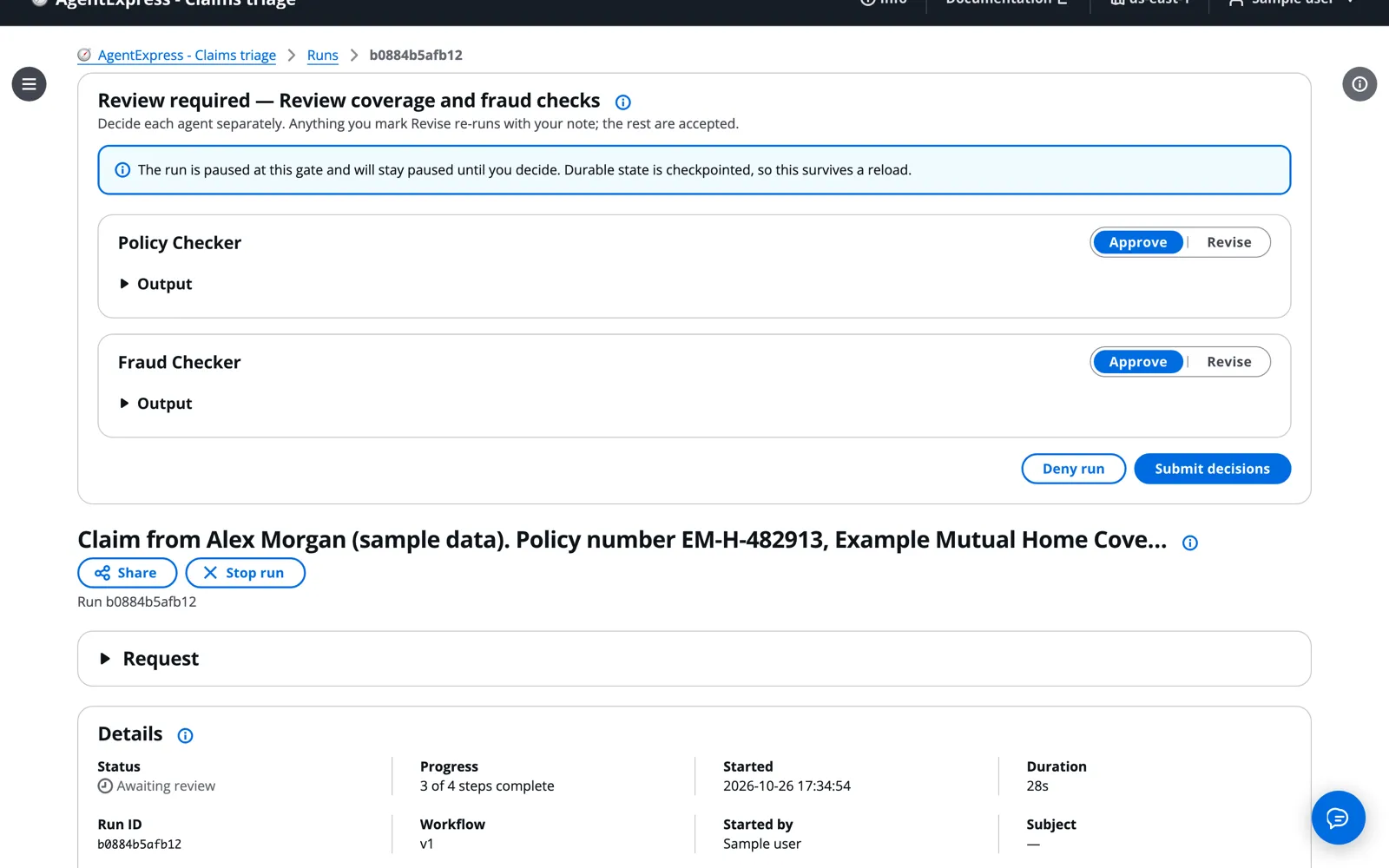
Once both checks are approved, the Decision Letter Writer returns an outcome, a subject line, the letter and internal notes. One detail stands out. The sample claim never says which currency the amount is in, so the writer asks the customer instead of guessing.
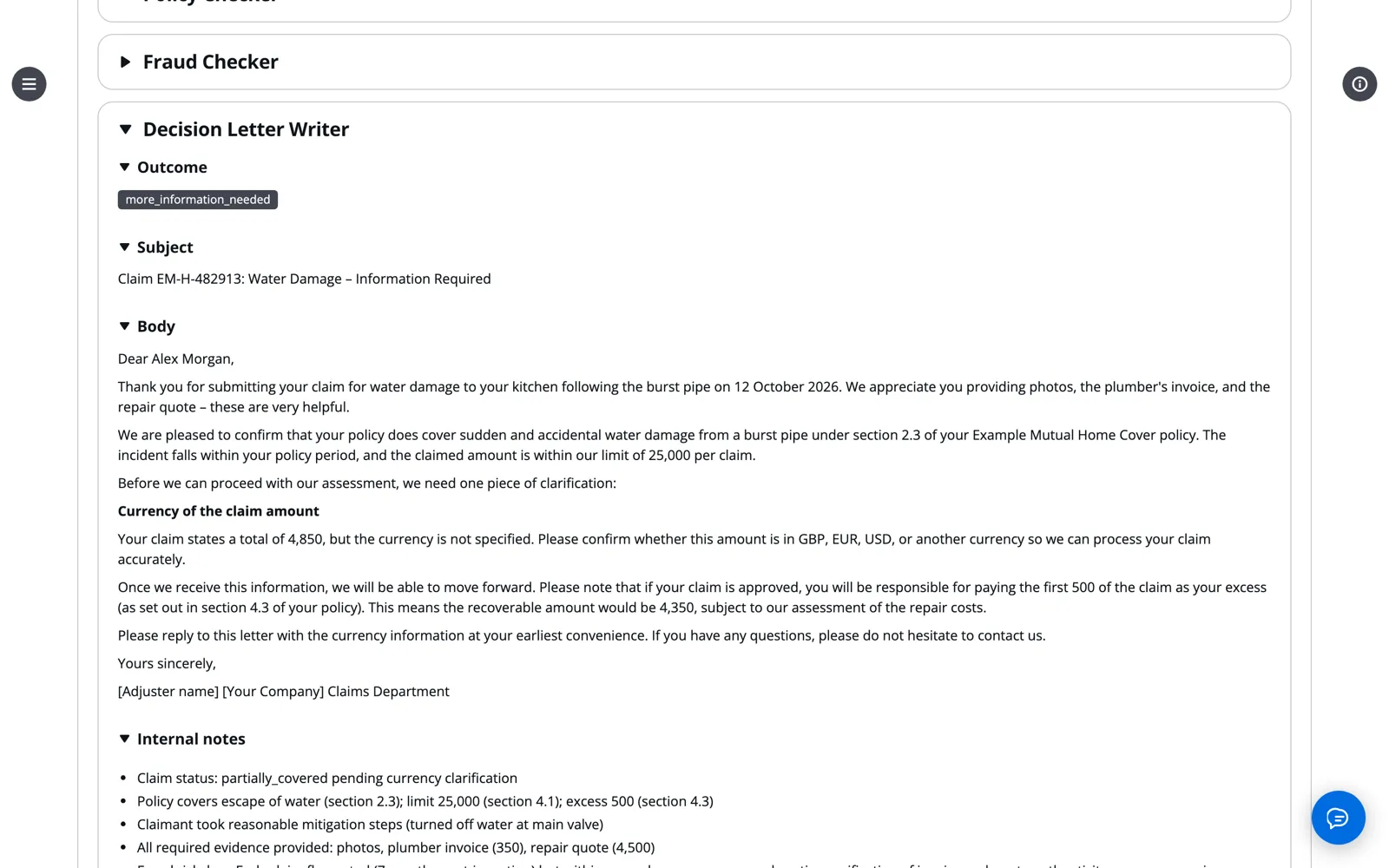
Observability answers the manager's question with the estimated cost per run and per agent. Prompts & I/O shows what each agent was sent and returned. These are list-price estimates for planning, not a bill. Afterwards, Destroy on the Deployment panel tears the build down with the same tool that deployed it.

How it works under the hood
The file
Everything the Assistant drafted lives in
workflow.json . It declares the agents, topology, tools, gates, access rules, guardrails and UI strings. Here's a trimmed excerpt from the claims build. The ... marks parts left out, such as the tool's description and each agent's guardrail and evaluator settings.JSON
{..."tools": {"policyDocs": {"type": "kb",..."corpora": ["policies"],"maxResults": 6}},"agents": {"intake": {"name": "Intake","produces": "claim-intake","attachments": true,...},"policy_checker": {"name": "Policy Checker","produces": "coverage-assessment","tool": "policyDocs","corpus": "policies","toolMode": "model","maxToolCalls": 6,...},"fraud_checker": {"name": "Fraud Checker","produces": "fraud-assessment",...},"letter_writer": {"name": "Decision Letter Writer","produces": "decision-letter",...}},"steps": [{ "agent": "intake" },{"parallel": ["policy_checker", "fraud_checker"],"gateId": "review_checks","gateName": "Review coverage and fraud checks","hitl": true},{ "agent": "letter_writer" }]}
The
steps array is the whole topology. A parallel step runs its agents side by side, and "hitl": true adds a review gate after it. The kb tool goes to one agent through tool and corpus , and "toolMode": "model" lets that agent choose its own searches. Every key is documented in the workflow.json reference .From file to stack
CDK and Terraform both read this file and create the same routes, tool targets, IAM grants and Cedar policies. That means a new workflow needs no Terraform, CDK or Cedar edits. The Builder and the deploy check the file with the same rules. A mistake fails at
cdk synth or terraform plan , and the error names the entry that caused it. When you deploy, a CodeBuild project applies the frozen version to a fresh copy of the framework and runs cdk deploy or terraform apply .At run time
The orchestrator runs on AgentCore Runtime and compiles
steps into a LangGraph graph. A parallel step fans out and then joins at one group gate. Agents with runtime: "main" , like the four in the claims build, run as nodes inside the orchestrator. A dedicated agent runs on its own runtime and is called with InvokeAgentRuntime , which carries the trace context along. harness and a2a agents run on AgentCore Harness or behind an Agent Card.Tool calls
Each tool becomes a target on the build's AgentCore Gateway, with Cedar permits generated from its tool block. Agents call the Gateway with a machine token, not a person's sign-in, and the policy engine denies anything that isn't permitted. Even when the model picks the calls, Cedar still applies and telemetry still records each one. In the claims run's timeline, that call shows up as
policyDocs___retrieve .Tools that act as the signed-in person work differently. They sit on a second Gateway that checks the person's sign-in, and the tool's own provider decides what that person can do.
Review gates
A review gate is LangGraph's
interrupt() , and an AgentCore Memory checkpointer saves the run's state while it waits. The backend resumes the same run through its session ID:- Approve continues the run.
- Revise stores the note and re-runs the agent. In a parallel stage, only the flagged agents re-run.
- Deny ends the run.
Tracing and cost
Each run carries one OpenTelemetry
session.id , and its spans flow to CloudWatch Transaction Search. The runtime also writes a telemetry row for every model, tool, memory, guardrail and policy call. Token counts are exact. Cost is a list-price estimate from configured rates, the AWS Price List or a built-in snapshot, and each row records which source it used.By the numbers
What | Detail |
|---|---|
Config | One file ( workflow.json ) drives the build |
Tools | 7 tool types and 4 built-in tools |
Connectors | 10 OAuth SaaS connectors |
Infrastructure as code | 2 paths (CDK and Terraform) |
Tests | 5,300+ automated tests (Python, UI, CDK and Terraform) |
The cost profile is serverless: AgentCore, Lambda, on-demand DynamoDB and S3 Vectors. Evaluations, guardrails, Code Interpreter and Browser sessions, and Transaction Search above 1% cost extra, and the Observability tab meters those too.
Try it yourself
Get started
If your team already runs an AgentExpress console, sign in and start with your own prompt. Otherwise, deploy one into an AWS account you use for experiments. You'll need:
- A container engine that builds
linux/arm64(Finch, Docker or Podman)
- Node.js 20 or later
- AWS credentials
- Amazon Bedrock model access
First, clone the sample:
Bash
git clone https://github.com/aws-samples/sample-aiml-solution-labs.gitcd sample-aiml-solution-labs/workshop/AgentExpress
Then deploy the control plane with either tool.
With AWS CDK:
Bash
cd orchestrator/cdk && npm install# once per account and regionnpx cdk bootstrapnpx cdk deploy -c idp=cognito -c createCognito=true \-c enableGateway=true
Or with Terraform:
Bash
cd orchestrator/terraform && \cp terraform.tfvars.example terraform.tfvars# remote state, once per account./bootstrap-state.sh# first apply of a new stack onlyterraform apply -target=null_resource.ui_buildterraform apply
Nobody has a login yet. Create a user and add it to groups with the
aws cognito-idp commands in Users, groups and RBAC . Then open the uiUrl (CDK) or ui_url (Terraform) output and sign in.Keep going
- Clone or deploy the code from aws-samples on GitHub .
- Watch the AgentExpress demo video .
- Take the hands-on AgentExpress workshop .
- Read the user guide , starting with Your first build and run .
- Read the architecture guide .
- Learn more in the Amazon Bedrock AgentCore documentation .
Then write your own prompt. Swap the claim for a support ticket, an invoice or a purchase request. Describe the checks you want and where a human should stay in the loop, and see what the Assistant builds.
Series: AgentExpress: Build a Governed Multi-Agent System in Minutes (1 article)
- 1AgentExpress: Turn Your Use Case into a Governed Multi-Agent System in Minutes This article
Enjoyed reading this content? Let the author know!
Your likes, comments, shares, and saves help creators reach more builders.

Loading recommendations
Loading article