
Building Intelligent AI Agents with AWS Strands: A Hands-On Guide
Discover how to build intelligent, task-specific AI agents using the new AWS Strands SDK. This hands-on guide walks you through integrating Amazon Bedrock models with Strands Agents, connecting to Model-Connected Plugins (MCP) for real-time tools like AWS documentation and diagram generation.


In the rapidly evolving landscape of generative AI, the ability to create intelligent agents that can reason, plan, and interact with external systems is becoming increasingly vital. AWS's Strands Agents SDK emerges as a powerful, open-source framework designed to simplify the development of such agents and Agentic workflows.
In this blog post, we’ll delve into Strands Agents — what they are, how to get started, and explore eight practical use cases that highlight the power of agentic AI in enterprise environments.
What is AWS Strands Agents SDK?
AWS Strands Agents is an open-source SDK that adopts a model-driven approach to building and running AI agents with minimal code. It enables developers to create agents that can plan, reason, and select tools autonomously, leveraging the capabilities of large language models (LLMs) like those available through Amazon Bedrock.
Key Features:
- Simplified Agent Development: Build agents with just a few lines of code by defining prompts and tools.
- Tool Integration: Easily integrate external tools and APIs to extend agent capabilities.
- Model Agnostic: Supports various LLM providers, including Amazon Bedrock, Anthropic, and more.
- Multi-Agent Systems: Facilitates the creation of complex workflows involving multiple collaborating agents.
- Security and Observability: Includes features for guardrails, prompt security, and monitoring agent performance.
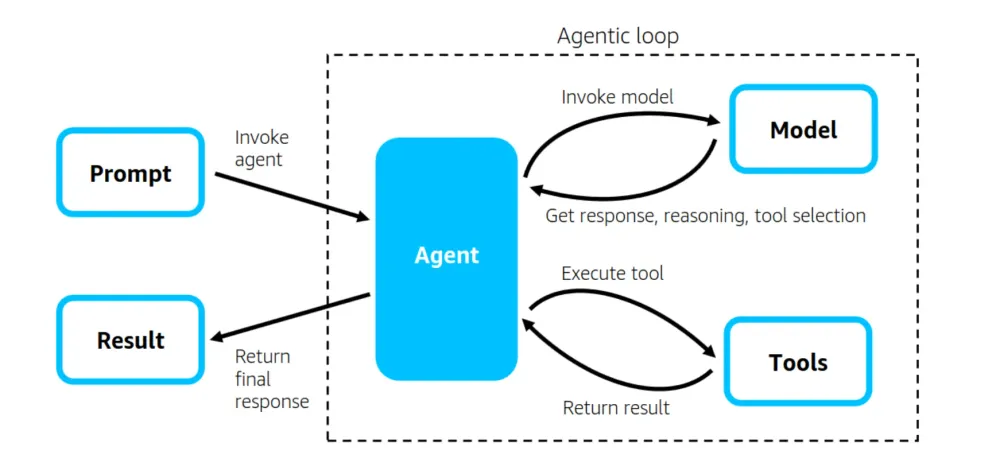
Understanding the Internals of AWS Strands Agents SDK
The AWS Strands Agents SDK empowers developers to build intelligent AI agents by leveraging the advanced reasoning capabilities of large language models (LLMs). At its core, the SDK facilitates a model-driven approach where agents can autonomously plan, reason, and act to accomplish complex tasks.
Core Components:
- Model: The LLM serves as the agent's "brain," interpreting prompts, making decisions, and determining the sequence of actions required to achieve a goal.
- Tools: External functions or APIs that the agent can invoke to perform specific tasks, such as data retrieval, computations, or interactions with other services.
- Prompt: Defines the agent's objective and provides context for the task at hand.
Agentic Loop:
The Strands Agents SDK operates on an iterative loop, enabling agents to:
- Plan: Decompose tasks into manageable sub-tasks and determine the optimal sequence of actions.
- Reason: Utilize the LLM to make informed decisions based on context, available tools, and prior interactions.
- Act: Invoke appropriate tools to execute actions.
- Reflect: Assess the outcomes of actions, identify any discrepancies or errors, and adjust strategies accordingly.
This feedback loop ensures that agents can adapt to dynamic environments, handle unexpected scenarios, and improve their performance over time.
Getting Started: Creating Your First Agent
Let's begin by creating a simple "Hello, World!" agent using the Strands Agents SDK.
Prerequisites
- Python 3.10 or higher
- An AWS account with access to Amazon Bedrock
- Enable access to the following Bedrock models
- Anthropic Claude 3.5 Haiku
- Anthropic Claude 3.5 Sonnet V2
- Anthropic Claude 3.7 Sonnet
- Amazon Nova Micro
- Amazon Nova Lite
- Amazon Nova Pro
- AWS CLI configured with appropriate credentials and permissions to the required resources
Installation
Python
pip install strands-agents -q
Python
pip install strands-agents-tools -q
plaintext
pip install uv yfinance matplotlib beautifulsoup4 pandas requests -q
After installing the packages, restart the kernel.
Creating a Simple Agent
In this example, we import the Agent class from the strands module, and interact with the agent by passing a message. The agent processes the input using the underlying LLM and returns a response.
This simple Python example shows how to interact with an Amazon Bedrock Agent using the
strands library. The Agent is created with a system prompt (or defaults) and then sent a question — in this case, “Explain Amazon Bedrock Agents.” The agent processes the query and returns a natural language response, which is printed out. This demonstrates how easily you can build conversational AI apps powered by Amazon Bedrock with minimal code.Python
from strands import Agent# Define the agent with a system promptagent = Agent()# Interact with the agentresponse = agent("Explain Amazon Bedrock Agents")print(response)
Exploring Practical Use Cases
The true power of Strands Agents becomes evident when exploring real-world applications. Below are several use cases demonstrating the versatility of the SDK.
1. Web Scraping with Hacker News
Automate the extraction of article titles and links from Hacker News using Python libraries like
requests and BeautifulSoup .This Python snippet demonstrates how to build a simple web scraping agent using the
strands library with two tools: a Python REPL to run scripts, and a file writer to save results. The agent is prompted to scrape article titles and links from the Hacker News front page ( https://news.ycombinator.com/news ), then save the output as a CSV file named with the current date. The Python code is executed in a non-interactive way, letting the agent automate data extraction and storage seamlessly. This shows how you can quickly build agents to fetch, process, and save live web data using minimal code.When you run this code, the agent reads the prompt, plans the steps, uses the Python REPL tool to scrape article titles and links from Hacker News, and saves the results as a date-stamped CSV file using the file write tool—all autonomously.
Python
from strands_tools import python_repl, file_writefrom strands import Agent, toolimport osos.environ["BYPASS_TOOL_CONSENT"] = "true"agent = Agent(tools=[python_repl, file_write])prompt = """Get the titles and the links of the articles listed in https://news.ycombinator.com/news.When you execute a python script, make sure to run it in non-interactive mode.Write the results as a CSV file names news_{date}.csv."""response = agent(prompt)
2. Stock Price Analysis
Analyze historical stock data for Amazon using
yfinance , calculate moving averages, and compare with S&P 500.This example shows how to create a financial analyst agent using the
strands library with a Python REPL tool. The agent uses the yfinance Python module to fetch historical stock data for a given company (e.g., Amazon). It then generates key visualizations, including the 20-day moving average of closing prices and daily return rate comparison against the S&P 500 over the past year. Additionally, the agent calculates the stock’s volatility based on return rates. This demonstrates how to combine natural language instructions with automated data retrieval and analysis to generate insightful financial reports programmatically.When you run this code, the agent acts as a financial analyst: it retrieves Amazon’s historical stock data using
yfinance , calculates and plots the 20-day moving average and daily return rates vs. S&P 500, computes the volatility of returns, and generates the results—all by reasoning through the system prompt and executing code via the Python REPL tool.Python
from strands_tools import python_replfrom strands import Agent, toolimport osos.environ["BYPASS_TOOL_CONSENT"] = "true"system_prompt = """You are a financial analyst. Provide following charts:- Plot 20-days moving average of closing prices for the past one year.- Plot daily return rate comparison against S&P500 for the same period.Also, compute following two metrics of the stock:- Volatility of the return ratesUse `yfinance` module to retrive the historical data."""agent = Agent(tools=[python_repl],system_prompt=system_prompt,model="us.anthropic.claude-3-5-sonnet-20241022-v2:0")response = agent("Amazon")
3. City Weather Data Collection and Storage
Fetch detailed weather information by city and date/time from a public weather source, extracts key weather metrics, and stores them in DynamoDB for historical analysis.
This example demonstrates how to build a weather data agent using the
strands library that fetches weather details for a specified city and date/time from a public weather service like wttr.in . The agent sends an HTTP GET request to retrieve JSON weather data including temperature, humidity, wind speed, and general conditions.It then stores the extracted weather information into an AWS DynamoDB table named CityWeatherData in the
us-west-2 region. The DynamoDB table uses City as the partition key and DateTime as the sort key, with other weather metrics saved as additional attributes.If the live data is unavailable or access is blocked, the agent simulates realistic weather data for testing purposes.
This approach enables automated weather data collection, storage, and retrieval, making it easy to build time-series weather analysis or alerting applications.
When you run this code, the agent fetches weather data for New York City from
wttr.in via an HTTP GET request, extracts relevant weather details, and saves them into the DynamoDB table CityWeatherData using City and DateTime as keys—autonomously reasoning through the task using the http_request and use_aws tools.Python
from strands_tools import use_aws, http_requestfrom strands import Agent, toolimport osos.environ["BYPASS_TOOL_CONSENT"] = "true"system_prompt = """You are a weather data agent. Your job is to fetch weather details for a given city and date/time by searching publicly available weather information on the web.[Instructions]- Use HTTP GET to query a public weather website or API (e.g., https://wttr.in) with city and date parameters.- Extract weather details such as temperature, conditions, humidity, wind speed, and date/time from the response.- Save these weather details into a DynamoDB table named "CityWeatherData" in us-west-2.- Use 'City' as the partition key and 'DateTime' as the sort key.- Store other extracted weather details as attributes.- If live data is unavailable or blocked, simulate realistic weather data for testing."""example_url = """Example: To get weather in San Francisco for today, query:https://wttr.in/San+Francisco?format=j1This returns JSON with weather details."""agent = Agent(tools=[use_aws, http_request],system_prompt=f"{system_prompt} {example_url}",model="us.anthropic.claude-3-5-sonnet-20241022-v2:0")response = agent("Get the weather details for New York City on 2025-06-01 12:00 PM and save to DynamoDB.")
4. DataFrame Manipulation with pandas
Perform data transformations using pandas, such as adding computed columns and aggregating statistics.
This example demonstrates how to use an AI agent to automatically generate a Python script that performs common data analysis tasks using the pandas library. The prompt asks the agent to:
- Create a sample DataFrame with columns like 'Name', 'Age', and 'Salary'.
- Calculate a new 'Bonus' column as 10% of each salary.
- Filter the data to include only entries where age is above 30.
- Group the filtered data into age brackets (20s, 30s, 40s) and compute average Salary and Bonus for each group.
- Include inline comments and a detailed function docstring for clarity.
- Provide usage examples and list any required external libraries.
- Generate documentation explaining how the code works and how to run it.
The agent executes the script and returns the output, providing an end-to-end example of AI-assisted code generation for data processing tasks, complete with explanations and runnable examples.
When this prompt is executed, the agent uses the Python REPL tool to generate, run, and display the output of a full pandas-based script that creates and transforms a DataFrame, computes bonuses, filters by age, groups data into brackets, and calculates averages—while also adding comments, docstrings, usage examples, required libraries, and documentation as instructed.
Python
prompt = """Write a Python script using the pandas library that performs the following tasks:- Create a sample DataFrame with the columns: 'Name', 'Age', and 'Salary'.- Add a new column named 'Bonus' that is 10% of the corresponding 'Salary' value.- Filter the DataFrame to include only rows where the 'Age' is greater than 30.- Group the data by age brackets (e.g., 20s, 30s, 40s) and calculate the average 'Salary' and 'Bonus' for each group.Execute the python script and show the output.Requirements:- Include clear inline comments to explain the logic.- Add a docstring for the function, describing its purpose, parameters, and return value.- Provide an example of how to use the function.- List any external libraries that need to be installed with pip (if any).- Include brief documentation describing how the code works and how to run it."""response = agent(prompt)
5. PySpark Data Processing Example
Process large datasets using PySpark, perform transformations, and save results as Parquet files.
This example shows how an AI agent can generate a complete PySpark script to perform typical big data processing steps. The prompt instructs the agent to:
- Initialize a SparkSession to start the PySpark environment.
- Create a sample CSV file named
users.csvcontaining user data columns likeid,name,age, andcity.
- Load this CSV file into a DataFrame.
- Transform the data by:
- Filtering users older than 25.
- Adding a new column classifying users as 'Adult' or 'Minor' based on age.
- Grouping by city to compute the average age per city.
- Save the final DataFrame as a Parquet file for efficient storage.
- Include detailed inline comments, a function docstring, usage examples, external dependencies, and documentation on how to run the code.
- Execute the script and return the output.
This use case highlights how AI can help quickly generate complex data engineering workflows in PySpark with clear documentation and runnable code, making it easier for developers and data engineers to get started or prototype quickly.
When executed, the agent generates and runs a PySpark script that creates a sample CSV, performs filtering, labeling, and grouping transformations, and saves the result as a Parquet file, along with comments, docstrings, usage example, and documentation.
Python
prompt = """Write a PySpark script that performs the following tasks:1. Create a SparkSession to initialize the PySpark environment.2. Generate a sample CSV file named 'users.csv' containing the following columns: 'id', 'name', 'age', and 'city'.3. Read the 'users.csv' file into a DataFrame.4. Apply the following transformations:- Filter the DataFrame to include only users older than 25.- Add a new column that labels each user as 'Adult' if their age is greater than 18, otherwise 'Minor'.- Group the data by 'city' and calculate the average age for each city.5. Save the final transformed DataFrame as a Parquet file.Execute the python code and show the outputRequirements:- Include clear inline comments to explain the logic.- Add a docstring for the function, describing its purpose, parameters, and return value.- Provide an example of how to use the function.- List any external libraries that need to be installed with pip (if any).- Include brief documentation describing how the code works and how to run it."""response = agent(prompt)
6. Machine Learning Processing
Train and evaluate machine learning models for tasks like customer churn prediction.
This example demonstrates how an AI agent can help automatically generate Python code for a full machine learning workflow — from data preprocessing to model training and evaluation — with detailed explanations and runnable output at each stage.
Step 1: Data Loading and Preprocessing for Customer Churn Prediction
Creates a synthetic customer dataset, handles missing values, encodes categorical features, normalizes numerical data, and splits into training and test sets with detailed commentary.
The AI generates code to create a sample customer churn CSV dataset, handle missing values, encode categorical variables, normalize numerical features, and split the data into training and test sets. It uses popular libraries like
pandas and scikit-learn with clear inline comments and documentation.Step 2: Training Multiple Machine Learning Models
Trains Random Forest, Gradient Boosting, and Logistic Regression models using 5-fold cross-validation, calculating and displaying key classification metrics for comparison.
Building on the preprocessed data, the agent writes code to train three different classifiers: Random Forest, Gradient Boosting, and Logistic Regression. It applies 5-fold cross-validation and calculates performance metrics (accuracy, precision, recall, F1 score) for each model. This step includes detailed metric summaries and example usage.
Step 3: Model Evaluation, Visualization, and Selection
Evaluates all trained models, visualizes ROC curves and confusion matrices, selects the best model based on F1 score
Finally, the AI produces code to visualize model performance via ROC curves and confusion matrices, compare models based on F1 scores, select the best-performing model, and save it to disk using
joblib . Visualization is done with matplotlib and seaborn , and the code is documented for ease of use.When executed, the agent builds a full churn prediction pipeline by generating Python code to preprocess data, train and evaluate multiple ML models with cross-validation, and finally visualize performance, select the best model, and save it to disk.
Python
step1_prompt = """I'm building a machine learning pipeline for predicting customer churn.First, write Python code for loading and preprocessing the data with the following steps:1. Create a sample CSV file named 'customer_data.csv' containing relevant customer churn data, and then load it.2. Handle missing values appropriately using common techniques (e.g., fill with mean, drop rows).3. Encode categorical variables using suitable methods such as one-hot encoding or label encoding.4. Normalize the numerical features to ensure all values are on a similar scale.5. Split the dataset into training and test sets using an 80/20 ratio.Use the pandas and scikit-learn libraries. Make sure the code includes detailed comments explaining each step.Execute the python code and show the outputRequirements:- Include clear inline comments to explain the logic.- Add a docstring for the function, describing its purpose, parameters, and return value.- Provide an example of how to use the function.- List any external libraries that need to be installed with pip (if any).- Include brief documentation describing how the code works and how to run it."""# Test with a simple examplestep1_response = agent(step1_prompt)step2_prompt = f"""Now that we have the preprocessing code, write Python code to train and evaluate multiple machine learning models:1. Use the preprocessed dataset obtained from the previous step.2. Train the following models:- Random Forest Classifier- Gradient Boosting Classifier- Logistic Regression3. Apply 5-fold cross-validation to evaluate each model’s performance.4. For each model, calculate and display the following metrics:- Accuracy- Precision- Recall- F1 ScoreUse scikit-learn for modeling and evaluation. The output should include a summary of metrics for each model.Here’s the preprocessing code for reference:{step1_response}Execute the python code and show the outputRequirements:- Include clear inline comments to explain the logic.- Add a docstring for the function, describing its purpose, parameters, and return value.- Provide an example of how to use the function.- List any external libraries that need to be installed with pip (if any).- Include brief documentation describing how the code works and how to run it."""step2_response = agent(step2_prompt)# Step 3: Model Evaluation and Selectionstep3_prompt = f"""Finally, write Python code to evaluate and select the best machine learning model:1. Compare the trained models using the evaluation metrics: Accuracy, Precision, Recall, and F1 Score.2. Create visualizations for each model:- ROC Curve- Confusion Matrix3. Based on the F1 Score, identify and select the best-performing model.4. Save the selected model to disk using `joblib`.Use libraries like `matplotlib`, `seaborn`, and `scikit-learn` for visualization and evaluation.Here’s the model training code for reference:{step2_response}Execute the python code and show the outputRequirements:- Include clear inline comments to explain the logic.- Add a docstring for the function, describing its purpose, parameters, and return value.- Provide an example of how to use the function.- List any external libraries that need to be installed with pip (if any).- Include brief documentation describing how the code works and how to run it."""step3_response = agent(step3_prompt)
7. Using Custom Tools
Deploy specialized agents for investment research, budget optimization, and financial planning.
This Python code creates a multi-agent financial assistant using the Strands SDK and Amazon Bedrock models, each tailored for a specific financial task:
- Specialized Agents
- Investment Research Assistant
Uses
us.amazon.nova-pro-v1:0to provide insights into stocks, ETFs, and market trends.
- Budget Optimizer Assistant
Uses
us.amazon.nova-lite-v1:0to help users track and improve monthly spending habits.
- Financial Planner Assistant
Uses
us.amazon.nova-micro-v1:0to guide users through long-term financial planning.
Each assistant is wrapped in a
@tool -decorated function and initialized with a relevant system prompt to specialize the agent’s behavior.- Orchestrator Agent
A main orchestrator agent uses a system prompt to route user queries to the most suitable assistant, based on the query’s intent. In this case, it identifies that the query involves budgeting, investing, and financial planning, and delegates the tasks accordingly.
- Natural User Interaction
A user simply asks:
"I'm 30 years old, earning $6,000/month. I want help managing my budget, investing, and building a plan for early retirement."
The orchestrator automatically distributes this complex query to the relevant specialized tools and returns an integrated, helpful response.
When executed, the orchestrator agent receives the user’s financial query and intelligently routes parts of it to three specialized assistants—investment research, budget optimization, and financial planning—each powered by a tailored Bedrock model, then aggregates their responses to provide comprehensive, expert financial advice.
Python
from strands.models.bedrock import BedrockModel# Investment Research Assistantmodel_research = BedrockModel(model_id="us.amazon.nova-pro-v1:0")@tooldef investment_research_assistant(query: str) -> str:investment_researcher = Agent(model=model_research,system_prompt="""You are a financial research analyst who helps users explore various investment opportunities.You specialize in providing insights into stocks, ETFs, mutual funds, bonds, and other instruments.You also highlight key market trends, risk factors, and historical performance.Your goal is to equip users with comprehensive, objective information to support their investment decisions.""",)return investment_researcher(query).message# Budget Optimizer Assistantmodel_budget = BedrockModel(model_id="us.amazon.nova-lite-v1:0")@tooldef budget_optimizer_assistant(query: str) -> str:budget_coach = Agent(model=model_budget,system_prompt="""You are a smart budgeting assistant who helps users manage and optimize their monthly expenses.You analyze income, spending patterns, and savings goals, and suggest personalized recommendationsto cut unnecessary costs and improve savings. Your goal is to help users maintain a healthy financial balance.""",)return budget_coach(query).message# Financial Planner Assistantmodel_planner = BedrockModel(model_id="us.amazon.nova-micro-v1:0")@tooldef financial_planner_assistant(query: str) -> str:financial_planner = Agent(model=model_planner,system_prompt="""You are a certified financial advisor bot who helps users create customized financial plansbased on their goals, income, age, and risk tolerance.You guide them through budgeting, saving, debt management, insurance, and retirement planning.Your goal is to provide practical, step-by-step advice to help users achieve financial stability and growth.""",)return financial_planner(query).message
Call the Tools
Python
from strands import Agent# Define orchestrator system prompt with clear tool selection guidanceMAIN_SYSTEM_PROMPT = """You are an assistant that routes queries to specialized agents:- For research questions and factual information → Use the research_assistant tool- For product recommendations and shopping advice → Use the product_recommendation_assistant tool- For travel planning and itineraries → Use the trip_planning_assistant tool- For simple questions not requiring specialized knowledge → Answer directlyAlways select the most appropriate tool based on the user's query."""# Strands Agents SDK allows easy integration of agent toolsorchestrator = Agent(system_prompt=MAIN_SYSTEM_PROMPT,tools=[investment_research_assistant, budget_optimizer_assistant, financial_planner_assistant])orchestrator("""I'm 30 years old, earning around $6,000 per month.I have some student loans and moderate savings.I want to understand how I can better manage my monthly budget,explore investment options, and build a solid long-term financial planfor buying a house and retiring early. Can you help?""")
8. MCP Integration - AWS Solutions Architect Agent with Documentation Querying and Diagram Generation
1. Query AWS documentation (via an MCP server).
2. Generate architectural diagrams (via another MCP server).
This code uses the Strands SDK, Amazon Bedrock, and MCP (Model Context Protocol) to generate AWS architecture diagrams from natural language.
🔧 How It Works:
- Uses
Claude 3.5 Haikuvia Bedrock to understand and respond to user prompts.
- Connects to AWS MCP plugins:
- 📚
aws-documentation-mcp-serverfor querying AWS docs.
- 🗺️
aws-diagram-mcp-serverfor generating diagrams.
- Sends a prompt like: "Create a diagram of a website that uses AWS Lambda for a static site hosted on S3."
- The agent returns the diagram file path, and the code renders it automatically.
This enables developers and architects to visually design AWS solutions just by asking questions, automating documentation and diagrams in one go.
Python
from mcp import StdioServerParameters, stdio_clientfrom strands import Agentfrom strands.models import BedrockModelfrom strands.tools.mcp import MCPClientfrom IPython.display import Image, display # Import for displaying imagesimport osaws_docs_client = MCPClient(lambda: stdio_client(StdioServerParameters(command="uvx", args=["awslabs.aws-documentation-mcp-server@latest"])))aws_diag_client = MCPClient(lambda: stdio_client(StdioServerParameters(command="uvx", args=["awslabs.aws-diagram-mcp-server@latest"])))bedrock_model = BedrockModel(model_id="us.anthropic.claude-3-5-haiku-20241022-v1:0",temperature=0.7,)SYSTEM_PROMPT = """You are an expert AWS Certified Solutions Architect. Your role is to help customers understand best practices on building on AWS.You can query the AWS Documentation and generate diagrams. When you generate a diagram,you MUST tell the customer the full file path of the diagram in the format "The diagram is saved at: <filepath>"."""
Generate the Architecture Diagram
Python
# Set up diagram output directorydiagram_dir = "./generated-diagrams"os.makedirs(diagram_dir, exist_ok=True)# Main logic block using aws_diag_clientwith aws_diag_client:all_tools = aws_diag_client.list_tools_sync()agent = Agent(tools=all_tools, model=bedrock_model, system_prompt=SYSTEM_PROMPT)query = "Create a diagram of a website that uses AWS Lambda for a static website hosted on S3"print(f"Sending query to agent: {query}\n")# Run the query through the agentagent_result = agent(query)# Extract textual content from agent_resultfinal_agent_response_text = ""if hasattr(agent_result, 'response') and isinstance(agent_result.response, str):final_agent_response_text = agent_result.responseelif hasattr(agent_result, 'content') and isinstance(agent_result.content, str):final_agent_response_text = agent_result.contentelif hasattr(agent_result, 'output') and isinstance(agent_result.output, str):final_agent_response_text = agent_result.outputelif isinstance(agent_result, str):final_agent_response_text = agent_resultelse:try:final_agent_response_text = str(agent_result)print("DEBUG: Converted agent_result to string.")except Exception as e:print(f"ERROR: Could not extract text from AgentResult. Error: {e}")print("Please inspect the 'agent_result' object to determine the correct attribute.")# Print agent responseprint("\n--- Agent's Full Response Text ---")print(final_agent_response_text)print("--- End of Agent's Full Response Text ---\n")# Try to extract diagram path from responsediagram_path = Noneif final_agent_response_text:path_marker = "The diagram is saved at: "if path_marker in final_agent_response_text:start_index = final_agent_response_text.find(path_marker) + len(path_marker)end_index = final_agent_response_text.find("\n", start_index)end_index = end_index if end_index != -1 else len(final_agent_response_text)diagram_path_raw = final_agent_response_text[start_index:end_index].strip()diagram_path = diagram_path_raw.strip("`'\"")print(f"\nExtracted diagram path: '{diagram_path}'")if diagram_path and os.path.exists(diagram_path):print(f"Displaying diagram from: {diagram_path}")display(Image(filename=diagram_path))elif diagram_path:print(f"Diagram file not found at: {diagram_path}")print(f"Current working directory: {os.getcwd()}")expected_dir = os.path.dirname(diagram_path)if os.path.exists(expected_dir):print(f"Directory '{expected_dir}' exists with files: {os.listdir(expected_dir)}")else:print(f"Directory '{expected_dir}' does NOT exist.")else:print("Agent response did not include a diagram path in the expected format.")else:print("No textual response extracted from the agent's result.")
Conclusion
AWS Strands Agents SDK offers a powerful yet accessible framework for building intelligent AI agents capable of complex reasoning and interaction with external systems. With its model-driven approach, support for various tools and models, and ease of integration, developers can rapidly prototype and deploy agents for a wide range of applications
To explore more and get hands-on experience, visit the [Strands Agent Jupyter Notebook]
https://github.com/aws-samples/sample-advanced-rag-using-bedrock-and-sagemaker/blob/main/Lab%205.%20Strands%20Agent/Strands.ipynb
Enjoyed reading this content? Let the author know!
Your likes, comments, shares, and saves help creators reach more builders.

Loading recommendations
Loading article