
Build a Knowledge Graph with Amazon Neptune and the Strands Agent SDK
See how to leverage the Strands Agent SDK with Amazon Neptune to build and interact with a knowledge graph.


Build a Knowledge Graph with Amazon Neptune and the Strands Agent SDK
A couple of weeks back, AWS released a new open source agent framework library, the Strands Agent SDK . Since I've been knee-deep in MCP server stuff lately, I thought, "why not give it a spin?" I was particularly curious to see how well it would play with Amazon Neptune. You know how it goes - sometimes these integrations can be tricky, so I try it out and let you all know what I found.
Setup
To get started, I had to install the Strands Agent SDK and the Strands Agent Tools, which provides a set of pre-built tool primitives for simplifying common tasks like calling AWS services or using MCP servers which I was planning on leveraging. I also had to install this
uvx since I am going to be running the Amazon Neptune MCP servers and uvx is required.pip install strands-agents strands-agents-tools uvxIn addition to installing these libraries, I also needed an Amazon Neptune instance. With the initial setup out of the way, I was ready to get started.
Using the use_aws Tool
To start things off, I decided to try one of the tools they provided, called
use_aws . This tool lets you use AWS services directly, which is pretty helpful. It's works as a wrapper around boto3 , which allows me to work with both Neptune Database and Neptune Analytics. For my test run, I decided to try running an openCypher query on my Neptune Analytics graph containing the air-routes dataset, which has information about airports and flights. The
use_aws tool made it easy to interact with my Neptune Analytics graph. After setting up some basic settings, such as the LLM for my agent, I was able to declare a new tool passing it the service name, neptune-graph , the operation name, execute_query , and the required parameters.from strands import Agentfrom strands.models import BedrockModelfrom strands_tools import use_aws
use_aws_agent = Agent( model=BedrockModel(model_id="anthropic.claude-3-5-sonnet-20240620-v1:0"), tools=[use_aws],)
use_aws_agent.tool.use_aws(service_name="neptune-graph", operation_name="execute_query", parameters={"query": "", "language":"OPEN_CYPHER"}, region="us-west-2", graph_id="<INSERT YOUR NEPTUNE ANALYTICS GRAPH ID HERE>")resp = agent("Run this query: MATCH (n) RETURN n LIMIT 10")Running that gave me the following response.
The query "MATCH (n) RETURN n LIMIT 10" has been successfully executed on the Neptune Graph database. Let me summarize the results for you:
1. The query returned 10 nodes as requested.2. The nodes represent a mix of continents and countries.3. Each node has an ID, entity type, labels, and properties.
Here's a breakdown of the returned nodes:
Continents (3):1. Oceania (OC)2. South America (SA)3. North America (NA)
Countries (7):1. Zimbabwe (ZW)2. United Kingdom (UK)3. Ukraine (UA)4. Uganda (UG)5. Turkmenistan (TM)6. Tunisia (TN)7. Syrian Arab Republic (SY)
Each node has the following structure:- ~id: A unique identifier for the node- ~entityType: "node" for all entries- ~labels: Either ["continent"] or ["country"]- ~properties:   - type: Either "continent" or "country"  - code: A two-letter code for the continent or country  - desc: The full name of the continent or country
This query gives us a glimpse into the structure of the graph database, showing that it contains geographical data about continents and countries. The database seems to use two-letter codes for both continents and countries, along with their full names.
Is there anything specific you'd like to know about these results, or would you like to run a different query on the graph?
So my agent managed to query the database and summarize the results.
While interesting, when working with agents, I'll probably just want to ask a question in plain English, you know? So let's see how it handles asking, "Find me a flight from ANC to SEA in my graph?"
Certainly! I'll craft a query to find a flight from ANC (Anchorage) to SEA (Seattle) in the graph. We'll use an OpenCypher query to search for this flight path. Let's structure the query to find a direct flight or a connection with one stop.Tool #2: use_aws
I apologize, but it seems that the query didn't return any results. This could mean a few things:
1. There might not be a direct flight or a one-stop connection from ANC to SEA in our graph.2. The airport nodes might not be labeled as 'airport' or might not have the 'code' property as we assumed.3. The relationship between airports might not be labeled as 'FLIGHT'.
Let's try a more general query to see what kind of airport data we have in the graph. We'll look for nodes that have an 'code' property that matches 'ANC' or 'SEA':
...<CONTENT OMITTED>...
Tool #4: use_aws
Based on the query results, I can provide you with information about flights from ANC (Anchorage) to SEA (Seattle). There is a direct flight available between these two airports. Here are the details:
1. Direct Flight:   - Departure: Anchorage Ted Stevens International Airport (ANC)   - Arrival: Seattle-Tacoma International Airport (SEA)   - Distance: 1440 miles   - Flight type: Direct route
2. Airport Information:   a) Anchorage Ted Stevens International Airport (ANC):      - City: Anchorage, Alaska      - Elevation: 151 feet      - Runways: 3      - Longest runway: 12,400 feet      - ICAO code: PANC      - Coordinates: 61.1744° N, 149.9960° W
   b) Seattle-Tacoma International Airport (SEA):      - City: Seattle, Washington      - Elevation: 432 feet      - Runways: 3      - Longest runway: 11,901 feet      - ICAO code: KSEA      - Coordinates: 47.4490° N, 122.3090° W
This direct flight is the most efficient route between Anchorage and Seattle. However, if you're interested in alternative routes or connecting flights, there are several options with one stop. Some notable connecting cities include:
1. Portland (PDX)2. San Francisco (SFO)3. Los Angeles (LAX)4. Las Vegas (LAS)5. Phoenix (PHX)6. Denver (DEN)7. Chicago (ORD)8. Minneapolis (MSP)
These connecting flights would typically have longer total distances and travel times compared to the direct flight. The choice of a connecting flight might be influenced by factors such as availability, price, or personal preference for layover cities.
Is there any specific information about this flight route or the airports that you'd like to know more about?
In this example, my agent did generate and run a correct query, but it took several iterations, in this case 3, to get a proper query.
In the first attempt, it generated a query but didn't have the right label names for the properties, so while it can write and execute the query, nothing was returned. On the next try, the agent looked up the proper schema for the graph. On the third attempt, it used that schema to generate the correct query. Success!
I have to say, I did appreciate that persistent, iterative approach that Strands took here. Sure, it took a few rounds, but I also didn’t give it any additional hints or context, so the first attempts were just shots in the dark. I suspect that few of us would get it right without knowing the schema either ;)
Using the Amazon Neptune MCP servers
For my next experiment, I decided to try something different and use the MCP integration in Strands along with the Amazon Neptune MCP server . The code here took a similar approach to above in declaring my agent and LLM. The biggest difference here was that I used the
MCPClient tool to instantiate and run my MCP server by passing it the proper arguments. I did also add some custom instructions to the system prompt to let my agent know that it should first fetch the schema and to ensure proper casing of properties whenever it writes a query.Note: For more details on the Amazon Neptune MCP servers, check out these blog posts:
Simplifying Amazon Neptune Integration with MCP Servers
Build a Knowledge Graph with MCP Memory and Amazon Neptune
from mcp import stdio_client, StdioServerParametersfrom strands import Agentfrom strands.tools.mcp import MCPClientimport os
query_mcp_client = MCPClient(lambda: stdio_client(StdioServerParameters(command="uvx",     args=["awslabs.amazon-neptune-mcp-server@latest"],    env={"NEPTUNE_ENDPOINT": "<NEPTUNE ENDPOINT AS SPECIFIED HERE https://github.com/awslabs/mcp/tree/main/src/amazon-neptune-mcp-server>"},    )))with query_mcp_client:    tools = query_mcp_client.list_tools_sync()    # Create an agent with all tools    agent = Agent(tools=tools,         system_prompt="""You are an agent that interacts with an Amazon Neptune database to run graph queries.        Whenever you write queries you should first fetch the schema to ensure that you understand the correct labels and property names         as well as the appropriate casing of those names and values.        """,    )    agent("Find me a flight from Anchorage to New York that goes through Chicago?")
Running this code, gave the following response.
I'll help you find a flight from Anchorage to New York that goes through Chicago. Let me query the graph database to find this information for you.
First, let me check the graph schema to understand the structure of the flight data:Tool #1: get_graph_schemaNow, I'll search for a flight route from Anchorage to New York that connects through Chicago. I'll need to find the airport codes for these cities first, and then find the connecting flights.
Let's start by finding the airport codes for Anchorage, Chicago, and New York:Tool #2: run_opencypher_queryNow that I have the airport codes, I'll search for a flight route from Anchorage (ANC) to New York (either JFK or LGA) that goes through Chicago (either ORD or MDW):Tool #3: run_opencypher_queryI found flights from Anchorage to New York that go through Chicago. Here are the options:
Option 1:First Leg: Anchorage (ANC) to Chicago O'Hare (ORD) - 2,840 milesSecond Leg: Chicago O'Hare (ORD) to New York LaGuardia (LGA) - 731 milesTotal Distance: 3,571 milesOption 2:First Leg: Anchorage (ANC) to Chicago O'Hare (ORD) - 2,840 milesSecond Leg: Chicago O'Hare (ORD) to New York JFK (JFK) - 737 milesTotal Distance: 3,577 milesBoth options connect through Chicago O'Hare (ORD) airport, with the first option landing at LaGuardia and the second at JFK. The total distances are very similar, with the LaGuardia route being slightly shorter by just 6 miles.%
With the custom prompting I gave, I noticed that my agent first checks the schema and then generates and runs the query, which worked correctly on the first attempt.
While providing agents the ability to run queries is quite powerful, I thought it would be interesting to see if we could leverage our agent and the underlying LLM to automate and augment a knowledge graph similar to the approach taken in this blog post .
To achieve this, I decided to use a combination of a Perplexity MCP server to research information on a topic and a Neptune Memory MCP server to store that information in our knowledge graph.
Given the topic of this post, I decided to have my agent research, store, and summarize key considerations for building and using a memory server with the Strands SDK.
from mcp import stdio_client, StdioServerParametersfrom strands import Agentfrom strands.tools.mcp import MCPClient
memory_mcp_client = MCPClient(lambda: stdio_client(StdioServerParameters(    command="uvx",     args=["https://github.com/aws-samples/amazon-neptune-generative-ai-samples/releases/download/mcp-servers-v0.0.9-beta/neptune_memory_mcp_server-0.0.9-py3-none-any.whl"],    env={"NEPTUNE_MEMORY_ENDPOINT": "<NEPTUNE ENDPOINT AS SPECIFIED HERE https://github.com/awslabs/mcp/tree/main/src/amazon-neptune-mcp-server>"})))perplexity_mcp_client = MCPClient(lambda: stdio_client(StdioServerParameters(command="npx",     args=["server-perplexity-ask"],    env={"PERPLEXITY_API_KEY": "<YOUR PERPLEXITY API KEY>"},    )))with memory_mcp_client, perplexity_mcp_client:    tools = memory_mcp_client.list_tools_sync() + perplexity_mcp_client.list_tools_sync()    agent = Agent(tools=tools,         system_prompt="""        You are a research agent. Your role is to:            1. Analyze incoming research questions, search your own information as well as web information to find and propose answers                       2. As you research and find information store the important entities, observations, and relations in my memory knowlege graph            3. At the end of your research provide a brief summary of your findings and the knowledge graph entities you used to back those findings        """)    agent("""I work on the Amazon Neptune team.  I am currently building and testing MCP servers with            the Strands Agent SDK to show how you can Amazon Neptune with an agent framework to store memories in the form of a knowledge graph.                      I am interested in what key considerations I should take into account?            """)
Running this code, we see the following results.
I'd be happy to help you research the key considerations for building and testing MCP servers with the Strands Agent SDK that use Amazon Neptune as a knowledge graph for storing memories.
Let me first check if there's any existing information in the memory knowledge graph that might be relevant to your question.Tool #1: read_memoryLet me also check the status of the Amazon Neptune memory server to understand its current configuration.Tool #2: get_memory_server_statusNow, let me research key considerations for integrating Amazon Neptune with the Strands Agent SDK for building MCP servers. I'll gather information using Perplexity.Tool #3: perplexity_askLet me gather additional information specifically about memory management in agent systems and Amazon Neptune's features for knowledge graphs:Tool #4: perplexity_askNow that I've gathered some information, let me also look into considerations specific to memory persistence and testing in agent frameworks:Tool #5: perplexity_askLet me store this valuable information in the knowledge graph to help organize what we've learned:Tool #6: create_entitiesI need to create entities in the correct format:Tool #7: create_entitiesLet me create the entities with the correct format including observations:Tool #8: create_entitiesLet me correct the format for observations as a list:Tool #9: create_entitiesNow let me create two more key entities:Tool #10: create_entitiesNow let's create relationships between these entities:Tool #11: create_relationsLet's add a few more important relationships:Tool #12: create_relationsNow that I've created a knowledge graph with the key entities and relationships, let me search the memory to verify what we've stored:Tool #13: read_memoryBased on my research, here's a summary of key considerations for building and testing MCP servers with the Strands Agent SDK using Amazon Neptune as a knowledge graph for storing memories:
Key Considerations for MCP Servers with Neptune and Strands Agent SDK1. Data Modeling and Schema DesignFlexible Graph Schema: Choose between Property Graph (Gremlin) or RDF (SPARQL) models based on your specific agent memory requirements.Schema Alignment: Design your knowledge graph schema to align with the Strands Agent SDK data structures and agent memory access patterns.Memory Representation: Structure your graph to effectively represent entities, relationships, and agent experiences in a way that enables efficient retrieval and reasoning.2. Performance OptimizationQuery Efficiency: Optimize Gremlin or SPARQL queries to avoid deep traversals and leverage indexed properties.Batch Operations: Where possible, use batch write and read operations to reduce overhead.Caching Strategy: Consider implementing a caching layer for frequently accessed memories to reduce database load.Monitoring Query Performance: Use Neptune's built-in monitoring tools to identify and optimize slow queries.3. Scalability ConsiderationsInstance Sizing: Select appropriate Neptune instance types based on your expected workload.Read Replicas: Utilize Neptune's read replica capability to scale read-heavy memory operations.Memory Management: Implement policies for archiving or summarizing older, less relevant memories as your knowledge graph grows.4. Security ImplementationAccess Controls: Leverage AWS IAM for fine-grained access control to your Neptune database.VPC Configuration: Properly configure your Neptune instance within a secure VPC environment.Connection Security: Ensure secure connections between your MCP servers and Neptune instances.5. Testing StrategiesFunctional Testing: Validate memory write/read operations using representative test data.Performance Testing: Benchmark against actual Neptune instances (not emulators) to get accurate performance measurements.Edge Case Handling: Test with edge-case data and failure scenarios to ensure robustness.Test Isolation: Use test bootstrapping and cleanup to ensure repeatability and integrity.6. Monitoring ApproachesCloudWatch Integration: Set up comprehensive monitoring with CloudWatch to track system metrics and query performance.Audit Logging: Enable Neptune's audit logs for tracking query history and debugging.Alerting: Implement alerts for slow queries, failed requests, and resource exhaustion.7. Advanced FeaturesGraphRAG Integration: Consider implementing Graph-based Retrieval Augmented Generation to enhance context-aware responses by combining vector search with graph analysis.Integration with AWS Services: Leverage other AWS services like Comprehend, Textract, and Rekognition for enhancing agent memory with structured information from unstructured data.These considerations, organized in our knowledge graph, provide a comprehensive framework for building robust MCP servers with the Strands Agent SDK and Amazon Neptune. The knowledge graph approach allows you to represent complex relationships between components and practices, providing a structured view of the system architecture and best practices.
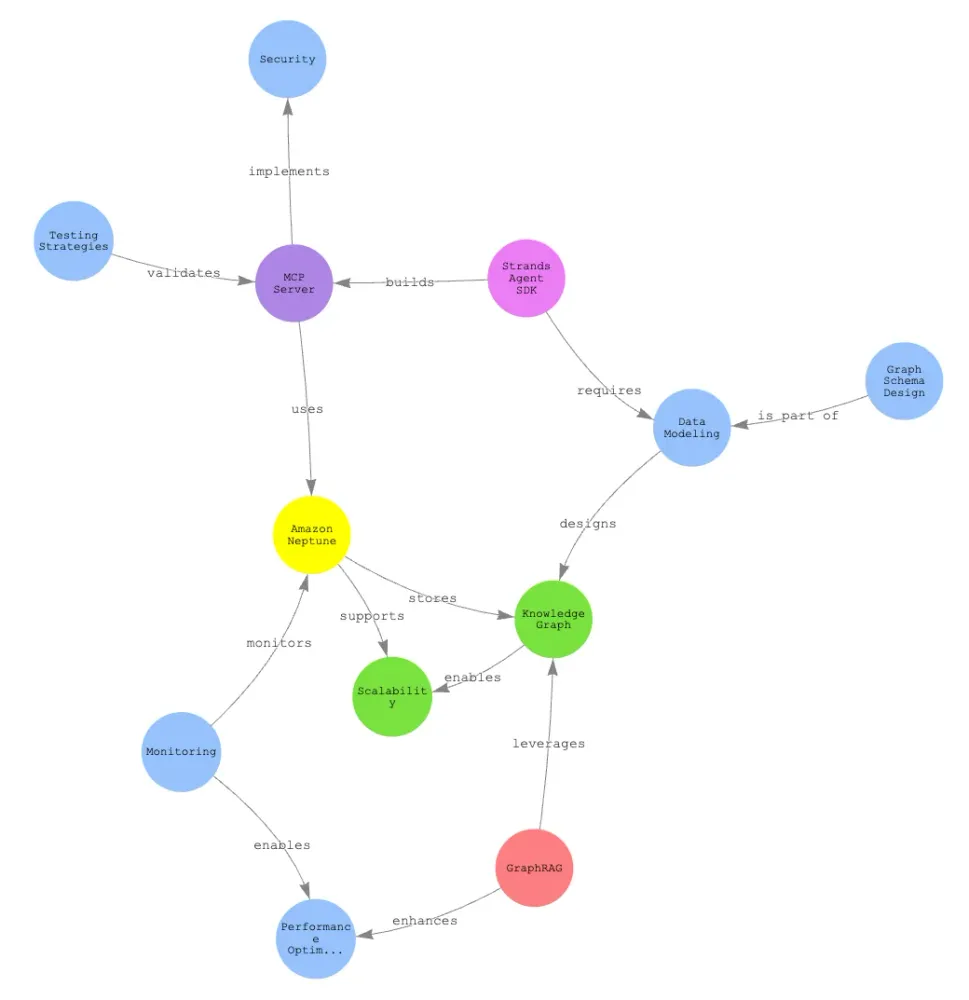
You know, that's a pretty solid summary of the main points we need to think about. Let's take a peek at our knowledge graph and see the crucial entities and relationships that have been stored, it's always good to have that kind of information handy, am I right?
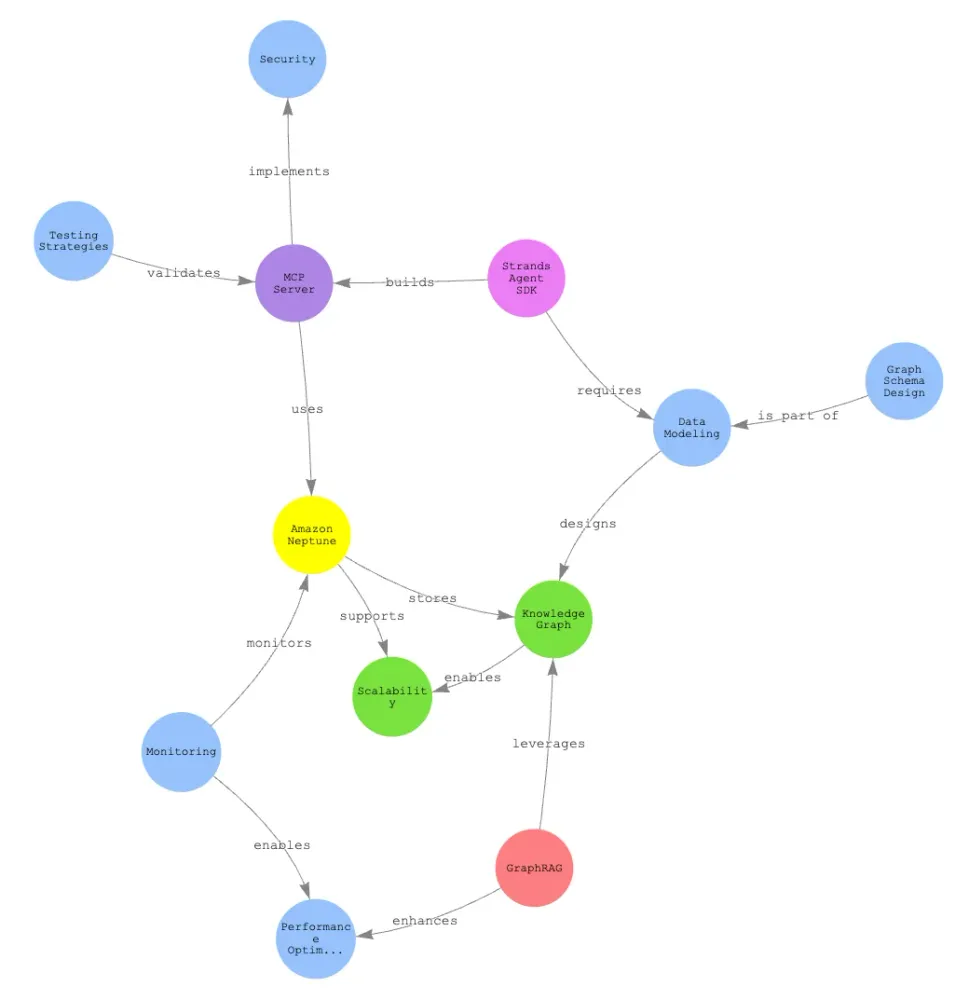
Taking a look at our knowledge graph, I see that we know have the key points from above connected together to allow for later retrieval and reuse.
Conclusion
Overall, I'm actually pretty happy with my experiments, and two things really stood out to me:
First off, I found the SDK user-friendly. I didn't have to jump through hoops to get things running, and most important, it just worked. Admittedly, my examples above are pretty straightforward, but they worked expected, no odd bugs or cryptic error messages that you get from initial releases of a toolkit. I haven't tried out some of the more complex features such as observability, evaluation, multi-agent collaboration etc. so there may be features where this isn't true. However, my initial experience has been positive enough to try out those features, instead of waiting.
Second, the docs were much clearer and more complete than I see on even much more mature open-source projects. Docs are hard to build and maintain, and docs for open source projects are even harder. They could benefit from some more examples that go beyond the “Hello World” type. Strands do have a samples GitHub repo ( here ) which (currently) has some nice use case focused examples and will hopefully continue to be updated with some other tools specific examples as well.
After this test drive, I'm honestly excited about what's next. I've got the basics down, and my next step is to start building some more complex examples.
Enjoyed reading this content? Let the author know!
Your likes, comments, shares, and saves help creators reach more builders.

Loading recommendations
Loading article