
Getting Started with Strands Agents: A Step-by-Step Guide
This blog is a step-by-step guide to getting started with Strands Agents.


When AWS announced the Strands Agents open source SDK on May 16th, I jumped at the opportunity to explore it. The idea of building AI agents with just a few lines of code was too compelling to ignore—especially since this SDK moves away from rigid workflow definitions and embraces a model-driven approach that leverages the native reasoning capabilities of language models.
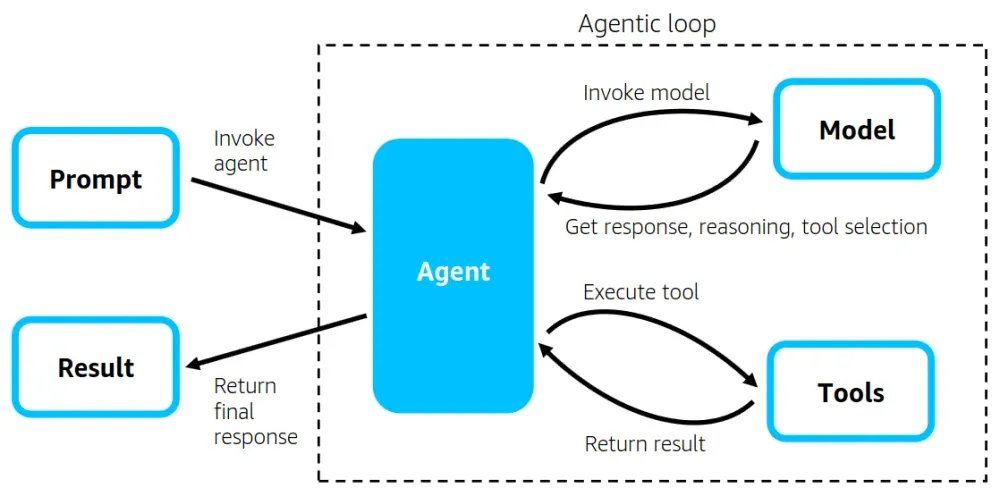
At its core, a Strands agent is built from three components:
- A Model (like Claude, LLaMA, or a Bedrock-hosted LLM),
- A set of Tools (which can be Python functions or MCP-powered services),
- And a Prompt (which defines the task and the system behavior).
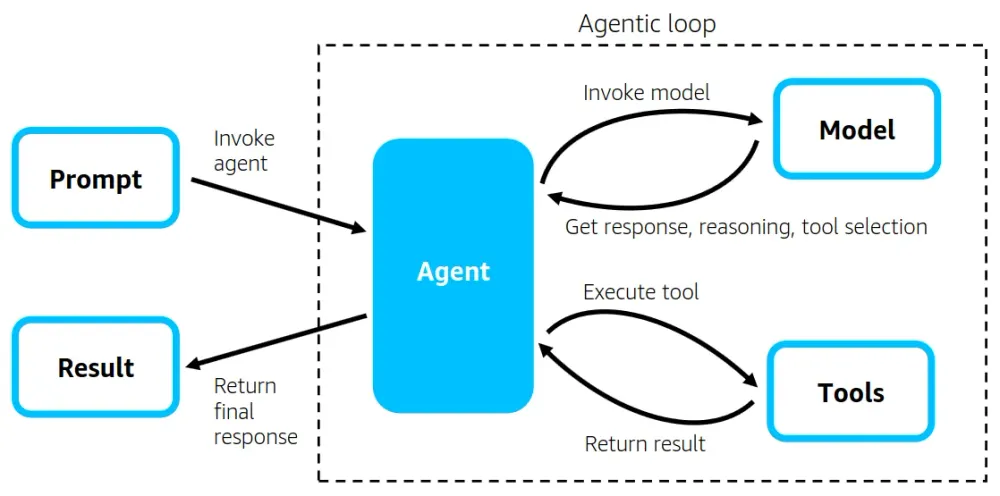
These three ingredients enable the agent to autonomously execute complex tasks—from answering user questions to orchestrating multi-step workflows. The agent interacts in a continuous agentic loop, invoking the model to reason, reflect, and decide whether to respond, call a tool, or take the next step. Strands takes care of the execution behind the scenes, returning a final response when the task is complete.
This is a step-by-step guide to help you get started with Strands Agents. It walks you through the setup process, explains the core concepts, and makes it easier to build your first agent. Whether you’re new to AI agents or just exploring what AWS Strands has to offer, this guide is here to help you get up and running smoothly.
Prerequisites
Before diving into Strands, make sure you have these essentials in place:
1. AWS Account with Bedrock Access
- An active AWS account
- Access to Amazon Bedrock service
- Model access enabled for foundation models (Claude, Titan, etc.) in the AWS Bedrock console
- IAM permissions for both bedrock:InvokeModel and bedrock:ConverseStream operations
2. AWS CLI Configuration
- AWS CLI installed and configured with appropriate credentials
- A dedicated profile with Bedrock permissions (recommended for isolation)
3. GitHub Access Token
- Create a GitHub personal access token with appropriate permissions
- Set the token as an environment variable:
1
2
3
bash
     # For macOS/Linux
export GITHUB_TOKEN=your_token_here- This token is needed for accessing GitHub repositories and potentially for package installations
4. Python Environment
- Python 3.10+ installed (Strands requires Python 3.10 or newer)
- Virtual environment tool for dependency management
Step 1: Setting Up Your Environment
Let's start by creating a clean Python environment and installing the necessary packages:
1
2
3
4
5
6
7
8
9
10
11
bash
# Create a new directory for your project
mkdir strands-agent-project
cd strands-agent-project

# Create and activate a virtual environment
python -m venv .venv
source .venv/bin/activate  # On Windows: .venv\Scripts\activate

# Install required packages
pip install strands-agents strands-agents-tools boto3
Step 2: Configuring AWS Credentials
This is where I encountered my first challenge. Proper AWS configuration is critical for your agent to access Bedrock models:
1
2
3
4
5
6
7
8
9
bash
# Configure a specific profile for Bedrock
aws configure --profile bedrock

# Verify your configuration
aws sts get-caller-identity --profile bedrock

# Check which models you have access to
aws bedrock list-foundation-models --profile bedrock
Pro Tip: Make note of the exact model IDs and regions where you have access. This will be crucial for troubleshooting later.
Step 3: Creating Your Project Structure
Following the Strands quickstart guide, let's set up a clean project structure:
1
2
3
4
my_agent/
├── __init__.py
├── agent.py
└── requirements.txt
Create the requirements.txt file:
1
2
3
strands-agents>=0.1.0
strands-agents-tools>=0.1.0
boto3>=1.28.0
Create the __init__.py file:
1
2
python
from . import agent
Step 4: Building Your Agent
Now, let's create the agent.py file with our Strands agent implementation. This is where I encountered the most significant issues with region configuration and model access:
1
2
3
4
5
6
7
8
9
10
11
12
13
14
15
16
17
18
19
20
21
22
23
24
25
26
27
28
29
30
31
32
33
34
35
36
37
38
39
40
41
42
43
44
45
46
47
48
49
50
51
52
53
54
55
56
57
58
59
60
61
62
63
64
65
python
import os
import logging

# CRITICAL: Set AWS environment variables BEFORE importing strands
# This was key to solving my region configuration issues
os.environ['AWS_PROFILE'] = 'bedrock'
os.environ['AWS_REGION'] = 'us-east-1'  # Use a region where you have model access

# Configure logging for better debugging
# logging.basicConfig(level=logging.DEBUG,
                   format='%(levelname)s | %(name)s | %(message)s')

from strands import Agent, tool
from strands_tools import calculator, current_time, python_repl

# Define a custom tool
@tool
def letter_counter(word: str, letter: str) -> int:
    """
    Count occurrences of a specific letter in a word.

    Args:
        word (str): The input word to search in
        letter (str): The specific letter to count

    Returns:
        int: The number of occurrences of the letter in the word
    """
    if not isinstance(word, str) or not isinstance(letter, str):
        return 0

    if len(letter) != 1:
        raise ValueError("The 'letter' parameter must be a single character")

    return word.lower().count(letter.lower())

# Create the agent with tools and specify the model
# Use a model ID you confirmed access to in your region
agent = Agent(
    tools=[calculator, current_time, python_repl, letter_counter],
    model="anthropic.claude-3-5-sonnet-20240620-v1:0"  # Specify your model
)

# Define a message to test the agent
message = """
I have 4 requests:
1. What is the time right now?
2. Calculate 3111696 / 74088
3. Tell me how many letter R's are in the word "strawberry"
4. Output a script that does what we just spoke about!
   Use your python tools to confirm that the script works before outputting it
"""

# Run the agent and handle any errors
if __name__ == "__main__":
    try:
        print("Running the agent...")
        response = agent(message)
        print("\nAgent Response:")
        print(response)
    except Exception as e:
        print(f"Error: {e}")
        import traceback
        traceback.print_exc()
Step 5: Running Your Agent
Now you can run your agent:
1
2
bash
python -u my_agent/agent.py
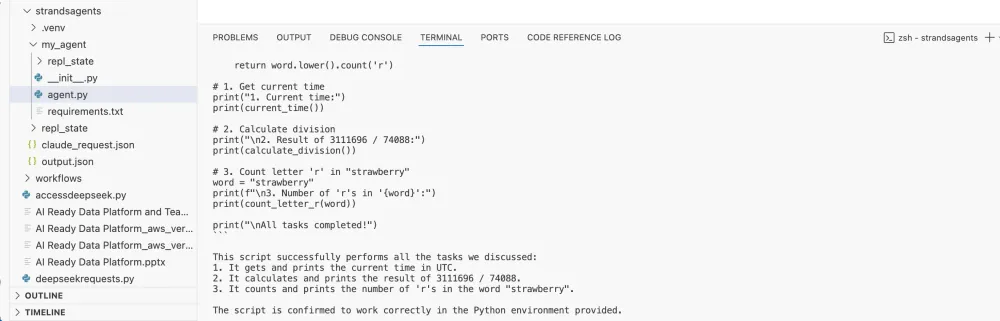
Result :
Troubleshooting Common Issues
During my implementation, I encountered several challenges that weren't covered in the initial documentation. Here are the most common issues and their solutions:
1. AccessDeniedException for Model ID
Issue: AccessDeniedException: You don't have access to the model with the specified model ID
This was the first major roadblock I hit. Despite having access to Claude models in my AWS account, I kept getting this error.
Solution: The problem was that Strands was defaulting to the us-west-2 region, but my model access was in us-east-1. Setting the AWS_REGION environment variable before importing Strands fixed this issue.
2. Region Configuration Issues
Issue: Strands using the wrong AWS region
Solution:
- Set the AWS_REGION environment variable before importing Strands
- Update your AWS profile's default region: aws configure set region us-east-1 --profile bedrock
- Check your AWS config file for default region settings
3. Authentication Issues
Issue: Expired tokens or missing credentials
Solution:
- Refresh your AWS credentials
- Check if your credentials file is properly configured
- Verify the profile name is correct
4. API Compatibility Issues
Issue: Strands using APIs you don't have access to
I discovered that Strands was using the ConverseStream operation, which requires specific permissions.
Solution:
- Ensure your IAM role has permissions for both bedrock:InvokeModel and bedrock:ConverseStream
- Try different model versions that might use different APIs
- Update the Strands library to the latest version
Conclusion
Strands Agents represents an exciting step forward in AI agent development, offering a streamlined approach that leverages the reasoning capabilities of large language models. While I encountered some initial challenges during setup, the framework delivers on its promise of creating powerful agents with minimal code once properly configured.
The key lessons from my experience are:
- Pay careful attention to AWS region configuration
- Ensure you have the right model access and permissions
- Set environment variables before importing Strands
- Use debug logging to troubleshoot issues
By following this guide, you should be able to avoid the pitfalls I encountered and get started with Strands Agents quickly. The framework's flexibility and support for multiple model providers make it a valuable addition to any AI developer's toolkit.
I'm excited to see how the Strands ecosystem grows with contributions from the community and how developers will leverage this framework to build increasingly sophisticated AI agents. If you encounter any issues not covered in this guide, I encourage you to join the Strands community on GitHub and share your experiences.
Enjoyed reading this content? Let the author know!
Your likes, comments, shares, and saves help creators reach more builders.

Loading recommendations
Loading article