
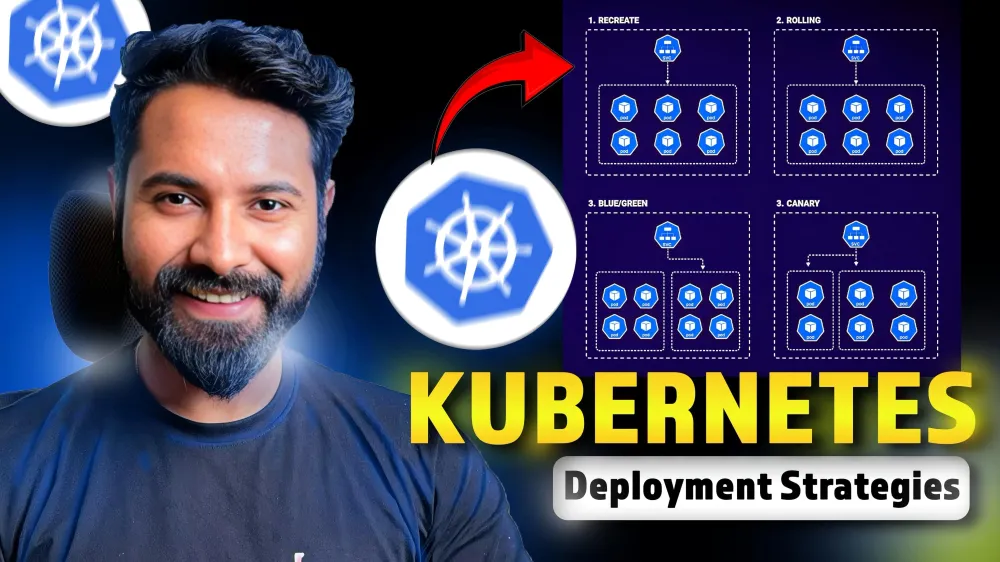
Kubernetes Deployment Strategies Explained
Master these Kubernetes Deployment Strategies to crush those DevOps interviews!

Introduction
Kubernetes, the most popular container orchestration platform, has transformed the landscape of modern software development. As the industry's demand for scalable, reliable, and efficient applications continues to grow, mastering the diverse deployment strategies within the Kubernetes ecosystem has become paramount.
In this article, we will dive deep into the intricacies of Kubernetes deployments, exploring a range of strategies - from the foundational Recreate and Rolling Update approaches to the more advanced Blue-Green and Canary techniques.
If you want to learn Kubernetes from scratch, I recommend watching this tutorial as its a pre-requisite for understanding the Deployment Strategies used in the same 🚀
What is a Kubernetes Deployment?
A deployment in Kubernetes is like a manager that makes sure your application Pods are running smoothly and that you can easily update them when needed, without disrupting your service.
What are Deployment Strategies?
Deployment strategies are techniques for changing/upgrading a running application from one version to another, a good strategy ensures:
- Zero downtime
- Reduce time to market
- Faster Rollback
- More Frequency
Types of deployment strategies
- Recreate
- Rolling Update
- Blue-green
- Canary
- Shadow
- A/B testing
- Progressive Delivery
Now, you must be thinking, "bhaiya ! why do I need so many, isn't there one best strategy?"
I agree, but based on your environment, application size and customer needs you can choose whichever strategy works best for you.
Here's a table to make things simpler for you
| Strategy | Has Downtime? | Can be used in Production? |
|---|---|---|
| Recreate | Yes | No |
| Rolling Update | No | Yes |
| Blue-Green | No | Yes |
| Canary | No | Yes |
| Shadow | No | Yes |
| A/B Testing | No | No |
| Progressive Delivery | No | Yes (Recommended) |
Now let's understand the Top 4 Deployment strategies in depth, comment "ArgoCD" if you want an in-depth blog / video on Progressive Delivery 🚀
Recreate Deployment Strategy
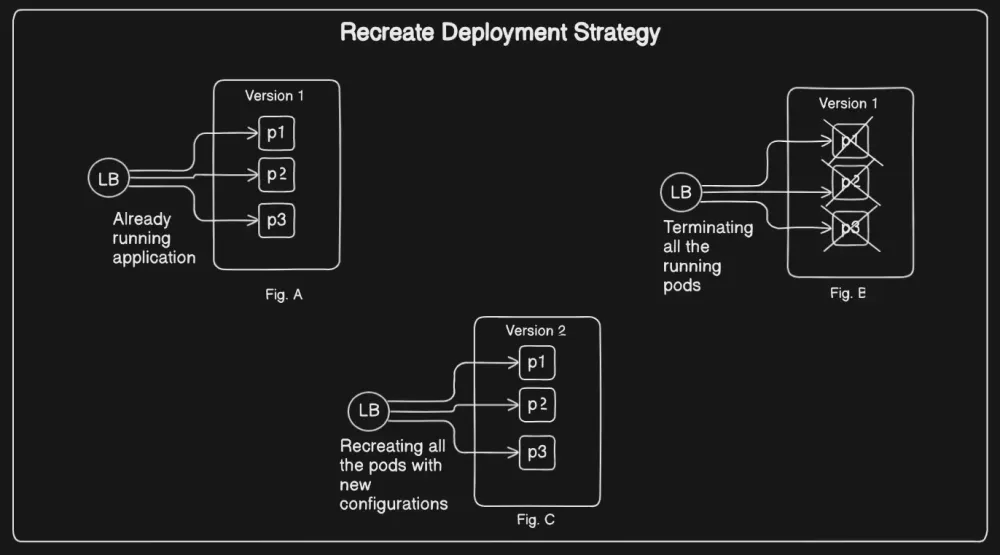
- Recreate deployment strategy involves the process of terminating all existing running pods before creating new ones.
How it works ?
- Pod Termination: kubernetes terminates all existing pods.
- Pod Creation: It creates new pods with updated configurations.
| Pros | Cons |
|---|---|
| Application state entirely renewed | Downtime that depends on the both shutdown and boot duration of the application |
Full Hands-on for Recreate Deployment in this Repository
Rolling Update Deployment Strategy
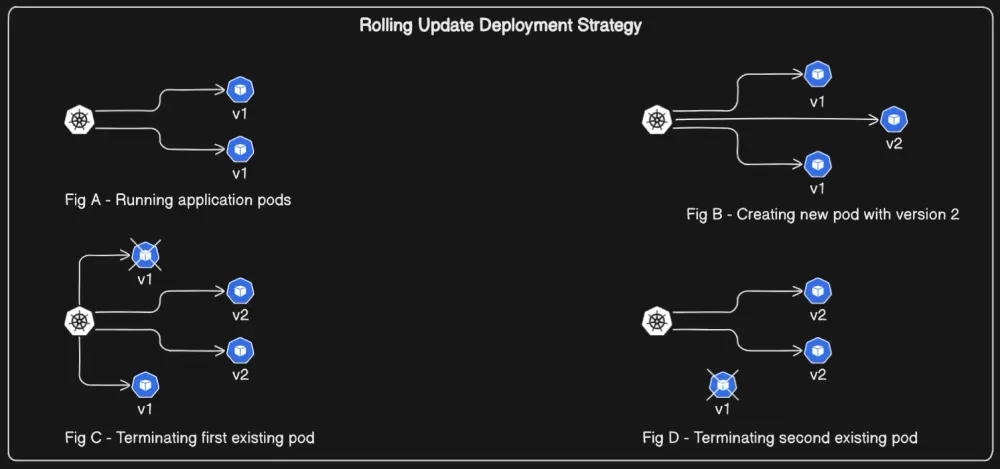
- A rolling update in Kubernetes is a deployment strategy used to gradually replace the existing set of Pods with a new set of Pods one by one.
- This ensures that there is no downtime during the update process as the application continues to serve requests while the update is in progress.
How it works ?
- Pod Creation: kubernetes creates one new pod of newer version.
- Pod Termination: It terminates existing pods.
| Pros | Cons |
|---|---|
| Version is slowly released across instances | Rollout/Rollback can take time |
| Convenient for stateful applications | No control over traffic |
Blue-Green Deployment Strategy
- Blue-Green deployment is a strategy used in Kubernetes (and other environments) to reduce downtime and risk when deploying new versions of an application.
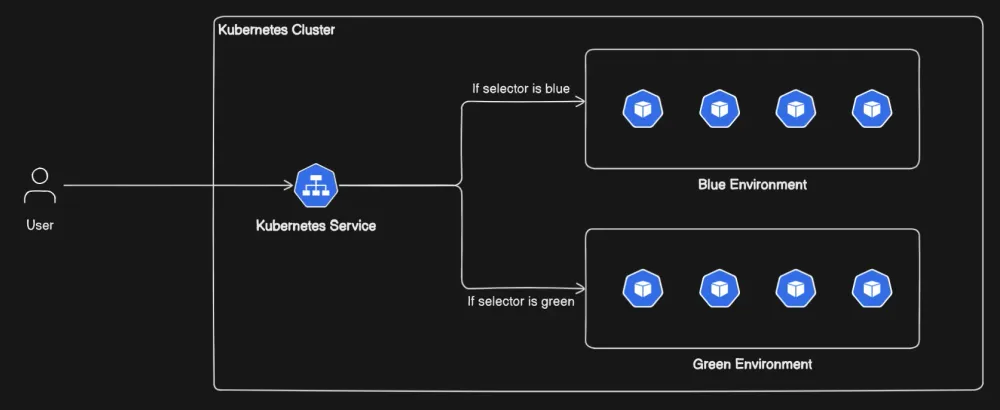
- It involves maintaining two separate environments, which are referred to as Blue and Green.
How it works ?
- Blue Environment: This is the live environment, where the current version of your application is running..
- Green Environment: The new version of the application is deployed to the Green environment. During this phase, there is no impact on the users accessing the Blue environment.
- Test the Green Environment: Once the Green environment is up, it is fully tested to ensure the new version works as expected.
- Switch traffic: After validating that the Green environment is stable, the routing of user traffic is switched from Blue to Green. Now, the Green environment becomes the live production environment, and users interact with the new version.
| Pros | Cons |
|---|---|
| Instant rollout/rollback | Requires double the resources |
| Avoid versioning issue, change entire cluster state in one go | Proper test of entire platform should be done before releasing to the production environment. |
Full Hands-on for Blue-Green Deployment in this Repository
Canary Deployment Strategy
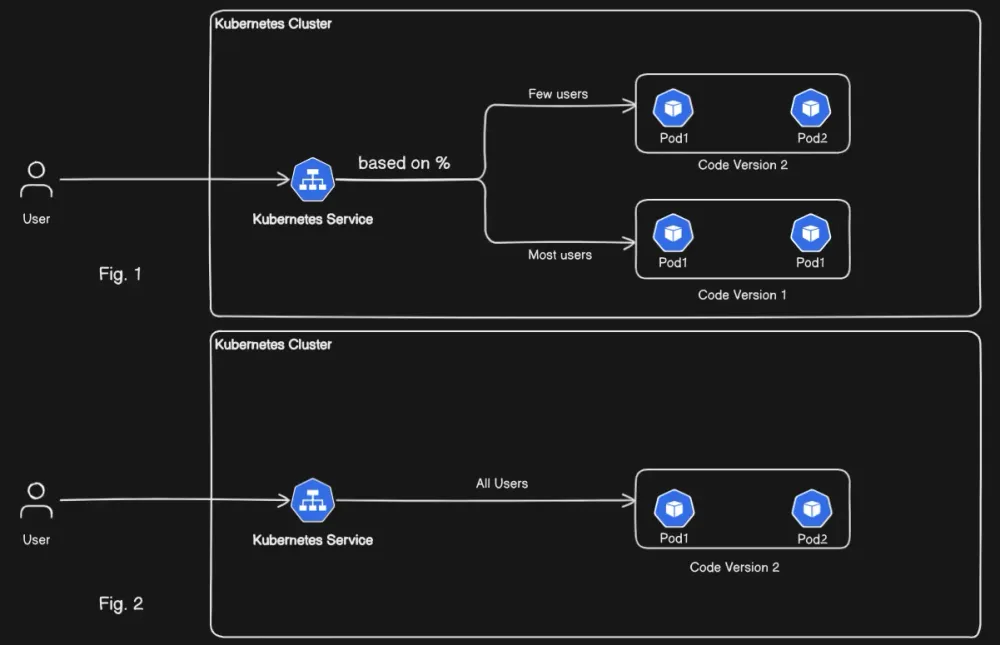
- A Canary Deployment in Kubernetes is a strategy where a new version of an app is released to a small group of users first. If it works well, it’s gradually rolled out to everyone. This helps reduce the risk of issues affecting all users.
How it works ?
- Deploy New Version (Canary Release):
- The new version of the application is first deployed to a small subset of users or a specific group of pods, called the canary.
- This is typically a small fraction of the total traffic, so the new version gets tested by a limited audience while the majority of users continue to use the stable, old version.
- Traffic Splitting:
- The traffic is split between the old version (the stable version) and the new version (the canary version).
- Initially, a small percentage (e.g., 5–10%) of the traffic is routed to the new canary version, and the rest continues to go to the old version.
- Monitor and Analyze:
- While the canary version is live, you monitor it for any errors or issues (like crashes, performance problems, etc.).
- Gradual Rollout:
- If the canary version performs well, the percentage of traffic routed to the canary version is gradually increased.
- This can be done in stages, such as 10%, 25%, 50%, and then 100%, depending on how confident you are with the new release.
- The gradual increase reduces the risk of impacting all users if something goes wrong with the new version.
| Pros | Cons |
|---|---|
| Version released for subset of users | Slow rollout |
| Convenient for error rate and performance monitoring | Fine tune traffic distribution can be expensive |
Full Hands-on for Canary Deployment in this Repository
Conclusion
Check the Full Video Tutorial on my YouTube Channel here
Quite interesting, right?
How every strategy has their own pros and cons.
Now a question to you, which strategy would you pick for your next Kubernetes Deployment?
That's it from my side, I hope you enjoyed the blog and will try it out :)
Happy Learning
TrainWithShubham
Enjoyed reading this content? Let the author know!
Your likes, comments, shares, and saves help creators reach more builders.

Loading recommendations
Loading article