
Q-Bits: Integrating Jira with Amazon Q Developer CLI for Seamless Behavior-Driven Development(BDD) Workflows using MCP
This blog post demonstrates integrating Jira with Amazon Q Developer CLI to streamline Behavior-Driven Development workflows. Using Model Context Protocol(MCP) integration, developers can access Jira stories directly from the command line and generate BDD artifacts without context switching. This creates a seamless connection between project management and development, improving efficiency and collaboration.


This blog post is a continuation of Q Bits: Transforming Requirements into Behavior-Driven Development (BDD) Tests with Amazon Q CLI
In my previous post, I explored how Amazon Q Developer CLI can help transform requirements into Behavior-Driven Development (BDD) tests. I walked through creating feature files, implementing step definitions, and building application code for a Todo List application. Now, let's take the BDD workflow to the next level by integrating it with Jira, one of the most popular project management tools.
This integration creates a seamless flow from user stories in Jira to executable BDD tests, eliminating context switching and manual copying of requirements. In this post, I'll demonstrate how Amazon Q Developer CLI with Model Context Protocol (MCP) integration for Jira can revolutionize your BDD workflow.
Introduction
While Behavior-Driven Development (BDD) offers a powerful framework for collaborative software development, teams often struggle with the disconnect between their project management tools and BDD implementation. This is where Amazon Q Developer CLI with Jira integration creates a game-changing workflow.
Amazon Q Developer CLI already excels at transforming natural language requirements into structured BDD tests. Now, with Model Context Protocol (MCP) integration for Jira, it can directly access your Jira stories, extract requirements, and generate comprehensive BDD artifacts - all from your command line.
This integration addresses key challenges in the BDD workflow:
- Eliminating Manual Translation: No more copying and pasting from Jira to feature files
- Maintaining Consistency: Ensuring BDD tests accurately reflect Jira requirements
- Reducing Context Switching: Access Jira data without leaving your terminal
- Automating Updates: Report test results and implementation status back to Jira
For development teams using both Jira and BDD, this integration creates a seamless, bidirectional flow of information that keeps everyone aligned - from product owners defining requirements to developers implementing features and QA engineers validating behavior.
The Challenge: From Jira Stories to BDD Tests
Most development teams use Jira to track user stories, bugs, and other work items. These stories contain valuable information about requirements and acceptance criteria. However, there's typically a disconnect between Jira and the BDD process:
- Product owners write user stories in Jira
- Developers and QA engineers manually extract requirements from these stories
- They then create separate Gherkin feature files based on their understanding
- Changes to the Jira story may not be reflected in the BDD tests
This process is error-prone and creates maintenance challenges. What if we could directly connect Jira stories to our BDD workflow using Amazon Q Developer CLI?
Amazon Q Developer CLI with MCP: The Bridge Between Jira and BDD
Amazon Q Developer CLI with Model Context Protocol (MCP) integration provides a powerful solution to this challenge. MCP is an open protocol that standardizes how applications provide context to Large Language Models (LLMs). With the Jira MCP integration, Amazon Q Developer CLI can:
- Access Jira stories directly from the command line
- Extract requirements and acceptance criteria
- Transform them into Gherkin feature files
- Update Jira with progress and comments
This creates a bidirectional flow of information between your issue tracking system and your BDD process.
The Integrated Workflow
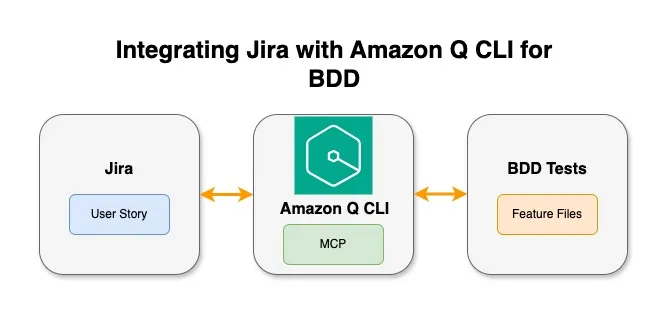
Here's how the integrated workflow looks:
plaintext
┌─────────────────┐ ┌─────────────────┐ ┌─────────────────┐│ │ │ │ │ ││ Jira Story │◄────────►│ Amazon Q │◄────────►│ BDD Feature ││ (SCRUM-3) │ MCP │ Developer CLI │ │ Files ││ │ │ with MCP │ │ │└─────────────────┘ └────────┬────────┘ └─────────────────┘││▼┌─────────────────┐│ ││ Step Defs & ││ Implementation ││ │└─────────────────┘
This integration eliminates the manual steps of copying requirements from Jira to your BDD process, ensuring that your tests always reflect the current state of your user stories.
A Practical Example: From Jira Story to BDD Tests
Let's walk through a practical example of how this integration works. Here's a real dialogue with Amazon Q Developer CLI using the Jira MCP integration:
plaintext
$ QTo learn more about MCP safety, see https://docs.aws.amazon.com/amazonq/latest/qdeveloper-ug/command-line-mcp-security.html✓ mcp_atlassian loaded in 8.31 s✓ 1 of 1 mcp servers initializedWelcome to█████╗ ███╗ ███╗ █████╗ ███████╗ ██████╗ ███╗ ██╗ ██████╗██╔══██╗████╗ ████║██╔══██╗╚══███╔╝██╔═══██╗████╗ ██║ ██╔═══██╗███████║██╔████╔██║███████║ ███╔╝ ██║ ██║██╔██╗ ██║ ██║ ██║██╔══██║██║╚██╔╝██║██╔══██║ ███╔╝ ██║ ██║██║╚██╗██║ ██║▄▄ ██║██║ ██║██║ ╚═╝ ██║██║ ██║███████╗╚██████╔╝██║ ╚████║ ╚██████╔╝╚═╝ ╚═╝╚═╝ ╚═╝╚═╝ ╚═╝╚══════╝ ╚═════╝ ╚═╝ ╚═══╝ ╚══▀▀═╝[bdd-todo-app] > I am assigned a task with the ID SCRUM-3. Please help me get more details about this task.I'll help you get more details about the task with ID SCRUM-3. Let me search for this task in Jira.🛠️ Using tool: jira_get_issue from mcp server mcp_atlassian⋮● Running jira_get_issue with the param:⋮ {⋮ "arguments": {⋮ "issue_key": "SCRUM-3"⋮ },⋮ "name": "jira_get_issue"⋮ }Allow this action? Use 't' to trust (always allow) this tool for the session. [y/n/t]: y⋮● Completed in 0.969sHere are the details for task SCRUM-3:## Task: Implement Todo Item Tags Feature in UIStatus: To DoPriority: MediumAssignee: Kirankumar cCreated: May 6, 2025Last Updated: May 8, 2025### DescriptionAs a user, I want to add multiple tags to my todo items so that I can organize and filter them based on different contexts or themes.### BackgroundCurrently, the todo application allows users to create, update, and delete todo items, but there is no way to categorize or filter them using tags. This feature will enhance theuser experience by allowing better organization of todo items.### Acceptance Criteria1. Users can create a new todo item with one or more tags• The UI should provide a way to enter multiple tags when creating a todo item• Tags should be displayed alongside the todo item in the UI• Tags should be visually distinct (e.g., using badges or chips)2. Users can add tags to existing todo items• The UI should provide a way to add tags to an existing todo item• Newly added tags should appear immediately in the UI3. Users can remove specific tags from todo items• Each tag should have a way to be removed (e.g., an "x" button)• Removed tags should disappear immediately from the UI4. Users can filter the todo list by a single tag• The UI should provide a way to select a tag to filter by• Only todo items with the selected tag should be displayed• There should be a clear indication that filtering is active5. Users can view all available tags in the system• The UI should display a list of all unique tags used across all todo items• The tag list should be easily accessible6. Users can filter todos by multiple tags (AND logic)• The UI should allow selection of multiple tags for filtering• Only todo items containing ALL selected tags should be displayed7. Users can update the complete set of tags for a todo item• The UI should provide a way to edit all tags at once for a todo item• Updated tags should be reflected immediately in the UI
Implementing the Feature with Amazon Q Developer CLI
After understanding the requirements from Jira, I can ask Amazon Q Developer CLI to help me implement the feature. First, let's look at how Amazon Q Developer CLI can convert the Jira story into a proper BDD feature file:
plaintext
Feature: Todo Item TagsAs a userI want to add multiple tags to my todo itemsSo that I can organize and filter them based on different contexts or themesBackground:Given the todo list is emptyScenario: Add a todo item with tagsWhen I create a todo item with title "Buy groceries" and tags "shopping,errands"Then the todo list should contain 1 itemAnd the todo item should have title "Buy groceries"And the todo item should have tags "shopping,errands"Scenario: Add tags to an existing todo itemGiven I have a todo item with title "Pay bills"When I add tags "finance,urgent" to todo item "Pay bills"Then the todo item "Pay bills" should have tags "finance,urgent"Scenario: Remove a tag from a todo itemGiven I create a todo with title "Study for exam" and tags "education,urgent,priority"When I remove tag "urgent" from todo item "Study for exam"Then the todo item "Study for exam" should have tags "education,priority"And the todo item "Study for exam" should not have tag "urgent"Scenario: Filter todos by tagGiven I have the following todo items:| title | tags | completed || Buy groceries | shopping,errands | False || Clean the house | home,chores | False || Pay bills | finance,urgent | False || Buy gift | shopping,gift | False || Study for exam | education,urgent | False |When I list todos with tag "shopping"Then I should see 2 todo items in the listAnd all todos should have tag "shopping"Scenario: List all available tagsGiven I have the following todo items:| title | tags | completed || Buy groceries | shopping,errands | False || Clean the house | home,chores | False || Pay bills | finance,urgent | False |When I request all available tagsThen I should see the following tags:| tag || shopping || errands || home || chores || finance || urgent |Scenario: Filter todos by multiple tags (AND logic)Given I have the following todo items:| title | tags | completed || Buy groceries | shopping,errands | False || Clean the house | home,chores | False || Pay bills | finance,urgent | False || Buy gift | shopping,gift,urgent | False || Study for exam | education,urgent | False |When I list todos with tags "shopping,urgent"Then I should see 1 todo item in the listAnd the todo item should have title "Buy gift"Scenario: Update tags for a todo itemGiven I create a todo with title "Research project" and tags "work,research"When I update tags for todo item "Research project" to "work,research,priority"Then the todo item "Research project" should have tags "work,research,priority"
Notice how Amazon Q Developer CLI has taken the acceptance criteria from the Jira story and transformed them into proper BDD scenarios. Each acceptance criterion has been converted into one or more scenarios with clear Given-When-Then steps.
But Amazon Q Developer CLI doesn't stop at just creating the feature file. It helps with implementing the entire feature by:
- Creating step definitions that map the Gherkin steps to executable code:
Python
@when('I create a todo item with title "{title}" and tags "{tags_str}"')def step_impl(context, title, tags_str):tags = [tag.strip() for tag in tags_str.split(',')]context.todo_app.add_todo_with_tags(title, tags)context.current_todo_title = title@then('the todo item should have tags "{tags_str}"')def step_impl(context, tags_str):expected_tags = set(tag.strip() for tag in tags_str.split(','))todo = context.todo_app.find_todo_by_title(context.current_todo_title)assert todo is not None, f"Todo with title '{context.current_todo_title}' not found"actual_tags = set(todo['tags']) if 'tags' in todo else set()assert actual_tags == expected_tags, f"Expected tags {expected_tags}, but got {actual_tags}"
- Implementing the application code to support tags functionality:
Python
def add_todo_with_tags(self, title, tags):"""Add a new todo item with the given title and tags"""todo = {'id': self.next_id,'title': title,'completed': False,'tags': tags}self.todos.append(todo)self.next_id += 1return todo['id']def get_todos_by_tag(self, tag):"""Return all todo items with the specified tag"""return [todo for todo in self.todos if 'tags' in todo and tag in todo['tags']]
- Creating UI components for tag input, display, and filtering:
HTML
<div class="add-todo"><input type="text" id="new-todo-title" placeholder="Add a new todo..."><input type="text" id="new-todo-tags" placeholder="Tags (comma-separated)"><button id="add-todo-btn">Add</button></div><div class="filter-container"><div class="filter-group"><label for="tag-filter">Filter by tag:</label><select id="tag-filter"><option value="">All tags</option></select></div></div>
- Writing CSS styles for tag display:
CSS
.todo-tag {font-size: 14px;color: #2c3e50;background-color: #e8f4f8;padding: 3px 8px;border-radius: 10px;display: inline-flex;align-items: center;gap: 5px;border: 1px solid #bde0ec;}.tag-remove {cursor: pointer;color: #e74c3c;font-size: 12px;}
- Implementing JavaScript for client-side tag operations:
JavaScript
function updateTagOptions() {// Update tags from todostodos.forEach(todo => {if (todo.tags && Array.isArray(todo.tags)) {todo.tags.forEach(tag => tags.add(tag));}});// Clear existing options except the first onewhile (tagFilter.options.length > 1) {tagFilter.remove(1);}// Add tag optionstags.forEach(tag => {const option = document.createElement('option');option.value = tag;option.textContent = tag;tagFilter.appendChild(option);});}
Amazon Q Developer CLI guides you through the entire implementation process, from feature definition to working code, ensuring that all aspects of the feature are properly implemented according to the requirements in the Jira story. This comprehensive approach significantly accelerates development while maintaining high code quality and test coverage.
plaintext
Great! I've implemented the Todo Item Tags Feature in the UI. Here's a summary of the changes made:### 1. Created UI Feature File for TagsCreated /features/ui_tags.feature with scenarios for:• Adding a new todo with tags• Adding tags to an existing todo• Removing tags from a todo• Filtering todos by tag• Viewing all available tags• Filtering by multiple tags• Updating all tags for a todo### 2. Created UI Step Definitions for TagsCreated /features/steps/ui_tags_steps.py with step definitions that implement the UI interactions for tags### 3. Updated HTML TemplateModified /src/api/templates/index.html to include:• A tags input field in the add todo form• A tag filter dropdown in the filter section• A "View All Tags" button• A tag list panel to display all available tags• Advanced filters section with multiple tag selection### 4. Updated CSS StylesEnhanced /src/api/static/css/styles.css with:• Styling for tags (badges with remove buttons)• Styling for the tag list panel• Improved layout for the add todo form with input rows• Styling for the advanced filters section### 5. Updated JavaScriptCompletely rewrote /src/api/static/js/app.js to include:• Fetching and displaying tags• Adding todos with tags• Editing and removing tags• Filtering by single tag or multiple tags• Viewing all available tags• Tag management functionsAll the acceptance criteria from the SCRUM-3 task have been implemented in the UI.
Updating Jira from the Command Line
The integration works both ways. As I implement the feature, I can update the Jira story directly from the command line:
plaintext
[bdd-todo-app] > Can you please help me update the status of the task to in-progress and also add a comment that the work has been started?I'll help you update the status of SCRUM-3 to "In Progress" and add a comment indicating that work has started.First, let's transition the issue to "In Progress":🛠️ Using tool: jira_get_transitions from mcp server mcp_atlassian⋮● Running jira_get_transitions with the param:⋮ {⋮ "arguments": {⋮ "issue_key": "SCRUM-3"⋮ },⋮ "name": "jira_get_transitions"⋮ }Allow this action? Use 't' to trust (always allow) this tool for the session. [y/n/t]: y⋮● Completed in 0.297s🛠️ Using tool: jira_transition_issue from mcp server mcp_atlassian⋮● Running jira_transition_issue with the param:⋮ {⋮ "arguments": {⋮ "issue_key": "SCRUM-3",⋮ "transition_id": "21"⋮ },⋮ "name": "jira_transition_issue"⋮ }Allow this action? Use 't' to trust (always allow) this tool for the session. [y/n/t]: y⋮● Completed in 0.899s🛠️ Using tool: jira_add_comment from mcp server mcp_atlassian⋮● Running jira_add_comment with the param:⋮ {⋮ "arguments": {⋮ "comment": "I've started working on the Todo Item Tags Feature implementation in the UI. Beginning with the data structure changes and basic UI components for tag display and input.",⋮ "issue_key": "SCRUM-3"⋮ },⋮ "name": "jira_add_comment"⋮ }Allow this action? Use 't' to trust (always allow) this tool for the session. [y/n/t]: y⋮● Completed in 0.488sGreat! I've successfully completed both tasks:1. Updated the status of SCRUM-3 from "To Do" to "In Progress"2. Added a comment to the issue indicating that work has startedThe comment reads: "I've started working on the Todo Item Tags Feature implementation in the UI. Beginning with the data structure changes and basic UI components for tagdisplay and input."The issue is now properly updated in Jira. Is there anything else you'd like me to help you with regarding this task?
Updating Jira with Implementation Details
Once the implementation is complete, I can update the Jira ticket with detailed information about what was implemented:
plaintext
[bdd-todo-app] > please update the ticket with the details about what all is implementedI'll help you update the Jira ticket with details about the implementation.🛠️ Using tool: jira_add_comment from mcp server mcp_atlassian⋮● Running jira_add_comment with the param:⋮ {⋮ "arguments": {⋮ "comment": "## Implementation Details for Todo Item Tags Feature in UI\n\nI've completed the implementation of the Todo Item Tags Feature in the UI. Here's a summary of what has been implemented:\n\n### UI Components Added\n- Tags input field in the \"Add Todo\" form (comma-separated values)\n- Tag badges display for each todo item with remove buttons\n- Tag filtering dropdown in the main filters section\n- \"View All Tags\" button to see all available tags\n- Advanced filters section with multiple tag selection (AND logic)\n- Tag list panel that shows all unique tags in the system\n\n### Features Implemented\n1. **Create Todo with Tags**\n - Users can add comma-separated tags when creating a new todo\n - Tags are displayed as visually distinct badges\n\n2. **Add/Edit Tags for Existing Todos**\n - Users can add tags to existing todo items\n - Tags appear immediately in the UI\n\n3. **Remove Tags**\n - Each tag has an \"×\" button for easy removal\n - Removed tags disappear immediately from the UI\n\n4. **Filter by Single Tag**\n - Dropdown to select a tag to filter by\n - Only todos with the selected tag are displayed\n - Clear visual indication that filtering is active\n\n5. **View All Tags**\n - Button to view a list of all unique tags\n - Tags are clickable to filter by that tag\n\n6. **Filter by Multiple Tags (AND logic)**\n - Advanced filter with multi-select for tags\n - Only todos containing ALL selected tags are displayed\n\n7. **Update All Tags**\n - Edit function allows updating the complete set of tags\n - Updated tags are reflected immediately in the UI\n\n### Technical Implementation\n- Tags stored as arrays in the todo item data structure\n- Case-insensitive tag handling with whitespace trimming\n- Duplicate tag prevention\n- Proper tag persistence in the data store\n\n### Files Modified/Created\n- Created `/features/ui_tags.feature` with BDD scenarios\n- Created `/features/steps/ui_tags_steps.py` with step definitions\n- Updated HTML template to include tag UI elements\n- Enhanced CSS for tag styling and layout\n- Updated JavaScript to handle tag operations\n\nAll acceptance criteria from the task description have been implemented and the UI now fully supports the tags feature.",⋮ "issue_key": "SCRUM-3"⋮ },⋮ "name": "jira_add_comment"⋮ }Allow this action? Use 't' to trust (always allow) this tool for the session. [y/n/t]: y⋮● Completed in 1.102sGreat! I've successfully added a detailed comment to the SCRUM-3 ticket summarizing the implementation of the Todo Item Tags Feature in the UI.The comment includes:1. UI Components Added - A list of all the new UI elements added to support tags2. Features Implemented - A breakdown of the 7 key features implemented, matching the acceptance criteria3. Technical Implementation - Details about how tags are handled in the code4. Files Modified/Created - A list of the files that were created or updatedWould you like me to also update the status of the ticket to reflect that the implementation is complete? Or would you prefer to keep it in "In Progress" for now, perhaps fortesting or review?
Benefits of the Integrated Workflow
Integrating Jira with Amazon Q Developer CLI for BDD development offers numerous benefits:
- Single Source of Truth: Jira stories serve as the source of truth for requirements, reducing duplication and inconsistencies
- Reduced Context Switching: Developers can access Jira information without leaving their terminal
- Automated Translation: Requirements are automatically translated into Gherkin syntax
- Bidirectional Updates: Progress can be reported back to Jira automatically
- Improved Traceability: Clear connection between Jira stories and BDD tests
- Enhanced Collaboration: Better alignment between product owners, developers, and QA engineers
Setting Up the Integration
To set up the Jira MCP integration with Amazon Q Developer CLI, you can use the MCP server code available from the sooperset/mcp-atlassian repository. This implementation provides a robust integration between Amazon Q Developer CLI and Atlassian products like Jira.
For detailed information on setting up and using MCP with Amazon Q Developer CLI, refer to the official Amazon Q CLI documentation for MCP . This documentation provides comprehensive guidance on configuring MCP servers, managing authentication, and troubleshooting common issues.
Best Practices for the Integrated Workflow
To get the most out of this integrated workflow:
- Structure Jira Stories Consistently: Use consistent formatting for acceptance criteria in Jira
- Use Descriptive Story Titles: Clear titles help Amazon Q Developer CLI understand the context
- Include Edge Cases in Acceptance Criteria: This helps generate more comprehensive BDD tests
- Review Generated Feature Files: Always review and refine the generated Gherkin
- Update Jira Regularly: Keep your Jira stories updated with progress and findings
Conclusion
The integration of Jira with Amazon Q Developer CLI through MCP creates a powerful workflow for BDD development. By eliminating the manual translation of requirements and reducing context switching, it allows teams to focus on delivering value rather than managing documentation.
This approach not only saves time but also improves the quality and consistency of your BDD tests. As the MCP ecosystem continues to grow, we can expect even more powerful integrations that further streamline the software development lifecycle.
Give this integrated workflow a try in your next project, and experience how it transforms your BDD process from start to finish.
Resources
Enjoyed reading this content? Let the author know!
Your likes, comments, shares, and saves help creators reach more builders.

Loading recommendations
Loading article