
Q-Bits: Transforming Requirements into Behavior-Driven Development (BDD) Tests with Amazon Q CLI
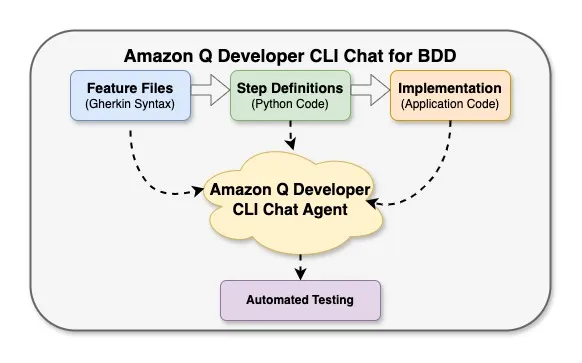
Amazon Q Developer CLI's Chat agent accelerates Behavior-Driven Development by generating feature files, step definitions, and implementation code from natural language descriptions. This powerful conversational tool reduces cognitive load by handling implementation details while developers focus on describing desired behaviors. Using Amazon Q Developer CLI's Chat agent with BDD leads to more maintainable, better-documented code that satisfies both technical and non-technical stakeholders.


Introduction
Behavior-Driven Development (BDD) is a collaborative software development methodology that bridges the gap between business and technical teams. It focuses on defining the behavior of a system through examples written in a language that all stakeholders can understand. BDD emerged as an evolution of Test-Driven Development (TDD) , adding a layer that emphasizes communication and collaboration. The core principles of BDD include:
- Shared language: Using a ubiquitous language that both business and technical teams understand
- Concrete examples: Describing system behavior through specific examples rather than abstract requirements
- Executable specifications: Converting these examples into automated tests that verify the system works as expected
The BDD process typically follows these steps:
- Discovery: Collaborative sessions where stakeholders explore requirements through examples
- Formulation: Converting examples into structured Gherkin scenarios (Given-When-Then format)
- Automation: Implementing step definitions that connect scenarios to code
- Implementation: Writing the application code that satisfies the scenarios
Despite its benefits, writing good Gherkin scenarios remains challenging. Business stakeholders describe features in natural language, while developers need structured Gherkin syntax for test automation. This translation process is often time-consuming and error-prone.
Enter the Chat agent on Amazon Q Developer CLI - an AI-powered assistant that can bridge this gap by transforming plain text requirements into well-structured Gherkin feature files. In this post, I'll show you how Amazon Q CLI Chat agent (referred as Q CLI throughout this blog) can accelerate your BDD workflow and improve collaboration between technical and non-technical team members.
The BDD Challenge
BDD encourages collaboration between business stakeholders and development teams through a shared language for describing system behavior. However, there's often a disconnect:
- Business stakeholders think in terms of user stories and natural language descriptions
- Developers and QA engineers need structured Gherkin syntax with precise Given-When-Then steps
- Converting between these formats requires time and expertise
This translation process can introduce misunderstandings, missed requirements, or inconsistent test coverage. What if we could automate this conversion while maintaining the essence of the requirements?
Amazon Q CLI: Your BDD Partner
Amazon Q CLI is an AI-powered assistant that can understand natural language and generate code, including Gherkin feature files. It can:
- Parse plain text requirements and identify key behaviors
- Structure these behaviors into proper Gherkin syntax
- Generate comprehensive scenarios covering various use cases
- Maintain consistent terminology and style across features
BDD Workflow with Amazon Q CLI
The diagram below illustrates how Amazon Q CLI transforms the traditional BDD workflow:
plaintext
┌───────────────────┐ ┌───────────────────┐ ┌───────────────────┐│ │ │ │ │ ││ Plain Text │ │ Amazon Q CLI │ │ Gherkin Feature ││ Requirements │────►│ Transformation │────►│ Files ││ │ │ │ │ │└───────────────────┘ └───────────────────┘ └────────┬──────────┘││▼┌───────────────────┐ ┌───────────────────┐ ┌───────────────────┐│ │ │ │ │ ││ Implementation │◄────┤ Step Definition │◄────┤ BDD Test ││ Code │ │ Generation │ │ Automation ││ │ │ │ │ │└───────────────────┘ └───────────────────┘ └───────────────────┘
This workflow eliminates the manual translation step between business requirements and testable Gherkin scenarios, accelerating the development process and reducing the potential for misinterpretation.
Let's see this in action with a real example from my Todo List application.
From Plain Text to Gherkin: A Practical Example
I started with a plain text description of a feature I wanted to implement - the ability to add tags to todo items. Here's what I provided to Amazon Q CLI:
plaintext
q chat "I need to add a tagging feature to my todo app. Users should be able to add multiple tags to a todo item, remove tags, filter todos by tag, and see all available tags in the system. Can you create a BDD feature file for this?"
This simple prompt contained the core requirements but lacked the structure needed for automated testing. Amazon Q CLI analyzed this request and generated a complete Gherkin feature file:
plaintext
Feature: Todo Item TagsAs a userI want to add multiple tags to my todo itemsSo that I can organize and filter them based on different contexts or themesBackground:Given the todo list is emptyScenario: Add a todo item with tagsWhen I create a todo item with title "Buy groceries" and tags "shopping,errands"Then the todo list should contain 1 itemAnd the todo item should have title "Buy groceries"And the todo item should have tags "shopping,errands"Scenario: Add tags to an existing todo itemGiven I have a todo item with title "Pay bills"When I add tags "finance,urgent" to todo item "Pay bills"Then the todo item "Pay bills" should have tags "finance,urgent"Scenario: Remove a tag from a todo itemGiven I create a todo with title "Study for exam" and tags "education,urgent,priority"When I remove tag "urgent" from todo item "Study for exam"Then the todo item "Study for exam" should have tags "education,priority"And the todo item "Study for exam" should not have tag "urgent"Scenario: Filter todos by tagGiven I have the following todo items:| title | tags | completed || Buy groceries | shopping,errands | False || Clean the house | home,chores | False || Pay bills | finance,urgent | False || Buy gift | shopping,gift | False || Study for exam | education,urgent | False |When I list todos with tag "shopping"Then I should see 2 todo items in the listAnd all todos should have tag "shopping"Scenario: List all available tagsGiven I have the following todo items:| title | tags | completed || Buy groceries | shopping,errands | False || Clean the house | home,chores | False || Pay bills | finance,urgent | False |When I request all available tagsThen I should see the following tags:| tag || shopping || errands || home || chores || finance || urgent |Scenario: Filter todos by multiple tags (AND logic)Given I have the following todo items:| title | tags | completed || Buy groceries | shopping,errands | False || Clean the house | home,chores | False || Pay bills | finance,urgent | False || Buy gift | shopping,gift,urgent | False || Study for exam | education,urgent | False |When I list todos with tags "shopping,urgent"Then I should see 1 todo item in the listAnd the todo item should have title "Buy gift"Scenario: Update tags for a todo itemGiven I create a todo with title "Research project" and tags "work,research"When I update tags for todo item "Research project" to "work,research,priority"Then the todo item "Research project" should have tags "work,research,priority"
Notice how Amazon Q CLI:
- Created a proper feature description with user story format
- Generated a background section for common setup
- Developed multiple scenarios covering all the requested functionality
- Added detailed examples with data tables
- Included edge cases like filtering by multiple tags
- Maintained consistent terminology throughout
This transformation took seconds rather than the 30+ minutes it might have taken to manually craft these scenarios.
Beyond Feature Files: Step Definitions and Implementation
Amazon Q CLI doesn't stop at generating feature files. It helps with the entire BDD workflow, from feature files to working code. Let's see how it assists with step definitions and implementation:
plaintext
q chat "Now that we have the feature file for todo tags, can you help me create the step definitions in Python using the behave framework?"
Amazon Q CLI then generated the corresponding step definitions:
Python
from behave import given, when, thenimport sysimport os# Add the src directory to the Python pathsys.path.append(os.path.join(os.path.dirname(__file__), '../../src'))from api.todo_app import TodoApp@when('I create a todo item with title "{title}" and tags "{tags}"')def step_impl(context, title, tags):tag_list = [tag.strip() for tag in tags.split(',')]context.todo_app.add_todo_with_tags(title, tag_list)@then('the todo item should have tags "{tags}"')def step_impl(context, tags):expected_tags = [tag.strip() for tag in tags.split(',')]todos = context.todo_app.get_all_todos()assert todos[-1]['tags'] == expected_tags, f"Expected tags {expected_tags}, but got {todos[-1]['tags']}"@when('I add tags "{tags}" to todo item "{title}"')def step_impl(context, tags, title):tag_list = [tag.strip() for tag in tags.split(',')]context.todo_app.add_tags_to_todo(title, tag_list)@given('I create a todo with title "{title}" and tags "{tags}"')def step_impl(context, title, tags):tag_list = [tag.strip() for tag in tags.split(',')]context.todo_app.add_todo_with_tags(title, tag_list)@when('I remove tag "{tag}" from todo item "{title}"')def step_impl(context, tag, title):context.todo_app.remove_tag_from_todo(title, tag)@then('the todo item "{title}" should not have tag "{tag}"')def step_impl(context, title, tag):todo = context.todo_app.find_todo_by_title(title)assert todo is not None, f"Todo with title '{title}' not found"assert tag not in todo['tags'], f"Todo '{title}' still has tag '{tag}'"
And for the implementation code:
plaintext
q chat "Now please help me implement the TodoApp methods needed for these step definitions"
Amazon Q CLI generates the implementation code:
Python
def add_todo_with_tags(self, title, tags):"""Add a new todo item with the given title and tags"""todo = {'id': self.next_id,'title': title,'completed': False,'tags': tags}self.todos.append(todo)self.next_id += 1return todo['id']def add_tags_to_todo(self, title, tags):"""Add tags to an existing todo item"""todo = self.find_todo_by_title(title)if todo:if 'tags' not in todo:todo['tags'] = []for tag in tags:if tag not in todo['tags']:todo['tags'].append(tag)return Truereturn Falsedef remove_tag_from_todo(self, title, tag):"""Remove a tag from a todo item"""todo = self.find_todo_by_title(title)if todo and 'tags' in todo and tag in todo['tags']:todo['tags'].remove(tag)return Truereturn Falsedef get_todos_by_tag(self, tag):"""Return all todo items with the specified tag"""return [todo for todo in self.todos if 'tags' in todo and tag in todo['tags']]def get_all_tags(self):"""Return all unique tags used across all todo items"""tags = set()for todo in self.todos:if 'tags' in todo:for tag in todo['tags']:tags.add(tag)return list(tags)def get_todos_by_tags(self, tags):"""Return all todo items that have all the specified tags (AND logic)"""return [todo for todo in self.todos if 'tags' in todo and all(tag in todo['tags'] for tag in tags)]def update_todo_tags(self, title, tags):"""Update all tags for a todo item"""todo = self.find_todo_by_title(title)if todo:todo['tags'] = tagsreturn Truereturn False
Testing, Debugging, and Iterative Development
Amazon Q CLI doesn't just stop at generating code - it actively helps you execute tests, diagnose failures, and fix issues in your BDD workflow. This completes the BDD cycle of Red-Green-Refactor:
Running Tests and Fixing Issues
When you're ready to run your BDD tests, Amazon Q CLI can:
- Execute test commands - Help you run the appropriate behave commands with the right parameters
- Diagnose test failures - Analyze error messages and test failures to identify root causes
- Suggest fixes - Provide specific code changes to address failing tests
- Update implementation code - Modify your application code to make tests pass
For example, after implementing the feature file and step definitions, you might encounter test failures when running behave:
plaintext
q chat "I'm getting this error when running behave: AttributeError: 'TodoApp' object has no attribute 'get_todos_by_tags'. Can you help me fix it?"
Amazon Q CLI would analyze the error and provide a solution:
Python
def get_todos_by_tags(self, tags):"""Return all todo items that have all the specified tags (AND logic)"""return [todo for todo in self.todos if 'tags' in todo and all(tag in todo['tags'] for tag in tags)]
Iterative Test-Fix Cycles
Amazon Q CLI excels at the iterative test-fix cycle that's central to BDD:
- Run tests to see them fail (Red)
- Get help implementing the missing functionality
- Run tests again to see them pass (Green)
- Refactor with Amazon Q CLI's assistance
This iterative approach ensures that your implementation satisfies all the requirements specified in your feature files.
End-to-End Testing Support
Amazon Q CLI can also help with:
- Setting up test environments - Providing commands to configure your testing environment
- Debugging complex test failures - Analyzing more complex issues that span multiple files
- Refactoring tests - Improving test organization and reducing duplication
- Extending test coverage - Suggesting additional test scenarios for edge cases
The Complete BDD Workflow with Amazon Q CLI
With Amazon Q CLI, the entire BDD workflow becomes more efficient:
plaintext
┌─────────────────────────────────────────────────────────────────────────┐│ ││ Traditional BDD Workflow ││ │├─────────────┬─────────────────┬────────────────────┬───────────────────-┤│ │ │ │ ││ Business │ Manual │ QA Engineer │ Developer ││ Analyst/ │ Translation │ │ ││ Product │ Process │ (Step Defs/Tests) │ (App Code) ││ Owner | | | || (Features) │ │ │ │└─────────────┴─────────────────┴────────────────────┴───────────────────-┘VS┌─────────────────────────────────────────────────────────────────────────┐│ ││ Amazon Q CLI BDD Workflow ││ │├─────────────┬─────────────────┬────────────────────┬───────────────────-┤│ │ │ │ ││ Business │ Amazon Q CLI │ Amazon Q CLI │ Amazon Q CLI ││ Analyst/ │ Translation │ Generation │ Implementation ││ Product │ │ (Step Defs/Tests) │ (App Code) ││ Owner │ │ │ │| (Features) │ │ │ │├─────────────┴─────────────────┴────────────────────┴───────────────────-┤│ ││ Test-Fix-Refactor Cycle ││ ││ Amazon Q CLI Test Execution & Debugging ││ │└─────────────────────────────────────────────────────────────────────────┘
This streamlined workflow reduces the time and effort required at each stage, while maintaining consistency throughout the process. The key improvements include:
- Automated translation from business requirements to Gherkin feature files
- Consistent generation of step definitions that implement the tests
- Test-first approach where tests are implemented before application code
- Intelligent implementation of application code that satisfies the tests
- Automated test-fix-refactor cycles to quickly resolve issues and make tests pass
- Continuous refactoring to improve code quality while maintaining functionality
By integrating Amazon Q CLI throughout the entire BDD workflow, teams can focus on delivering value rather than struggling with the mechanics of the process.
Benefits of Using Amazon Q CLI for BDD
Using Amazon Q CLI for BDD development offers several advantages:
- Faster Feature Development: Transform requirements into Gherkin in seconds rather than minutes or hours
- Improved Consistency: Maintain consistent terminology and structure across all feature files
- Comprehensive Coverage: AI can identify edge cases that humans might miss
- Reduced Learning Curve: Team members less familiar with Gherkin can still contribute effectively
- Living Documentation: Generate clear, readable scenarios that serve as documentation
- End-to-End Support: Get help with every stage from feature files to implementation code
Best Practices for Using Amazon Q CLI in BDD
To get the most out of Amazon Q CLI for BDD development:
- Start with Clear Requirements: The more specific your initial description, the better the generated Gherkin
- Iteratively Refine: Use follow-up prompts to refine and expand the generated scenarios
- Review Generated Output: Always review the generated Gherkin for accuracy and completeness
- Maintain a Consistent Style: Use Amazon Q CLI to enforce a consistent style across your feature files
- Combine with Human Expertise: Use Amazon Q CLI as a collaborative partner, not a replacement for domain expertise
- Use Domain-Specific Examples: Provide domain-specific examples to help Amazon Q CLI understand your context
Conclusion
Amazon Q CLI transforms the BDD process by bridging the gap between natural language requirements and structured Gherkin syntax. This not only accelerates development but also improves collaboration between technical and non-technical team members.
By automating the tedious aspects of BDD, Amazon Q CLI allows teams to focus on what matters most: delivering software that meets user needs. As AI assistants like Amazon Q continue to evolve, we can expect even more powerful tools for streamlining the software development lifecycle.
In my next post, I'll show you how to take this workflow to the next level by integrating Amazon Q CLI with Jira for a seamless BDD experience from user stories to implementation.
Resources
Enjoyed reading this content? Let the author know!
Your likes, comments, shares, and saves help creators reach more builders.

Loading recommendations
Loading article