
How I used Amazon Nova-Lite to build an AI-powered legal Document Analyzer
I used the recent Amazon Nova to build a solution that summarizes, extracts key clauses, and flags risks from contracts, terms and conditions, and agreements.

Introduction
Have you ever clicked "I agree" without reading the Terms and Conditions? You're not alone. Legal documents, contracts, user agreements, or privacy policies are often filled with dense, complex language that most people skip.
What if AI could help streamline this process? That's exactly what I set out to build: an AI-powered legal document analyzer using Amazon Bedrock's Nova models.
Enter Amazon Bedrock and Amazon Nova
Amazon Bedrock provides serverless access to powerful foundation models through a unified API. For this project, I leveraged the Nova Lite model (`amazon.nova-lite-v1:0`), which offers an excellent balance of performance and cost-effectiveness for text analysis tasks.
The Architecture
I used the recent Nova Models to build a solution that summarizes, extracts key clauses, and flags risks from contracts, terms and conditions, and agreements.
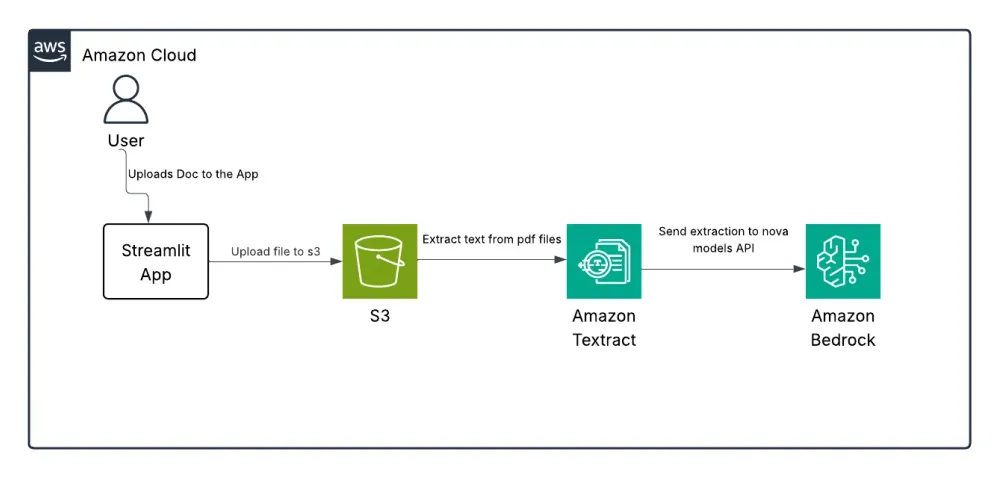
The application follows a simple workflow:
- Document Upload: Users upload their legal documents through the Streamlit interface
- Text Extraction: For PDFs, Amazon Textract extracts the text content
- AI Analysis: The extracted text is sent to Amazon Nova with specialized prompts
- Results Presentation: The analysis is displayed in an organized, user-friendly format
The Magic Behind the Scenes: Prompt Engineering
The key to getting high-quality legal analysis lies in effective prompt engineering. I created specialized system prompts that instruct the Nova model to act as a legal document assistant:
system_prompt = [ { "text": "You are a legal document assistant. You help lawyers summarize contracts, extract key clauses, and identify legal risks or unusual terms. Be concise and accurate." }]For each analysis task, I crafted specific user prompts:
- Summary generation: "Summarize the following legal contract in bullet points..."
- Clause extraction: "Extract all important legal clauses and their purposes..."
- Risk identification: "Identify any potential risks or unusual terms..."
Implementation Highlights
S3 Integration
The `s3_upload.py` script handles secure document storage:
def upload_file_to_s3(file_path): file_name = os.path.basename(file_path) try: s3.upload_file(file_path, BUCKET_NAME, file_name) print(f"File uploaded successfully as '{file_name}'") except Exception as e: print(f"Upload failed: {e}")Text Extraction with Textract
The extraction function module uses Amazon Textract to process PDF documents:
def extract_pdf(s3_object): response = textract.start_document_text_detection( DocumentLocation={'S3Object': {'Bucket': BUCKET_NAME, 'Name': s3_object}} ) job_id = response['JobId']
Nova Model Integration
This is how I implemented the Nova Model:
import boto3import json
client = boto3.client("bedrock-runtime", region_name="us-east-1")LITE_MODEL_ID = "us.amazon.nova-lite-v1:0"
system_prompt = [    {        "text": "You are a legal document assistant. You help lawyers summarize contracts, extract key clauses, and identify legal risks or unusual terms. Be concise and accurate."    }]
inf_params = {"maxTokens": 1000, "topP": 0.9, "topK": 20, "temperature": 0.3}
def run_nova_legal_task(prompt):    message_list = [{"role": "user", "content": [{"text": prompt}]}]
    request_body = {        "schemaVersion": "messages-v1",        "system": system_prompt,        "messages": message_list,        "inferenceConfig": inf_params    }
    try:        response = client.invoke_model(            modelId=LITE_MODEL_ID,            contentType="application/json",            accept="application/json",            body=json.dumps(request_body)        )
        result = json.loads(response["body"].read())
User Interface
The Streamlit-based frontend provides an intuitive experience:
if st.button("Analyze Contract"): with st.spinner("Analyzing contract... This may take a minute."): if do_summary: st.info("Generating summary...") summary_prompt = f"Summarize the following legal contract..." response = run_nova_legal_task(summary_prompt, bedrock_client) results["summary"] = clean_response(response)Take a look at the final solution:
Results and Benefits
The finished application delivers impressive results:
- Time savings: Analysis that would take hours is completed in minutes
- Comprehensive review: Consistent extraction of key information from any contract
- Risk identification: Highlights potential issues that might be overlooked
- User-friendly output: Presents findings in a clear, organized format
- Downloadable reports: Allows users to save and share analysis results
Lessons Learned
Building this application taught me several valuable lessons:
- Prompt engineering is crucial: The quality of AI outputs depends heavily on how you structure your prompts
- Error handling matters: Robust error handling ensures a smooth user experience
- AWS service integration: Combining multiple AWS services creates powerful workflows
- Iterative improvement: Testing with real legal documents helped refine the system
Conclusion
This contract analyzer is a great example of how AI can help anyone—lawyers, business owners, or everyday users—understand complex contracts, terms, and agreements.
If you have your idea or workflow to improve with AI, Amazon Bedrock makes it easy. You can use Amazon Nova to build smart apps without worrying about infrastructure or model tuning.
Enjoyed reading this content? Let the author know!
Your likes, comments, shares, and saves help creators reach more builders.

Loading recommendations
Loading article