
Automate the Well-Architected Review w. Amazon Q
Validate your application architecture for AWS best practice using Amazon Q.


In a previous post , I showed you how you can use Amazon Q to review your architecture drawn in draw.io for AWS best practices across the six pillars of the AWS Well-Architected Framework.
In this post, we’ll take it a step further. We’ll use Amazon Q to perform a full Well-Architected Framework Review (WAFR) for an application written in Infrastructure as Code (IaC), such as CloudFormation or Terraform.
We'll also ask Amazon Q to answer the review questions and generate a full report with architecture risks and an implementation plan. This is a fully end-to-end automated way to conduct a Well-Architected review, something typically done by an AWS Solutions Architect or an AWS Partner.
Let’s get started.
Step 1 – Create a Workload in the Well-Architected Tool
In your AWS Console, go to Well-Architected Tool and create a workload. Note the ARN of the workload, as we’ll use it in the prompt later.
I created a workload named
"amazonq" . In the Properties section, I noted the ARN. You can check here for more details on creating workloads.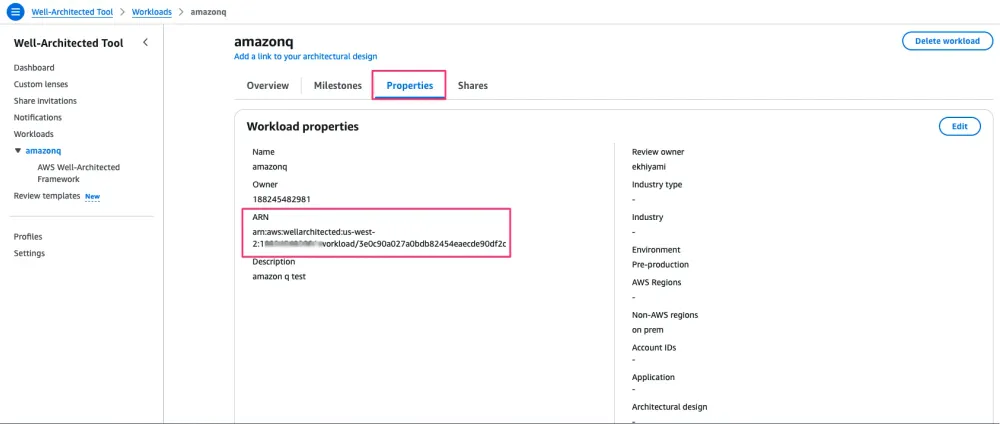
Step 2 – Deploy an Application Using CloudFormation
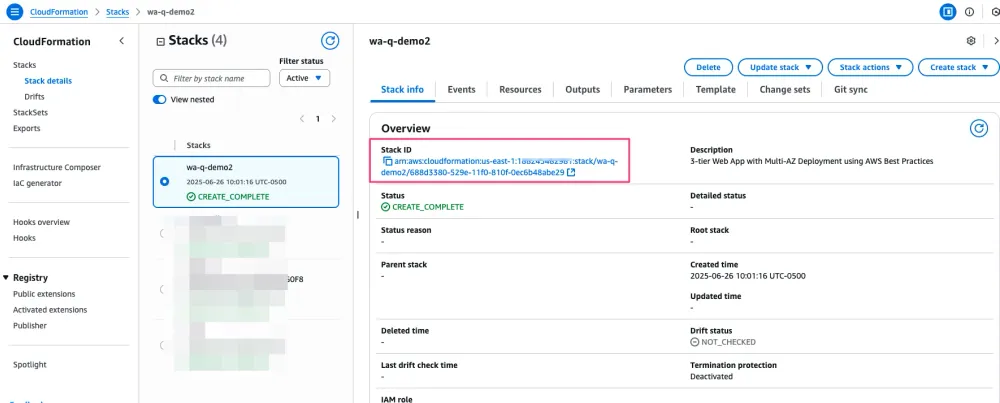
For this demo, I deployed a simple application using AWS CloudFormation. Again, you’ll need to note its ARN, as we’ll use it in the prompt.
You can:
- Use a sample 3-tier application, or
- Ask Amazon Q to generate a simple CloudFormation template and deploy it in your account.
In my account, I choose CloudFormation, Stack info and note the ARN of my demo app.
3- Let's now put this into work and ask Amazon Q to complete a Well-Architected Review for the application we identified in 2 and put the result in the workload we identified in 1.
Step 3 – Run the Review Using Amazon Q
Now let’s put it all together. We’ll ask Amazon Q to complete a Well-Architected Review for the application from Step 2 and record the results in the workload from Step 1.
Fire up the Amazon Q CLI, copy and paste the prompt below, and replace the ARNs with your actual values.
plaintext
You have a Workload in AWS Well-Architected Tool with the arn arn:aws:wellarchitected:<region>:<account-id>:workload/<workload-id>.You are tasked to conduct a Well-Architected-Review based on the application that is described in Cloudformation.1. ensure to fetch the current template of the Stack <cloudformation-stack-arn> and write it into a file review-template.json.2. Analyze the review-template.json Cloudformation template.3. Go through all lenses and pillars attached to the workload and answer the questions.IMPORTANT: Do not guess any answer, only answer what you can, based on the analyzed Cloudformation template, that was provided.For each question that you can answer, update the Well-Architected review of the workload that i provided. Leave all other questions for manual review.
The prompt asks Amazon Q to:
- Iterate through the questions of the Well-Architected Framework across the six pillars
- Validate 300+ AWS best practices
- Answers 70+ review questions as it sees fits
- Identify best practices already in place or those that are missing
- Create a list of High and Medium Risk Issues (HRIs and MRIs)
- Generate an implementation plan for each recommended action
- In my test, it took about 15 minutes which is a huge win comparing to the 3-4 hours it takes to do the same review using only human (AWS SA, or AWS Partner)
You can then generate a report with all these insights.
You can watch the video here . It’s a little long because it goes through multiple pillars, so I asked Amazon Q to stop after completing Operational Excellence, Security, and Reliability. It only identified a few best practices, but you get the idea.
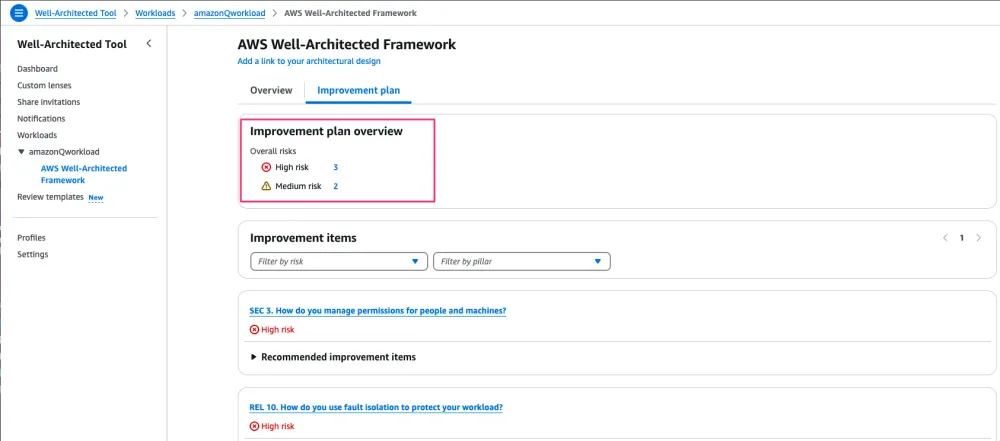
After it finishes, I go to my AWS Console and check the review Amazon Q created. As you can see, it was able to identify best practices in Security and Reliability.
I asked Amazon Q in the prompt to be strict and not guess. It only marks a best practice as “in place” if it finds clear evidence from your application that it has been implemented.
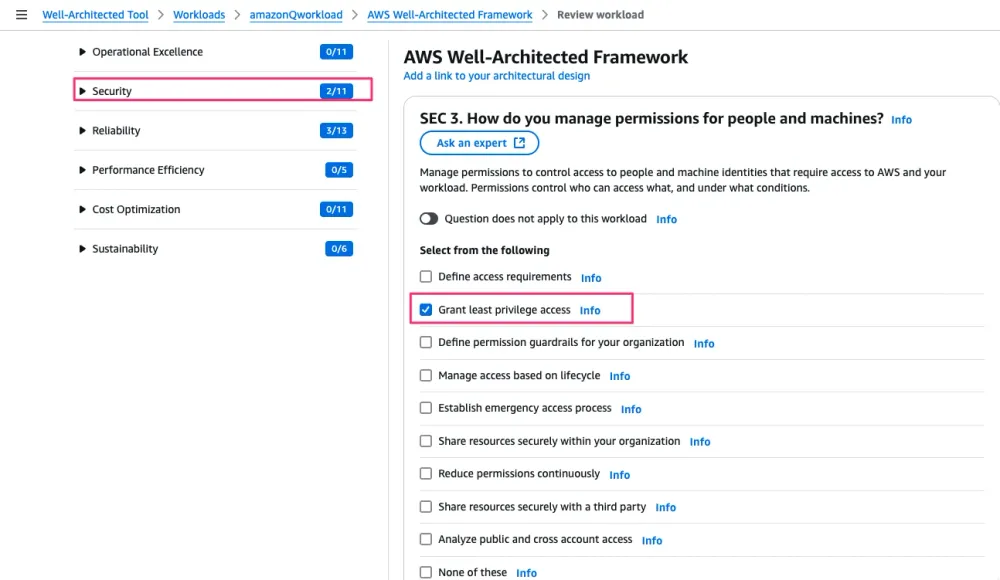
A Few Things to Note
Amazon Q didn’t identify any best practices under the Operational Excellence pillar. The reason is that this pillar focuses more on people and process than on technology. It couldn't find any evidence, for example, that you have a Cloud Center of Excellence (CCoE).
The point is, even though you can automate much of the review for AWS best practices, you still need human input to validate the non-technical aspects. This method gives you a jump start so you don't have to start from scratch.
Using this approach, you could also include additional lenses from the AWS Lens Catalog for domain-specific reviews. For example, the Containers Lens, Serverless Lens , and more.
Conclusion and What’s Next
In this short post, I showed you how you can quickly start the AWS Well-Architected Review process to identify missing best practices in your application architecture.
Using Amazon Q enables you to scan your IaC templates for best practices, create a WA review in the Console, and identify any HRIs or MRIs. It also generates an implementation plan to help you address those risks.
We also discussed why this process is not a replacement for human review. Best practices are not only about technology, but also about the processes in your organization and the people who create and follow them.
If you need help with anything related to AWS best practices, feel free to reach out.
Enjoyed reading this content? Let the author know!
Your likes, comments, shares, and saves help creators reach more builders.

Loading recommendations
Loading article