
Application Security - Authorization
Web applications exposing private content require access control mechanisms to ensure that only authorized users can access the content.

Overview
Web applications exposing private content require access control mechanisms to ensure that only authorized users can access the content. Examples include SPA based internal portals that require user authentication, and downloading confidential files. Access control can be implemented at the origin level or at the CDN level according to the use case.
Common use cases
Origin-based access control
If you are using CloudFront as a reverse proxy with no caching enabled (i.e. Caching Disabled is configured in Managed Caching Policy ), then you can simply use the native authorization capabilities of your origin (e.g. API Gateway ). For this to work correctly, configure the Origin Request Policy to forward to your origin the request attribute carrying the authorization info, such as the Authorization header .
If your content is cacheable, but you prefer to keep managing authorization on your own infrastructure, consider integrating CloudFront with your authorization servers using Lambda@Edge. This architecture allows you to benefit from CloudFront caching. Read more about this implementation in this blog .
Consider the following sections if you want to offload the authorization logic from your web application components to CloudFront.
CloudFront-based access control using TLS Authentication (mTLS)
CloudFront supports mutual mTLS, a security protocol that requires both the server and client to authenticate each other using X.509 certificates, enabling you to validate client identities at CloudFront's server-side. Using mTLS, you can ensure only clients presenting trusted certificates can successfully establish TLS connections with your CloudFront distributions. It's typically used in scenarios where you have control over the client device to securely install and manage the client TLS certificate, such as IoT, connected devices, enterprise applications, payment terminals, etc..
To use it, create a trust store based on your CA bundle in an S3 bucket and then enable mTLS on the CloudFront distribution using the created trust store, which currently is not compatible with HTTP/3, and requires HTTPS Only viewer protocol policy on all cache behaviors.
Currently, CloudFront does not offer a native certificate revocation list, but it provides connection function, a custom code that allows you to implement sophisticated validation logic. For example, using the same domain name, you can enforce mTLS only on certain paths of the application, only from devices outside of your controlled network, and relatively relax your tolerance to expired client certificates based on geographical locations.
CloudFront-based access control using signed tokens
CloudFront provides a native access control mechanism using Signed URLS or Signed cookies , for scenarios where mTLS is not an option, e.g. managing certificates is not desirable or no control over client device. To use this method, follow the steps explained in the documentation :
- Configure an asymmetric cryptographic keys for signing tokens, using signing key groups .
- In your authentication workflow, append the required token fields in query parameters or cookies of the vended resource URL. The token contains an expiry date, the signing key id, the policy and a signature. The policy allows you to define the conditions that needs to be met by a request to pass the token validation test by CloudFront. For example, you can use a custom policy , to generate a token that is valid for all URLs starting with a specific path.
- Enable signature in the CloudFront's cache behavior that is used for private content. From that point on, all requests will be controlled by CloudFront for token validation. Unauthorized requests receive a 403 error, which can be customized using CloudFront's Custom Error Page functionality .
Use the aws-sdk to generate a valid token with your private key. As an illustration, the below code in Nodejs generates an RSA based CloudFront signed URL for a specific object edge-image.jpg valid for two hours.
JavaScript
const AWS = require('aws-sdk');// It's recommended not to store signing keys in code. The below is just an illustrative example.const cloudfrontAccessKeyId = 'K25ULYFPSTHQP9';const cloudFrontPrivateKey = '-----BEGIN RSA PRIVATE KEY-----\nMIIEowIBAAKCAQ....2gvvIH\n-----END RSA PRIVATE KEY-----';const signer = new AWS.CloudFront.Signer(cloudfrontAccessKeyId, cloudFrontPrivateKey);const signedUrl = signer.getSignedUrl({url: 'https://d3jqlnxofenq2x.cloudfront.net/edge-image.jpg',expires: Math.floor((Date.now() + 2 * 60 * 60 * 1000) / 1000),});console.log(signedUrl);
The output of the above code snippet looks like this:

Note that CloudFront supports RSA and ECDSA based encryption algorithms to create signed tokens, with ECDSA offering several advantages over traditional RSA signatures, including faster signature generation and verification, smaller signature sizes that result in shorter URLs, and equivalent security with smaller key sizes.
CloudFront-based access control using CloudFront Functions
If CloudFront's native signed token does not meet your access control requirements, you can build a custom access control logic using edge functions. For example, you might want to use a different cryptography for signing tokens such as symmetric cryptography, or you might want to include non-standard attributes in the signature such as the user-agent header, or you might want to implement a conditional tokenization logic based on the user network. The following custom implementations illustrate the some of the possibilities with edge functions:
- CloudFront Functions to validate JWT based token . Note that CloudFront Functions currently doesn't allow external network calls, and in consequence, signing keys need to be stored in the function code. To reduce the risk of storing signing key in CloudFront Function code, do not manually configure the key in the code, but rather use an automation that rotates keys and generate the function code before deploying to CloudFront. This way, keys do not risk being uploaded to public repositories like Github.
- AWS Solution: Secure Media Delivery at the edge . This AWS Solution uses CloudFront Function to implement a custom access control mechanism adapted to video streaming.
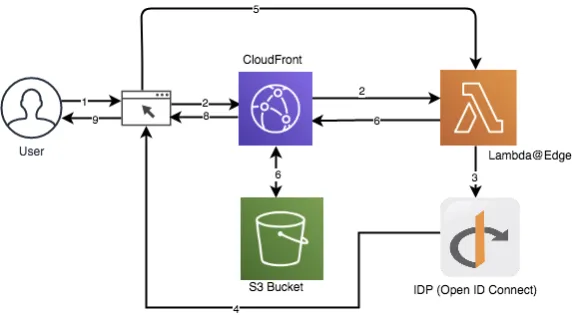
- Using OpenID Connect to authenticate a Single Page Application hosted on S3 . The solutions uses AWS Secrets Manager to store signing keys, and can work with an external Identity Provider (IdP) like Cognito or Okta. This implementation was published prior to the launch of CloudFront Functions, which is why it's fully relying on Lambda@Edge. It ca be optimized to use CloudFront Functions for the token validation part, and Lambda@Edge for the integration with IdPs.
Resources
Enjoyed reading this content? Let the author know!
Your likes, comments, shares, and saves help creators reach more builders.

Loading recommendations
Loading article