

Enhancing Network Security with EC2 Security Groups with Amazon Q Developer
Amazon Q Developer streamlines AWS cloud security by providing expert guidance for EC2 Security Groups, helping teams automate and maintain robust security measures through automated rule creation and compliance monitoring.


Welcome to another edition of Q-Bits, where we explore how Amazon Q Developer makes AWS operations more intuitive. Today, we'll focus on enhancing network security with EC2 Security Groups.
Introduction
Security Groups act as virtual firewalls for your Amazon EC2 instances, controlling both inbound and outbound traffic. In this guide, we'll explore how to effectively implement and manage Security Groups to protect your cloud infrastructure using Amazon Q Developer.
Lets explore how to leverage Amazon Q Developer as both an inline coding companion and through its CLI interface to streamline the process of setting up EC2 Security Groups. We'll demonstrate how to use Amazon Q Developer to generate security group rules, explain complex concepts like stateful vs. stateless filtering, and provide step-by-step CLI examples for managing ingress and egress rules. By integrating Amazon Q Developer into your workflow, you'll be able to quickly access relevant AWS documentation, get real-time coding assistance, and receive best practice recommendations as you configure your security groups. We'll show how to use the 'q' command in your terminal to get instant answers to your security group-related questions, and how to leverage Amazon Q Developer's inline suggestions to write more secure and efficient code. Whether you're a beginner looking to understand the basics of security groups or an experienced developer seeking to optimize your configurations, this guide will demonstrate how Amazon Q Developer can enhance your security group management process.
Getting Started with Amazon Q Developer
Start by installing the Amazon Q Developer extension or plugin in your IDE and installing Amazon Q for command line .
Understanding Security Groups vs. Network ACLs
EC2 Security Groups and NACLs both provide network security, but they operate at different levels and have different characteristics. Security Groups control traffic at the instance level, while NACLs control traffic at the subnet level. Security Groups are stateful, meaning they remember the direction of traffic flow, while NACLs are stateless, requiring explicit rules for both inbound and outbound traffic
Lets ask Amazon Q Developer in CLI the difference between security group and Network ACL’s to see how it accesses AWS documentation quickly for relevant information.
Bash
$ q chatThings to try• Fix the build failures in this project.• List my s3 buckets in us-west-2.• Write unit tests for my application.• Help me understand my git status/acceptall Toggles acceptance prompting for the session./profile (Beta) Manage profiles for the chat session/context (Beta) Manage context files for a profile/help Show the help dialogue/quit Quit the application> What are the key differences between Security Groups and Network ACLs?# Security Groups vs Network ACLsSecurity Groups and Network ACLs are both important AWS network security controls, but they operate differently:## Security Groups• **Stateful**: Return traffic is automatically allowed, regardless of outbound rules• **Instance level**: Act as a virtual firewall for EC2 instances and other AWS resources• **Allow rules only**: Can only specify allow rules, not deny rules• **Evaluated as a whole**: All rules are evaluated before deciding to allow traffic• **Apply to an instance**: Associated with instances, not subnets• **Default configuration**: By default, all outbound traffic is allowed## Network ACLs• **Stateless**: Return traffic must be explicitly allowed by rules• **Subnet level**: Control traffic in and out of subnets• **Allow and deny rules**: Can specify both allow and deny rules• **Rule processing order**: Rules are evaluated in numerical order (lowest first)• **Apply to all instances**: Automatically apply to all instances in the associated subnet• **Default configuration**: Default NACL allows all inbound and outbound trafficNetwork ACLs provide a broader, subnet-level security layer, while Security Groups offer more granular control at the instance level. For comprehensive security, it's best practice to use both in combination.
Network ACLs provide a broader, subnet-level security layer, while Security Groups offer more granular control at the instance level. For comprehensive security, it's best practice to use both in combination.
Implementing Security Groups
When implementing EC2 Security Groups, Amazon Q Developer streamlines the process by providing intelligent, context-aware solutions. Whether creating basic web server access rules or configuring complex multi-tier architectures, Q Developer offers production-ready code that adheres to AWS best practices. Simply comment your requirements, and it generates optimized security configurations, including proper ingress/egress rules, inter-group references, and appropriate CIDR blocks.
Let's see this in action by creating basic security group structure with the help of CLI
Bash
$ q chat> Show how to create a basic web server security group# Step 1: Get your VPC ID (if you don't already know it)aws ec2 describe-vpcs --query "Vpcs[*].{VpcId:VpcId,Name:Tags[?Key=='Name'].Value|[0],CidrBlock:CidrBlock}" --output table# Step 2: Create the security group (replace vpc-xxxxxxxx with your actual VPC ID)aws ec2 create-security-group \--group-name WebServerSG \--description "Security group for web servers" \--vpc-id vpc-xxxxxxxx# Step 3: Add inbound rules for HTTP and HTTPS from anywhereaws ec2 authorize-security-group-ingress \--group-id sg-xxxxxxxxxxxxxxxxx \--protocol tcp \--port 80 \--cidr 0.0.0.0/0aws ec2 authorize-security-group-ingress \--group-id sg-xxxxxxxxxxxxxxxxx \--protocol tcp \--port 443 \--cidr 0.0.0.0/0# Step 4: Add inbound rule for SSH from a specific IP range (replace with your IP range)aws ec2 authorize-security-group-ingress \--group-id sg-xxxxxxxxxxxxxxxxx \--protocol tcp \--port 22 \--cidr 192.168.1.0/24
In IDE it can generate the code for you as follows
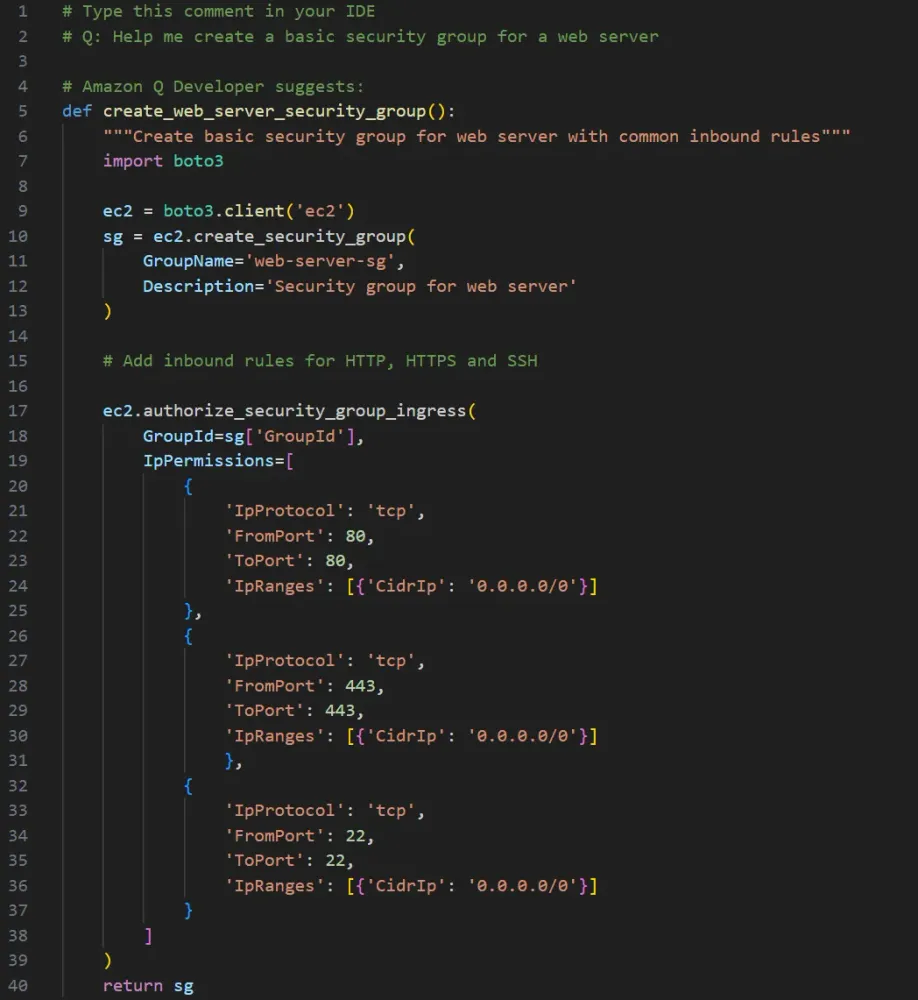
As your architecture grows more complex, so do your security requirements. Q Developer shines when helping to implement security for multi-tier applications.
Security Best Practices
Security best practices are essential but can be challenging to remember and implement consistently. Q Developer helps bridge this gap by providing code that inherently follows AWS security best practices.
You can use Amazon Q CLI to learn about Security Best practices and even ask it to implement these for your security groups.

When asked about implementing security groups, it generates solutions to ensure that your security implementations are not just functional but also maintainable and compliant with industry standards
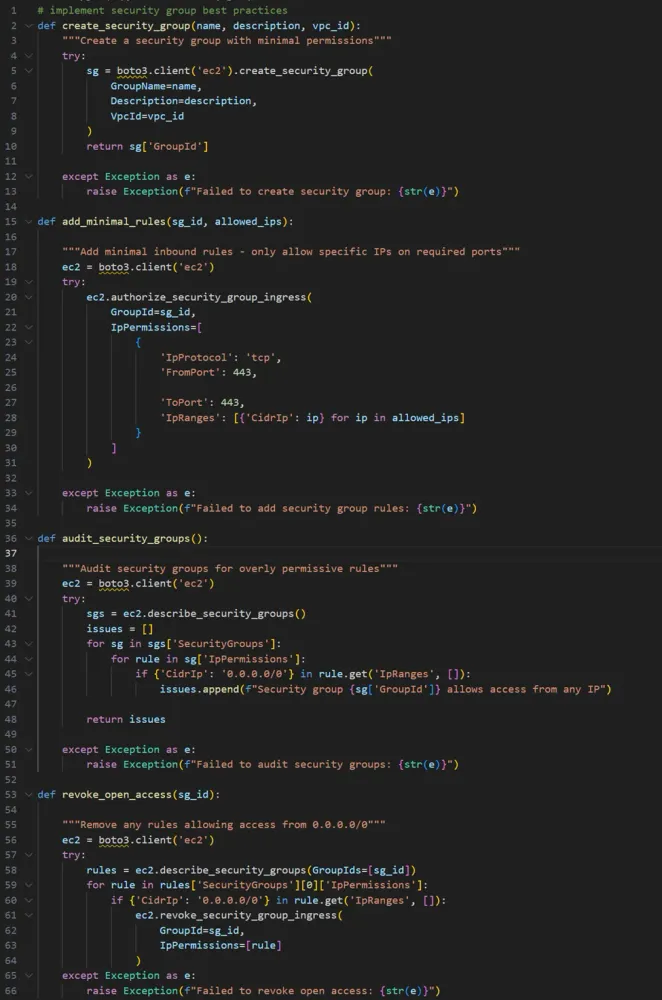
Security isn't just about implementation; it's also about ongoing maintenance and vigilance. Q Developer assists in creating sophisticated auditing tools that can systematically review your security group configurations. Amazon Q Developer can help identify potential security risks, such as overly permissive rules or unnecessary internet access. By automating these checks, you can maintain a strong security posture and quickly identify any deviations from best practices.
So finally, let's ask Amazon Q in CLI for a commands to audit our security groups:
Bash
$ q chat> what are the commands to audit security group?# AWS CLI Commands to Audit Security GroupsHere's a comprehensive list of AWS CLI commands to audit your security groups:## Basic Security Group Informationbash# List all security groups with basic detailsaws ec2 describe-security-groups --output table# Get detailed information about a specific security groupaws ec2 describe-security-groups --group-ids sg-12345678# List security groups with their VPC IDsaws ec2 describe-security-groups --query 'SecurityGroups[*].[GroupId,GroupName,VpcId]' --output table## Finding Overly Permissive Rulesbash# Find security groups with 0.0.0.0/0 inbound accessaws ec2 describe-security-groups \--filters Name=ip-permission.cidr,Values=0.0.0.0/0 \--query 'SecurityGroups[*].{Name:GroupName,ID:GroupId,Rules:IpPermissions[?contains(IpRanges[].CidrIp, `0.0.0.0/0`)]}' \--output json# Find security groups with specific ports open to the world (example: SSH port 22)aws ec2 describe-security-groups \--filters Name=ip-permission.cidr,Values=0.0.0.0/0 Name=ip-permission.from-port,Values=22 \--query 'SecurityGroups[*].{Name:GroupName,ID:GroupId}' \--output table# Find security groups with all ports openaws ec2 describe-security-groups \--filters Name=ip-permission.protocol,Values=-1 \--query 'SecurityGroups[*].{Name:GroupName,ID:GroupId}' \--output table## Identifying Unused Security Groupsbash# Get all security groupsaws ec2 describe-security-groups --query 'SecurityGroups[*].GroupId' --output text > all_sgs.txt# Get security groups used by EC2 instancesaws ec2 describe-instances \--query 'Reservations[*].Instances[*].SecurityGroups[*].GroupId' \--output text | tr '\t' '\n' | sort -u > used_sgs.txt# Get security groups used by RDS instancesaws rds describe-db-instances \--query 'DBInstances[*].VpcSecurityGroups[*].VpcSecurityGroupId' \--output text | tr '\t' '\n' | sort -u >> used_sgs.txt# Get security groups used by ELBsaws elb describe-load-balancers \--query 'LoadBalancerDescriptions[*].SecurityGroups' \--output text | tr '\t' '\n' | sort -u >> used_sgs.txt# Get security groups used by ALBs/NLBsaws elbv2 describe-load-balancers \--query 'LoadBalancers[*].SecurityGroups' \--output text | tr '\t' '\n' | sort -u >> used_sgs.txt# Find unused security groups (requires sort, uniq, and comm commands)sort all_sgs.txt | uniq > all_sgs_sorted.txtsort used_sgs.txt | uniq > used_sgs_sorted.txtcomm -23 all_sgs_sorted.txt used_sgs_sorted.txt > unused_sgs.txt## Checking Default Security Groupsbash# List all default security groupsaws ec2 describe-security-groups \--filters Name=group-name,Values=default \--query 'SecurityGroups[*].{ID:GroupId,VPC:VpcId,InboundRules:IpPermissions,OutboundRules:IpPermissionsEgress}' \--output json## Security Group Referencesbash# Find security groups that reference other security groupsaws ec2 describe-security-groups \--query 'SecurityGroups[?length(IpPermissions[?length(UserIdGroupPairs)>`0`])>`0`].{Name:GroupName,ID:GroupId}' \--output table## Security Group Usagebash# Find which EC2 instances use a specific security groupaws ec2 describe-instances \--filters Name=instance.group-id,Values=sg-12345678 \--query 'Reservations[*].Instances[*].[InstanceId,Tags[?Key==`Name`].Value|[0]]' \--output table# Find which ENIs use a specific security groupaws ec2 describe-network-interfaces \--filters Name=group-id,Values=sg-12345678 \--query 'NetworkInterfaces[*].{ID:NetworkInterfaceId,PrivateIP:PrivateIpAddress}' \--output table## Checking for Compliancebash# Check if security groups comply with specific port restrictions (example: no port 3389 RDP)aws ec2 describe-security-groups \--filters Name=ip-permission.from-port,Values=3389 \--query 'SecurityGroups[*].{Name:GroupName,ID:GroupId}' \--output table## Exporting Security Group Rules for Documentationbash# Export all security group rules to a JSON fileaws ec2 describe-security-groups \--query 'SecurityGroups[*].{Name:GroupName,ID:GroupId,Description:Description,InboundRules:IpPermissions,OutboundRules:IpPermissionsEgress}' \--output json > security_groups_audit.json
Conclusion
We've seen how Amazon Q Developer transforms the process of implementing and managing EC2 Security Groups from a potentially daunting task into a guided, systematic approach. From basic security group creation to complex automation and auditing tasks, Q Developer serves as both a teacher and a practical assistant. Its ability to provide context-aware solutions, explain complex concepts, and generate production-ready code makes it an invaluable tool for anyone working with AWS security configurations.
While the tool provides excellent guidance, always remember to review and test the suggested configurations in a non-production environment first, ensuring that the security measures align with your specific requirements and organizational policies.
Enjoyed reading this content? Let the author know!
Your likes, comments, shares, and saves help creators reach more builders.

Loading recommendations
Loading article