
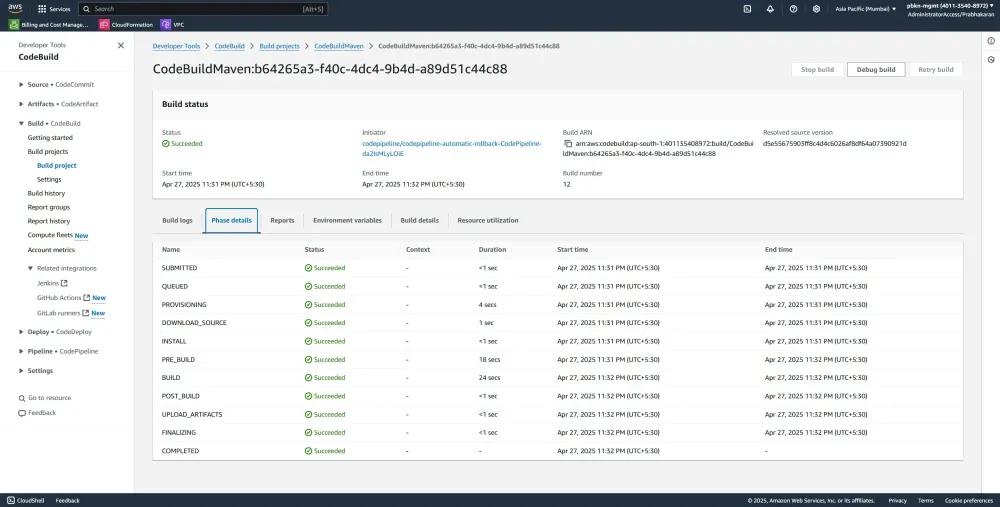
SAM Builds in CodePipeline: A buildspec.yml Deep Dive
Deep-dive into configuring your SAM application with CodePipeline and CodeBuild using buildspec.yaml, highlighting key configurations for seamless deployments.

📌 Step-by-Step Configuration:
1️⃣ Add a Proper buildspec.yaml File
Your CodeBuild project uses a
buildspec.yaml to run the AWS SAM commands for packaging and deployment:YAML
version: 0.2phases:pre_build:commands:- echo Logging in to SAM build...- aws --version- sam --version- mvn --versionbuild:commands:- echo Build started on `date`- cd HelloWorldFunction- mvn clean compile install -DskipTests=true- cd ..- sam validate -t template.yaml --lint- echo ${S3_BUCKET} # S3_BUCKET defined in the environment variables of the code build- sam package --template-file template.yaml --s3-bucket ${S3_BUCKET} --output-template-file packaged.yaml --no-resolve-s3post_build:commands:- echo Build completed on `date`artifacts:files:- HelloWorldFunction/target/HelloWorld-1.0.jar- packaged.yaml
- ✅ Note: The packaged SAM template (
packaged.yaml) is generated from your originaltemplate.yaml. Thispackaged.yamlis referenced explicitly in your pipeline for deployment.
2️⃣ CodePipeline Configuration with CloudFormation Actions
Ensure your AWS CodePipeline explicitly uses the
packaged.yaml created during the build stage:YAML
- Name: DeployOnFailure:Result: ROLLBACKActions:- Name: CreateChangeSetActionTypeId:Category: DeployOwner: AWSProvider: CloudFormationVersion: '1'InputArtifacts:- Name: BuildOutputConfiguration:ActionMode: CHANGE_SET_REPLACEStackName: !Sub "${StackName}-${AWS::AccountId}-${AWS::Region}"Capabilities: CAPABILITY_IAM,CAPABILITY_AUTO_EXPAND,CAPABILITY_NAMED_IAMChangeSetName: !Sub "CodePipelineChangeSet-${AWS::AccountId}-${AWS::Region}"TemplatePath: "BuildOutput::packaged.yaml"RoleArn: !GetAtt CodePipelineRole.ArnRunOrder: 1- Name: ExecuteChangeSetActionTypeId:Category: DeployOwner: AWSProvider: CloudFormationVersion: '1'InputArtifacts:- Name: BuildOutputConfiguration:ActionMode: CHANGE_SET_EXECUTEStackName: !Sub "${StackName}-${AWS::AccountId}-${AWS::Region}"Capabilities: CAPABILITY_IAM,CAPABILITY_AUTO_EXPAND,CAPABILITY_NAMED_IAMChangeSetName: !Sub "CodePipelineChangeSet-${AWS::AccountId}-${AWS::Region}"TemplatePath: "BuildOutput::packaged.yaml"RoleArn: !GetAtt CodePipelineRole.ArnRunOrder: 2
- ✅ Note: The
OnFailure: ROLLBACKensures that failed deployments automatically roll back to the last known stable configuration.
3️⃣ Configuring AWS CodeBuild with Environment Variables
The AWS CodeBuild environment explicitly specifies the artifact bucket (
S3_BUCKET ) as an environment variable:YAML
CodeBuildProject:Type: AWS::CodeBuild::ProjectProperties:Name: CodeBuildMavenLogsConfig:CloudWatchLogs:Status: ENABLEDGroupName: !Ref CodeBuildLogGroupSource:Type: CODEPIPELINEBuildSpec: "buildspec.yaml"Environment:ComputeType: BUILD_GENERAL1_SMALLImage: "aws/codebuild/amazonlinux-x86_64-standard:5.0"Type: LINUX_CONTAINEREnvironmentVariables:- Name: S3_BUCKETType: PLAINTEXTValue: !Ref ArtifactBucketNameServiceRole: !GetAtt CodeBuildRole.ArnArtifacts:Type: CODEPIPELINE
- ✅ Tip: This setup ensures secure and easy management of environment-specific configurations.
4️⃣ Utilizing Correct Artifact Paths in SAM Templates
Your SAM
template.yaml should correctly reference the artifact files created during the build:YAML
HelloWorldFunction:Type: AWS::Serverless::FunctionProperties:CodeUri: HelloWorldFunction/target/HelloWorld-1.0.jarHandler: helloworld.App::handleRequestRuntime: java11Architectures:- x86_64MemorySize: 512Environment:Variables:PARAM1: VALUEJAVA_TOOL_OPTIONS: -XX:+TieredCompilation -XX:TieredStopAtLevel=1Events:HelloWorld:Type: ApiProperties:Path: /helloMethod: get
- ✅ Important: The
CodeUripath aligns precisely with the artifacts specified inbuildspec.yaml.
🎯 Putting It All Together:
This robust SAM build and deployment setup allows seamless integration into your CI/CD workflow, ensuring consistent, automated deployments and rollbacks.
For a complete walk-through on the AWS CodePipeline automatic rollback integration, refer to my detailed blog:
🔖 Summary & Key Takeaways:
- Clearly configure your build and deploy stages with
buildspec.yaml.
- Use environment variables effectively for secure, maintainable pipelines.
- Ensure precise artifact referencing to avoid deployment inconsistencies.
- Automatically roll back to maintain application stability.
Now you're ready to build more resilient, serverless applications with AWS SAM and CodePipeline! 🚀
🎉 About the Author
PBKN is a 12x AWS Certified (AWStronaut) & Official AWS SME & Community Builder
Enjoyed reading this content? Let the author know!
Your likes, comments, shares, and saves help creators reach more builders.

Loading recommendations
Loading article