
Application Performance - Image optimization
Images are commonly the heaviest components of a web page. Optimize images to improve user experience, reduce content delivery costs, and enhance SEO.

Overview
Images are usually the heaviest components of a web page, both in terms of bytes and number of HTTP requests. Optimizing images on your website is critical to improve your users’ experience, reduce delivery costs and enhance your position in search engine ranking. For example, Google’s Largest Contentful Paint metric in their search ranking algorithm is highly impacted by how much you optimize the images on your website.
Architectural decisions
An image optimization solution can be architected in a variety of ways, based on your requirements in terms of cost, flexibility, and performance. When architecting an image optimization solution, you need to make the following technical decisions:
- What image transformations are needed? Is it formatting, resizing, cropping, etc.
- Where do we decide which transformation to be applied for a specific image request? In the front-end on the client-side (static, responsive design, etc.), on the server side (based on request content such as device) or combination of both?
- Where do we execute the transformation? In a central location or in a distributed way?
- When do we execute the transformation? Every time or do we store transformed images for a short duration? Is it synchronously or asynchronously executed?
Another important decision to make is whether you want to build the solution using AWS services, or acquire a 3rd party managed solution.
Common use cases
Managed solutions
You can opt for managed image solutions if you are looking for a commercial-off-the-shelf** service :
- From vendors available on the AWS Marketplace, such as Cloudinary , ImageKit.io or Cloudimage . They offer integrations with your existing CloudFront setup.
- From AWS using Amplify Hosting. If you are using Amplify Hosting to serve your Server Side Rendered web applications, you can benefit from their native image optimization feature. With some additional integration, you can just use this feature from Amplify Hosting for image optimization with your own CloudFront setup, without using Amplify Hosting to serve your whole web application.
With this approach, you benefit from a a simple solution to operate and integrate, but usually it comes at a higher cost, and you are bound in terms of architecture and feautres to capabilities offered by the managed service.
AWS Solution for Image transformation
The AWS Solutions team maintains a serverless image transformation solution, that offer rich functionalities. Using CloudFormation, you can deploy it, and update it when new versions are available from AWS Solutions team. It provides some level of customizations through the CloudFormation template parameters, such as proxying the image requests through API Gateway or S3 Object Lambda.

Custom deployment
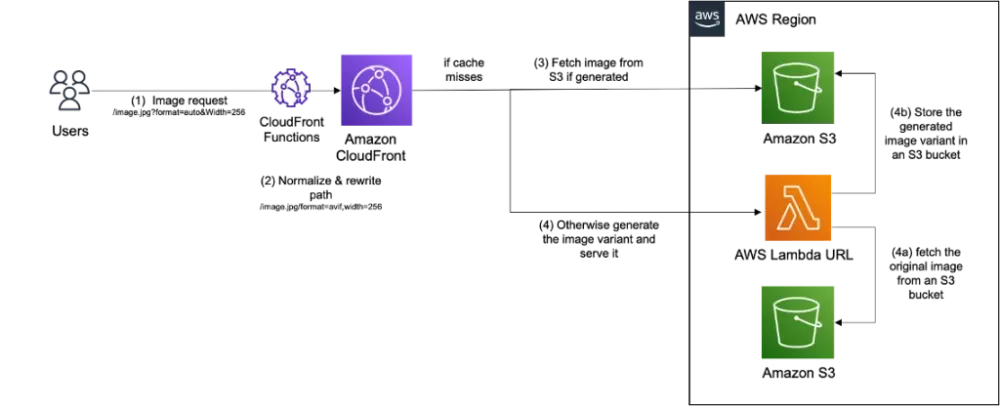
If you want to customize your image optimization deployment, and adapt it to your own web stack, you can consider this AWS sample code as a starting point. It's designed to be simple to integrate, performant and cost effective. Image processing is done in a Lambda function using the Sharp library , which integrates directly with CloudFront using Lambda URL. It offers the possibility to temporary store generated image in an S3 bucket to reduce the amount of image processing in case of cache misses.

Resources
Enjoyed reading this content? Let the author know!
Your likes, comments, shares, and saves help creators reach more builders.

Loading recommendations
Loading article