
Application Performance - API & dynamic acceleration
Dynamic traffic (e.g. APIs or very personalized webpages) are little to not cacheable, but can benefit from the security and acceleration of AWS edge services.

Overview
Workloads such as dynamic APIs or very personalized webpages are little to not cacheable. However, they benefit from the security and acceleration provided by AWS edge services, such as CloudFront and Global Accelerator. AWS edge services operate across hundreds of worldwide distributed Points of Presence (PoPs) within 20 to 30 milliseconds from users on average. Traffic to the origin is carried back over the AWS global network instead of going over the public internet. The AWS Global Infrastructure is a purpose-built, highly available, and low-latency private infrastructure built on a global, fully redundant, metro fiber network that is linked via terrestrial and trans-oceanic cables across the world.
Dynamic acceleration with CloudFront
CloudFront can accelerate APIs based on REST, WebSockets and gRPC. Acceleration is based on the following techniques:
- Terminating TCP/TLS connection closer to users reducing connection latencies.
- Serving content over modern internet protocols such as QUIC or TLS1.3, even if the origin doesn’t support it.
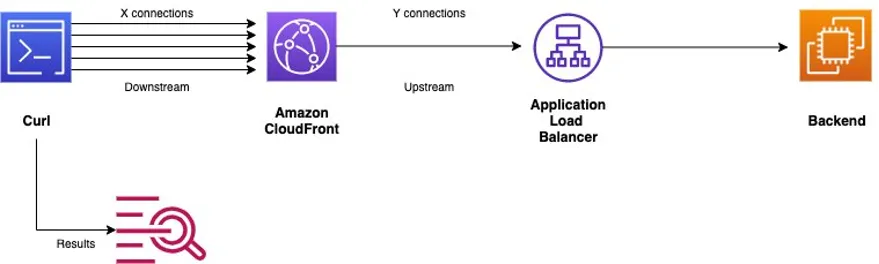
- Persisting connections to the origin. Sometimes, the request must be forwarded to the origin, such as when the content is not present in local cache or when it is purely dynamic, such as APIs. Requests forwarded over persistent connections from PoPs do not need to establish a new TCP/TLS connection to the origin, which removes the latency of multiple round trips, and maintains scaled TCP windows.
For more in depth information on how CloudFront optimizes HTTP dynamic traffic, consider the following resources:
You can further reduce API latency by: Increasing TCP Keep-alive timeout on your origin, and in your CloudFront configuration to enhance connection re-use; Enabling Origin Shield in your CloudFront distribution, forcing requests to spend a longer time on the AWS network in their journey to the Origin servers and further consolidating connections to the origin; Enabling TLS1.3 on your origin for faster connection establishment between CloudFront and your origin servers.
In addition, the lower rate of connection establishment at the origin reduces its cost in terms of scaling. More specifically for EC2 and ALB based origins, it results in lower Data Transfer Out (DTO) charges, because the DTO overhead of sending TLS certificates from the origin will be reduced. Note that CloudFront doesn't meter TLS overhead in its DTO calculations.
To use CloudFront as a reverse proxy, you need to configure the Caching Disabled Managed Caching Policy in your distribution, in the relevant cache behavior. This will instruct CloudFront to forward requests received from PoPs directly to your origin. By default, If you do not explicitly configure an Origin Request Policy, CloudFront strips cookies, query parameters and most of headers before forwarding the request to your origin. Exceptionally, CloudFront sends the Host header with the value of your origin's domain name, appends the X-Forwarded-For header incremented by the IP of the requester, and overrides the User-Agent header with the value of Amazon CloudFront. Note that when CloudFront is configured as reverse proxy, it does not compress responses using Gzip or Brotli.
If you need certain request attributes to be forwarded to CloudFront, you need to explicitly configure it in the Origin Request Policy. For example, you can forward all the request attributes received by the user, by configuring the AllViewer Managed Origin Request Policy. Note that when you do that, CloudFront sends the Host header as received by the user, in contrast to sending the value of your origin's domain name. When your API origin expects its origin domain name in the Host header, such as with API Gateway, configure instead AllViewerExceptHostHeader Managed Origin Request Policy .
To enrich the forwarded request with meta-data from CloudFront , such as the country of the user, or information about its device, configure the relevant CloudFront headers in the Origin Request Policy. For custom dynamic headers, such as True-Client-IP, use a CloudFront Function on viewer request event to add them upstream.
Dynamic acceleration with Global Accelerator
Global Accelerator routes user traffic to the nearest PoP using BGP Anycast. From there, Global Accelerator carries your user traffic to your origin over the Amazon backbone. Global Accelerator further enhances performance using the following techniques:
- Jumbo frame support. By enabling jumbo frames between the AWS edge location and the application endpoint in the AWS Region, Global Accelerator is able to send and receive up to 6X more data (payload) in each packet. Jumbo frame support cuts down the total time required to transmit data between users and your application.
- TCP termination at the edge. Global Accelerator reduces initial TCP setup time by establishing a TCP connection between the client and the AWS PoP closest to the client. Almost concurrently, a second TCP connection is made between the PoP and the application endpoint in the AWS Region.
- Large receive side window, TCP buffers and congestion window. For TCP terminated traffic, Global Accelerator is able to receive and buffer larger amounts of data from your application in a shorter time period by tuning receive side window and TCP buffer settings on the AWS edge infrastructure. This provides faster downloads to your clients, who are now fetching data in a shorter time directly from the AWS edge. By transmitting data over the AWS global network, Global Accelerator can scale up the TCP congestion window to send larger amounts of data than usually possible via the public internet.
Resources
Enjoyed reading this content? Let the author know!
Your likes, comments, shares, and saves help creators reach more builders.

Loading recommendations
Loading article