
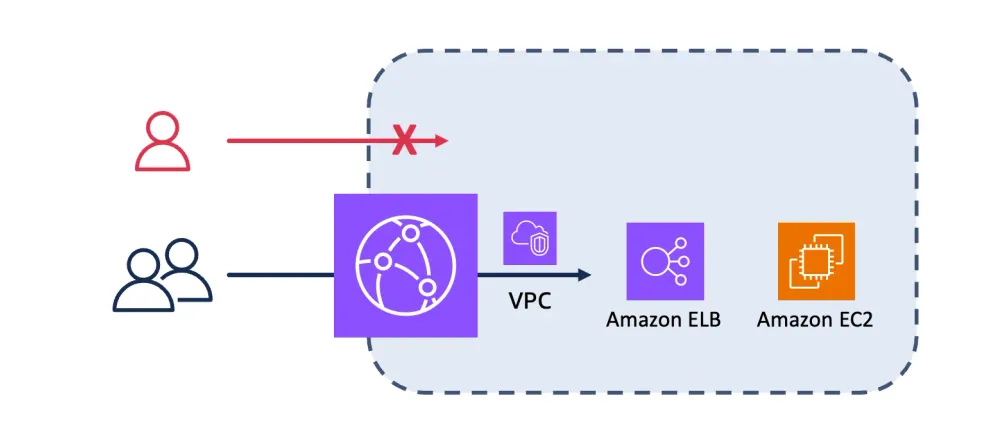
Application Security - Origin cloaking
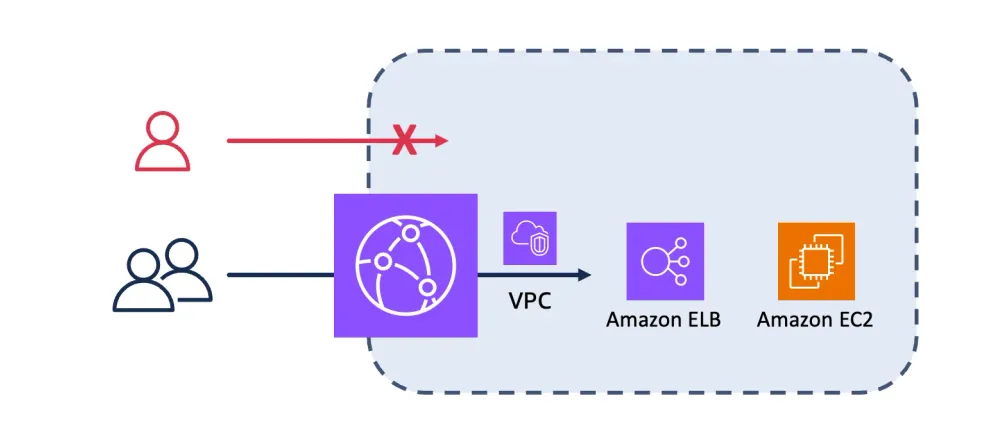
Origin Cloaking stops malicious actors from by-passing CloudFront and its security controls to attack the origin directly.

Last updated on 5 Feb 2026
Overview
Origin cloaking is a set of techniques aiming at reducing the attack surface of web applications. It's a best practice to use CloudFront as a single-entry point to web applications, where security controls, such as protections against DDoS attacks and undesired bots, are applied. Origin cloaking stops malicious actors from by-passing CloudFront and its security controls to attack the origin directly, using firewall rules to block any traffic not coming from the CloudFront entry point. Origin cloaking can be achieved at multiple layers of the OSI model.
At network layer
When your origin's infrastructure allows you to control inbound network access, add restrictions to only allow traffic coming from CloudFront's network.
VPC Origins
If you origin is an EC2 instance, an Application Load Balancer or a Network Load Balancer, you can keep your origin in a private subnet in your VPC , and leverage the VPC Origins feature of CloudFront. It allows you to restrict access exclusively to requests coming from CloudFront distributions configured with VPC Origins in your own AWS account. If you need to further restrict access to requests coming from specific CloudFront distributions, instead of all CloudFront distributions configured with VPC Origins in your AWS account, consider adding origin cloaking techniques at higher OSI layers, as described in the rest of this article. Read this blog to learn about strategies to migrate public origins to private VPC origins in CloudFront.
Note that VPC Origins also support cross account implementations , i.e. when origin infrastructure is hosted in a different AWS Account, than the one where CloudFront distribution are created.
IP based restrictions
If you have to leave such resources in a public subnet (e.g. your ALB will be accessed by multiple CDNs), or you have an origin type that is not supported by CloudFront's VPC Origins, you can restrict access to requests coming from CloudFront's network using security groups. You need to associate your origin with a Security Group, to which you add the AWS-managed prefix list for Amazon CloudFront .
If your origin is on your premises, you can restrict access to requests coming from CloudFront's network by allow listing CloudFront's origin facing IP addresses, which can be found in this IP list when you filter on the CLOUDFRONT_ORIGIN_FACING value of the service field. In this approach, you need to subscribe to IP changes to update your ACL. Check this blog post to learn how to implement origin cloaking on on-premise web servers using third-party firewalls. Traffic between CloudFront's network and your on-prem network can be isolated from the internet, using AWS Direct Connect with a public virtual interface.
Note that if a malicious actor discovers the domain name of your on-prem origin servers, they can bypass your IP based restriction, by leveraging CloudFront distribution in other AWS account and pointing them to your domain name. Therefore, it's recommended to add origin cloaking techniques at OSI higher level.
At higher layers
Origin Access Control (OAC) with AWS managed origin services
Many AWS managed origin services, such as Amazon S3, enforce access control using IAM-based authorization. These services require requests to be authenticated and cryptographically signed using AWS Signature Version 4 (SigV4).
CloudFront integrates natively with several AWS managed origins, including S3, S3 , MediaPackage V2 , Lambda Function URL and MediaStore , through Origin Access Control (OAC). When OAC is enabled, CloudFront signs origin requests using SigV4 on behalf of the distribution, allowing the origin to authenticate CloudFront and authorize requests according to its resource-based policies.
For example, with S3, you can keep the bucket private and grant exclusive access to CloudFront by allowing only the CloudFront distribution’s service principal in the bucket policy. This prevents direct public access and ensures that objects are retrievable only through CloudFront.
To use OAC, enable it in the origin configuration of your CloudFront distribution and update the origin’s resource policy to explicitly trust the CloudFront distribution identity.
If your origin does not support OAC, such as on-prem servers, AWS Application Load Balancers, Amazon API Gateway or EC2 instances behind an AWS Network Load Balancer, consider implementing authentication using Mutual TLS.
Mutual TLS
Just as Amazon CloudFront can be configured to authenticate an origin server’s identity by validating its TLS certificate, CloudFront can also be configured to present a client TLS certificate to the origin for mutual TLS (mTLS) authentication. With mTLS enabled, CloudFront proves its identity to the origin, and the origin verifies CloudFront’s certificate before accepting connections. In mutual TLS origin connections, CloudFront's role is limited to presenting the certificate; all certificate validation logic and security policies are enforced by your origin servers.
To get started with mTLS authentication between CloudFront and your origin, read the following blog:
At HTTP layer
If mutual TLS (mTLS) is not feasible, you can implement application-layer request authentication between CloudFront and your origin by cryptographically signing origin requests at the edge. In this model, a CloudFront edge function (CloudFront Functions or Lambda@Edge) computes a message authentication code (MAC), for example using HMAC, over selected request components (such as method, path, headers, and timestamp), and includes the signature in the request sent to the origin.
The origin independently verifies the signature using a shared secret and rejects requests with missing, invalid, or expired signatures. This ensures that only requests generated by your CloudFront distribution are accepted and provides integrity protection against tampering in transit.
You are responsible for selecting the signing algorithm, securely managing and rotating the signing keys (for example using encrypted configuration or a secure key store), implementing the signing logic at the edge, and enforcing strict validation on the origin.
Note that this approach provides application-layer authentication and integrity but does not provide the strong, transport-level mutual authentication guarantees of mTLS.
If your origin does not support request signing, or if you don't consider that this level of access control is needed for your application, you can configure CloudFront to send a custom header containing a shared secret with your origin, that can be validated by your origin to process the request. Make sure to rotate this shared secret on a regular basis to reduce the risk of leaked secrets. Consider the following example implementation:
- ALB based origin. You can validate the secret header on an ALB based origin using an ALB rule or using an AWS WAF rule if your ALB is already associated with an AWS WAF WebACL.
- API Gateway based origin. You can validate the secret header on an API Gateway using API keys .
- NGINX based origin. Assuming that CloudFront sends a custom header X-CloudFront with value abc123, you can validate the secret header on Nginx based web server (Cloud based or On-premises based) by adding the following code in the server tag of the /etc/nginx/nginx.conf Nginx configuration file:
1
2
3
if ($http_x_cloudfront != "abc123") {
return 403;
}- Apache based origin. Assuming that CloudFront sends a custom header X-CloudFront with value abc123, you can validate the secret header on Apache based web server (Cloud based or On-premises based) by adding the following code in httpd.conf configuration file (and ssl.conf file if used):
1
2
3
RewriteEngine On
RewriteCond %{HTTP:x-cloudfront} !^abc123$ [NC]
RewriteRule ^ - [F]Enjoyed reading this content? Let the author know!
Your likes, comments, shares, and saves help creators reach more builders.

Loading recommendations
Loading article