

Voice-Controlled Humanoid Robots Using Amazon Nova Sonic and AWS IoT
This project uses Amazon Nova Sonic and AWS IoT for real-time, hands-free voice control of humanoid robots. By integrating AI speech-to-speech streaming with tool calling, developers can create intuitive and responsive robotic systems. The setup includes AWS IoT-enabled robots and AWS cloud infrastructure for robust and scalable voice command execution.

Seamless Speech-to-Speech Control for Humanoid Robots with Amazon Nova Sonic and AWS IoT
Introduction
Previously, hands-free voice control was complicated, making it difficult to determine the break points for extracting voice commands or user intentions. In the era of large language models (LLMs), we can handle text input commands using tools or function calling. However, enabling voice commands requires developers to use multiple models to convert speech to text, process it through the LLM, and then convert text back to speech. This process makes streaming input challenging, leading to significant delays and errors due to incorrect stopping points.
The ideal solution is an LLM that supports speech-to-speech streaming with integrated tool use, eliminating the need for developers to manage voice commands. Amazon Nova Sonic is the model we've been searching for!
Demo
Overview

The system comprises two main components: AWS IoT -enabled robots and the AWS cloud with real-time AI speech-to-speech streaming and tool calling .
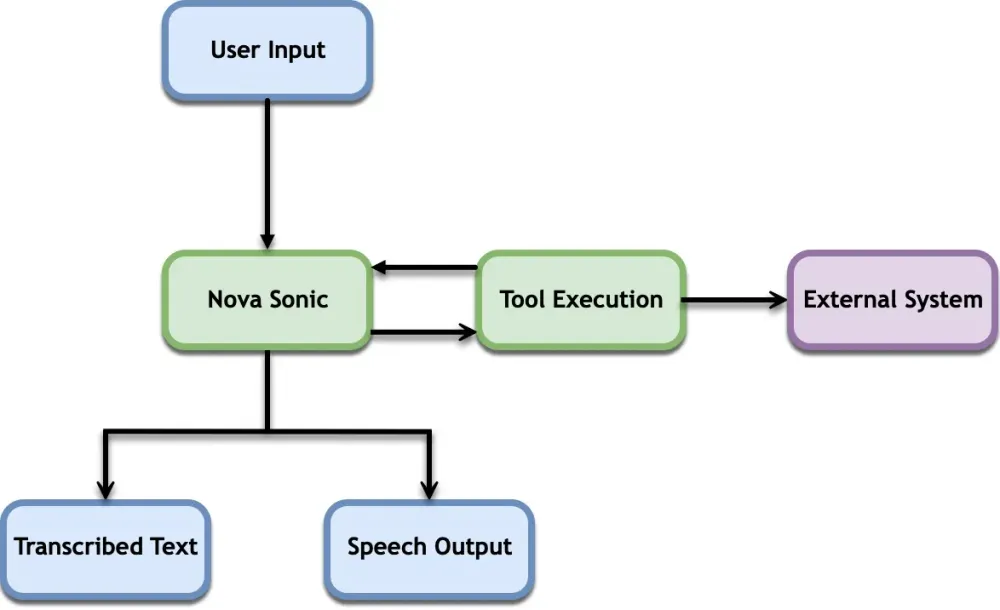
In this blog post, I will focus on the AWS cloud. As for the AWS IoT-enabled robots, they are simply pub/sub Python services that subscribe to an AWS IoT topic. When a new message arrives, it forwards the trigger API call with a buffer queue.
Python
# Create an instance of ActionExecutorexecutor = ActionExecutor()# Callback when any publish is receiveddef on_publish_received(publish_packet_data):publish_packet = publish_packet_data.publish_packetassert isinstance(publish_packet, mqtt5.PublishPacket)print("Received message from topic'{}':{}".format(publish_packet.topic, publish_packet.payload))global received_countreceived_count += 1# Add action to queue based on the received payloadtry:payload = json.loads(publish_packet.payload)action_name = payload.get("toolName")if action_name:executor.add_action_to_queue(action_name)else:print("No action specified in the payload")except json.JSONDecodeError:print("Invalid JSON payload received")if received_count == input_count:received_all_event.set()…………….# Create MQTT5 clientclient = mqtt5_client_builder.mtls_from_path(endpoint=input_endpoint,port=input_port,cert_filepath=input_cert,pri_key_filepath=input_key,http_proxy_options=proxy_options,on_publish_received=on_publish_received,on_lifecycle_stopped=on_lifecycle_stopped,on_lifecycle_connection_success=on_lifecycle_connection_success,on_lifecycle_connection_failure=on_lifecycle_connection_failure,client_id=input_client_id,keep_alive_interval_sec=5,)print("MQTT5 Client Created")
For the AWS cloud, the setup is built using AWS CDK. It includes the AWS IoT Thing construct ( ThingWithCert L3 construct) and the aws-apprunner-alpha Service. The client certification and robot client code must be manually deployed to each Raspberry Pi.
If the
keep_alive_interval_sec parameter isn't explicitly set in the sample code, the client might appear to hang up when, in reality, it’s simply taking a long time to reconnect due to the default setting.How to Use Amazon Nova Sonic to Control a robot?
The web application is built using Express.js and Node.js, incorporating WebSocket for real-time voice input and speech capabilities within the web browser. We have adapted the sample code and updated the prompt as follows:
plaintext
You are a robot Command assistant.Your primary role is to assist the user by calling available tools to perform actions or physical tasks.Do not attempt to perform tasks directly; instead, rely on tools to achieve the desired outcomes.Keep your responses concise and focused on the task at hand.Don't say anything similar to "can't command the robot to perform physical actions" or "I can't do that".When the user asks you to perform a task, respond with the name of the tool that can be used to accomplish it.For example, if the user asks you to "make the robot stand up", you should respond with "stand".Available tools:- stand: Command the robot to stand up and maintain a standing position.- go_forward: Command the robot to move forward in the direction it is currently facing.- back_fast: Command the robot to move backward quickly.- left_move_fast: Command the robot to move left quickly.- right_move_fast: Command the robot to move right quickly.- sit_ups: Command the robot to perform sit-ups.- turn_left: Command the robot to turn left.- turn_right: Command the robot to turn right.- wave: Command the robot to wave its hand.- bow: Command the robot to bow.- squat: Command the robot to squat down.- chest: Command the robot to perform chest exercises.- left_shot_fast: Command the robot to perform a fast left punch.- right_shot_fast: Command the robot to perform a fast right punch.- wing_chun: Command the robot to perform Wing Chun moves.- left_uppercut: Command the robot to perform a left uppercut.- right_uppercut: Command the robot to perform a right uppercut.- left_kick: Command the robot to perform a left kick.- right_kick: Command the robot to perform a right kick.- stand_up_front: Command the robot to stand up from the front.- stand_up_back: Command the robot to stand up from the back.- twist: Command the robot to twist its body.- stand_slow: Command the robot to stand up slowly.- stepping: Command the robot to perform stepping motions.
With the following tools scheme.
TypeScript
export const DefaultToolSchema = JSON.stringify({type: "object",properties: {},required: [],});export const tools = [{toolSpec: {name: "stand",description:"Command the robot to stand up and maintain a standing position.",inputSchema: { json: DefaultToolSchema },},},{toolSpec: {name: "go_forward",description:"Command the robot to move forward in the direction it is currently facing.",inputSchema: { json: DefaultToolSchema },},},……………{toolSpec: {name: "stepping",description: "Command the robot to perform stepping motions.",inputSchema: { json: DefaultToolSchema },},},];
Code to start the streaming session.
TypeScript
public setupPromptStartEvent(sessionId: string): void {console.log(`Setting up prompt start event for session ${sessionId}...`);const session = this.activeSessions.get(sessionId);if (!session) return;// Prompt start eventthis.addEventToSessionQueue(sessionId, {event: {promptStart: {promptName: session.promptName,textOutputConfiguration: {mediaType: "text/plain",},audioOutputConfiguration: DefaultAudioOutputConfiguration,toolUseOutputConfiguration: {mediaType: "application/json",},toolChoice: {any: {},},toolConfiguration: {tools: tools,},},},});session.isPromptStartSent = true;}
The key is to set the " toolChoice " to "any," ensuring that at least one tool is invoked each time. While the model decides which tool to call, there will always be a tool utilized. If you use the default "Auto" setting, it can be challenging to select a tool for an action.
TypeScript
public async processToolUse(toolName: string,toolUseContent: any): Promise<any> {// Implement the logic for processing tool use based on the toolName and toolUseContentconsole.log(`Processing tool use: ${toolName}`);console.log(`Tool use content:`, toolUseContent);if (!Object.keys(Actions).includes(toolName.toLocaleLowerCase())) {throw new Error(`Invalid tool name: ${toolName}`);}console.log("Processing directionTool with toolName:", toolName);if (this.robot === "all") {Array.from({ length: 6 }, (_, i) => i + 1).map((i) => {this.iotPublisher.publishToRobot(`robot_${i}/topic`,JSON.stringify({ toolName: toolName })).catch(console.error);});} else {this.iotPublisher.publishToRobot(this.robot + `/topic`,JSON.stringify({ toolName: toolName })).catch(console.error);}return {success: true,message: `Tool ${toolName} processed successfully.`,};}
Conclusion
The integration of Amazon Nova Sonic with AWS IoT for seamless speech-to-speech control of humanoid robots represents a significant advancement in hands-free voice command technology. By leveraging real-time AI speech-to-speech streaming and tool calling, developers can now create more intuitive and responsive robotic systems. The combination of AWS IoT-enabled robots and the AWS cloud infrastructure ensures robust and scalable solutions, making it easier to deploy and manage these systems.
This approach not only simplifies the process of voice command extraction but also enhances the accuracy and efficiency of robotic actions. As we continue to explore the capabilities of large language models and real-time AI, the potential for innovative applications in robotics and beyond is immense. Amazon Nova Sonic is a promising step towards a future where voice commands can seamlessly control complex systems, paving the way for more advanced and user-friendly technologies.
Contributors
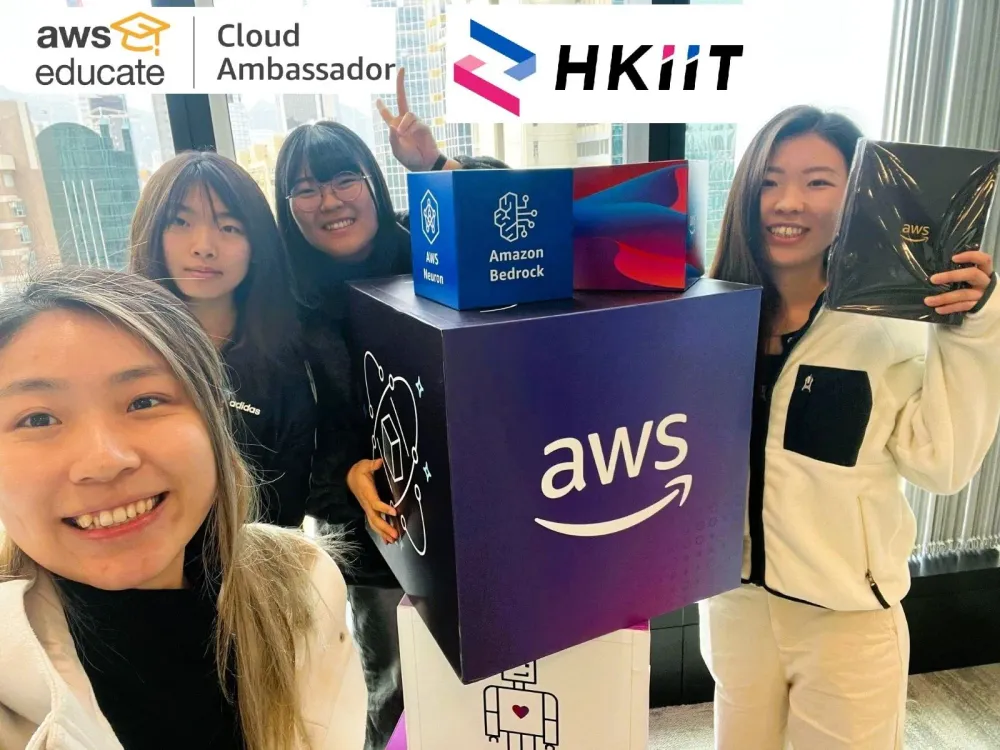
- Koei Tang - AWS Community Builder + AWS Educate Cloud Ambassador
- Angela Chow - AWS Educate Cloud Ambassador
- Kathy WU - AWS Educate Cloud Ambassador
- Hau Yee Leung - AWS Educate Cloud Ambassador
Enjoyed reading this content? Let the author know!
Your likes, comments, shares, and saves help creators reach more builders.

Loading recommendations
Loading article