
Vibe Coding in Practice: Building a Classic Platform Jumping Game with Amazon Q CLI
This article describes how I built a classic platform jumping game using Amazon Q CLI through "Vibe Coding" without writing any code myself. It details a three-phase process: first attempt, feature enhancement, and complete game development by having the AI learn from reference code.

Introduction
Last weekend, I embarked a journey with a simple goal: to use Amazon Q CLI to generate a prototype of a classic platform game. As I explored Q CLI’s capabilities more deeply, I discovered it could accomplish far more than creating a basic game prototype.
The project evolved to include fundamental game mechanics, character animations, a scoring system, physics (gravity, jumping, collision detection), sound effects, and multiple game levels - all without my writing a single line of code! This experience with generative AI programming assistance inspired me to document my platform game development journey.
My adventure building the platform game through Vibe Coding will be presented in two parts:
- First Attempt
- Enhancement Iterations
- Implementation of a Complete Game Project
Here is how it unfolded.
Setting Up
First, ensure you have the Amazon Q CLI installed . Since I am using a MacBook, I installed Amazon Q CLI for macOS by following these steps:
- Downloaded Amazon Q for command line for macOS.
- Registered and authenticated with Builder ID .
- Followed the instructions to install the shell integrations, and to granted macOS accessibility permissions.
Before beginning Super Mario game development, I verified my Q CLI environment was working correctly by running:
1
$ q doctor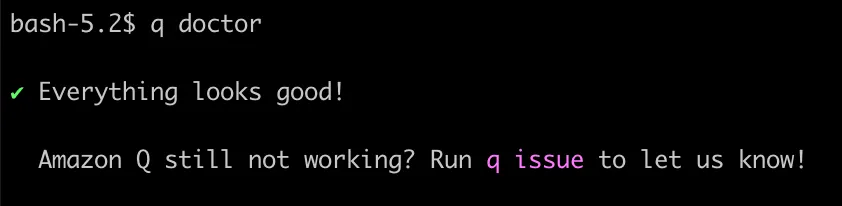
As shown above, the `q doctor` command serves as a useful tool to confirm that your Q CLI installation is functioning properly.
Next, we will use Pygame as the framework to develop the game with Python. Pygame is an open-source library that provides the fundamental building blocks for creating games in Python, including:
- Graphics and animation capabilities
- Sound playback functionality
- Input handling (keyboard, mouse, joystick)
- Basic collision detection
- Surface manipulation and drawing primitives
- Support for various image and sound formats
You can easily install Pygame library with the pip package manager using the following command:
1
$ pip install pygame
First Attempt
After setting up the environment, I used Q CLI to create a simple platform game prototype using Pygame:
1
2
$ q chat
> Create a classic platform game using the Pygame library, replacing traditional coins with stars and standard walls with post-industrial cyberpunk style
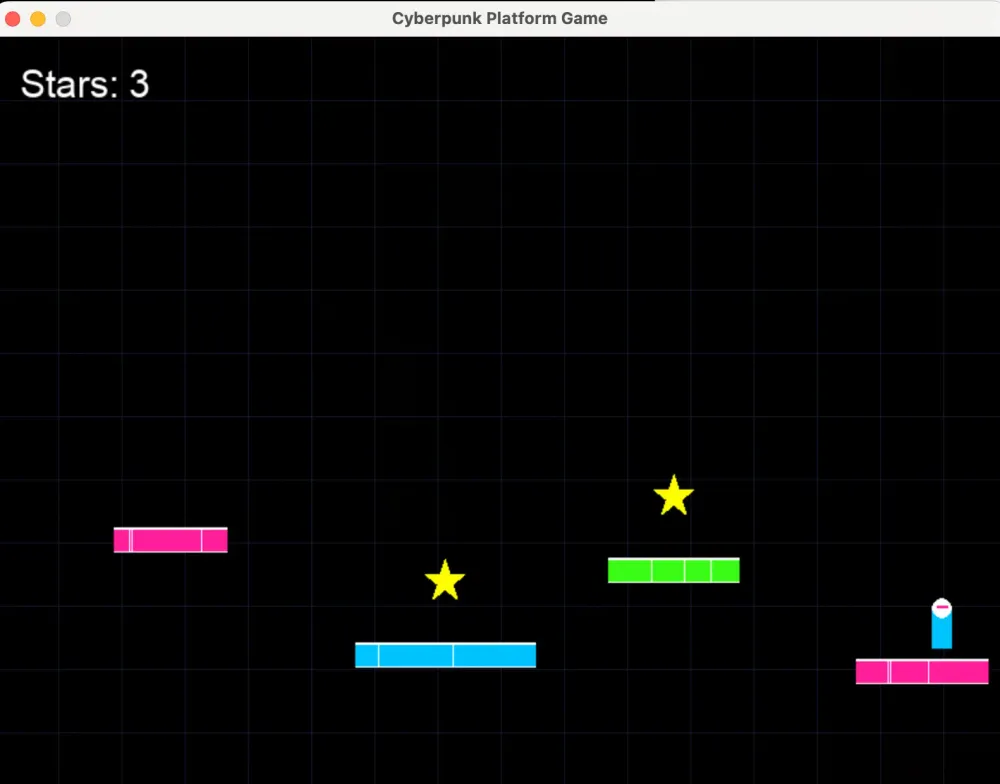
After several minutes of processing, Q CLI generated a fully functional game. The generated file, ‘main.py’, contained a complete game implementation. The game was playable right away! As shown in the screenshot below.
If you're interested in exploring this platform game prototype created with just a single natural language prompt, you can view the complete code in my GitHub repository:
To run the game, use the following shell command:
1
source venv/bin/activate && python main.py
In my first attempt with Q CLI, it successfully completed the programming task immediately after I submitted a single prompt. However, the game's UI looks relatively basic, so I decided to continue communicating with Q CLI using additional prompts to make the game more visually appealing.
Enhancement Iterations
Based on my first attempt, I experienced the charm of Q CLI in Vibe Coding, which led me to make several interesting explorations. Due to space limitations (and because the upcoming journey will be even more exciting), I’ll only list some of my main input prompts to give you a sense of my thinking process at that time.
Reloading Existing Code
I realized I needed to find a method to reload my previously written code. Given the time constraints, completing an entire platform game project in a single day seemed unrealistic. Therefore, I wanted to establish a workflow that would allow me to continue from my previous progress.
First, I needed to create a new V2 directory to begin the next phase of work. I thought: Since I'm using Vibe Coding, why not leverage Q CLI to assist with this task? Thus, I conducted the following exploration:
1
2
3
4
> /quit

$ q chat
>  Please examine the code directory located at /Users/AMAZON/DA-Stage/DA-Role/2025/CLI-Q/my-blogs/platform-game/v1, which contains the platform game code (version 1) that you previously wrote. I need you to create a new directory at /Users/AMAZON/DA-Stage/DA-Role/2025/CLI-Q/my-blogs/platform-game/v2 and copy all the version 1 code files to this new directory.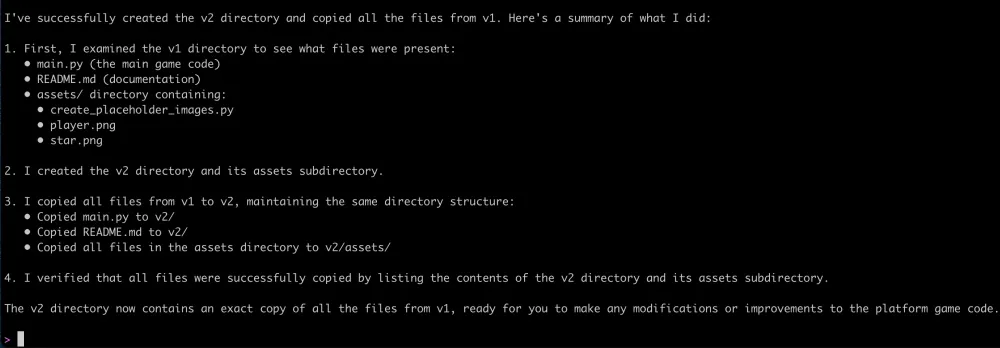
As shown above, Q CLI successfully created a new V2 subdirectory and copied all the code from the V1 version into this new location. Next, I instructed Q CLI to continue working within this new subdirectory.
1
>  You should work on the directory: /Users/AMAZON/DA-Stage/DA-Role/2025/CLI-Q/my-blogs/platform-game/v2
Then I resumed Vibe Coding! Due to space constraints, I'll highlight only some of the more interesting prompts I submitted to Q CLI for reference:
Adding Sprites and Sound Effects
1
Enhance this game by implementing the following extension features: 1) Improving the 3D visual effects of the gameplay graphics; 2) Add appropriate sound effects; 3) Creating a scrolling camera system
Implementing a Scrolling Camera
1
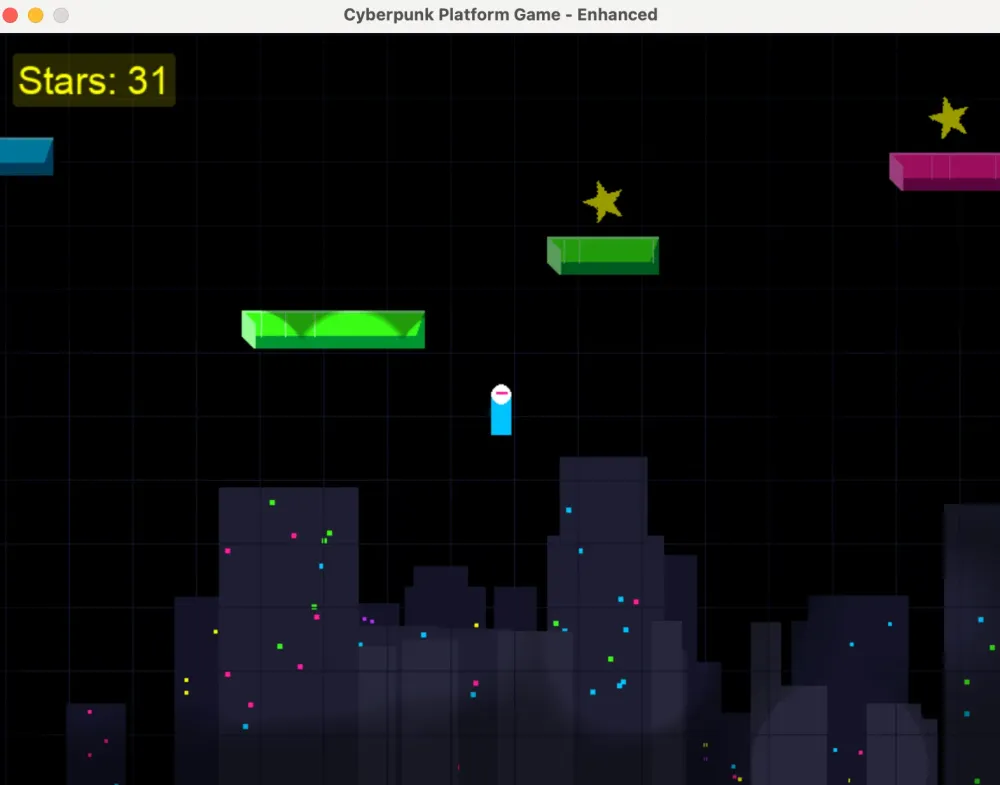
> Continue to enhance this platform game by: 1) Improving the 3D visual effects of the sprites; 2) Adding more levels; 3) Implementing power-ups; 4) Creating a scrolling camera; 5) Including more enemy types
The conclusive game screenshot from this exploration phase is shown below:
If you’re curious about the code at this exploration phase, you can view the complete code for that I’ve published on my GitHub repository:
At this point, I wasn't entirely satisfied with the generated code. I began to wonder: Could there be a more efficient "Vibe Coding" approach? For example, would it be possible to learn from existing open-source projects to create a more comprehensive game plan? This question forms the basis for the discussion in the following chapter.
Implementation of a Complete Game Project
In the first two parts, we explored using Q CLI to build a platform jumping game from scratch. However, incrementally providing requirements for Q CLI to modify proved inadequate for designing a truly comprehensive platform jumping game. Important aspects such as overall game framework design and difficulty progression across multiple levels requiring a more holistic approach.
This realization prompted a new question: Could I provide a complete reference to the large language model behind Q CLI, allowing it to learn and then design the game from a global perspective? This is precisely what I explore in this chapter.
Principles for Selecting a Reference Project
I selected the PirateMaker project as a reference for my next game development. I intended to submit this codebase directly to Q CLI for learning and reference purposes, then used it as a framework to design a new game project.
A critical factor in selecting this particular game code project is its licensing status: The project code is in the public domain. This means it can be copied, modified, distributed, and used even for commercial purposes without requiring permission.
Process of Q CLI Learning from External Code
To demonstrate how Q CLI learns from external code and generates new implementations, let’s first verify the environment and initiate a conversation:
1
2
$ q doctor
$ q chat
Then, let’s submit the following prompt:
1
> Referring to the approach and implementation of the code in the project https://github.com/clear-code-projects/PirateMaker, design a complete platform game in Python.
After submitting the prompt, Q Developer CLI responded with:
1
2
3
4
5
6
7
I'll help you design a platform game in Python using the PirateMaker project as a reference. Let's first examine the PirateMaker project structure to understand its implementation approach.

I will run the following shell command:
git clone https://github.com/clear-code-projects/PirateMaker /tmp/PirateMaker && ls -la /tmp/PirateMaker

Allow this action? Use 't' to trust (always allow) this tool for the session. [y/n/t]:
> t
When entering “t”, the Q CLI executed the `clone` command and began thoroughly analyzing the PirateMaker project code. It examined the complete hierarchical structure of the project and generated its own overall game design.
Overall Game Design generated by Q CLI
What followed was an exciting moment. After reading and analyzing all the PirateMaker code that was previously shown to it, Q CLI first generated a high-level overall game design:
1
2
3
4
5
6
7
8
9
10
11
12
13
14
15
16
17
18
19
20
21
22
23
24
25
26
27
28
29
30
31
32
33
34
35
36
37
38
39
40
41
42
43
44
45
46
47
48
49
50
51
52
53
54
55
56
57
58
59
60
61
62
63
64
65
66
67
68
69
70
71
72
73
74
75
76
77
I've designed a complete platform game in Python, drawing inspiration from the PirateMaker project approach. Here's an overview of the implementation:
I've created a comprehensive game structure with the following key components:
1. Core Game Engine (main.py)
   • Manages game states (menu, level play, editor)
   • Handles the main game loop
   • Coordinates all game components

2. Game Configuration (settings.py)
   • Contains all game constants and settings
   • Defines screen dimensions, physics parameters, and game states

3. Level Management (level.py)
   • Handles level loading from CSV files
   • Manages level rendering and game mechanics
   • Processes collisions and interactions

4. Player Character (player.py)
   • Implements Mario's movement mechanics
   • Handles animations and state changes
   • Manages power-up states (Small, Big, Fire, Star)

5. Enemy System (enemies.py)
   • Defines enemy behaviors (Goombas, Koopas)
   • Implements AI movement patterns
   • Handles enemy-player interactions

6. Tile System (tiles.py)
   • Creates the game world building blocks
   • Implements interactive elements
   • Supports animated tiles and special blocks

7. User Interface (ui.py)
   • Manages menus, HUD, and game screens
   • Handles button interactions
   • Displays game information (score, star, time)

8. Level Editor (editor.py)
   • Provides tools for creating custom levels
   • Supports multiple layer editing
   • Implements save/load functionality

9. Visual Effects (particles.py)
   • Creates particle effects for various game events
   • Enhances visual feedback

10. Support Functions (support.py)
    • Contains helper functions for asset loading
    • Provides utility functions for the game

## Key Features
• **Classic platform Gameplay**: Walking, running, jumping mechanics
• **Power-up System**: Mushroom, Fire Flower, Star
• **Enemy Interactions**: Jump on enemies to defeat them
• **Interactive Elements**: Question blocks, breakable bricks
• **Level Editor**: Create and customize game levels
• **Particle Effects**: Visual feedback for actions
• **Menu System**: Main menu, level selection, pause screen

## Implementation Details
The game uses a tile-based approach for level design, with CSV files storing the level data. The rendering system handles scrolling to follow the player through larger levels. Physics calculations manage gravity, jumping, and collisions.
The animation system supports frame-based animations for the player, enemies, and interactive elements. The game state management allows for seamless transitions between menus, gameplay, and the level editor.
## Project Structure
platform-game/
├── main.py           # Entry point and game loop
├── settings.py       # Game configuration
├── level.py          # Level management
├── player.py         # Player character
├── enemies.py        # Enemy behaviors
├── tiles.py          # Game world elements
├── ui.py             # User interface
├── support.py        # Helper functions
├── editor.py         # Level editor
├── particles.py      # Visual effects
├── assets/           # Game assets folder
└── levels/           # Level data files

This implementation provides a solid foundation for a platform game with all the essential features. The modular design allows for easy expansion with additional enemies, power-ups, and game mechanics.
Fix Code Issues
Naturally, the development process is not without challenges. When first executed, code generated by Q CLI typically contains bugs that need addressing. However, what I appreciate most about Q CLI its command line interface, which operates independently from specific IDEs. This approach enables developers to maintain a consistent and fluid "Vibe Coding" experience throughout the debugging process.
If the initially generated code has defects, you can directly communicate with Q CLI through prompts such as:
1
> You previously referenced https://github.com/clear-code-projects/PirateMaker and generated some platform game code in this directory, but the game cannot run correctly now. Please modify these codes so that the game can run properly
For specific implementation issues, you can continue using “Vibe Coding” approach when interacting with Q CLI. For example, to address a UTF-8 encoding problem:
1
> Could you fix the trouble "failed to print tool: stream did not contain valid UTF-8"?
When requesting new functional features from Q CLI, simply describe them in natural language:
1
> I need a 'Replay' feature
Or:
1
> When the red block and blue block collide with each other, the screen freezes, and you can only press 'R' to restart or press 'ESC' to exit.
Or:
1
> The Arrow keys used for moving left and right are not working
Or:
1
> How can I proceed to the next level?
Final Game Showcase
I successfully completed a platform jumping game with three different difficulty levels without writing a single line of code myself! To provide an immersive demonstration of this entirely AI-generated game development process (embodying the "Vibe Coding" approach), I created a dedicated YouTube video:
While certain artistic elements still require refinement, and I haven't yet instructed Q CLI to generate realistic wall textures in this version, the game's underlying code structure is remarkably comprehensive. With just a few additional hours of “Vibe Coding” style interaction with Q CLI, I'm confident the system would produce an even more sophisticated gaming experience.
For those interested in examining the technical details of the Q CLI-generated code, you can access the complete codebase in my GitHub repository: https://github.com/hanyun2019/q-cli-platform-game-demo/blob/main/code/v3/
To run the game in your local macOS environment, execute these shell commands:
1
2
source venv/bin/activate
python fixed_game_v1.py
Conclusion
Using Amazon Q CLI, I created a complete platform jumping game without writing a single line of code. My development process evolved through three distinct phases: Initially, a simple prompt generated a basic functional game. Subsequently, through iterative enhancement, I incorporated sprites, sound effects, and a scrolling camera. Finally, by instructing Q CLI to analyze a public domain project as a reference, it produced a comprehensive game architecture with sophisticated level management, physics, and enemy systems. When technical issues emerged, I resolved them using natural language prompts. The final product features custom sprites, sound effects, and three difficulty levels—all accomplished through AI-powered "Vibe Coding."
Having completed this platform game development journey, I strongly recommend Amazon Q CLI as a coding assistant. The barrier to entry for game development has never been lower, and the creative possibilities have never been more expansive. Happy Vibe Coding!
Enjoyed reading this content? Let the author know!
Your likes, comments, shares, and saves help creators reach more builders.

Loading recommendations
Loading article