AWS Builder Center
Automate DocumentDB Operations using custom Terraform provider

Automate DocumentDB Operations using custom Terraform provider

Automate approach to manage internal documentdb operations - user, role and index

When working with Document databases for a product, I was looking for a scalable and managed solution and I went ahead with AWS DocumentDB. AWS DocumentDB has emerged as a strong choice to manage with easy to scale and compatibility with the MongoDB engine. This provides an easier option for users wanting to migrate their infrastructure to AWS, using MongoDB as a database before migration. In this article, I will explain how I developed a custom Terraform provider in Go to manage DocumentDB Index after migration from MongoDB. This article won’t cover information about migration steps. Those can be part of a separate article. 
Why I developed Terraform provider to automate database operations?
In my use case, I need to use Terraform to deploy and manage DocumentDB clusters, being a standard option within my project for automation. I managed to deploy the cluster through aws official terraform provider . To elaborate on custom providers, they work as plugins for Terraform to manage different services. They are developed in GO.
After cluster deployment, I found I need to automate DB operations for which i can use scripts. I found, using provider maybe a better approach to keep consistency in the project as most of the infrastructure in project managed by Terraform. Terraform provider framework is well matured but there were all outdated providers for DocumentDB and I did not find any provider supporting all three operations I was looking for: user, roles and Index. So, I decided to contribute to Index automation to a provider which was already supporting user and roles.
In this guide, you will learn how you can also use the same provider to manage your users, roles and Indexes. Before we move further, let me start from fundamentals and steps to use the provider. 
What is Amazon DocumentDB?
Amazon DocumentDB is a fully managed document database, compatible with MongoDB workloads. It was released in 2019 and provides high availability, scalability using replica instances. It supports one primary instance and up to 15 replica instances. Unlike DynamoDB which is serverless, we need to provision and manage compute instances for DocumentDB. 
Even though AWS handles patching, backup and infrastructure management. 
DocumentDB provides instance based and elastic based cluster options. More details on DocumentDB available in the AWS documentation 
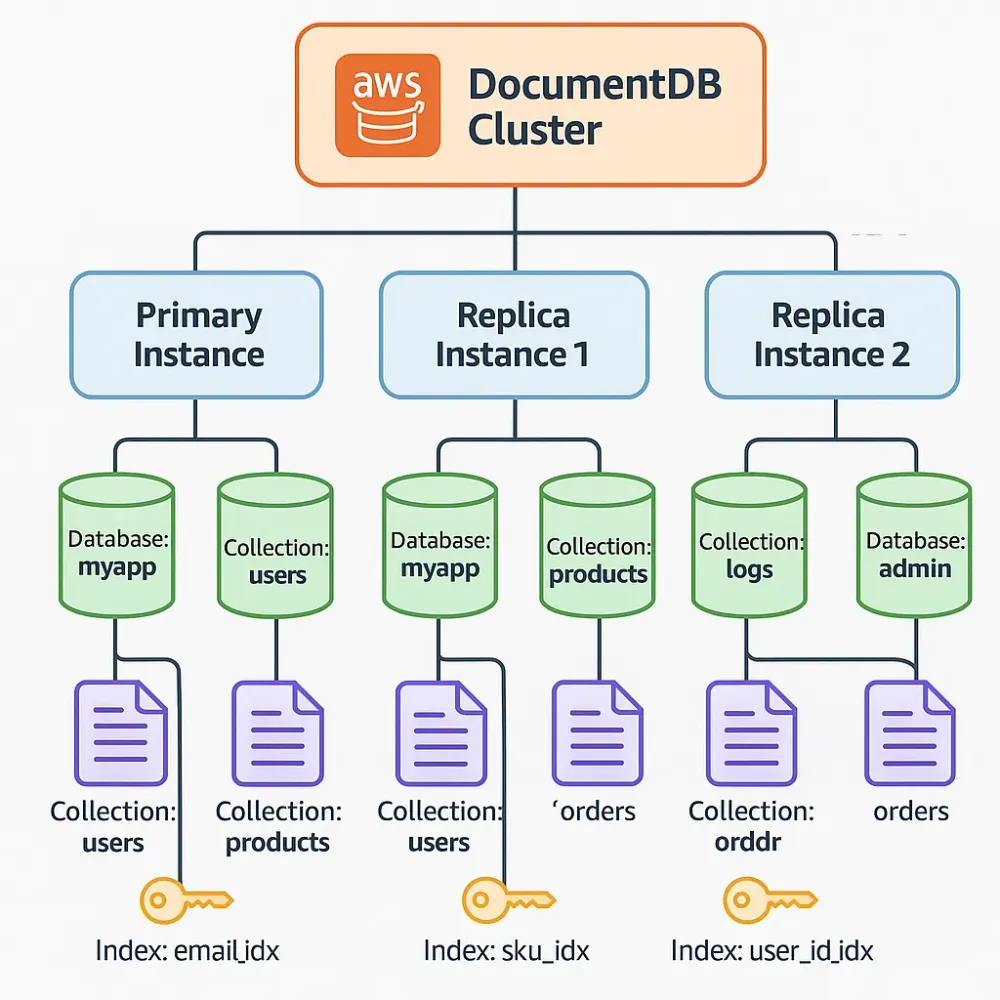
AWS documentDB can have multiple databases and each database will have its collections. Each collection will have their Index. 
How are DocumentDB organized in the AWS?
In AWS, clusters are in the top level of hierarchy that define DocumentDB deployment. We can deploy multiple instances in the cluster. Each cluster can have primary (writer) and multiple replica instances (readers). When the request for read/write operations come to the DocumentDB, they come to the instance endpoint which belongs to the instance with DB and collection.  
Replica instances can be available in different regions to provide high availability. Also, instances. All instances belong to single replica set named rs0
Database operations 
OperationQuery
Create or switch to databaseuse <database_name>
List all databasesshow dbs
Get database statisticsdb.stats()
Drop databasedb.dropDatabase()
1
2
3
4
5
6
7
8
9
10
11
12
13
14
15
16
17
18
19
20
21
22
23
24
25
26
27
28
29
30
31
32
33
34
35
36
37
38
39
40
41
42
43
44
45
46
47
48
49
50
51
52
53
54
55
56
57
58
59
60
61
62
63
64
65
66
67
68
69
70
71
72
73
74
75
76
77
78
79
80
81
82
rs0 [direct: primary] test> show dbs
myapp 32.00 KiB
rs0 [direct: primary] test> use myapp
switched to db myapp
rs0 [direct: primary] myapp> db.users.insertMany([
... {
... email: "admin@example.com",
... username: "admin",
... firstName: "Admin",
... lastName: "User",
... role: "admin",
... isActive: true,
... createdAt: new Date(),
... lastLogin: new Date()
... },
... {
... email: "user1@example.com",
... username: "user1",
... firstName: "John",
... lastName: "Doe",
... role: "user",
... isActive: true,
... createdAt: new Date(),
... lastLogin: new Date()
... },
... {
... email: "user2@example.com",
... username: "user2",
... firstName: "Jane",
... lastName: "Smith",
... role: "user",
... isActive: true,
... createdAt: new Date(),
... lastLogin: new Date()
... }
... ])
{
acknowledged: true,
insertedIds: {
'0': ObjectId('6858932c507dba03f8baa8b9'),
'1': ObjectId('6858932c507dba03f8baa8ba'),
'2': ObjectId('6858932c507dba03f8baa8bb')
}
}

rs0 [direct: primary] myapp> db.users.countDocuments()
... db.users.find().pretty()
[
{
_id: ObjectId('6858932c507dba03f8baa8b9'),
email: 'admin@example.com',
username: 'admin',
firstName: 'Admin',
lastName: 'User',
role: 'admin',
isActive: true,
createdAt: ISODate('2025-06-22T23:35:08.351Z'),
lastLogin: ISODate('2025-06-22T23:35:08.351Z')
},
{
_id: ObjectId('6858932c507dba03f8baa8ba'),
email: 'user1@example.com',
username: 'user1',
firstName: 'John',
lastName: 'Doe',
role: 'user',
isActive: true,
createdAt: ISODate('2025-06-22T23:35:08.351Z'),
lastLogin: ISODate('2025-06-22T23:35:08.351Z')
},
{
_id: ObjectId('6858932c507dba03f8baa8bb'),
email: 'user2@example.com',
username: 'user2',
firstName: 'Jane',
lastName: 'Smith',
role: 'user',
isActive: true,
createdAt: ISODate('2025-06-22T23:35:08.351Z'),
lastLogin: ISODate('2025-06-22T23:35:08.351Z')
}
]
We will use inserted data using db.users.insertMany() for our example, later in the article.
What is a collection?
A Database provides logical grouping of collections. It can be compared with tables in the relational database. Data stored in collections are called documents. 
  • Documents can have different structure unlike relational database
  • Document stored in BSON format (binary json) although it looks like JSON
  • Each document have unique _id field
Collection operations
OperationQuery
List collectionshow collections
Collection statisticsdb.<collection_name>.stats()
Count documentsdb.<collection_name>.CountDocumetns()
Drop collectionsdb.customers.drop()
Example of document structure
1
2
3
4
5
6
7
8
9
10
11
12
13
14
15
{
  "_id": ObjectId("507f1f77bcf86cd799439011"),
  "name": "John Doe",
  "email": "john@amzn.com",
  "address": {
    "street": "123 Main St",
    "city": "Seattle",
    "state": "WA"
  },
  "orders": [
    { "orderId": "ORD001", "amount": 99.99 },
    { "orderId": "ORD002", "amount": 149.50 }
  ],
  "createdAt": ISODate("2023-01-15T10:30:00Z")
}
What are Indexes?
Indexes in DocumentDB are similar to the book indexes, useful to improve query performance by creating pointers to the data. 
Index types in DocumentDB
  • Single field Index
  • Compound Index
  • Wildcard index
  • Geospatial Index
  • Partial Index
  • TTL (time to live) Index
  • Text Index
Index operations
OperationQuery
List all Indexes of collectiondb.<collection_name>.getIndexes()
Get Index usage statisticsdb.<collection_name>.aggregate([ { $indexStats: {} } ])
Drop specific Indexdb.customers.dropIndex(“email_1”)
drop all indexes except _iddb.customers.dropIndexes()
Now, you can understand for any application with multiple components and databases involved, having multiple Indexes to each collection can have dozens of Indexes in total. Managing them through CLI can be difficult. What I learned from my experience, it is difficult to track which collections have all Index configured, and which if there is no typo in them. It won’t create errors in write/read operations but will impact performance by slowing down the query actions. This can result in incidents and finding Index by logging into each database instance is not how enterprise resources are managed. In this case, an organized automation approach is really needed. 
For this reason, I worked on managing Index through Terraform by developing a provider for it. This provider is available here https://registry.terraform.io/providers/megum1n/mongodb 
 How does Terraform provider help to manage Index?
As we discussed, a manual approach is not helpful for several reasons. 
Problem with manual approach: 
  • Manual cli based automation involve multiple scripts
  • No version control mechanism
  • Environment inconsistencies (dev vs prod index may differ)
  • No easy rollback strategy
  • Outdated documentation
Using the terraform provider abstraction layer as the automation part is already written in the provider. This reduces the effort to write operational automation. In our case, we just need to call the provider and mention the resources we want to manage with Terraform. 
Terraform uses a state file with if used with a remote state like S3 with version control, it can be easy to rollback. Terraform also provides idempotency and keeps track of the current state of infrastructure, which is database configuration like user, index in our case. 
The aim is to provide an overview of the DocumentDB, benefits of using Terraform for automation and then explain how you can use this custom provider to automate Index, users and roles. 
Let’s understand how to use the provider now. 
Before we start, we have a few prerequisites
  1. Document DB cluster deployed
  2. We can reach cluster endpoint from where we want to run Terraform 
  3. Terraform is installed
Note: DocumentDB runs on a private IP cluster so in my test I installed an EC2 instance in the same vPC to reach DocumentDB cluster. 
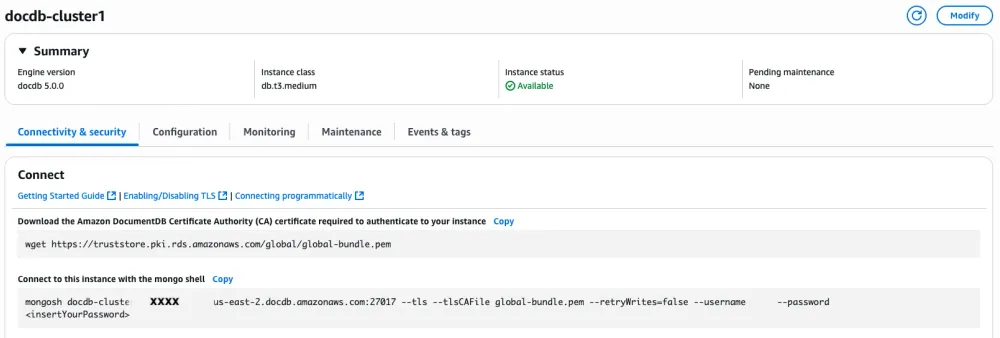
We can connect to the cluster instance using mongosh utility. When you select the cluster instances it will show you required arguments for the connection.
 
1
mongosh docdb-cluster1.xxx.us-east-1.docdb.amazonaws.com:27017 --tls --tlsCAFile global-bundle.pem --retryWrites=false --username 'user' --password 'db_password'
Now, create these terraform files to use the provider.
  • provider.tf
  • main.tf
  • variables.tf
  • users.tf
  • index.tf
To store secret information, we can save them in environment variables but in enterprise environment, we should use secret manager on AWS.
1
2
3
4
5
6
7
8
# .env
export TF_VAR_docdb_hosts='["<DocDB instance hostname>:27017"]'
export TF_VAR_docdb_username="<DocDB instance username>"
export TF_VAR_docdb_password="<DocDB instance password>"
export TF_VAR_database_name="<DB_name>"
export TF_VAR_role_name="<db_user's_role>"
export TF_VAR_user_username="<db_user>"
export TF_VAR_user_password="<db_user's_password>"
In providers.tf, we will keep configuration to define the provider and input it requires to connect to the DocumentDB instance.
1
2
3
4
5
6
7
8
9
10
11
12
13
14
15
16
17
18
19
20
21
22
23
#providers.tf

provider "mongodb" {
hosts = var.mongo_hosts
username = var.mongo_username
password = var.mongo_password
tls = var.tls
insecure_skip_verify = var.insecure_skip_verify
certificate = fileexists(var.certificate_path) ? file(var.certificate_path) : null
auth_source = var.auth_source
replica_set = var.replica_set
}

terraform {
required_providers {
mongodb = {
source = "megum1n/mongodb"
version = "0.3.1" # Specify version for better reproducibility
}
}

required_version = ">= 1.0" # Specify minimum Terraform version
}
In variables.tf, we will define variable names and types
1
2
3
4
5
6
7
8
9
10
11
12
13
14
15
16
17
18
19
20
21
22
23
24
25
26
27
28
29
30
31
32
33
34
35
36
37
38
39
40
41
42
43
44
45
46
47
48
49
50
51
52
53
54
55
56
57
58
59
60
61
62
63
64
65
66
67
68
69
70
71
72
73
74
75
76
77
78
79
80
81
82
83
84
85
86
87
88
89
90
91
92
93
94
95
96
97
98
99
100
101
102
103
104
105
106
107
108
# variables.tf
variable "docdb_hosts" {
description = "DocumentDB cluster endpoint"
type = list(string)
default = null
validation {
condition = var.docdb_hosts != null && length(var.docdb_hosts) > 0
error_message = "At least one DocumentDB host must be specified."
}
}

variable "tls" {
description = "Enable TLS (required for DocumentDB)"
type = bool
default = true
}

variable "docdb_username" {
description = "DocumentDB master username"
type = string
default = null
sensitive = true
validation {
condition = var.docdb_username != null && length(var.docdb_username) > 0
error_message = "DocumentDB username cannot be empty."
}
}

variable "docdb_password" {
description = "DocumentDB master password"
type = string
default = null
sensitive = true
validation {
condition = var.docdb_password != null && length(var.docdb_password) > 0
error_message = "DocumentDB password cannot be empty."
}
}

variable "database_name" {
description = "Database name"
type = string
}

variable "role_name" {
description = "MongoDB role name"
type = string
}

variable "user_username" {
description = "New MongoDB username"
type = string
}

variable "user_password" {
description = "New DocumentDB user password"
type = string
sensitive = true
}

variable "auth_source" {
description = "Authentication source database (always 'admin' for DocumentDB)"
type = string
default = "admin"
}

variable "replica_set" {
description = "DocumentDB replica set name (always 'rs0' for DocumentDB)"
type = string
default = "rs0"
}

variable "insecure_skip_verify" {
description = "Skip TLS certificate verification (not recommended for production)"
type = bool
default = false
}

variable "docdb_ca_cert_path" {
description = "Path to DocumentDB CA certificate file (global-bundle.pem)"
type = string
default = "global-bundle.pem"
}

# Index management variables
variable "create_indexes" {
description = "Whether to create database indexes"
type = bool
default = true
}

variable "index_collection" {
description = "Collection name for the index"
type = string
default = "users"
}

variable "index_field" {
description = "Field name to create index on"
type = string
default = "email"
}

variable "index_unique" {
description = "Whether the index should be unique"
type = bool
default = true
}
In terraform.tfvars, we will provide values of those variables which are not secrets.
1
2
3
4
5
6
7
8
# terraform.tfvars

database_name = "myapp"
role_name = "app_role"
user_username = "app_user"
tls = true
auth_source = "admin"
replica_set = "rs0"
main.tf to include resources of user, roles and indexes.
1
2
3
4
5
6
7
8
9
10
11
12
13
14
15
16
17
18
19
20
21
22
23
24
25
26
27
28
29
30
31
32
33
34
35
36
37
38
39
40
41
42
43
44
45
46
47
48
49
50
51
52
53
54
55
56
# main.tf

# Create DocumentDB role with custom privileges
resource "mongodb_role" "app_role" {
name = var.role_name
database = var.database_name

privileges = [
{
actions = ["find", "insert", "update", "remove"]
resource = {
# "" for all collections in the database
collection = ""
db = var.database_name
}
}
]

# Inherit from built-in readWrite role
roles = [
{
role = "readWrite"
db = var.database_name
}
]
}

# Create DocumentDB user with the custom role
resource "mongodb_user" "app_user" {
username = var.user_username
password = var.user_password
database = var.database_name

roles = [
{
role = var.role_name
db = var.database_name
}
]

depends_on = [mongodb_role.app_role]
}
# Create database indexes
resource "mongodb_index" "user_email_idx" {
count = var.create_indexes ? 1 : 0

database = var.database_name
collection = var.index_collection
name = "${var.index_field}_idx"

keys = {
"${var.index_field}" = "1" # Ascending order
}

unique = var.index_unique
}
When we will run terraform apply , output will look like this.
1
2
3
4
5
6
7
8
9
10
11
12
13
14
15
16
17
18
19
20
21
22
23
24
25
26
27
28
29
30
31
32
33
34
35
36
37
38
39
40
41
42
43
44
45
46
47
48
49
50
51
52
53
54
55
56
57
58
59
60
61
62
63
64
65
66
# mongodb_role.example_role will be created
+ resource "mongodb_role" "example_role" {
+ database = "myapp"
+ name = "myapp"
+ privileges = [
+ {
+ actions = [
+ "find",
+ "insert",
+ "remove",
+ "update",
]
+ resource = {
+ collection = ""
+ db = "myapp"
}
},
]
+ roles = [
+ {
+ db = "myapp"
+ role = "readWrite"
},
]
}

# mongodb_user.example_role_user will be created
+ resource "mongodb_user" "example_role_user" {
+ database = "myapp"
+ password = (sensitive value)
+ roles = [
+ {
+ db = "myapp"
+ role = "admin"
},
]
+ username = "anuj"
}

# mongodb_index.user_email_idx[0] will be created
+ resource "mongodb_index" "user_email_idx" {
+ collection = "users"
+ database = "myapp"
+ keys = {
+ "email" = "1"
}
+ name = "email_idx"
+ unique = true
}

Plan: 3 to add, 0 to change, 0 to destroy.

Do you want to perform these actions?
Terraform will perform the actions described above.
Only 'yes' will be accepted to approve.

Enter a value: yes

mongodb_role.example_role: Creating...
mongodb_role.example_role: Creation complete after 0s [name=admin]
mongodb_user.example_role_user: Creating...
mongodb_user.example_role_user: Creation complete after 0s
mongodb_index.user_email_idx[0]: Creating...
mongodb_index.user_email_idx[0]: Creation complete after 0s [name=email_idx]

Apply complete! Resources: 3 added, 0 changed, 0 destroyed.
Now, you can validate your changes.
1
2
3
4
5
6
7
8
9
10
11
12
13
14
15
16
17
18
19
20
21
22
23
24

> use myapp
switched to db myapp

> show users
{

_id: 'anuj',
user: 'anuj',
db: 'myapp',
roles: [ { db: 'myapp', role: 'admin' } ]
}

rs0 [direct: primary] myapp> db.users.getIndexes()
[
{ v: 4, key: { _id: 1 }, name: '_id_', ns: 'myapp.users' },
{
v: 4,
unique: true,
key: { email: 1 },
name: 'email_idx',
ns: 'myapp.users'
}
]
This concludes introduction to custom Terraform provider to manage DocumentDB operations.
We can further manage it through CI/CD pipeline and create subdirectories of different environment. Another better approach is to create Terraform module. I will explain it in next article.
 
Any opinions in this article are those of the individual author and may not reflect the opinions of AWS.
Enjoyed reading this content? Let the author know!

Your likes, comments, shares, and saves help creators reach more builders.

Loading recommendations

Loading article