

Building an Appraiser Assistive Tool using Amazon Nova Pro
AI-powered Appraiser Assistive Tool aims to fix slow, inconsistent property appraisals by streamlining and standardizing the assessment process

Introduction
Property appraisals are critical to the real estate and mortgage industries, but the traditional process can be time-consuming and subject to inconsistencies.
Enter the Appraiser Assistive Tool (AAT) - an AI-powered solution designed to streamline and standardize the property condition assessment process. By leveraging advanced image recognition and machine learning capabilities, AAT helps appraisers evaluate properties more efficiently while maintaining professional oversight and accountability.
This post explores how AAT works with Fannie Mae's property condition and quality ratings system, demonstrating a proof of concept implementation using Amazon Nova Pro . Whether you're an appraiser, lender, or technology professional, you'll learn how AI can enhance the property assessment workflow while maintaining the crucial role of human expertise.
Background
Fannie Mae's property condition and quality ratings are determined through visual inspections conducted by licensed appraisers, who examine both interior and exterior elements without invasive testing. Using scales of C1-C6 for condition and Q1-Q6 for quality, appraisers assess visible components of the property's physical state, maintenance, construction quality, and materials. These standardized ratings help lenders evaluate lending risk, determine property eligibility, and establish consistent loan terms across the mortgage industry. You can learn more details about the property condition and quality ratings at Property Condition Ratings .
Idea
Visual property inspections for Fannie Mae condition and quality ratings are a good candidate for automation using Generative AI. By analyzing images of properties, AI systems could automatically detect defects, assess material quality, identify wear patterns, and evaluate construction features with greater consistency than human inspectors alone. These AI systems would best serve as assistive tools for appraisers, enhancing the accuracy and efficiency of the inspection process while maintaining professional oversight and accountability.
Solution
AAT processes property images using a system prompt to generate
- Fannie Mae property condition rating
- Corresponding numeric ratings (1-6)
- Detailed reasoning for the rating
AAT generates Fannie Mae property condition ratings using Amazon Nova Pro . Amazon Nova Pro is a highly capable multimodal model with the best combination of accuracy, speed, and cost for a wide range of tasks.
AAT Input
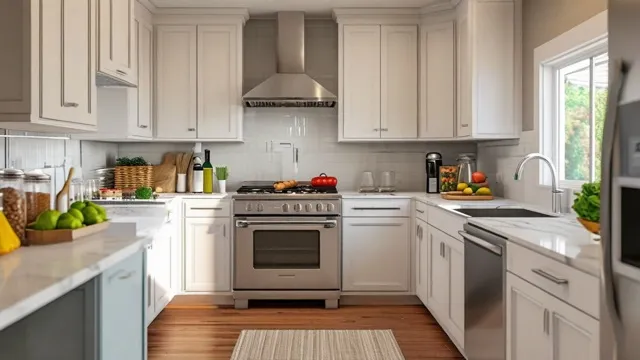
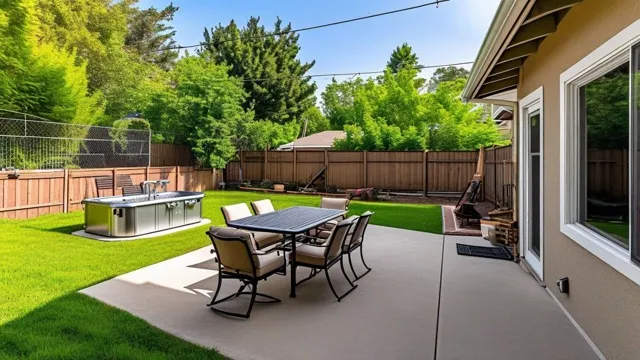
The following sample property images will be used for evaluating the automated rating performance of AAT. These sample input property images were generated by Amazon Nova Canvas :



AAT’s System Prompt
1
2
3
4
5
6
7
8
9
10
11
12
13
14
15
16
17
18
19
20
21
22
23
24
25
26
27
28
29
30
31
32
33
34
35
36
37
38
39
40
41
42
43
44
45
46
47
48
49
50
51
52
53
You are an experienced real estate appraiser. Analyze the provided property image and provide a detailed appraisal rating based on the following criteria:

C1 - Newly constructed/Never occupied

    No improvements needed
    Like-new condition
    May be new construction or recently renovated

C2 - No deferred maintenance

    Recent updates/renovations
    Minimal wear and tear
    High-quality materials and workmanship

C3 - Well-maintained

    Limited minor physical deterioration
    Normal wear and tear
    Some minor repairs/updates needed
    Still in good condition

C4 - Some minor deferred maintenance

    In need of some repairs
    Some deterioration visible
    Functional but showing age/wear

C5 - Major deferred maintenance

    Needs significant repairs
    Multiple items needing repair/replacement
    Substantial deterioration
    May affect safety/soundness
    May need substantial rehabilitation

C6 - Severe deferred maintenance

    Substantial damage/disrepair
    Health/safety issues present
    Major renovation required
    Uninhabitable in current condition

Please provide:
1. A letter rating between C1 and C6
2. A numeric rating between 1 and 6 and use 2 decimal places when the rating is in between with 1 at C1 and 6 at C6
3. Key observations that influenced your assessment

Format your response as a JSON object with the following structure:
{
    "letter_rating": <C1-C6>,
    "numeric_rating": <1-6>,
    "key_observations": ["<observation1>", "<observation2>", ...]
}
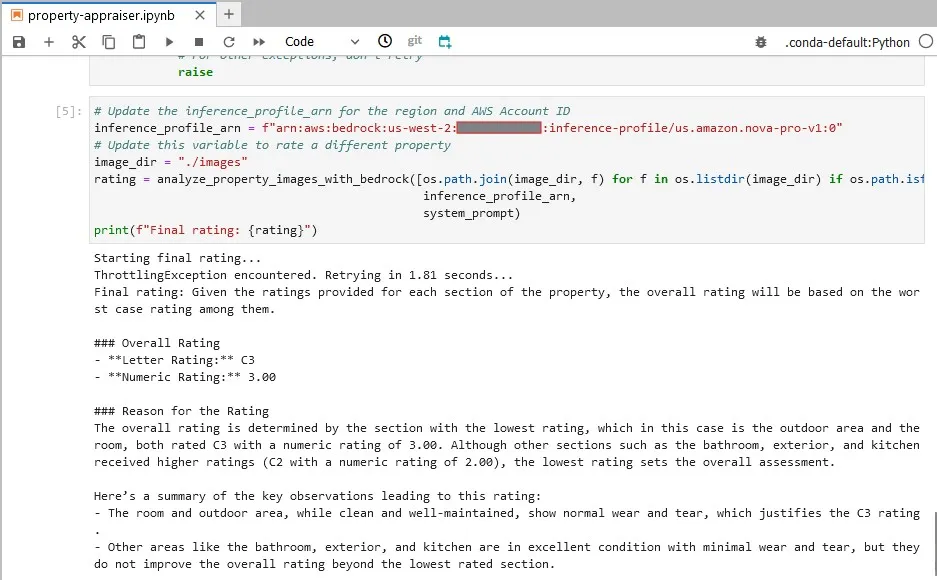
AAT Output
Conclusion
The Appraiser Assistive Tool (AAT) demonstrates the potential of AI to enhance property appraisal processes while maintaining human oversight. By combining the consistency and speed of machine learning with professional appraiser expertise, we can achieve:
- More consistent property ratings across different regions
- Better documentation through automated observation logging
- Enhanced accuracy through standardized assessment criteria
Note: Look at Amazon Bedrock Guardrails to implement safeguards based on your use case and responsible AI policies.
Special Acknowledgement
This blog wouldn't have been possible without the valuable contributions of Mallik Panchumarthy, whose innovative thinking and technical expertise helped shape its development. His insightful suggestions and problem-solving approach were instrumental in bringing this project to fruition. From conceptualization to implementation, Mallik's collaborative spirit and dedication to finding effective solutions exemplified the power of teamwork in creating meaningful content. Thank you, Mallik.
Appendix
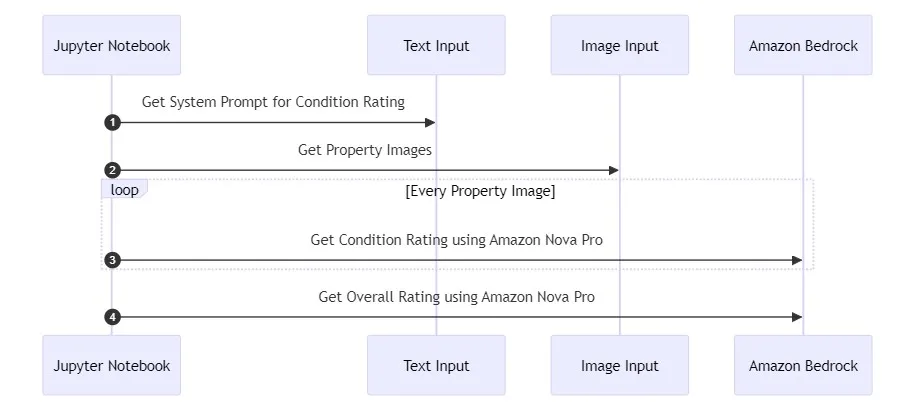
Sequence Diagram
Python Module
Please make sure you have access to Amazon Nova Pro model and use the model's inference profile when using this functionality. Adjust the system prompt text shared early in this post for your need. The code assumes the property images are in "jpg" format and need adjustment for other formats.
1
2
3
4
5
6
7
8
9
10
11
12
13
14
15
16
17
18
19
20
21
22
23
24
25
26
27
28
29
30
31
32
33
34
35
36
37
38
39
40
41
42
43
44
45
46
47
48
49
50
51
52
53
54
55
56
57
58
59
60
61
62
63
64
65
66
67
68
69
70
71
72
73
74
75
76
77
78
79
80
81
82
83
84
85
86
87
88
89
90
91
92
93
94
95
96
97
98
99
100
101
102
103
104
105
106
107
108
109
110
111
112
113
114
115
116
117
118
119
120
121
122
123
124
125
126
127
128
129
130
131
132
133
134
135
136
137
138
139
140
141
from typing import List
# Import specific Boto3 client for AWS Bedrock
from boto3 import client as boto3_client
import time
from botocore.exceptions import ClientError
import random

def analyze_property_images_with_bedrock(
    image_paths: List[str],
    inference_profile_arn: str,
    system_prompt: str
) -> str:
    """
    Analyze frames using Amazon Bedrock Converse API.

    Args:
        images: List of paths to property images
        inference_profile_arn: ARN of the Bedrock inference profile
        system_prompt: use prompt text from `property_condition_rating.txt` for property condition rating
                       or use prompt text from `quality_of_construction_rating.txt` for quality rating

    Returns:
        Letter rating, numeric rating, and the reason for the generated rating
    """
    bedrock_runtime = boto3_client(
        service_name="bedrock-runtime",
        # Extract region from ARN
        region_name=inference_profile_arn.split(":")[3]
    )

    all_ratings = []

    # Prepare the messages for conversation
    for image_path in image_paths:
        messages = []
        # Read image as bytes without encoding
        with open(image_path, "rb") as image_file:
            image_bytes = image_file.read()

            messages.append({
                "role": "user",
                "content": [{
                    "image": {
                        "format": "jpeg",
                        "source": {
                            # Send raw bytes directly
                            "bytes": image_bytes
                        }
                    }
                }]
            })

        # Use the Converse API with retry logic
        response = call_converse_with_retry(
            bedrock_runtime,
            modelId=inference_profile_arn,
            messages=messages,
            system=[{
                "text": system_prompt
            }]
        )

        # Extract content from response
        if ('output' in response and
                'message' in response['output'] and
                'content' in response['output']['message']):
            rating = response['output']['message']['content'][0]['text']
            # print(f"{image_path} rating is: {rating}")
            all_ratings.append(rating)
        else:
            print(f"Unexpected response format: {response}")

    # Generate final summary using Converse API
    try:
        # Combine all ratings into a single composite rating
        combined_ratings = "\n\n".join(all_ratings)
        print("Starting final rating...")
        final_response = call_converse_with_retry(
            bedrock_runtime,
            modelId=inference_profile_arn,
            messages=[{
                "role": "user",
                "content": [{
                    "text": combined_ratings
                }]
            }],
            system=[{
                "text": (
                    "Provide a overall numeric rating, letter rating, and the reason for the rating. "
                    "Letter rating C1 is the best while C6 is the worst."
                    "Numeric rating 1 is the best while 6 is the worst."
                    "The overall rating should be based on the worst case rating."
                )
            }]
        )

        # Extract content from final response
        if ('output' in final_response and
                'message' in final_response['output'] and
                'content' in final_response['output']['message']):
            return final_response['output']['message']['content'][0]['text']
        else:
            print(f"Unexpected final response format: {final_response}")
            return "Error: Unexpected response format"

    except Exception as e:
        print(f"Error generating final summary: {str(e)}")
        return "Error generating summary"

def call_converse_with_retry(bedrock_runtime, **kwargs):
    """
    Call the Bedrock Converse API with exponential backoff retry logic.

    Args:
        bedrock_runtime: Bedrock runtime client
        **kwargs: Arguments to pass to the converse API

    Returns:
        API response
    """
    max_retries = 5
    base_delay = 1  # Starting delay of 1 second

    for attempt in range(max_retries):
        try:
            return bedrock_runtime.converse(**kwargs)
        except ClientError as e:
            error_code = e.response['Error']['Code']
            if error_code == 'ThrottlingException':
                if attempt == max_retries - 1:  # Last attempt
                    raise  # Re-raise the exception if we've exhausted all retries

                # Calculate exponential backoff with jitter
                delay = (2 ** attempt * base_delay) + random.random()
                print(f"ThrottlingException encountered. Retrying in {delay:.2f} seconds...")
                time.sleep(delay)
            else:
                raise  # Re-raise if it's not a throttling error
        except Exception as e:
            # For other exceptions, don't retry
            raise
Enjoyed reading this content? Let the author know!
Your likes, comments, shares, and saves help creators reach more builders.

Loading recommendations
Loading article