
GitHub Actions + Amazon Q: Modernize ECS Deployments
Step-by-step guide to automate ECS deployments using GitHub Actions and Amazon Q. Learn blue/green deployment patterns and CloudWatch monitoring.


Introduction
In today's fast-paced development environment, efficient CI/CD pipelines are essential for delivering applications quickly and reliably. Amazon ECS is a powerful container orchestration service, but setting up deployment pipelines can be complex. This blog post demonstrates how Amazon Q Developer can streamline the process of creating GitHub Actions workflows for ECS deployments, implementing blue/green deployment strategies, and integrating CloudWatch alarms for health monitoring.
Prerequisites
- Before getting started with this tutorial, ensure you have: An AWS account with appropriate permissions
- GitHub account with a repository for your application code
- Terraform installed locally (version 1.0.0 or later)
- AWS CLI configured with appropriate credentials
- Basic understanding of ECS, GitHub Actions, and Terraform
Solution Overview
Our solution demonstrates how Amazon Q Developer can assist with:
- Infrastructure as Code: Generate Terraform scripts to provision all required AWS resources
- CI/CD Pipeline: Create GitHub Actions workflow files for automated deployments
- Blue/Green Deployments: Implement zero-downtime deployment strategies
- Monitoring: Set up CloudWatch alarms for deployment health checks
Let's explore how Amazon Q Developer can help at each stage of the process.
Infrastructure as Code with Amazon Q Developer
Setting up the infrastructure for ECS deployments requires multiple AWS resources. Amazon Q Developer can help generate the necessary Terraform code based on your requirements.
Disclaimer: The code in this blog was generated with Amazon Q Developer. While tested in our environment, AI-generated content may evolve over time. We recommend reviewing all scripts and testing thoroughly in non-production environments before deployment.
Example Prompt for Infrastructure Code
Here's a more detailed prompt that would generate the specific Terraform code we need:
plaintext
"I need to set up a complete ECS deployment pipeline with GitHub Actions and blue/green deployment. Can you help me create Terraform code with the following specifications:- VPC with public/private subnets using terraform-aws-modules/vpc/aws v5.0- ECR repository with scanning enabled- ECS Fargate cluster with container insights- ALB with target groups for blue/green deployment- ECS task definition and service with CodeDeploy controller- CodeDeploy resources for blue/green deployment- CloudWatch alarms for monitoring- IAM user for GitHub Actions- All resources properly tagged"
Amazon Q Developer will generate comprehensive Terraform code that provisions all these resources with proper configurations and best practices. Here's a snippet of the generated code:
Terraform
terraformprovider "aws" {region = var.aws_region}# VPC and Networkingmodule "vpc" {source = "terraform-aws-modules/vpc/aws"version = "~> 5.0"name = "${var.project_name}-vpc"cidr = var.vpc_cidrazs = ["${var.aws_region}a", "${var.aws_region}b"]private_subnets = var.private_subnetspublic_subnets = var.public_subnetsenable_nat_gateway = truesingle_nat_gateway = truetags = {Project = var.project_nameEnvironment = var.environment}}# ECR Repositoryresource "aws_ecr_repository" "app_repo" {name = "${var.project_name}-repo"image_tag_mutability = "MUTABLE"image_scanning_configuration {scan_on_push = true}tags = {Project = var.project_nameEnvironment = var.environment}}# ECS Clusterresource "aws_ecs_cluster" "main" {name = "${var.project_name}-cluster"setting {name = "containerInsights"value = "enabled"}tags = {Project = var.project_nameEnvironment = var.environment}}# CloudWatch Log Groupresource "aws_cloudwatch_log_group" "ecs_logs" {name = "/ecs/${var.project_name}"retention_in_days = 30tags = {Project = var.project_nameEnvironment = var.environment}}# Application Load Balancerresource "aws_lb" "main" {name = "${var.project_name}-alb"internal = falseload_balancer_type = "application"security_groups = [aws_security_group.alb_sg.id]subnets = module.vpc.public_subnetsenable_deletion_protection = falsetags = {Project = var.project_nameEnvironment = var.environment}}# ALB Security Groupresource "aws_security_group" "alb_sg" {name = "${var.project_name}-alb-sg"description = "Security group for ALB"vpc_id = module.vpc.vpc_idingress {from_port = 80to_port = 80protocol = "tcp"cidr_blocks = ["0.0.0.0/0"]}egress {from_port = 0to_port = 0protocol = "-1"cidr_blocks = ["0.0.0.0/0"]}tags = {Project = var.project_nameEnvironment = var.environment}}# ECS Task Security Groupresource "aws_security_group" "ecs_tasks_sg" {name = "${var.project_name}-ecs-tasks-sg"description = "Security group for ECS tasks"vpc_id = module.vpc.vpc_idingress {from_port = var.container_portto_port = var.container_portprotocol = "tcp"security_groups = [aws_security_group.alb_sg.id]}egress {from_port = 0to_port = 0protocol = "-1"cidr_blocks = ["0.0.0.0/0"]}tags = {Project = var.project_nameEnvironment = var.environment}}# ALB Target Groups for Blue/Green Deploymentresource "aws_lb_target_group" "blue" {name = "${var.project_name}-blue-tg"port = var.container_portprotocol = "HTTP"vpc_id = module.vpc.vpc_idtarget_type = "ip"health_check {path = var.health_check_pathport = "traffic-port"healthy_threshold = 3unhealthy_threshold = 3timeout = 5interval = 30matcher = "200-299"}tags = {Project = var.project_nameEnvironment = var.environment}}resource "aws_lb_target_group" "green" {name = "${var.project_name}-green-tg"port = var.container_portprotocol = "HTTP"vpc_id = module.vpc.vpc_idtarget_type = "ip"health_check {path = var.health_check_pathport = "traffic-port"healthy_threshold = 3unhealthy_threshold = 3timeout = 5interval = 30matcher = "200-299"}tags = {Project = var.project_nameEnvironment = var.environment}}# ALB Listenerresource "aws_lb_listener" "http" {load_balancer_arn = aws_lb.main.arnport = 80protocol = "HTTP"default_action {type = "forward"target_group_arn = aws_lb_target_group.blue.arn}tags = {Project = var.project_nameEnvironment = var.environment}}# ECS Task Execution Roleresource "aws_iam_role" "ecs_task_execution_role" {name = "${var.project_name}-ecs-execution-role"assume_role_policy = jsonencode({Version = "2012-10-17"Statement = [{Action = "sts:AssumeRole"Effect = "Allow"Principal = {Service = "ecs-tasks.amazonaws.com"}}]})tags = {Project = var.project_nameEnvironment = var.environment}}resource "aws_iam_role_policy_attachment" "ecs_task_execution_role_policy" {role = aws_iam_role.ecs_task_execution_role.namepolicy_arn = "arn:aws:iam::aws:policy/service-role/AmazonECSTaskExecutionRolePolicy"}# ECS Task Roleresource "aws_iam_role" "ecs_task_role" {name = "${var.project_name}-ecs-task-role"assume_role_policy = jsonencode({Version = "2012-10-17"Statement = [{Action = "sts:AssumeRole"Effect = "Allow"Principal = {Service = "ecs-tasks.amazonaws.com"}}]})tags = {Project = var.project_nameEnvironment = var.environment}}# Task Definitionresource "aws_ecs_task_definition" "app" {family = "${var.project_name}-task"network_mode = "awsvpc"requires_compatibilities = ["FARGATE"]cpu = var.task_cpumemory = var.task_memoryexecution_role_arn = aws_iam_role.ecs_task_execution_role.arntask_role_arn = aws_iam_role.ecs_task_role.arncontainer_definitions = jsonencode([{name = "${var.project_name}-container"image = "${aws_ecr_repository.app_repo.repository_url}:latest"essential = trueportMappings = [{containerPort = var.container_porthostPort = var.container_portprotocol = "tcp"}]logConfiguration = {logDriver = "awslogs"options = {"awslogs-group" = aws_cloudwatch_log_group.ecs_logs.name"awslogs-region" = var.aws_region"awslogs-stream-prefix" = "ecs"}}environment = var.container_environment}])tags = {Project = var.project_nameEnvironment = var.environment}}# ECS Serviceresource "aws_ecs_service" "app" {name = "${var.project_name}-service"cluster = aws_ecs_cluster.main.idtask_definition = aws_ecs_task_definition.app.arndesired_count = var.service_desired_countlaunch_type = "FARGATE"deployment_controller {type = "CODE_DEPLOY"}network_configuration {subnets = module.vpc.private_subnetssecurity_groups = [aws_security_group.ecs_tasks_sg.id]assign_public_ip = false}load_balancer {target_group_arn = aws_lb_target_group.blue.arncontainer_name = "${var.project_name}-container"container_port = var.container_port}lifecycle {ignore_changes = [task_definition,load_balancer]}depends_on = [aws_lb_listener.http]tags = {Project = var.project_nameEnvironment = var.environment}}# CloudWatch Alarm for Service Healthresource "aws_cloudwatch_metric_alarm" "service_health" {alarm_name = "${var.project_name}-service-health"comparison_operator = "GreaterThanThreshold"evaluation_periods = "2"metric_name = "HTTPCode_Target_5XX_Count"namespace = "AWS/ApplicationELB"period = "60"statistic = "Sum"threshold = "10"alarm_description = "This alarm monitors for excessive 5XX errors"dimensions = {LoadBalancer = aws_lb.main.arn_suffix}alarm_actions = [aws_sns_topic.deployment_alerts.arn]ok_actions = [aws_sns_topic.deployment_alerts.arn]tags = {Project = var.project_nameEnvironment = var.environment}}# SNS Topic for Deployment Alertsresource "aws_sns_topic" "deployment_alerts" {name = "${var.project_name}-deployment-alerts"tags = {Project = var.project_nameEnvironment = var.environment}}# CodeDeploy Applicationresource "aws_codedeploy_app" "app" {name = "${var.project_name}-deploy"compute_platform = "ECS"}# CodeDeploy Deployment Groupresource "aws_codedeploy_deployment_group" "app" {app_name = aws_codedeploy_app.app.namedeployment_group_name = "${var.project_name}-deploy-group"deployment_config_name = "CodeDeployDefault.ECSAllAtOnce"service_role_arn = aws_iam_role.codedeploy_role.arnauto_rollback_configuration {enabled = trueevents = ["DEPLOYMENT_FAILURE", "DEPLOYMENT_STOP_ON_ALARM"]}alarm_configuration {alarms = [aws_cloudwatch_metric_alarm.service_health.alarm_name]enabled = true}blue_green_deployment_config {deployment_ready_option {action_on_timeout = "CONTINUE_DEPLOYMENT"}terminate_blue_instances_on_deployment_success {action = "TERMINATE"termination_wait_time_in_minutes = 5}}deployment_style {deployment_option = "WITH_TRAFFIC_CONTROL"deployment_type = "BLUE_GREEN"}ecs_service {cluster_name = aws_ecs_cluster.main.nameservice_name = aws_ecs_service.app.name}load_balancer_info {target_group_pair_info {prod_traffic_route {listener_arns = [aws_lb_listener.http.arn]}target_group {name = aws_lb_target_group.blue.name}target_group {name = aws_lb_target_group.green.name}}}depends_on = [aws_ecs_service.app]}# CodeDeploy Roleresource "aws_iam_role" "codedeploy_role" {name = "${var.project_name}-codedeploy-role"assume_role_policy = jsonencode({Version = "2012-10-17"Statement = [{Action = "sts:AssumeRole"Effect = "Allow"Principal = {Service = "codedeploy.amazonaws.com"}}]})tags = {Project = var.project_nameEnvironment = var.environment}}resource "aws_iam_role_policy_attachment" "codedeploy_policy" {role = aws_iam_role.codedeploy_role.namepolicy_arn = "arn:aws:iam::aws:policy/AWSCodeDeployRoleForECS"}# GitHub Actions IAM Userresource "aws_iam_user" "github_actions" {name = "${var.project_name}-github-actions"tags = {Project = var.project_nameEnvironment = var.environment}}resource "aws_iam_access_key" "github_actions" {user = aws_iam_user.github_actions.name}resource "aws_iam_user_policy" "github_actions" {name = "${var.project_name}-github-actions-policy"user = aws_iam_user.github_actions.namepolicy = jsonencode({Version = "2012-10-17"Statement = [{Action = ["ecr:GetAuthorizationToken","ecr:BatchCheckLayerAvailability","ecr:GetDownloadUrlForLayer","ecr:BatchGetImage","ecr:InitiateLayerUpload","ecr:UploadLayerPart","ecr:CompleteLayerUpload","ecr:PutImage"]Effect = "Allow"Resource = "*"},{Action = ["ecs:DescribeServices","ecs:DescribeTaskDefinition","ecs:RegisterTaskDefinition","ecs:UpdateService"]Effect = "Allow"Resource = "*"},{Action = ["codedeploy:GetDeploymentGroup","codedeploy:CreateDeployment","codedeploy:GetDeployment","codedeploy:GetDeploymentConfig","codedeploy:RegisterApplicationRevision"]Effect = "Allow"Resource = "*"},{Action = ["iam:PassRole"]Effect = "Allow"Resource = [aws_iam_role.ecs_task_execution_role.arn,aws_iam_role.ecs_task_role.arn]}]})}
GitHub Actions Workflow with Amazon Q Developer
Creating GitHub Actions workflows for ECS deployments involves multiple steps. Amazon Q Developer can help generate the workflow YAML file with all the necessary steps.
Example Prompt for GitHub Actions Workflow
Here's a more detailed prompt that would generate the GitHub Actions workflow we need:
plaintext
"I need to create a GitHub Actions workflow for deploying to Amazon ECS with blue/green deployment using CodeDeploy. The workflow should:1. Trigger on pushes to the main branch and manual workflow dispatch2. Set up environment variables for AWS region, ECR repository, ECS cluster, service, container name, and CodeDeploy application/group3.3. Include steps to:- Check out the code repository- Configure AWS credentials using repository secrets- Log in to Amazon ECR- Build and tag a Docker image from the ./app directory- Push the image to ECR with both latest and commit SHA tags- Download the current ECS task definition- Update the task definition with the new image- Register the new task definition with ECS- Create a CodeDeploy deployment using appspec.yaml- Monitor the deployment status until completion or failure- Handle errors appropriately at each step"
Amazon Q Developer will generate a complete workflow file with all the necessary steps, including error handling and deployment monitoring. Here's a snippet of the generated workflow:
YAML
name: Deploy to Amazon ECSon:push:branches:- mainworkflow_dispatch:env:AWS_REGION: us-west-2ECR_REPOSITORY: demo-ecs-app-repoECS_CLUSTER: demo-ecs-app-clusterECS_SERVICE: demo-ecs-app-serviceCONTAINER_NAME: demo-ecs-app-containerCODEDEPLOY_APPLICATION: demo-ecs-app-deployCODEDEPLOY_DEPLOYMENT_GROUP: demo-ecs-app-deploy-groupjobs:build-and-deploy:name: Build and Deployruns-on: ubuntu-lateststeps:- name: Checkout codeuses: actions/checkout@v3- name: Configure AWS credentialsuses: aws-actions/configure-aws-credentials@v1with:aws-access-key-id: ${{ secrets.AWS_ACCESS_KEY_ID }}aws-secret-access-key: ${{ secrets.AWS_SECRET_ACCESS_KEY }}aws-region: ${{ env.AWS_REGION }}- name: Login to Amazon ECRid: login-ecruses: aws-actions/amazon-ecr-login@v1- name: Build, tag, and push image to Amazon ECRid: build-imageenv:ECR_REGISTRY: ${{ steps.login-ecr.outputs.registry }}IMAGE_TAG: ${{ github.sha }}run: |# Build a docker container and push it to ECRdocker build -t $ECR_REGISTRY/$ECR_REPOSITORY:$IMAGE_TAG -t $ECR_REGISTRY/$ECR_REPOSITORY:latest ./appdocker push $ECR_REGISTRY/$ECR_REPOSITORY:$IMAGE_TAGdocker push $ECR_REGISTRY/$ECR_REPOSITORY:latestecho "::set-output name=image::$ECR_REGISTRY/$ECR_REPOSITORY:$IMAGE_TAG"- name: Download task definitionrun: |aws ecs describe-task-definition --task-definition demo-ecs-app-task --query taskDefinition > task-definition.json- name: Fill in the new image ID in the Amazon ECS task definitionid: task-defuses: aws-actions/amazon-ecs-render-task-definition@v1with:task-definition: task-definition.jsoncontainer-name: ${{ env.CONTAINER_NAME }}image: ${{ steps.build-image.outputs.image }}- name: Register new task definitionrun: |aws ecs register-task-definition --cli-input-json file://${{ steps.task-def.outputs.task-definition }}- name: Create CodeDeploy Deploymentid: deployrun: |TASK_DEFINITION_ARN=$(aws ecs describe-task-definition --task-definition demo-ecs-app-task --query 'taskDefinition.taskDefinitionArn' --output text)# Update the appspec.yaml with the new task definitionsed -i "s|<TASK_DEFINITION>|$TASK_DEFINITION_ARN|g" appspec.yaml# Create deploymentaws deploy create-deployment \--application-name $CODEDEPLOY_APPLICATION \--deployment-group-name $CODEDEPLOY_DEPLOYMENT_GROUP \--revision revisionType=AppSpecContent,appSpecContent="{content=$(cat appspec.yaml)}" \--description "Deployment from GitHub Actions" \--output json- name: Monitor deploymentrun: |# Get the deployment ID from the previous stepDEPLOYMENT_ID=$(aws deploy list-deployments --application-name $CODEDEPLOY_APPLICATION --deployment-group-name $CODEDEPLOY_DEPLOYMENT_GROUP --query "deployments[0]" --output text)echo "Monitoring deployment: $DEPLOYMENT_ID"# Poll for deployment statuswhile true; doSTATUS=$(aws deploy get-deployment --deployment-id $DEPLOYMENT_ID --query "deploymentInfo.status" --output text)echo "Deployment status: $STATUS"if [ "$STATUS" == "Succeeded" ]; thenecho "Deployment succeeded!"breakelif [ "$STATUS" == "Failed" ] || [ "$STATUS" == "Stopped" ]; thenecho "Deployment failed or stopped!"exit 1fiecho "Waiting for deployment to complete..."sleep 15done
Blue/Green Deployment Strategy with Amazon Q Developer
Blue/green deployments allow for zero-downtime updates by creating a new environment (green) alongside the existing one (blue) and switching traffic once the new environment is ready.
Example Prompt for Blue/Green Deployment
Here's a more detailed prompt that would generate the blue/green deployment configuration we need:
plaintext
"I'm setting up blue/green deployments for my ECS service using CodeDeploy. Can you:1. Explain how blue/green deployments work with ECS and CodeDeploy2. Provide the necessary appspec.yaml file for CodeDeploy to use with my ECS service3. Show me the Terraform configuration needed for:- Setting up CodeDeploy application and deployment group- Configuring blue/green deployment options with a 5-minute termination wait time- Integrating with CloudWatch alarms for automatic rollbacks- Setting up proper IAM roles for CodeDeploy- Configuring the ECS service to use CODE_DEPLOY as the deployment controller- Creating two target groups for blue/green traffic routing"
Amazon Q Developer will explain the blue/green deployment process and provide the necessary configuration files, including the appspec.yaml file required by CodeDeploy:
YAML
version: 0.0Resources:- TargetService:Type: AWS::ECS::ServiceProperties:TaskDefinition: <TASK_DEFINITION>LoadBalancerInfo:ContainerName: "demo-ecs-app-container"ContainerPort: 80PlatformVersion: "LATEST"
Amazon Q will also explain how the blue/green deployment is configured in Terraform:
Terraform
# CodeDeploy Applicationresource "aws_codedeploy_app" "app" {name = "${var.project_name}-deploy"compute_platform = "ECS"}# CodeDeploy Deployment Groupresource "aws_codedeploy_deployment_group" "app" {app_name = aws_codedeploy_app.app.namedeployment_group_name = "${var.project_name}-deploy-group"deployment_config_name = "CodeDeployDefault.ECSAllAtOnce"service_role_arn = aws_iam_role.codedeploy_role.arnauto_rollback_configuration {enabled = trueevents = ["DEPLOYMENT_FAILURE", "DEPLOYMENT_STOP_ON_ALARM"]}blue_green_deployment_config {deployment_ready_option {action_on_timeout = "CONTINUE_DEPLOYMENT"}terminate_blue_instances_on_deployment_success {action = "TERMINATE"termination_wait_time_in_minutes = 5}}deployment_style {deployment_option = "WITH_TRAFFIC_CONTROL"deployment_type = "BLUE_GREEN"}ecs_service {cluster_name = aws_ecs_cluster.main.nameservice_name = aws_ecs_service.app.name}load_balancer_info {target_group_pair_info {prod_traffic_route {listener_arns = [aws_lb_listener.http.arn]}target_group {name = aws_lb_target_group.blue.name}target_group {name = aws_lb_target_group.green.name}}}}
CloudWatch Alarm Integration with Amazon Q Developer
Monitoring deployment health is crucial for ensuring reliability. Amazon Q Developer can help set up CloudWatch alarms to monitor your deployments.
Example Prompt for CloudWatch Alarms
Here's a more detailed prompt that would generate the CloudWatch alarm configuration we need:
plaintext
"I want to set up CloudWatch alarms to monitor the health of my ECS service during and after deployments. Specifically, I need:- An alarm that monitors 5XX errors from the Application Load Balancer- Integration with CodeDeploy for automatic rollbacks if the alarm triggers- SNS topic for alarm notifications- Proper dimensions to monitor the specific load balancer- Appropriate evaluation periods and thresholds for production use- Terraform code for all of these resources with proper tagging"
Amazon Q Developer will suggest relevant metrics to monitor and provide Terraform code to create CloudWatch alarms that integrate with CodeDeploy:
Terraform
# SNS Topic for Deployment Alertsresource "aws_sns_topic" "deployment_alerts" {name = "${var.project_name}-deployment-alerts"tags = {Project = var.project_nameEnvironment = var.environment}}# CloudWatch Alarm for Service Healthresource "aws_cloudwatch_metric_alarm" "service_health" {alarm_name = "${var.project_name}-service-health"comparison_operator = "GreaterThanThreshold"evaluation_periods = "2"metric_name = "HTTPCode_Target_5XX_Count"namespace = "AWS/ApplicationELB"period = "60"statistic = "Sum"threshold = "10"alarm_description = "This alarm monitors for excessive 5XX errors"dimensions = {LoadBalancer = aws_lb.main.arn_suffix}alarm_actions = [aws_sns_topic.deployment_alerts.arn]ok_actions = [aws_sns_topic.deployment_alerts.arn]tags = {Project = var.project_nameEnvironment = var.environment}}# Integration with CodeDeployresource "aws_codedeploy_deployment_group" "app" {# ... other configuration ...auto_rollback_configuration {enabled = trueevents = ["DEPLOYMENT_FAILURE", "DEPLOYMENT_STOP_ON_ALARM"]}alarm_configuration {alarms = [aws_cloudwatch_metric_alarm.service_health.alarm_name]enabled = true}}
Putting It All Together
With the help of Amazon Q Developer, we've created a complete ECS deployment pipeline using GitHub Actions. Let's see how it all works together:
Infrastructure Provisioning: Use the Terraform code generated by Amazon Q Developer to provision all required AWS resources.
Application Deployment: Push your code to GitHub, which triggers the GitHub Actions workflow.
CI/CD Pipeline Execution:
- The workflow builds and pushes a Docker image to ECR
- Updates the ECS task definition with the new image
- Initiates a blue/green deployment using CodeDeploy
- Monitors the deployment status
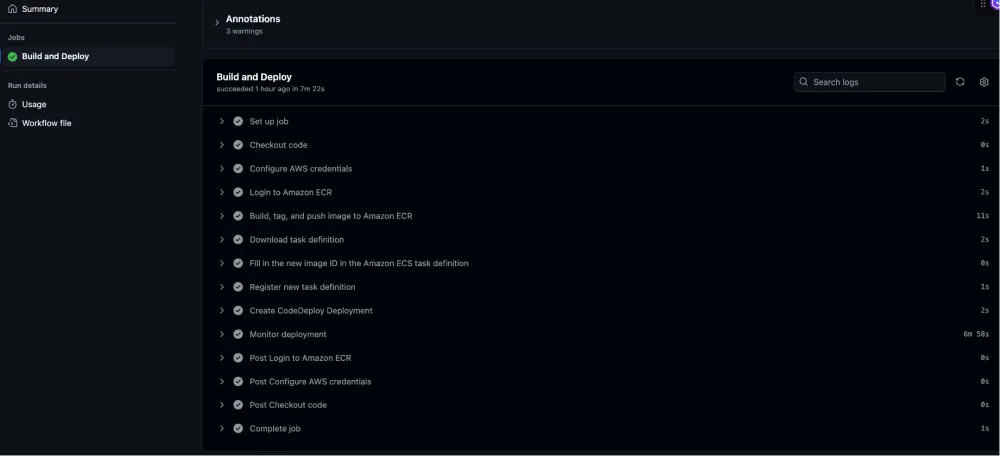
Blue/Green Deployment in Action:
Once the GitHub Actions workflow initiates the CodeDeploy deployment, you can observe the blue/green deployment process in the AWS Console:
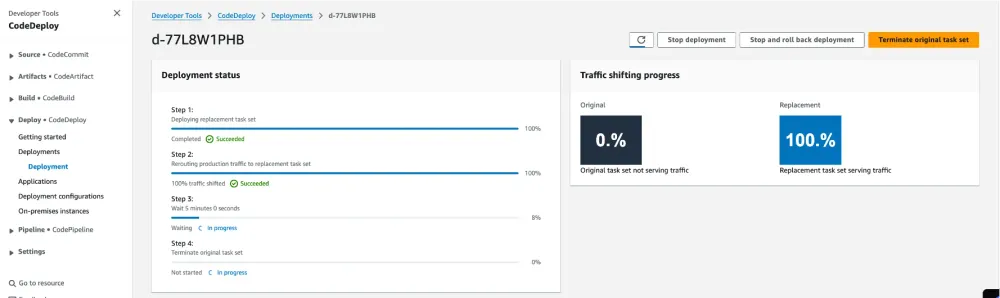
!CodeDeploy Blue/Green Deployment images/codedeploy-bluegreen.png
Figure 2: CodeDeploy performing a blue/green deployment to ECS tasks
The deployment process follows these steps:
• CodeDeploy creates a new (green) task set with the updated task definition
• Traffic is initially routed to the original (blue) task set
• The green task set is tested and validated
• Traffic is gradually shifted from blue to green
• After successful deployment, the blue task set is terminated
Deployment Monitoring: CloudWatch alarms monitor the health of the deployment and can trigger rollbacks if issues are detected.
Infrastructure Cleanup: When you're done with the resources, you can clean everything up.
Conclusion
Amazon Q Developer significantly streamlines the process of setting up and managing ECS deployment pipelines with GitHub Actions. By leveraging Amazon Q Developer's capabilities, developers can:
- Reduce the time spent on infrastructure setup and configuration
- Implement best practices for CI/CD pipelines
- Ensure reliable deployments with blue/green strategies
- Monitor application health effectively
This approach allows teams to focus more on developing features and less on managing deployment infrastructure.
Resources
- [AWS CodeDeploy Documentation]( https://docs.aws.amazon.com/codedeploy/latest/userguide/welcome.html )
- [GitHub Actions Documentation]( https://docs.github.com/en/actions )
- [Amazon ECS Documentation]( https://docs.aws.amazon.com/ecs/latest/developerguide/Welcome.html )
- [Amazon Q Developer Documentation]( https://aws.amazon.com/q/ )
About the Author
Jacky Wong is a Technical Account Manager at AWS. With over 10 years of experience in cloud infrastructure and DevOps, he specializes in automating deployment pipelines and implementing infrastructure as code solutions.
Enjoyed reading this content? Let the author know!
Your likes, comments, shares, and saves help creators reach more builders.

Loading recommendations
Loading article