

Finding Available and Cost Effective GPU Instances
Quickly discover what Accelerated Compute instances are available for short-term reservation with Amazon EC2 Capacity Blocks for ML
Series: Capacity on AWS (2 articles)
- 1Finding Available and Cost Effective GPU Instances This article

Intro
In my work with startups, I often have customers urgently needing access to powerful GPU instances (accelerated compute) in short time frames. Customers often feel they aren't able to find instances they need in an appropriate time frame and would like to save on costs where possible. However, there is likely more capacity available than you think!
This guide will provide some quick tips and some suggested code to easily search across AWS for available instances, to simplify decision making, and reduce risk. Specifically we're going to discuss Amazon EC2 Capacity Blocks for ML and how to effectively leverage them for access to short term powerful compute for Training Jobs, PoCs, and more.
Let's dive in.
Thought Process
Often customers want instances in regions they're working in or regions they're familiar with but for many quick training or PoC workloads that is not strictly necessary. What is key is what instances are available and at what price. Similar to the mentality around Spot, this changes the paradigm you work around when acquiring instances.
Think of Capacity Blocks as a hotel reservation, if you are willing stay at a different time range, are open do a variety of rooms, and are open to different locations you will have more options at more cost effective prices.
Capacity blocks are the same. If you consider a variety of regions, different start/end date ranges, and different instance types, you will have more choice over when and how you get access to these instances at more flexible prices.
Note: Prices are set per region, more cost effective options are purely region dependent. See the pricing page for more.
In Action
Alright so how do we do this? Go through each region manually and check the prices? To be honest, when I first started receiving customer requests in this area I did. But if I've learned anything at AWS, there's an API for everything.
Note there is not actually an API for everything.
The AWS Boto3 SDK makes it really easy to check CB availability in a region, for multiple instances, across different ranges. So all we need to do is extend that capability to all regions.
Below is a scrappy script I threw together and use constantly to answer this question for customers.
Prerequisites for my script are awscli and python. I've validated it on an Intel Mac system, but it should work for linux and windows similarly.
First create a python environment
python3 -m venv .venv source .venv/bin/activate Then install boto3
pip install boto3 Then copy the code below into a file called cb.py.
import boto3from datetime import datetime, timedeltaimport concurrent.futuresimport argparseimport csvimport osfrom botocore.exceptions import ClientError
VALID_INSTANCE_TYPES = {    "p5": "p5.48xlarge",    "p4d": "p4d.24xlarge",    "p5e": "p5e.48xlarge",    "p5en": "p5en.48xlarge",    "trn1": "trn1.32xlarge",    "trn2": "trn2.48xlarge"}
ALL_INSTANCE_TYPES = list(VALID_INSTANCE_TYPES.values())
def resolve_instance_type(user_input):    user_input = user_input.lower()    if user_input == "all":        return "all"    if user_input in VALID_INSTANCE_TYPES:        return VALID_INSTANCE_TYPES[user_input]    elif user_input in VALID_INSTANCE_TYPES.values():        return user_input    else:        raise argparse.ArgumentTypeError(            f"Invalid instance or family '{user_input}'. Must be one of: {', '.join(VALID_INSTANCE_TYPES.keys())}, full type names, or 'all'."        )
def parse_date(value):    try:        return datetime.strptime(value, "%Y-%m-%d")    except ValueError:        try:            days = int(value)            return datetime.utcnow() + timedelta(days=days)        except Exception:            raise argparse.ArgumentTypeError(f"Invalid date or day offset: {value}")
def get_all_regions():    ec2 = boto3.client('ec2')    response = ec2.describe_regions(AllRegions=True)    return [region['RegionName'] for region in response['Regions'] if region['OptInStatus'] in ('opt-in-not-required', 'opted-in')]
def query_capacity_blocks(region, instance_type, instance_count, start_date, end_date, duration_hours):    results = []    errors = []    client = boto3.client('ec2', region_name=region)    instance_types_to_check = ALL_INSTANCE_TYPES if instance_type == "all" else [instance_type]
    for inst_type in instance_types_to_check:        next_token = None        while True:            try:                params = {                    'InstanceType': inst_type,                    'InstanceCount': instance_count,                    'CapacityDurationHours': duration_hours                }                if start_date:                    params['StartDateRange'] = start_date                if end_date:                    params['EndDateRange'] = end_date                if next_token:                    params['NextToken'] = next_token
                response = client.describe_capacity_block_offerings(**params)                offerings = response.get('CapacityBlockOfferings', [])                for offer in offerings:                    results.append({                        'Region': region,                        'AvailabilityZone': offer['AvailabilityZone'],                        'Start': offer['StartDate'],                        'End': offer['EndDate'],                        'DurationHours': offer['CapacityBlockDurationHours'],                        'InstanceCount': offer['InstanceCount'],                        'UpfrontFee': float(offer['UpfrontFee']),                        'OfferingId': offer['CapacityBlockOfferingId'],                        'InstanceType': inst_type                    })                next_token = response.get('NextToken')                if not next_token:                    break            except ClientError as e:                err_msg = e.response['Error']['Message']                print(f"[{region} | {inst_type}] {err_msg}")                errors.append({'Region': region, 'Error': err_msg})                break            except Exception as e:                print(f"[{region} | {inst_type}] Unexpected Error: {e}")                errors.append({'Region': region, 'Error': str(e)})                break
    return results, errors
def write_to_csv(valid_results, error_results, output_file='capacity_block_results.csv'):    with open(output_file, 'w', newline='') as csvfile:        fieldnames = [            'Region', 'AvailabilityZone', 'Start', 'End',            'DurationHours', 'InstanceCount', 'UpfrontFee', 'OfferingId', 'InstanceType', 'Error'        ]        writer = csv.DictWriter(csvfile, fieldnames=fieldnames)        writer.writeheader()
        for row in valid_results:            row['Error'] = ''            writer.writerow(row)
        for err in error_results:            writer.writerow({                'Region': err['Region'],                'AvailabilityZone': '',                'Start': '',                'End': '',                'DurationHours': '',                'InstanceCount': '',                'UpfrontFee': '',                'OfferingId': '',                'InstanceType': '',                'Error': err['Error']            })
    print(f"\n✅ Results written to {os.path.abspath(output_file)}")
def main(args):    regions = get_all_regions()    print(f"Searching Capacity Blocks in {len(regions)} regions for {args.duration_hours}h blocks...")
    all_results = []    all_errors = []
    with concurrent.futures.ThreadPoolExecutor(max_workers=20) as executor:        futures = {            executor.submit(                query_capacity_blocks,                region,                args.instance,                args.instance_count,                args.start,                args.end,                args.duration_hours            ): region for region in regions        }        for future in concurrent.futures.as_completed(futures):            try:                region_results, region_errors = future.result()                all_results.extend(region_results)                all_errors.extend(region_errors)            except Exception as exc:                region = futures[future]                print(f"[{region}] Exception: {exc}")                all_errors.append({'Region': region, 'Error': str(exc)})
    if all_results:        reverse = args.order.lower() == 'descending'        key = args.order_by        if key not in all_results[0]:            print(f"⚠️ Invalid order-by field: {key}. Defaulting to 'UpfrontFee'")            key = 'UpfrontFee'        all_results.sort(key=lambda x: x.get(key, 0), reverse=reverse)
    print(f"\nFound {len(all_results)} valid offerings and {len(all_errors)} errors.\n")    write_to_csv(all_results, all_errors)
if __name__ == "__main__":    parser = argparse.ArgumentParser(description="Search and export EC2 Capacity Block Offerings.")
    parser.add_argument(        "--instance",        type=resolve_instance_type,        default="p5.48xlarge",        help="Instance family or full type (e.g., p5, p4d.24xlarge, trn2), or 'all' for all supported types. Default: p5"    )    parser.add_argument("--instance-count", type=int, default=1, help="Number of instances (default: 1)")    parser.add_argument("--duration-hours", type=int, default=24, help="Block duration in hours (default: 24 for 1 day)")    parser.add_argument("--start", type=parse_date, default=None, help="Start date (YYYY-MM-DD) or days from today")    parser.add_argument("--end", type=parse_date, default=None, help="End date (YYYY-MM-DD) or days from today")    parser.add_argument("--order-by", default="UpfrontFee", help="Field to sort results by (e.g. UpfrontFee, Start, Region)")    parser.add_argument("--order", choices=["ascending", "descending"], default="ascending", help="Sort order (default: ascending)")
    args = parser.parse_args()    main(args)
Disclaimer time: As noted this script is scrappy. Use at your own risk and review the contents. This script does not create resources but it does search through all regions and look through availability. It works on mac, it requires boto3, and there are likely edge cases where it will fail. Adjust to your need. This is not AWS official guidance but a personal script I find useful
The script takes instance count, duration, start, end, and an order by date and outputs a list of available instances across regions. It then outputs to a CSV
Here's example usage:
python cb.py --duration-hours 24 --instance all Here's the first 1 row of that call at the time of running the script (out of 120):
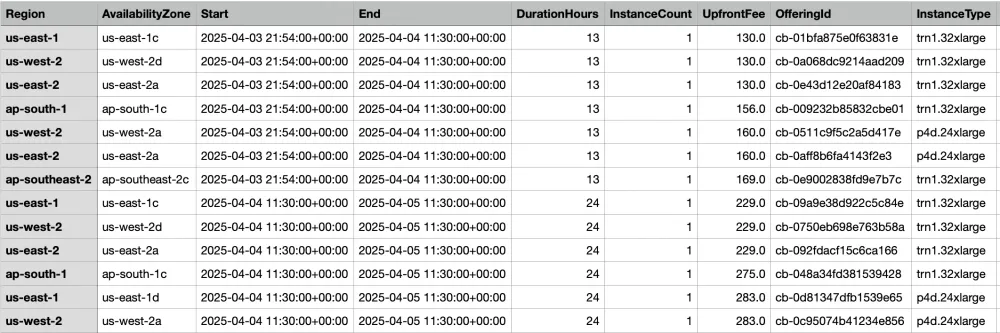
With this information we can now more effectively make a decision on what instances to use.
What next?
Remember you can definitely adjust a script like this to your use case. Want to get a daily report? Put this in a lambda and use events to trigger it daily. Want an api? Use API Gateway to call adhoc for these reports. Really it can be very flexible and applied to your use case.
Now we can feel much more confident in having access to cost effective and powerful compute for our novel use cases!
Happy hunting!
Series: Capacity on AWS (2 articles)
- 1Finding Available and Cost Effective GPU Instances This article
Enjoyed reading this content? Let the author know!
Your likes, comments, shares, and saves help creators reach more builders.

Loading recommendations
Loading article