

Stop Guessing, Start Routing: Explore Bedrock Prompt Routing
Explore AWS Bedrock Intelligent Prompt Routing for smarter, cost-effective GenAI model usage. See how it works


Hello AWS Community!
As Solutions Architects working with Generative AI, we're amazed by the power and flexibility Amazon Bedrock offers, giving us access to a diverse range of Foundation Models (FMs). Yet, this choice presents a challenge: how do we ensure we're consistently using the optimal model for each specific task, effectively balancing cost, latency, and the quality of the response? Relying on a single, general-purpose model often means compromising on one of these critical factors, while building custom routing logic adds significant development and maintenance overhead.
This is where the game changes. Amazon Bedrock's Intelligent Prompt Routing (IPR), currently in preview, offers a solution. It's a capability within Bedrock designed to direct your prompts to the most suitable FM from a pool you define. This isn't just conditional logic; it's about leveraging Bedrock's built-in intelligence to dynamically optimize your GenAI interactions.
Let's take a practical, deep dive into what IPR is, how it works, why it's a valuable tool for architects and developers, and walk through setting it up and monitoring its performance using the AWS console.
The Multi-Model Maze: Why Intelligent Routing is Essential
Building sophisticated GenAI applications often reveals that a one-size-fits-all model approach falls short. Imagine a customer service chatbot needing to instantly answer simple FAQs where low cost and speed are key, but also needing the deep reasoning power of a more advanced model for complex troubleshooting requests where accuracy is paramount. Or consider a marketing tool required to generate snappy, cost-effective ad copy alongside high-quality, coherent long-form articles. Running every query through the most powerful (and expensive) model is often inefficient, while using only a basic model limits capability. Similarly, applications demanding near real-time interaction need models optimized for low latency. Manually coding routing rules to handle this complexity is hard to scale as new models become available. This is the multi-model challenge IPR directly addresses.
Enter Prompt Routing: The Smart Traffic Cop for Your Prompts
Think of Bedrock IPR as an intelligent layer embedded within a Bedrock Agent. Instead of your application code deciding which FM to call, you configure to use IPR. When a prompt is received, the IPR capability intercepts it, evaluates the prompt, and selects the most appropriate FM from a pool of candidate models you've curated.
Conceptually, how does it work?
1. Integration: You choose IPR as the logic unit for your Bedrock execution instead of a single FM.
2. Candidate Pool: You define which FMs the router is allowed to choose from (e.g., balancing cost, speed, reasoning capabilities).
3. Intelligent Selection: Bedrock's routing logic analyzes the incoming prompt against the candidate models' characteristics and intended uses to determine the best fit.
4. Model Invocation: IPR selects the most suitable model from the candidates based on its analysis and then invokes that specific FM.
5. Fallback: A designated model is used if the routing logic cannot confidently select a candidate or encounters an error during selection.
This dynamic, prompt-by-prompt decision-making allows your application to adapt fluidly without complex, hardcoded routing logic in your own codebase.
Diving Deeper: Configuration Nuances
The effectiveness of IPR relies on how it evaluates prompts against your chosen models. The goal is to map the prompt to the model best equipped to handle it, aiming to optimize for the desired balance of quality, latency, and cost based on the models you provide in the candidate list.
You configure this process through the Routing Configuration, primarily by selecting the Candidate Models and the essential Fallback Model for robustness. Currently, you can choose from two prompt routers in preview that route requests between either Claude Sonnet 3.5 and Claude Haiku, or between Llama 3.1 7B and Llama 3.1 80B. We'll see these elements in action in the walkthrough below.
Why This Matters: Tangible Benefits (Insights, Not Hype)
From an architect's perspective, the advantages of using IPR are compelling. It translates directly to significant cost optimization by automatically leveraging more economical models for simpler tasks, reserving premium models only when the prompt's complexity demands it. This smart allocation directly impacts your AWS bill.
Furthermore, IPR enhances performance and user experience. Latency-sensitive queries can be automatically routed to faster models, improving the responsiveness of interactive applications like chatbots. Simultaneously, it ensures higher accuracy and quality by directing complex prompts requiring deeper understanding or creativity to the most capable models available in your candidate pool.
Perhaps one of the most significant benefits is simplified development and maintenance. IPR abstracts the routing complexity away from your application code. No more tangled chains or custom ML classifiers to maintain! This also boosts agility and future-proofing; adding new FMs to the candidate pool or swapping models becomes a configuration change within Bedrock, not a code deployment cycle. The routing capability adapts, allowing you to easily leverage the latest advancements in foundation models.
Walkthrough: Setting Up and Monitoring IPR
Let's walk through the steps of configuring and monitoring IPR using the AWS console, incorporating your screenshots along the way.
Enable IPR : Start within your Bedrock configuration. Instead of selecting a single Foundation Model, choose the "Intelligent prompt routing" option.
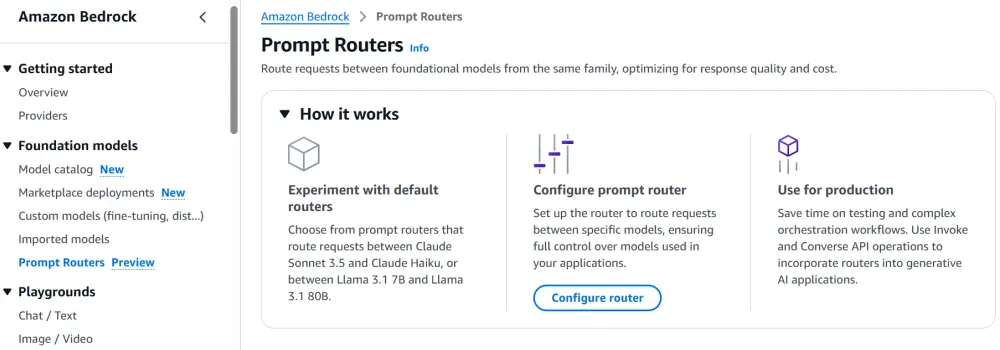
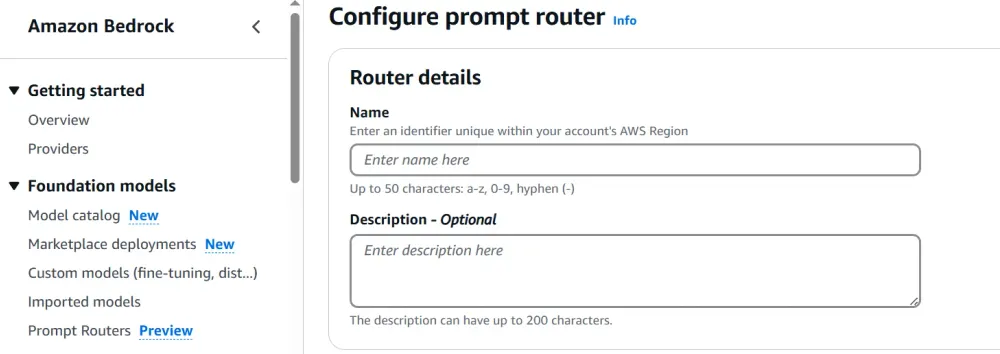
- Configure Router Details: You'll then define the specifics for this routing configuration. Give it a descriptive name and potentially a description for clarity.
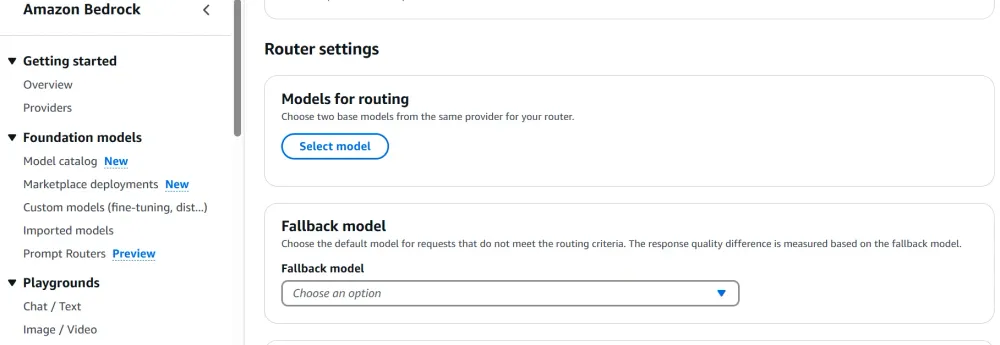
- Select Candidate and Fallback Models: This is the core configuration step. Choose the pool of FMs you want IPR to select from, considering the range of tasks and performance requirements. You must also designate a reliable Fallback Model.
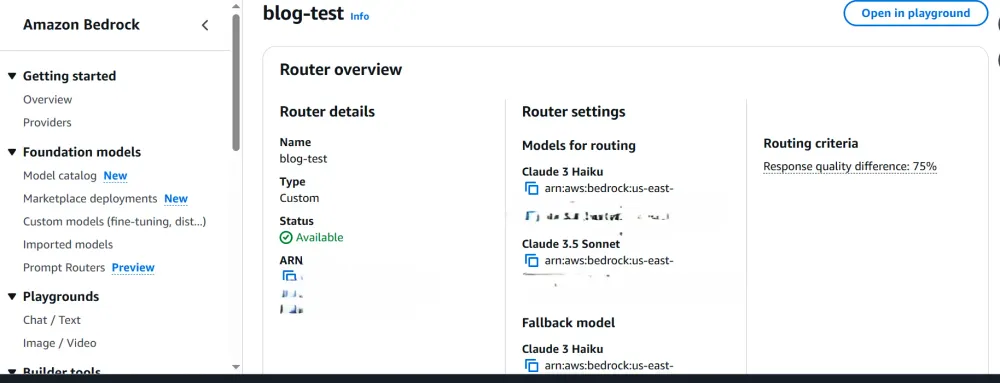
- Deploy & Review Configuration: Save your configuration and deploy a new version. After deployment, you can review the completed IPR setup, including its unique ARN.
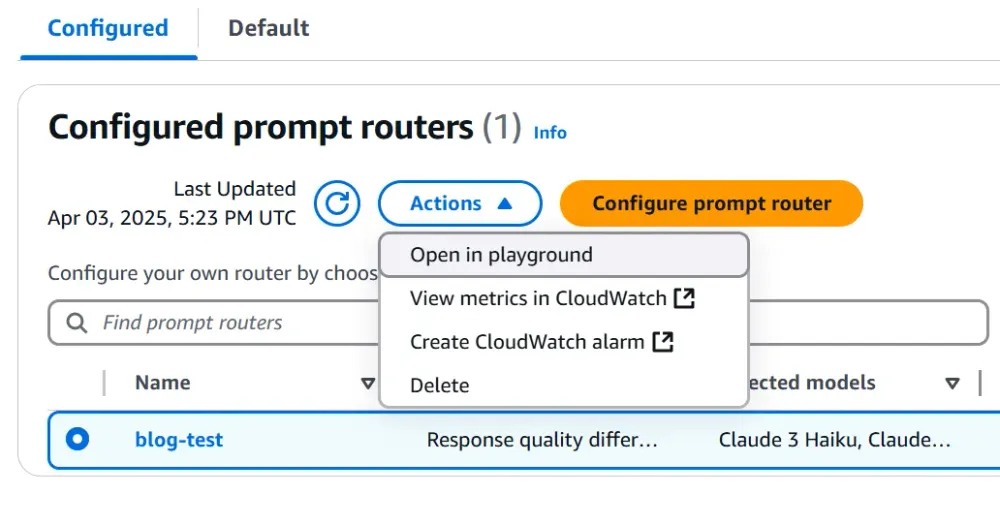
- Test and Observe Routing: Use the Bedrock console's Test Playground feature to send prompts
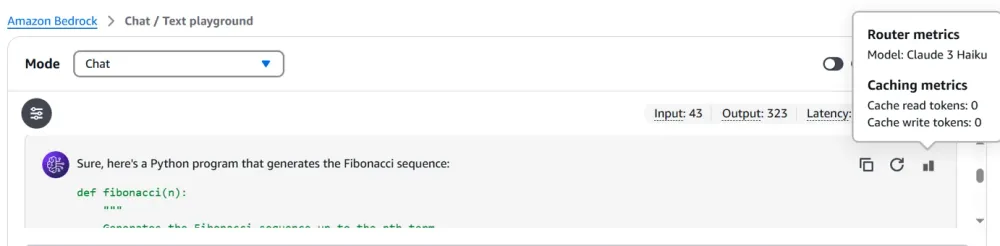
- After sending a prompt in the Playground, the response section often includes metadata indicating exactly which Foundation Model was selected by the Intelligent Prompt Routing logic for that specific request. This provides immediate feedback on the routing decision.
- Navigate to CloudWatch for Metrics: While the Playground confirms functionality and shows individual routing decisions, analyzing overall performance requires metrics. Go to the Amazon CloudWatch console.
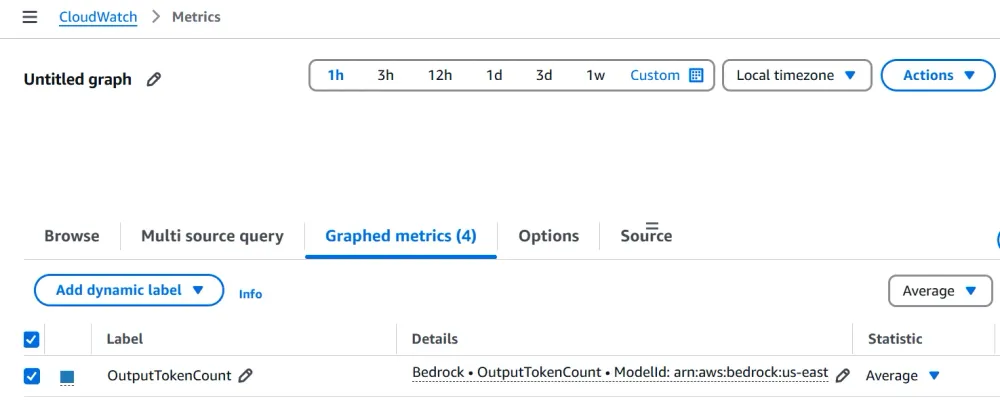
- Analyze Performance Metrics: Within CloudWatch metrics, filter or search for the metrics associated with your specific Bedrock Agent IPR configuration ARN. You should find metrics detailing invocation counts per routed model. This view aggregates performance over time.
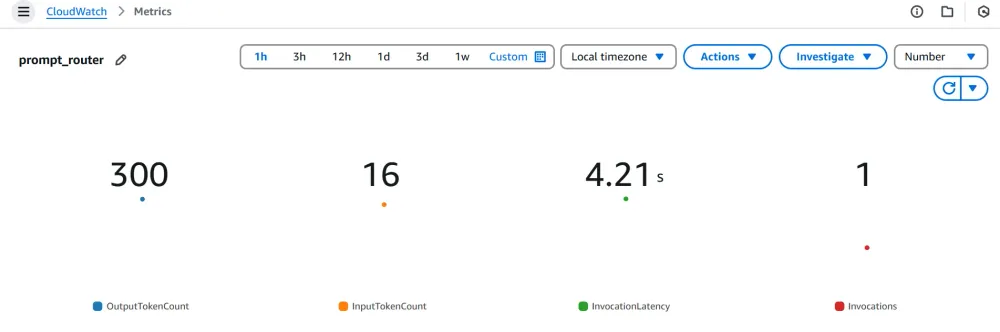
This monitoring loop (Test -> Observe -> Monitor -> Analyze) is essential for understanding how IPR is performing and whether your candidate model selection is achieving the desired balance of cost, latency, and quality.
Considerations and Best Practices (The Architect's View)
While IPR is powerful, keep a few architectural considerations in mind. The quality of your candidate model selection is paramount; the routing capability can only choose from the options you provide, so ensure the pool covers the necessary spectrum of capabilities (cost, speed, accuracy).
Active monitoring is non-negotiable. Since routing is dynamic, regularly check your CloudWatch metrics (as shown in the walkthrough) to understand which models are being invoked and ensure the cost and performance outcomes align with your goals. Remember that IPR is currently in preview, so functionality might evolve, and thorough testing is recommended before production deployment in critical systems. Lastly, be aware that invoking different models might occasionally introduce latency variations, particularly if a model endpoint experiences a cold start, although Bedrock generally manages this well.
Conclusion: A Smarter Way Forward for GenAI Apps
AWS Bedrock Prompt Routing isn't just a minor feature; it's a strategic enabler for building more efficient, cost-effective, and high-performing Generative AI applications. By managing model selection behind the scenes based on the prompt and your defined candidate pool, it frees up developers and architects to focus on innovation and user experience, knowing that the right foundation model is being leveraged for each interaction.
Based on my experience and analysis, this preview service holds significant promise for optimizing GenAI workloads on AWS. It's a definite step towards smarter resource utilization in the rapidly evolving FM landscape.
What are your thoughts? Have you started experimenting with Intelligent Prompt Routing? What use cases are you most excited about? Share your experiences, questions, and ideas in the comments below – let's learn and build together!
P.S. : The banner image was generated using Amazon Nova Canvas
Enjoyed reading this content? Let the author know!
Your likes, comments, shares, and saves help creators reach more builders.

Loading recommendations
Loading article