


Introduction
Generative AI is rapidly transforming the way we build and interact with software. At the heart of this transformation lies the concept of AI agents. These autonomous, intelligent entities are capable of perceiving their environment, making decisions, and taking actions to achieve specific goals. As organizations increasingly adopt AI-driven solutions, the need for efficient agent architectures in terms of scalability, cost, and flexibility becomes clear. Achieving these outcomes requires architecture designs that can deliver on these goals, such as multi-tenant architectures with multi-tenant agents. This blog starting from the fundamentals will try to explain concepts of multi-tenant agents.
What Are Agents?
Agents are autonomous systems designed to perform tasks on behalf of users without direct human intervention. Their core capabilities include:
- Planning & Reasoning: Agents can break down complex tasks into subtasks, apply logic, and make decisions, often powered by large language models (LLMs).
- Memory: Enables agents to maintain context across interactions, which is crucial for personalization, continuity, and intelligent decision-making. With short-term memory, agents can track conversation flow or task progress, while long-term memory allows them to retain user preferences, past interactions, or domain knowledge. This helps agents avoid repetition, build rapport, and deliver context-aware responses that evolve over time.
- Tool Integration: Agents can extend their functionality to suit diverse business needs with tool integrations through which they can interact with APIs or external services.
When Should You Use Agents?
Agents are particularly valuable when:
- Handling Complex Tasks: Tasks requiring autonomous operation, planning, and reasoning benefit from agent-driven automation. Agents are a great fit for non deterministic tasks which are probabilistic with no fixed outputs. For example, a retail company can use Agents for strategic business planning like analyzing their sales data, predicting seasonal demand, recommending optimal inventory levels and order products for their inventory for an upcoming sales event.
- Dynamic Adaptability: Agents excel in scenarios where real-time decision-making and adaptability are required, such as the same above retail company agent in real-time can see that ordered products are going to have delays due to shipping or vendor issues, then the agent can devise an alternate plan or options.
- Automating Repetitive Tasks: Agents can efficiently execute repetitive processes like generating reports, data retrieval, generating code, report summarization, etc. For example, an agent can assist healthcare providers by analyzing patient records, identifying potential diagnoses based on symptoms, and suggest/summarize treatment plans.
However, it's essential to weigh the cost implications of agent usage, as their advanced capabilities can introduce additional operational expenses.
Multi-tenant agents
A multi-tenant agent is an agent designed to serve multiple independent users or organizations—known as tenants—within a multi-tenant environment, while ensuring that each tenant’s data, configuration, and operations remain logically isolated. This can be achieved in two ways:
- Pooled model: A single instance of the agent serves multiple tenants, customizing responses based on tenant-specific context, while maintaining strict data separation and isolation.
- Silo model: Each tenant has a dedicated agent instance running in an isolated environment, with separate resources such as compute and application layers, ensuring complete operational and data isolation.
Multi-tenant agents are essential for scalable, cost-effective, and secure AI deployments, enabling centralized management and resource sharing without compromising privacy or tenant boundaries.
Amazon Bedrock agents
Amazon Bedrock Agents enable you to build, configure, and deploy autonomous AI agents that automate tasks and interact with users based on your organization’s data and APIs. These agents orchestrate interactions between foundation models (FMs), data sources, software applications, and user conversations. They can automatically call APIs, invoke knowledge bases, and manage complex workflows without requiring you to provision infrastructure or write extensive custom code
Silo bedrock agent
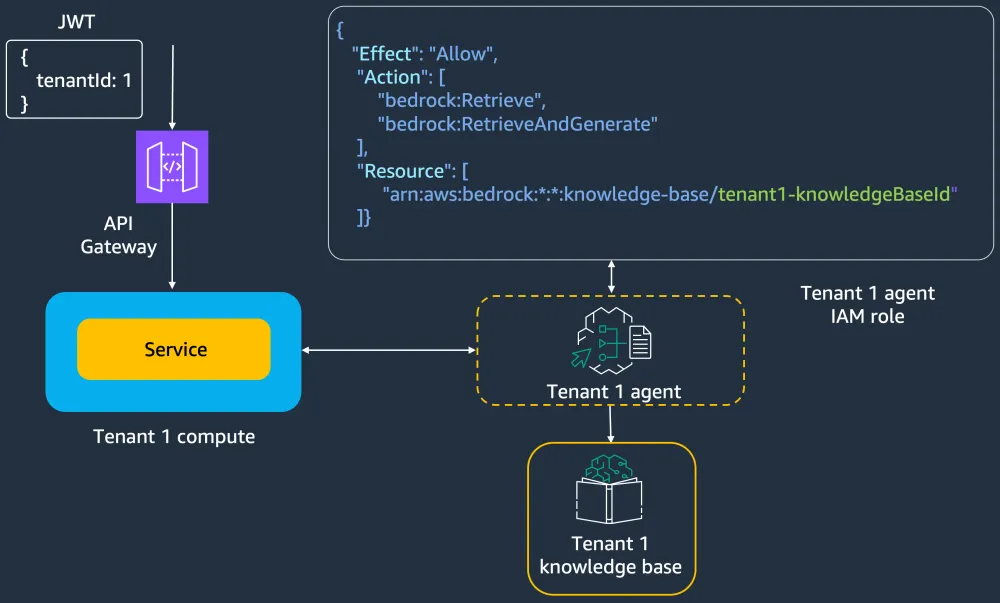
When you configure an Amazon bedrock agent, you need to configure the LLM and configure the agents functionality through action groups (which will be executed in a AWS lambda function). You can also enrich the agent by instructing it to interact with tenant-specific resources like Amazon Bedrock knowledge base or Amazon DynamoDB , etc.
You can create a silo bedrock agent for a tenant by configuring it to only interact with tenant-specific resources. To ensure tenant resources are protected, you need to enforce tenant isolation by attaching an execution role to the agent which will only allow it to interact with the dedicated tenant-specific resources(as shown in figure 1)
In this silo model, you can attach a Amazon Bedrock knowledge base directly to an agent. Once you attach the knowledge base directly to the agent, then based on user prompt, the agent can use its reasoning ability and retrieve required relevant data from the attached knowledge base. For a silo bedrock agent you can directly attach a tenant-specific knowledge base, and leverage the agents reasoning ability to let it retrieve tenant-specific data from the knowledge base. Refer to this gitrepo for amazon bedrock silo agent implementation details which interacts with Amazon DynamoDB .
Pooled bedrock agent
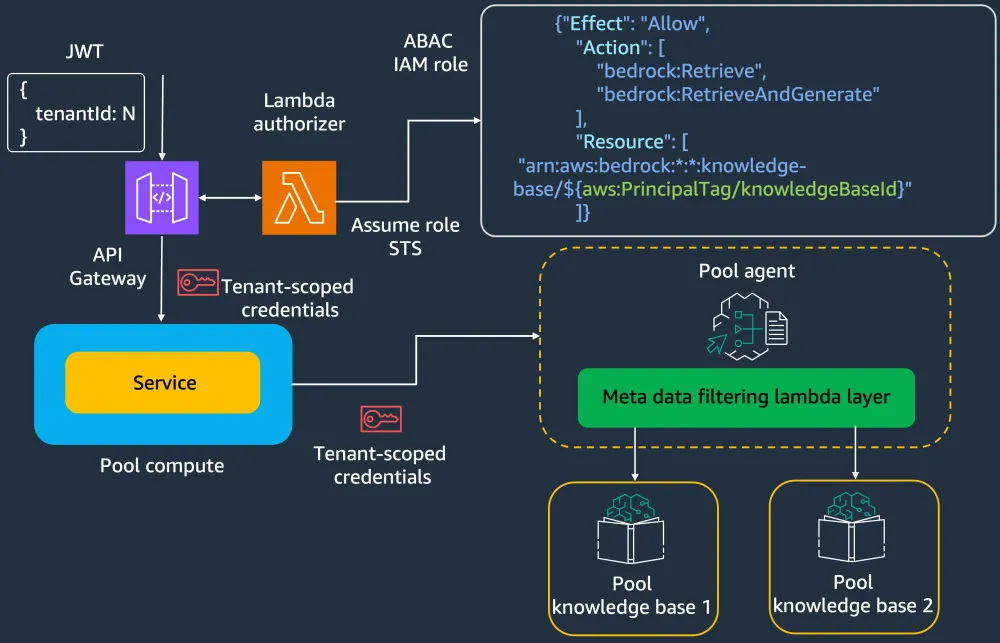
You can also configure a pooled bedrock agent, where you configure an LLM, action groups, and the agent to interact with a pooled knowledge base. Since the pooled knowledge base has multiple tenants data, we need to have more fine grained control over what data the agent can retrieve from the pooled knowledge base based on tenant context. With a pooled agent, instead of attaching the pooled knowledge base directly to agent and leveraging the agents reasoning ability to retrieve tenant-specific data, you need to enrich the action groups to select a pooled knowledge base based on tenant context provided to it. Based on the tenant metadata provided to it, the agent can use metadata filtering logic (packaged in a lambda layer) to retrieve tenant-specific data from a pooled knowledge base. Here tenant context and tenant metadata can be passed to agents through session attributes.
Since the pooled agent is shared across multiple tenants, you must enforce tenant isolation at run-time by dynamically generating tenant scoped credentials which provide access only to tenant-specific resources. One way you can implement this is (as shown in figure 2) at the Amazon API Gateway using a AWS Lambda authorizer you can assume a attribute-based access control (ABAC) IAM role with the tenant context, then you can pass this temporary tenant-specific scope credentials and additional tenant metadata to agents using session attributes. You can get the tenant context and tenant metadata from your SaaS identity (if you have implemented it) or get just tenant context from SaaS identity then get additional tenant metadata from SaaS control plane. Refer to this gitrepo for amazon bedrock pooled agent implementation details which interacts with Amazon DynamoDB.
Bridge bedrock agent
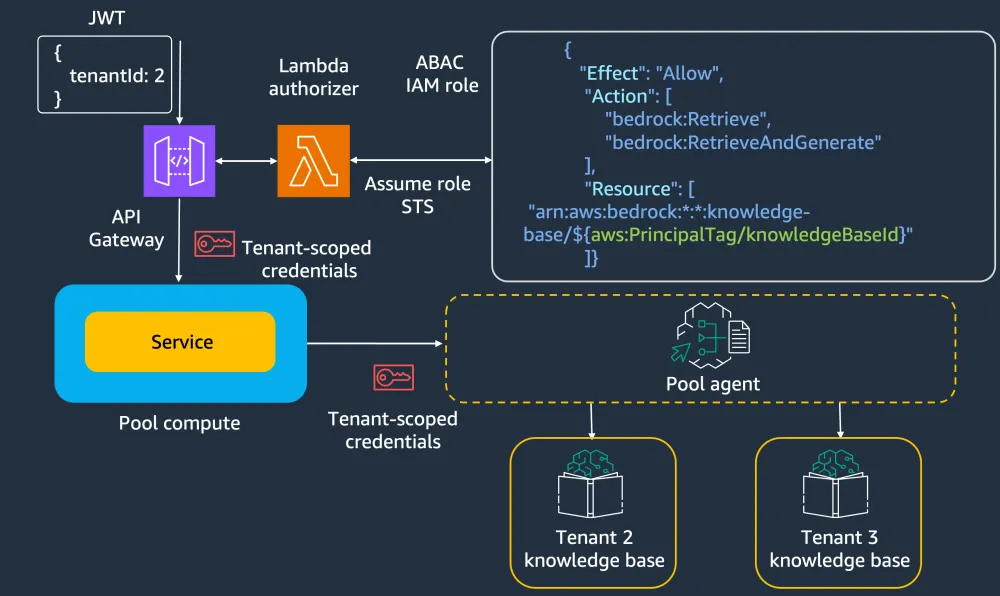
You can also build a bridge bedrock agent (combining silo & pool model), where you can have a pooled agent which is shared across multiple agents which can interact with siloed tenant-specific resources. To enforce tenant isolation here, to pool agent we can pass tenant context and dynamically generated tenant-specific scope credentials which will be used by the pooled agent to interact with tenant-specific resources like Amazon knowledge base(as shown in figure 3), Amazon DynamoDB..etc
You can use these Amazon Bedrock agents to build and deploy AI agents with a fully managed experience—eliminating the need to manage infrastructure or manually integrate core agent capabilities. These agents come equipped with features like multi-agent collaboration, observability, code interpretation, memory management, guardrails, and native integration with knowledge bases.
Agents with tool use
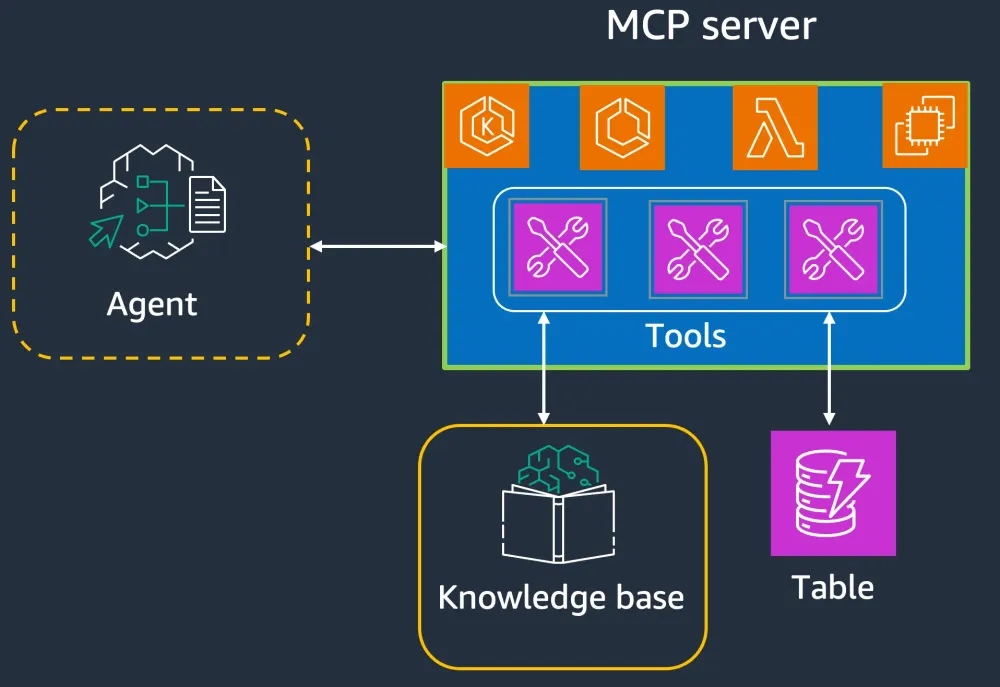
You can also build agents using tools, agents get additional functionality by integrating with tools which can enable agents to interact with an database, an API, third party system..etc. With the advent of Model Context Protocol (MCP), it provided a standard way for agents to interact with these tools. Using Strands Agents SDK (which is an open-source framework developed by AWS that simplifies the building, deployment, and scaling of intelligent, autonomous AI agents capable of reasoning, planning, and interacting with external tools and APIs—powered by LLMs), you can create agents which can integrate with MCP-based tools as shown in figure 4. Here MCP server can be run on any of the AWS compute services like Amazon EKS , Amazon ECS , AWS Lambda and Amazon EC2 .
You can use the Strands Agents SDK to build highly customizable agents, support integration with any model provider or proprietary LLM gateway, and the ability to deploy them anywhere you would host a Python application.
Agents with tool use - silo agent
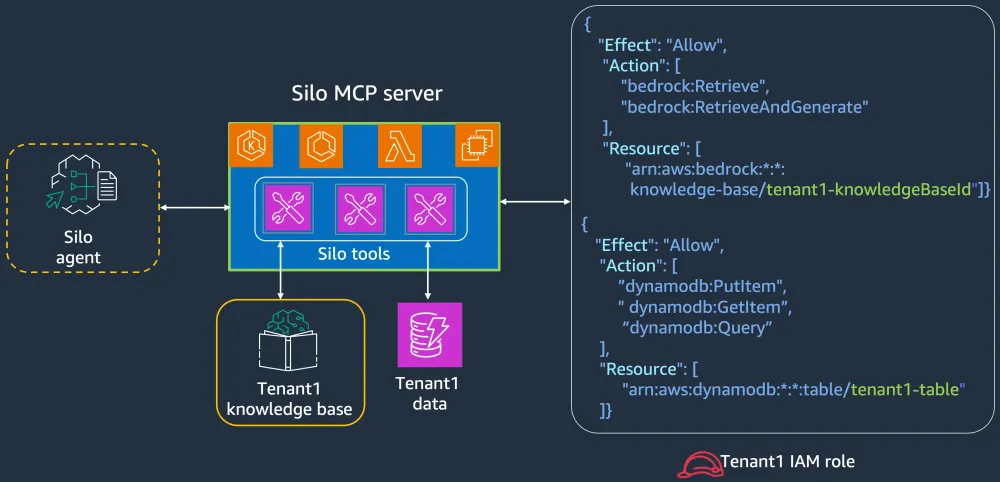
As shown in figure 5, you can build a silo agent which can interact with a silo MCP server which has silo tools, which can interact with dedicated tenant-specific resources. Since MCP server will run on an instance of compute, you can enforce tenant isolation by attaching a execution role to the compute scoping down permissions for the tools to only interact with tenant-specific resources.
Agents with tool use - pooled agent
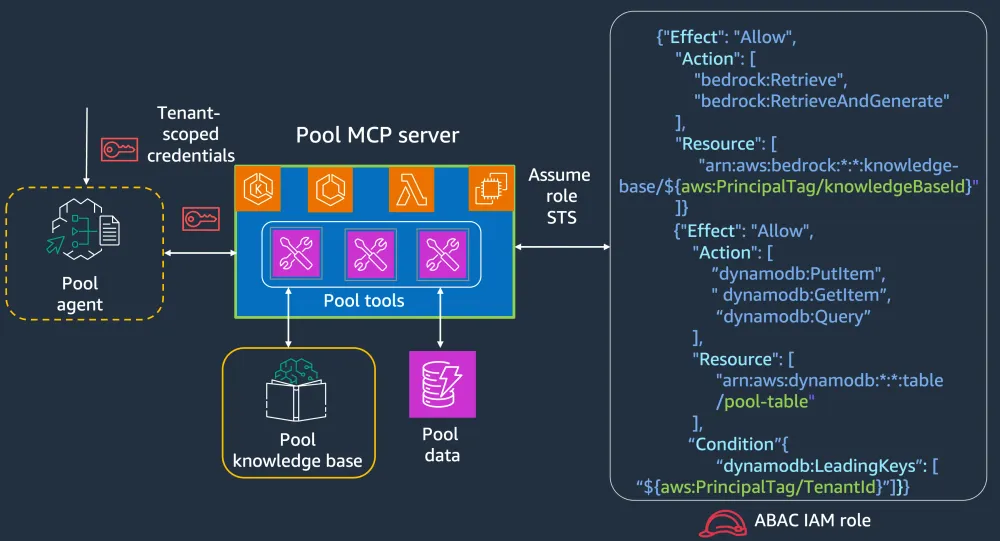
As shown in figure 6, you can build a pooled agent which can interact with a pooled MCP server and it’s pooled tools, which can interact with pooled resources. Here since the MCP server is shared across multiple tenants, to enforce tenant isolation you can enrich the pooled MCP server to dynamically generate tenant-specific scoped credentials in run-time by assuming an Attribute based access control (ABAC) IAM role using the tenant context passed to it by the agent. Then the pooled tools can use these tenant-specific scoped credentials to interact only with tenant-specific resources.
However, the introduction of an MCP server might add latency, and doing an assume role for each request also adds even more latency. One way to counter this is, as shown in figure 2 above, is to generate tenant-specific scoped credentials at the Amazon API Gateway level, cache them using the Amazon API Gateway caching feature and pass them to agents. And then agents can pass these attributes (which contains tenant-specific scoped credentials) to the pooled MCP server and the pooled tools can use those tenant-specific scoped credentials to enforce tenant isolation. The way you implement this might differ from architecture to architecture.
Sample implementation
Here is a sample implementation of the above outlined pooled agent which can integrate with pooled tools through a pooled MCP server using Strands Agent SDK.
Here the pooled agent creates/retrieves product details from a pooled Amazon DynamoDB table. It sends a request to the pooled MCP server, passing the tenant context. The MCP server then assumes a tenant-scoped ABAC role, which provides credentials restricted to that tenant’s data. These scoped credentials are used by the tools within the MCP server to securely access the pooled Amazon DynamoDB table with tenant-level isolation.
Attribute based access control (ABAC) role
The following ABAC role grants access exclusively to tenant-specific items in the pooled Amazon DynamoDB table, where the tenant id serves as the partition key to enforce data isolation.
plaintext
{"Version": "2012-10-17","Statement": [{"Effect": "Allow","Action": ["dynamodb:DeleteItem","dynamodb:GetItem","dynamodb:PutItem","dynamodb:Query","dynamodb:UpdateItem"],"Resource": "arn:aws:dynamodb:us-east-1:905418320997:table/pooled-tenant-table","Condition": {"ForAllValues:StringEquals": {"dynamodb:LeadingKeys": ["${aws:PrincipalTag/tenantId}"]}}}]}
Pooled MCP server
Below is the implementation of the pooled MCP server, built using FastMCP . When an agent invokes a tool, the tool uses the provided tenant id to assume the ABAC role described above. This generates tenant-scoped credentials, which are then used to interact with the pooled Amazon DynamoDB table—ensuring access is limited to items belonging to the specific tenant. This approach enforces strong tenant isolation within a shared data store. The pooled MCP server can be deployed on Amazon ECS or Amazon EKS for scalable and managed execution.
plaintext
"""MCP Server for tenant-specific Amazon DynamoDB access using FastMCP and ABAC."""import jsonimport osimport sysimport boto3import uuidimport reimport loggingfrom datetime import datetimefrom typing import Dict, List, Any, Optional, TypeVar, Genericfrom pydantic import BaseModelfrom fastmcp import FastMCP# Import configuration (assumed to be defined in config.py)sys.path.append(os.path.dirname(os.path.dirname(os.path.abspath(__file__))))from config import MCP_SERVER_NAME, MCP_SERVER_DESCRIPTION, ROLE_ARN_TEMPLATE, DYNAMODB_TABLE_NAMElogging.basicConfig(level=logging.INFO)logger = logging.getLogger(__name__)T = TypeVar('T')class MCPResponse(BaseModel, Generic[T]):result: Optional[T] = Noneerror: Optional[str] = Nonestatus_code: int = 200model_config = {"arbitrary_types_allowed": True}def dict(self) -> Dict[str, Any]:response = {}if self.result is not None:response["result"] = self.resultif self.error is not None:response["error"] = self.errorreturn responseclass TenantItem(BaseModel):tenant_id: stritem_id: strproduct: strvalue: Anydescription: Optional[str] = Nonecreated_at: strclass TenantCredentialManager:def __init__(self, role_arn_template: str):self.role_arn_template = role_arn_templateself.sts_client = boto3.client('sts')def get_tenant_credentials(self, tenant_id: str) -> Dict[str, str]:if not re.match(r'^[a-zA-Z0-9-]{1,36}$', tenant_id):raise ValueError(f"Invalid tenant ID format: {tenant_id}")try:response = self.sts_client.assume_role(RoleArn=self.role_arn_template,RoleSessionName=f"tenant-{tenant_id}-session",DurationSeconds=3600,Tags=[{'Key': 'tenantId', 'Value': tenant_id}])credentials = response['Credentials']return {'aws_access_key_id': credentials['AccessKeyId'],'aws_secret_access_key': credentials['SecretAccessKey'],'aws_session_token': credentials['SessionToken']}except Exception as e:raise Exception(f"Failed to assume role for tenant {tenant_id}: {str(e)}")class TenantDynamoDBManager:def __init__(self, table_name: str):self.table_name = table_namedef get_dynamodb_client(self, credentials: Dict[str, str]):return boto3.client('dynamodb',aws_access_key_id=credentials['aws_access_key_id'],aws_secret_access_key=credentials['aws_secret_access_key'],aws_session_token=credentials['aws_session_token'])def get_tenant_items(self, dynamodb_client, tenant_id: str) -> List[Dict]:try:response = dynamodb_client.query(TableName=self.table_name,KeyConditionExpression="tenant_id = :tid",ExpressionAttributeValues={":tid": {"S": tenant_id}})items = []for item in response.get('Items', []):parsed_item = {k: v[list(v.keys())[0]] for k, v in item.items()}items.append(parsed_item)return itemsexcept Exception as e:logger.error(f"Failed to query items for tenant {tenant_id}: {str(e)}")raisedef put_tenant_item(self, dynamodb_client, tenant_id: str, item_data: Dict) -> Dict:try:item_with_tenant = item_data.copy()item_with_tenant['tenant_id'] = tenant_iditem_with_tenant['item_id'] = item_with_tenant.get('item_id', str(uuid.uuid4()))item_with_tenant['created_at'] = datetime.now().isoformat()dynamodb_item = {k: {"S": str(v)} if isinstance(v, (str, dict, list)) else{"N": str(v)} if isinstance(v, (int, float)) else{"BOOL": v} if isinstance(v, bool) else{"S": str(v)}for k, v in item_with_tenant.items()}dynamodb_client.put_item(TableName=self.table_name, Item=dynamodb_item)return item_with_tenantexcept Exception as e:logger.error(f"Failed to put item for tenant {tenant_id}: {str(e)}")raiseapp = FastMCP(title=MCP_SERVER_NAME,description=MCP_SERVER_DESCRIPTION)credential_manager = TenantCredentialManager(ROLE_ARN_TEMPLATE)dynamodb_manager = TenantDynamoDBManager(DYNAMODB_TABLE_NAME)@app.tool(name="get_tenant_items",description="Get items for a specific tenant from the pooled DynamoDB table")def get_tenant_items(tenant_id: str) -> MCPResponse[List[TenantItem]]:try:credentials = credential_manager.get_tenant_credentials(tenant_id)dynamodb_client = dynamodb_manager.get_dynamodb_client(credentials)items = dynamodb_manager.get_tenant_items(dynamodb_client, tenant_id)tenant_items = [TenantItem(tenant_id=item.get("tenant_id"),item_id=item.get("item_id"),product=item.get("product"),value=item.get("value"),description=item.get("description"),created_at=item.get("created_at")) for item in items]return MCPResponse(result=tenant_items)except ValueError as e:return MCPResponse(error=str(e), status_code=400)except Exception as e:return MCPResponse(error=str(e), status_code=500)@app.tool(name="put_tenant_item",description="Add an item for a specific tenant to the pooled DynamoDB table")def put_tenant_item(tenant_id: str, product: str, value: int) -> MCPResponse[TenantItem]:try:credentials = credential_manager.get_tenant_credentials(tenant_id)dynamodb_client = dynamodb_manager.get_dynamodb_client(credentials)item_data_dict = {"product": product, "value": value}created_item = dynamodb_manager.put_tenant_item(dynamodb_client, tenant_id, item_data_dict)tenant_item = TenantItem(**created_item)return MCPResponse(result=tenant_item)except ValueError as e:return MCPResponse(error=str(e), status_code=400)except Exception as e:return MCPResponse(error=str(e), status_code=500)if __name__ == "__main__":app.run('streamable-http', host="0.0.0.0", port=8000, path='/mcp')
Pooled agent
Below is the code for the pooled agent, developed using the Strands Agents SDK. It initializes an MCP client to connect to the above described pooled MCP server, and then configures the agent with the desired model and a set of tools available from the pooled MCP server.
plaintext
import osimport jsonimport reimport uuidimport loggingfrom typing import Dict, Any, List, Optionalfrom pydantic import BaseModel, Fieldfrom mcp.client.streamable_http import streamablehttp_clientfrom strands.agent.conversation_manager import ConversationManager, SlidingWindowConversationManager# Configure logginglogging.basicConfig(level=logging.INFO)logger = logging.getLogger(__name__)# Import configurationfrom config import MCP_SERVER_URL, AGENT_NAME, AGENT_DESCRIPTION, BEDROCK_REGION, BEDROCK_MODEL_ID# Import Strands Agents SDKfrom strands import Agentfrom strands.tools.mcp import MCPClientasync def main(input_text: str = None):"""Main function to create and run the agent.Args:input_text: Optional input text to process. If None, runs in interactive mode."""logger.info(f"Starting Bedrock Agent for MCP Server at {MCP_SERVER_URL}")# Create agentmcp_client = MCPClient(lambda: streamablehttp_client(MCP_SERVER_URL))with mcp_client:# Create agentagent = Agent(model=BEDROCK_MODEL_ID,system_prompt="You help users to create products and get product details.",tools=mcp_client.list_tools_sync(),conversation_manager=CustomConversationManager())tenant_id = uuid.uuid4()input_text_with_context = f'{input_text} for tenant id {tenant_id}'response = agent(input_text_with_context)logger.info(response)# Entry pointif __name__ == "__main__":try:import asyncioasyncio.run(main())except Exception as e:logger.error(f"Failed to run agent: {str(e)}")import tracebacklogger.error(traceback.format_exc())class CustomConversationManager(SlidingWindowConversationManager):def __scrub_tenant_id(self, messages, uuid_pattern=r'[a-fA-F0-9]{8}-[a-fA-F0-9]{4}-[a-fA-F0-9]{4}-[a-fA-F0-9]{4}-[a-fA-F0-9]{12}'):def scrub_value(value):if isinstance(value, str):return re.sub(uuid_pattern, '<tenant_id_scrubbed>', value)elif isinstance(value, list):return [scrub_value(v) for v in value]elif isinstance(value, dict):return {k: scrub_value(v) for k, v in value.items()}else:return valuefor i, msg in enumerate(messages):messages[i] = scrub_value(msg)def apply_management(self, messages):self.__scrub_tenant_id(messages=messages)return super().apply_management(messages)
In this above example, the tenant context (tenant id) is passed as part of the input prompt. Since the pooled agent is shared across multiple tenants, it's important to ensure that the tenant context does not persist in the agent's conversation history. To address this, the Strands Agents SDK offers a flexible framework for context management via the
ConversationManager abstract class, which supports various strategies for managing conversation history.One such example is the
SlidingWindowConversationManager , which can be extended to customize behavior. In the code above, a CustomConversationManager extends SlidingWindowConversationManager and implements logic to scrub tenant context from the conversation history. This custom manager is then configured when initializing the agent, ensuring secure and isolated interactions across tenants.Conclusion
Whether you're looking for a fully managed solution or a highly customizable framework, on AWS you have flexible options for building multi-tenant agent-based systems. Amazon Bedrock agents offer a streamlined, infrastructure-free path with built-in capabilities like multi-agent collaboration, memory, and guardrails, while the Strands Agents SDK provides deep customization, model-provider flexibility, and deployment freedom for more advanced or specialized use cases.
As outlined above, you can develop multi-tenant agents with Amazon Bedrock Agents and/or the Strands Agents SDK. Then with these multi-tenant agents and agentic frameworks you can start building multi-tenant multi-agent architectures.
Enjoyed reading this content? Let the author know!
Your likes, comments, shares, and saves help creators reach more builders.

Loading recommendations
Loading article